How to Set Up Customer Support Automation for a Startup
Start with one help desk, a few routing rules and saved replies. Add a help centre and an AI agent once you know which questions repeat.
This guide to customer support automation for startups covers the setup in six steps, with startup pricing for the main tools and a simple way to estimate your monthly cost.
1. The Short Answer
To set up customer support automation for a startup, move every channel into one help desk, automate routing and replies for your top questions, then add AI to the questions you already answer well by hand.
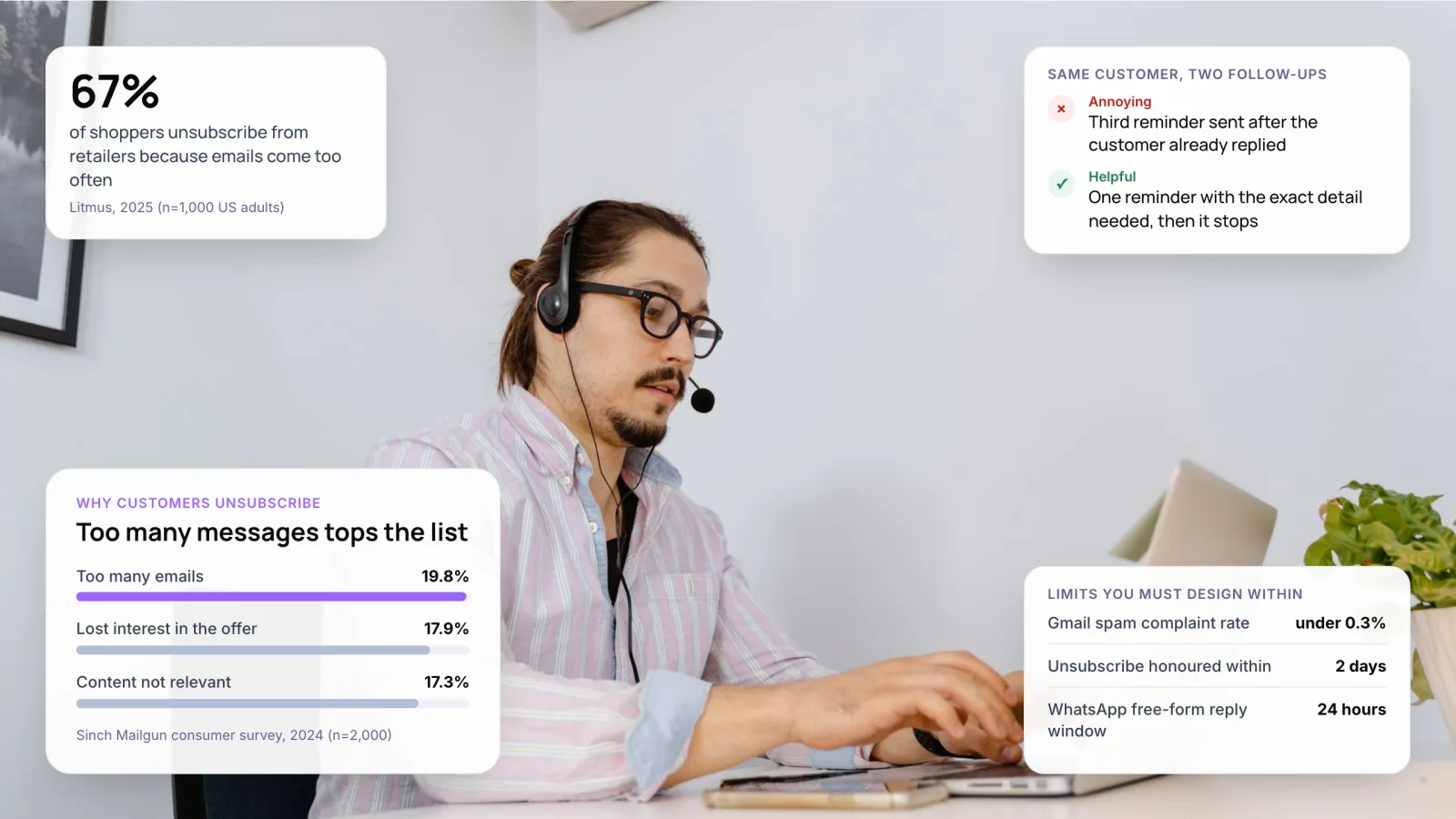
Customers expect speed. Zendesk’s CX Trends 2026 report found that 74% of consumers now expect customer service to be available 24/7 because of AI. A two-person team cannot cover that by hand, and most startups cannot pay for an enterprise build either.
If you are new to the idea, start with what customer support automation is and how it works. This post is about the order a small team should set it up in.
Key takeaways
- Automate in layers: help desk, then rules and saved replies, then a help centre, then AI.
- Several help desks have startup offers. Zendesk gives qualifying startups at least six months free, and Freshdesk’s Free Program covers up to two agents for six months.
- AI agents are often priced per outcome. Intercom’s Fin lists $0.99 per outcome, so the bill grows with your volume.
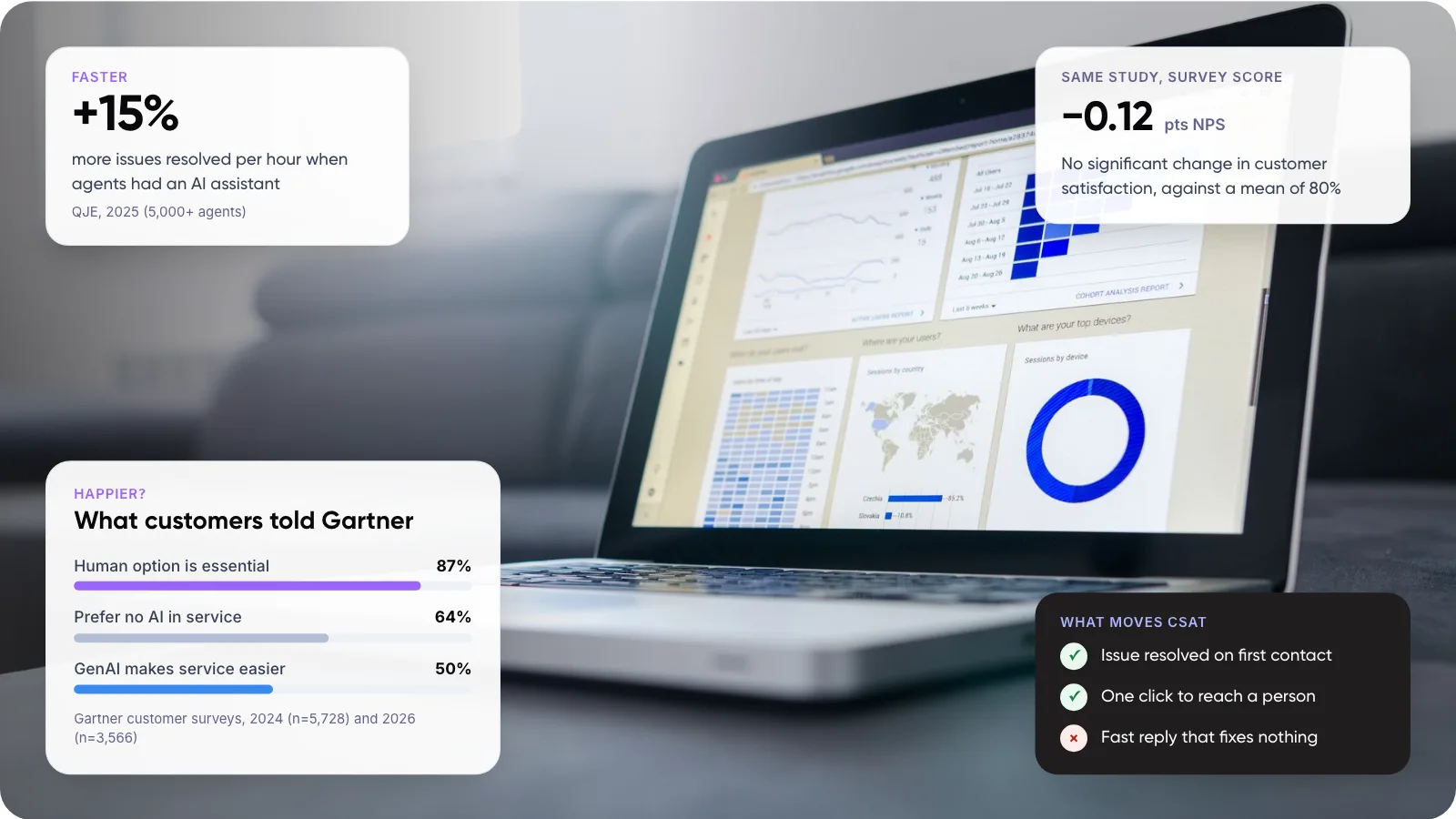
- Keep a visible route to a person. 87% of customers in a 2026 Gartner survey called it essential.
2. When Should a Startup Automate Customer Support?
No ticket count makes automation mandatory. In our view, three signals matter more than volume, because each one means people are doing repeat work a rule could do.
- The same few questions fill the inbox. Password resets, invoices and “where is my order” arrive every day.
- Replies stall outside working hours. Customers in other time zones wait until your morning.
- Founders and engineers still answer tickets. Every hour in the inbox is an hour away from the product.
When to wait
If you get a few dozen conversations a week and are still learning what customers ask, hold off on AI. Answer by hand for a month and log every question. That log becomes the content your automation needs later, and an AI agent trained on thin help content gives thin answers.
For a fuller look at the trade-offs, see whether customer support automation is worth it.
3. How to Set Up Customer Support Automation for Startups in 6 Steps
This is the order we recommend for a startup. Each step is useful on its own, so you can pause after any of them.
- Put every channel into one help desk. Connect your support email, website chat and social inbox, so each message becomes a ticket with one owner.
- Tag 100 recent conversations. Group them by intent, such as billing, login or delivery, and count each group. The top five groups are your automation list.
- Write saved replies and routing rules. Create a saved reply (a macro) for each top intent, and a rule that tags and assigns those tickets automatically.
- Publish a small help centre. Turn your saved replies into 10 to 20 articles. These become the source your AI agent answers from.
- Add an AI agent on the top intents only. Point it at the help centre, limit it to your top questions and test it on past conversations before customers see it.
- Review weekly and expand. Read a sample of AI answers each week, fix gaps in the articles, and add the next intent once resolution holds steady.
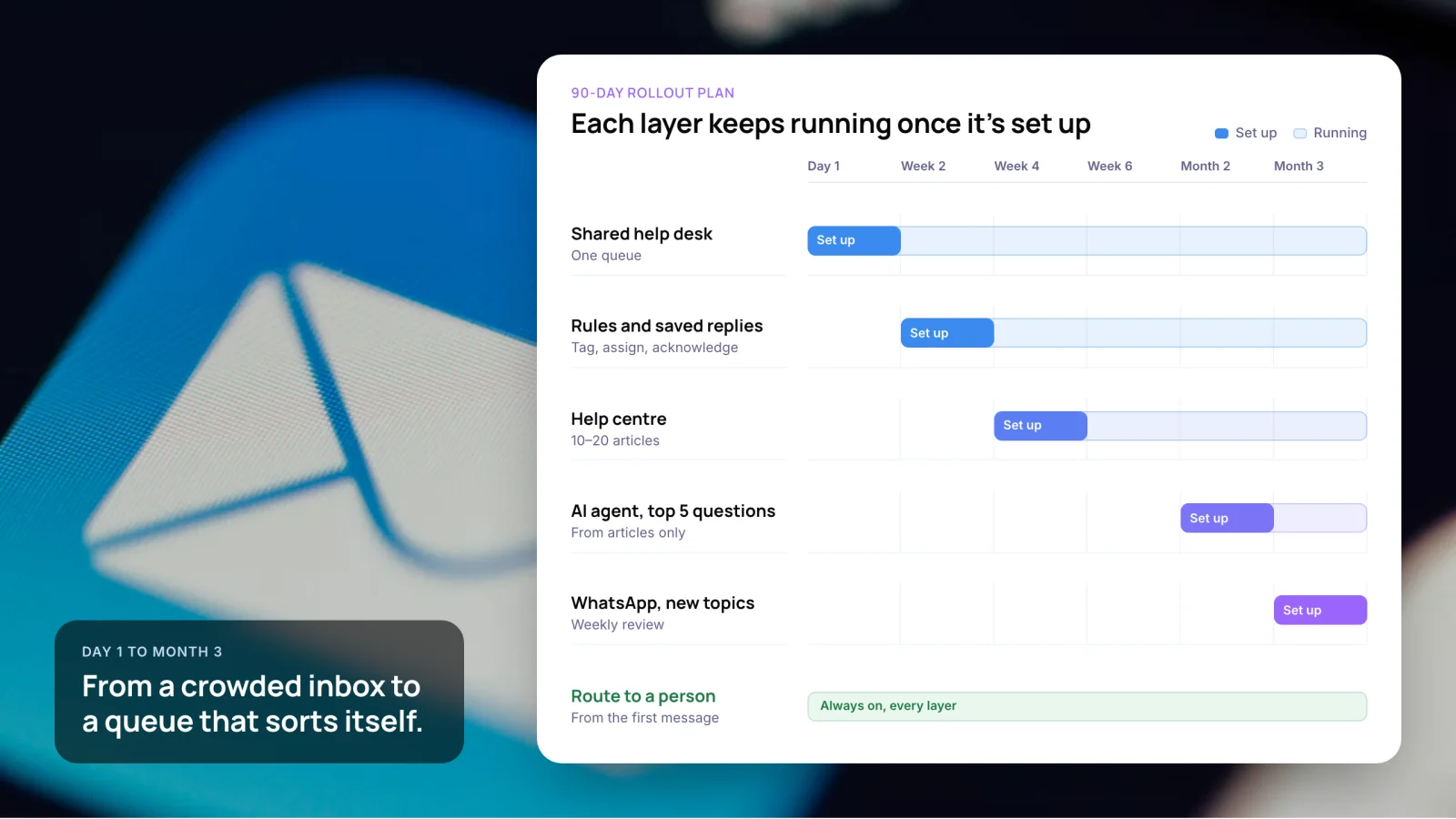
The 90-day rollout in our recommended order
- Day 1: shared help desk, one queue.
- Week 2: rules and saved replies (tag, assign, acknowledge).
- Week 4: help centre with 10 to 20 articles.
- Month 2: AI agent on the top 5 questions, answering from articles only.
- Month 3: WhatsApp and new topics, with a weekly review.
- Throughout: a route to a person from the first message, on every layer. Each layer keeps running once it is set up.
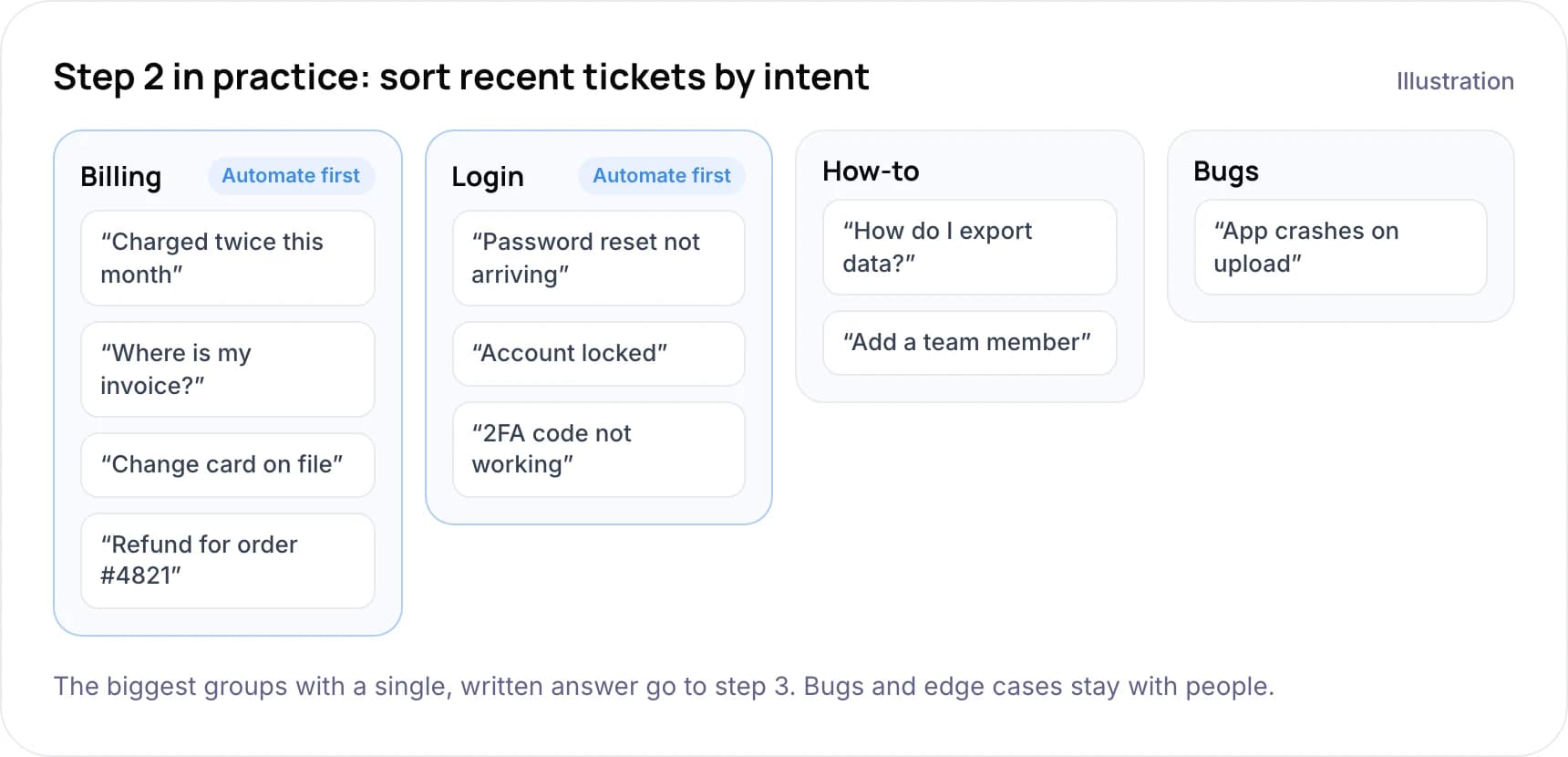
Step 2 in practice: sort recent tickets by intent (illustration)
- Billing (automate first): “Charged twice this month”, “Where is my invoice?”, “Change card on file”, “Refund for order #4821”.
- Login (automate first): “Password reset not arriving”, “Account locked”, “2FA code not working”.
- How-to: “How do I export data?”, “Add a team member”.
- Bugs: “App crashes on upload”.
The biggest groups with a single, written answer go to step 3. Bugs and edge cases stay with people. For more ideas on what fits, see our list of customer service tasks you can automate.
Tip: Give the help centre one owner. AI agents answer from your articles, so an out-of-date article turns into a wrong answer.
4. Which Customer Support Automation Tools Suit a Startup?
Most startups do not need to build from scratch. A help desk with built-in automation covers steps 1 to 4. The table compares common starting points by their startup offers, using list prices checked October 2026. Prices change often, so confirm before you sign up. For a wider feature-by-feature comparison, see our guide to the best customer support automation tools for small businesses.
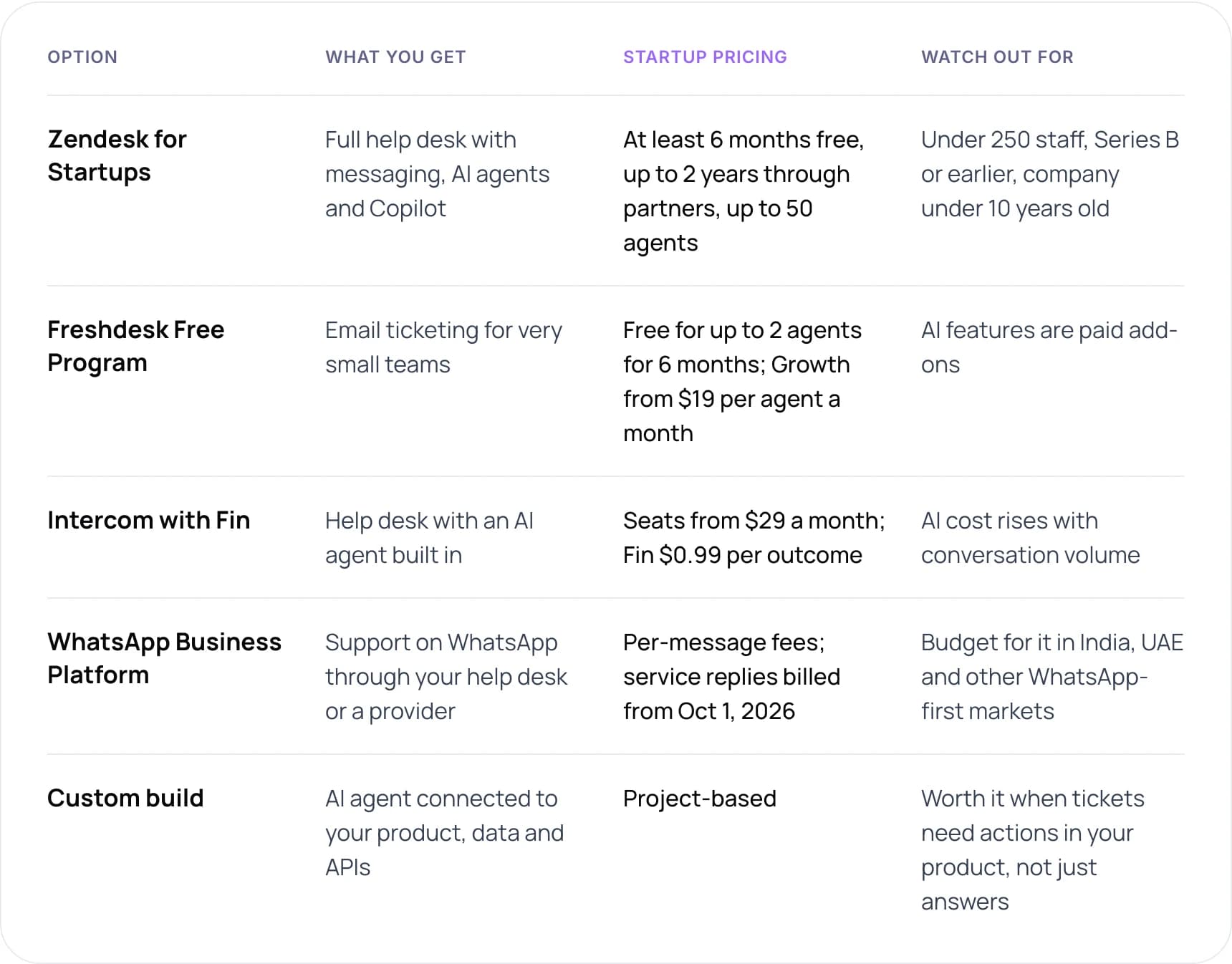
- Zendesk for Startups: full help desk with messaging, AI agents and Copilot. At least 6 months free, up to 2 years through partners, up to 50 agents. Watch out for: under 250 staff, Series B or earlier, company under 10 years old.
- Freshdesk Free Program: email ticketing for very small teams. Free for up to 2 agents for 6 months; Growth from $19 per agent a month. Watch out for: AI features are paid add-ons.
- Intercom with Fin: help desk with an AI agent built in. Seats from $29 a month; Fin $0.99 per outcome. Watch out for: AI cost rises with conversation volume.
- WhatsApp Business Platform: support on WhatsApp through your help desk or a provider. Per-message fees; service replies billed from October 1, 2026. Watch out for: budget for it in India, UAE and other WhatsApp-first markets.
- Custom build: AI agent connected to your product, data and APIs. Project-based. Worth it when tickets need actions in your product, not just answers.
Note: If you support customers on WhatsApp, budget for message fees. Since November 2024, replies inside the 24-hour customer service window were free. From October 1, 2026, Meta charges per message for those replies.
Our view: start on an off-the-shelf help desk. Move to a custom build when most tickets need data or actions from your own product, such as account changes, that a help desk app cannot reach. That is where custom AI agent development pays for itself.
5. How to Set Up Helpdesk Automation That Works
Helpdesk automation is the cheapest layer, and the one startups skip most often. For a small team, four rules do most of the work, and they run even when nobody is online.
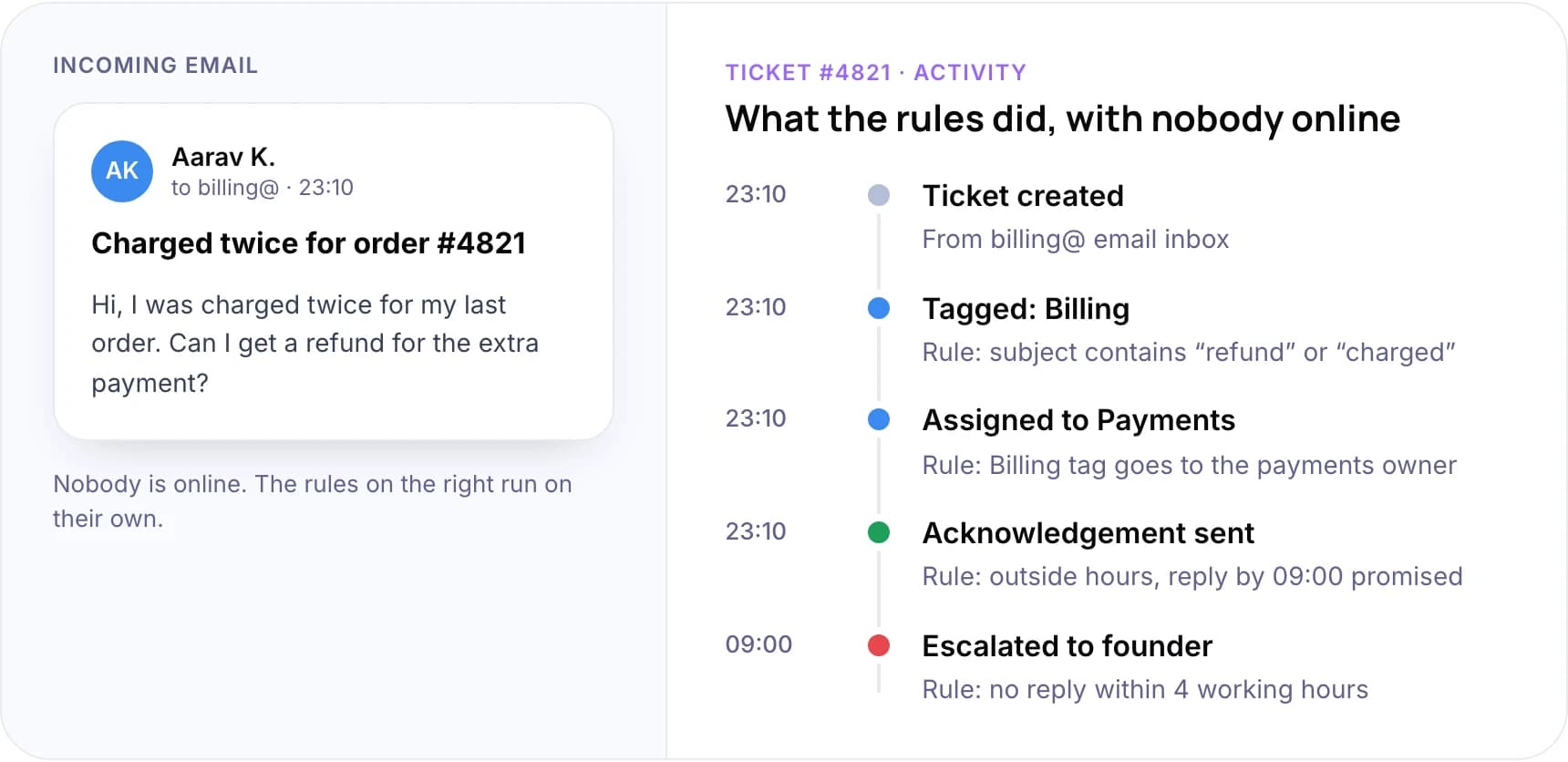
Email and ticket log are an illustration.
What the rules did with ticket #4821, “Charged twice for order #4821”, sent at 23:10
- 23:10 Ticket created. From the billing@ email inbox.
- 23:10 Tagged: Billing. Rule: subject contains “refund” or “charged”.
- 23:10 Assigned to Payments. Rule: Billing tag goes to the payments owner.
- 23:10 Acknowledgement sent. Rule: outside hours, reply by 09:00 promised.
- 09:00 Escalated to founder. Rule: no reply within 4 working hours.
Rules to set up first
- Auto-tag by keyword. “Refund”, “invoice” and “password” cover a lot of early volume.
- Assign by tag. Billing goes to whoever owns payments, bugs go to engineering.
- Acknowledge outside hours. Send the expected reply time and a link to the help centre.
- Escalate unanswered tickets. Flag anything with no reply after a set time, such as four working hours.
Keep the rule list short and name each rule clearly. Ten rules you understand are easier to fix than fifty that overlap. For routing methods and ticket tracking in more depth, read our guide to helpdesk automation for support tickets.
6. How to Add an AI Chatbot for Customer Support Without Losing Trust
An AI chatbot, or AI agent, answers customers from your help content. Some can also take actions, such as checking an order. It is the most visible layer, so its mistakes are visible too. If you are deciding between a simple bot and a wider setup, see chatbots vs customer support automation.
Customers are wary. In Gartner’s 2024 survey of 5,728 customers, 64% said they would prefer companies did not use AI for customer service, mostly because it might make a person harder to reach. In 2026, Gartner found that 87% of customers say access to a human agent is essential when companies use generative AI.
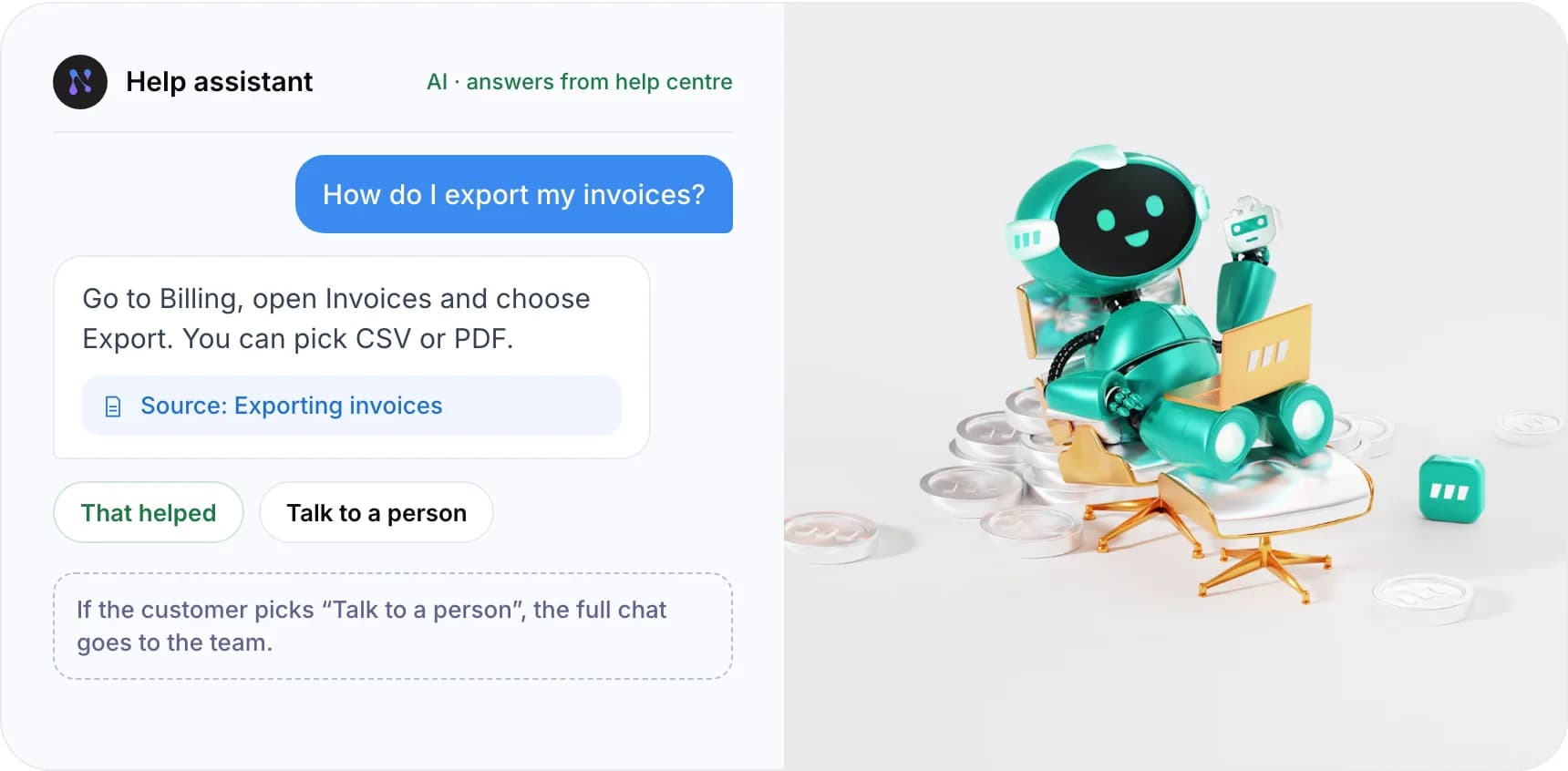
Chat shown is an illustration. Photo by Ant Rozetsky on Unsplash.
- Customer: “How do I export my invoices?”
- AI agent (answers from the help centre): “Go to Billing, open Invoices and choose Export. You can pick CSV or PDF.” Source: Exporting invoices.
- Options shown: “That helped” or “Talk to a person”. If the customer picks “Talk to a person”, the full chat goes to the team.
Four rules for a startup AI agent
- Show “talk to a person” from the first message. Do not make customers fight the bot to find it.
- Limit it to topics your help centre covers. Let it say “I don’t know” instead of guessing.
- Pass the history on handoff. The person who picks up should see the whole conversation.
- Track resolution. A chat the bot “handled” is not a win if the customer emails again an hour later.
Be careful with agents that change data. Gartner expects over 40% of agentic AI projects to be canceled by the end of 2027, citing cost, unclear value and weak risk controls. Give an agent read-only access first, then add actions such as refunds one at a time.
We cover handoff design in how to automate customer service without losing the human touch, and where AI stops being reliable in can automation handle complex customer problems.
Not sure which layer to automate first? Book a free AI consultation.
7. What Does Customer Support Automation Cost a Startup?
For most startups, the cost is help desk seats plus AI usage. The estimate below uses list prices checked October 2026 and leaves out taxes, add-ons and message fees.
How to estimate your monthly software cost
- Help desk plan: a startup program ($0), Freshdesk Growth ($19 per agent a month) or Intercom Essential ($29 per agent a month), billed annually.
- Support agents: the number of seats you pay for.
- Conversations per month: your total support volume.
- Share resolved by AI: the percentage of conversations the AI agent closes, priced at Fin’s $0.99 per outcome.
Formula: monthly cost = (agents × seat price) + (conversations × share resolved by AI × $0.99). Fin on a help desk other than Intercom has a $49 monthly minimum, so the AI line is never below $49 there. The conversations the AI does not resolve are left for your team.
Worked examples (2 agents, 800 conversations a month, 30% resolved by AI)
- Freshdesk Growth with Fin: $38 in seats plus about $238 for 240 AI outcomes, about $276 a month. 560 conversations are left for your team.
- Intercom Essential with Fin: $58 in seats plus about $238 in AI outcomes, about $296 a month.
- Startup program with Fin: $0 in seats plus about $238 in AI outcomes while the free period lasts. Startup programs are free for a set period, then a paid plan applies.
Two things raise the bill as you grow: more seats and more AI outcomes. Per-outcome pricing is fair when the AI resolves tickets well, but a busy month costs more. To compare this cost with the time your team saves, try our free AI ROI Calculator. For the savings side in detail, read how much customer support automation can save.
8. Real Examples of Support Automation
Sinch: more self-service, faster resolutions
Zendesk reports that Sinch, a communications platform, nearly doubled its self-service automation rate, from 17% to 32%, and improved full resolution times by 47%. These are vendor-reported results, but they show the pattern: better self-service content first, then automation on top.
Two of our own builds
- Zenva: ecommerce email support. An AI email assistant for Shopify merchants that drafts replies from live order data and each store’s policies, with agents reviewing every draft before it goes out. For one store with 2,000 customer emails a month, the estimate is about 50 hours of support effort saved each month.
- Paymate: payments customer support. An omnichannel customer support system that routes complex cases to the team. For high-confidence email queries, first response time went from hours to under one minute.
To see how an AI agent stays accurate on your own content, read our guide to deploying agentic RAG for customer service.
9. Common Mistakes Startups Make
- Buying AI before writing help content. The agent can only answer from what you have written down.
- Automating every channel at once. Start with the channel that carries most volume and get it right first.
- Hiding the human option. Customers who cannot reach a person come back angrier, often on a costlier channel.
- No owner for rules and articles. Rules drift and articles go stale unless one person checks them.
- Ignoring message costs. WhatsApp replies are billed per message from October 2026, so high reply volume adds up.
10. Frequently Asked Questions
How do I automate customer support for a startup?
Move all channels into one help desk, then tag recent conversations to find your top five questions. Write saved replies and routing rules for those, publish them as help articles, and add an AI agent that answers only from those articles. Review its answers weekly and expand one topic at a time.
What are the best customer support automation tools for startups?
Most startups begin with a help desk that has automation built in, such as Zendesk, Freshdesk or Intercom. Zendesk and Freshdesk run free startup offers for qualifying teams. Intercom bundles the Fin AI agent at $0.99 per outcome. A custom build makes sense when tickets need actions inside your own product.
How much does customer support automation cost a startup?
The main costs are help desk seats and AI usage. Freshdesk Growth lists $19 per agent a month and Intercom Essential $29, billed annually. Intercom’s Fin adds $0.99 per outcome. A two-agent team with 800 monthly conversations and 30% resolved by AI would pay about $276 a month on Freshdesk with Fin.
Can a startup automate customer service without coding?
Yes. Routing rules, saved replies, help centres and most AI agents can be set up in a help desk’s settings without code. You need developers when the AI must read or change data in your own product, such as updating an account, through an API (a connection between systems).
What are the benefits of customer service automation for a small team?
Faster first replies, coverage outside working hours and less repeat work for founders and engineers. Zendesk’s 2026 research found 74% of consumers expect 24/7 service because of AI. Automation lets a small team meet that without hiring night shifts, as long as a person stays reachable.
When should a startup add an AI agent?
Add one after your help centre covers your most common questions and your saved replies have been tested on real tickets. If you still change answers every week, wait. Start the agent on your top five questions only, with read-only access, and widen its scope once its resolution rate holds steady.
11. Conclusion
Customer support automation for startups works best in layers, each one built on the content and rules beneath it. This week, tag your last 100 conversations and count the top five intents. That list tells you which saved replies to write, which articles to publish and, later, what your AI agent should handle.
When you are ready for AI, see our AI customer support automation services, or read how customer support automation works end to end.
Want a second opinion on which layer to automate first? Book a free AI consultation with our team.
Author