Why AI-Powered Customer Support Automation Is a Must-Have in 2026
This guide explains why AI customer support automation has moved from a nice-to-have to a baseline expectation, what the real advantages are, where it can go wrong, and how to adopt it without damaging customer trust.
About
Businesses need AI in customer support automation in 2026 because customer expectations keep rising while support budgets do not. AI handles repetitive work instantly, gives every ticket an owner and a clock, and frees your people for the complex, high-value conversations. Done badly, it frustrates customers. Done well, with clear human escalation, it cuts response times, lowers cost per ticket and improves consistency.
Key takeaways
- Customers expect faster answers every year, and unresolved issues drive them away.
- Support leaders are being pushed to adopt AI, and AI spending is growing far faster than overall support budgets.
- The biggest gains come from speed, 24/7 coverage, consistency, smarter routing and agent assistance.
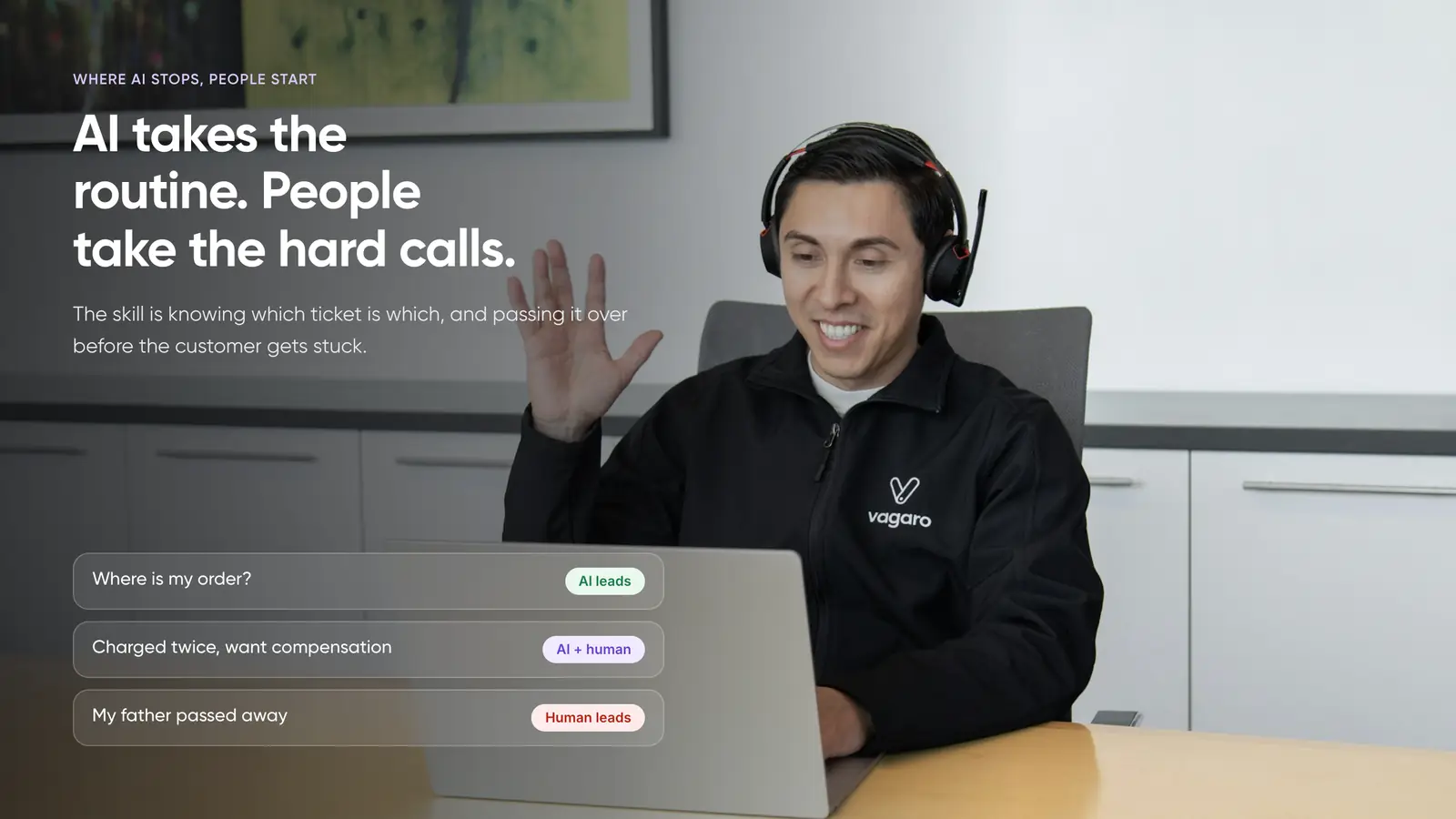
- Customers still want a human option, so the winning model is AI plus people, not AI instead of people.
- Start small, with classification, routing and drafts, then expand as accuracy is proven.
Why 2026 Is the Tipping Point
AI in support is not new. What changed is the pressure on both sides of the conversation.
Customer expectations keep climbing
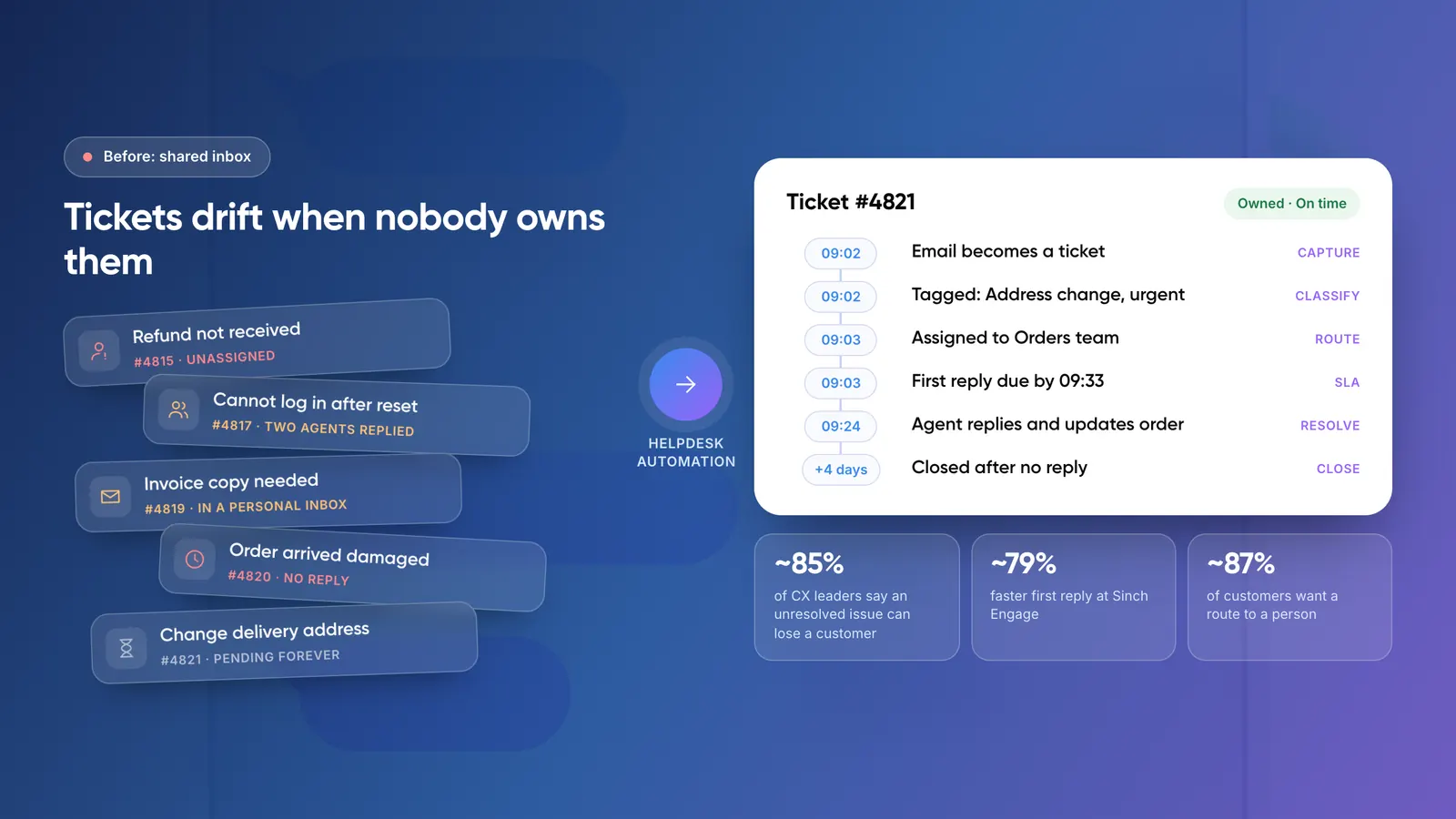
Zendesk's CX Trends 2026 research found that 85% of CX leaders say customers will leave a brand over an unresolved issue, even on first contact. The same research found 88% of customers expect faster replies than they did a year ago. Speed is no longer a differentiator. It is the entry ticket.
Leadership is demanding AI
A Gartner survey of 321 service and support leaders, run in October 2025, found that 91% reported pressure from executive leadership to implement AI in 2026. Their top priorities were better customer satisfaction, operational efficiency and self-service success.
Money is moving toward AI
Gartner's April to May 2026 survey of 199 service leaders found AI spending up 38%, while overall service and support budgets grew only 2%. Gartner also found that service and support leaders put a median of 12% of their 2025 budget into AI, the highest share among the ten business functions it assessed. In other words, AI is being funded by reprioritising, because there is no extra budget to hire your way out of the problem.
Adoption is spreading fast
Salesforce's May 2026 survey of 3,075 service professionals reported that adoption of AI agents in customer service rose from 39% to 66% in a year. If your competitors are answering in seconds and you are answering in hours, customers will notice.
What Is AI Customer Support Automation?
AI customer support automation uses artificial intelligence to handle, speed up or improve parts of the support workflow. It sits on top of traditional rule-based helpdesk automation (if this, then that) and adds a model that can read and understand text.
In practice that covers:
- Classification and triage: reading a message to detect topic, urgency, sentiment and language.
- Intelligent routing: sending the ticket to the right team or agent.
- AI agents and chatbots: resolving routine questions end to end.
- Agent assist: summarising long threads and drafting replies for a human to approve.
- Quality and insight: spotting recurring issues, knowledge gaps and at-risk customers.
The key distinction: fixed rules handle predictable steps, while AI handles messy, free-text input that rules cannot interpret. The strongest setups use both. For a deeper look at how rules and SLAs work, read our helpdesk automation guide, and for the difference between a basic bot and a full automation stack, see chatbots vs customer support automation.
8 Advantages of AI in Customer Support Automation
1. Instant responses, around the clock
AI does not sleep, queue or take breaks. Routine questions about order status, password resets, billing, returns or opening hours can be answered in seconds at 3 a.m. or during a Monday-morning spike. For global customers across time zones, this alone can transform the experience.
2. Lower cost per ticket
Automating repetitive requests means your team handles fewer tickets manually, so volume can grow without a matching rise in headcount. Instead of hiring in proportion to ticket growth, you scale the automation and keep your people for work that needs judgment.
3. Consistent answers at scale
Two agents can give two different answers to the same question. An AI trained on your approved help content gives the same answer every time, in your brand voice. That consistency reduces errors, rework and compliance risk.
4. Faster, smarter routing
AI reads the ticket, works out what it is about and how urgent it is, and passes that to your routing rules. Tickets reach the right person sooner, and urgent or high-value cases stop waiting in a general queue. This also helps close the common gap where tickets go missing because nobody owns them.
5. Happier, more productive agents
Agents spend less time on copy-paste questions and more on interesting problems. AI can summarise a long thread before the agent opens it and draft a reply from your knowledge base. Gartner's survey also found that 58% of service leaders plan to upskill agents into knowledge management specialists, a sign that human roles are shifting toward quality and expertise rather than disappearing.
6. Better use of data
Every ticket is data. AI can surface the top reasons customers contact you, flag products or policies that cause confusion, and highlight knowledge-base gaps. Many companies struggle here: HubSpot's 2024 State of Service report found that only 35% of CX leaders say their data is fully integrated with the tools they use. AI projects often force the integration work that pays off well beyond support.
7. Scalability during peaks
Product launches, sales events, outages and seasonal rushes create sudden surges. Automation absorbs the spike instead of letting response times collapse, and you avoid hiring and training temporary staff for short-lived demand.
8. A true omnichannel experience
AI can work across email, chat, web forms, WhatsApp and social channels, pulling every request into one system with the same context. Customers can switch channels without repeating themselves.
Real-World Results
Results vary by company, but published examples show the direction of travel.
- Sinch Engage: According to Zendesk's customer story, moving to a single help desk, rebuilding its help centre and adding AI agents cut first reply times by 79% and improved full resolution times by 47%. Its self-service automation rate rose from 17% to 32%. These are vendor-published figures, so treat them as one company's result.
- Paymate (Neura Dynamics build): An omnichannel support system answers routine email in under a minute and routes complex cases to the right team.
- Zenva (Neura Dynamics build): An AI email assistant drafts replies from live order data with an agent reviewing every draft, saving roughly 50 hours a month for every 2,000 emails.
The Reality Check
A credible case for AI has to include the risks. The data from 2026 is clear that customers are open to AI but unforgiving of bad AI.
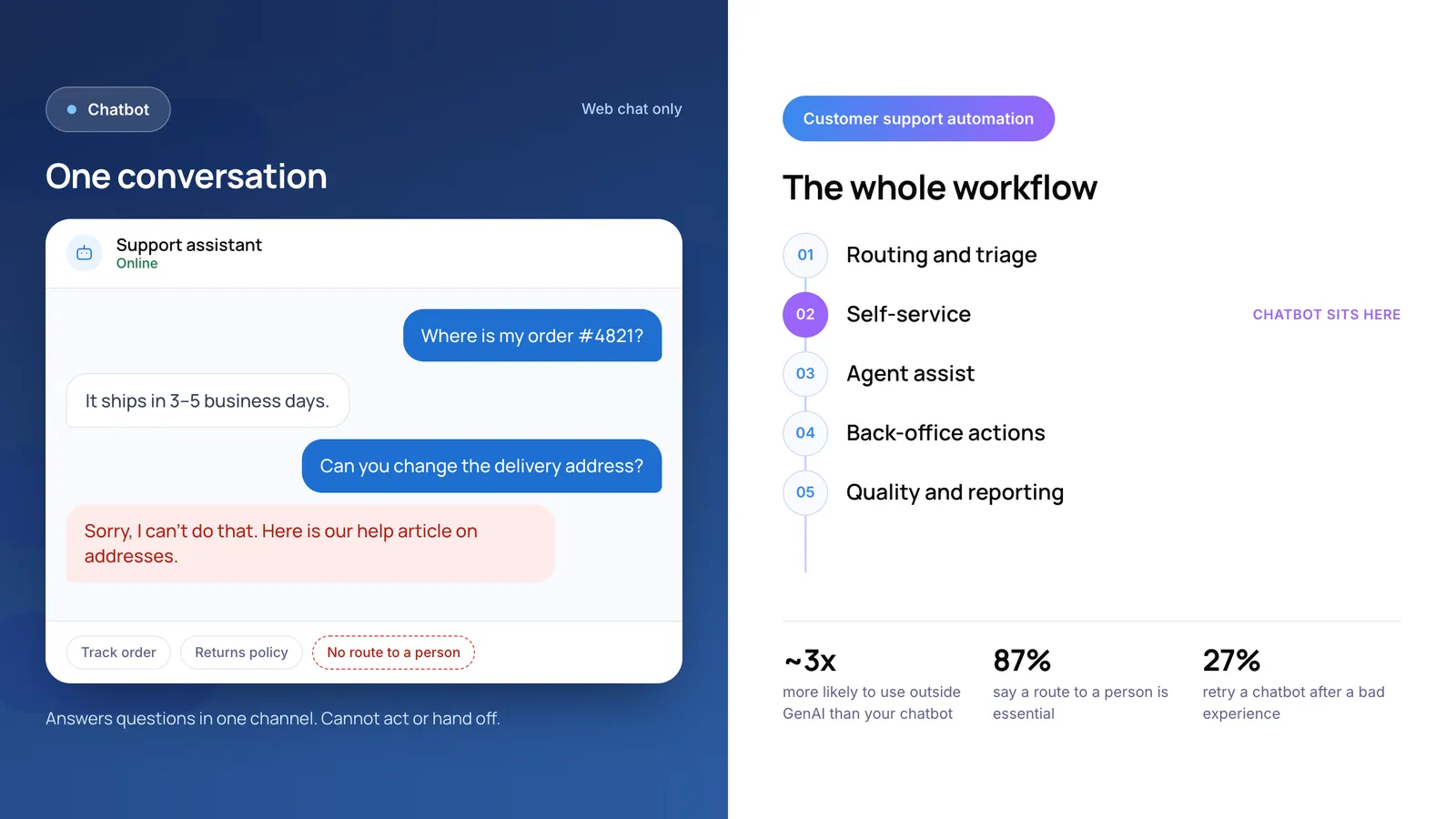
- Customers want a human option. Gartner's February to March 2026 survey of 3,566 customers found that 87% say companies using GenAI for service must provide access to a human agent. Customers push back when AI becomes a barrier to reaching a person.
- Bad experiences are costly. The same Gartner research found only 27% of customers would be willing to try a chatbot again after a negative experience. You rarely get a second chance.
- Adoption of company bots is still low. Gartner reported in July 2026 that customers are roughly three times more likely to use third-party GenAI tools than company-provided chatbots, and noted that many service organisations have yet to see financial returns from their AI investments.
The lesson is not to avoid AI. It is to avoid lazy AI i.e a bot with no escalation path, trained on outdated content, with no one reviewing its mistakes.
The Cost of Waiting
Delaying AI has its own price:
- Rising customer expectations mean your current response times will feel slower each year.
- Competitors' cost advantage lets them offer faster service at a lower cost per ticket.
- Agent burnout grows when skilled people spend their days on repetitive questions.
- Missed insight builds up, because manual teams rarely have time to analyse ticket data.
- A harder catch-up later, since AI works best with clean knowledge content, integrated systems and months of tuning that take time to build.
How to Adopt AI in Customer Support Without Losing the Human Touch
- Fix the basics first. Put every channel into one help desk, give every ticket a topic, priority and owner, and set SLA targets. AI on top of a messy process just makes the mess faster.
- Start with classification and routing. A wrong tag sends a ticket to the wrong queue, where your SLA timer still catches it. A wrong auto-reply goes straight to the customer.
- Clean up your knowledge base. AI answers are only as good as the content behind them. Assign owners, remove outdated articles and write clear answers.
- Add agent assist next. Summaries and draft replies with human approval deliver quick wins with low risk.
- Automate fully only where answers are fixed. Order status, FAQs, appointment changes and password resets are good candidates.
- Always offer a human exit. Make it easy to reach a person, and pass the full conversation context so customers never repeat themselves.
- Keep humans on high-stakes decisions. Refunds, cancellations, account changes, legal complaints and angry or high-value customers should stay behind human approval until accuracy is proven.
- Measure and review weekly. Look at breaches, reopened tickets, escalations and wrong answers, then fix the rule, the content or the prompt behind each.
Metrics to Track
- First response time and resolution time: are customers being helped faster?
- Automation or self-service resolution rate: how many issues does AI fully solve?
- Customer satisfaction (CSAT) on AI-handled vs human-handled tickets: is quality holding up?
- Escalation and handoff rate: are customers reaching humans when they need to?
- Reopen rate: are AI answers actually fixing the problem?
- Cost per ticket and agent productivity: is the investment paying back?
If you want to estimate the financial impact before committing, try the free AI ROI Calculator.
Which Businesses Benefit Most?
- Ecommerce and retail: high volumes of order, shipping and return questions.
- Fintech and payments: fast, accurate answers on transactions, with strict human review for sensitive actions.
- SaaS and technology: repetitive how-to and troubleshooting questions that AI can resolve from documentation.
- Travel and hospitality: time-sensitive changes and multilingual demand.
- Healthcare and services: appointment handling and routine enquiries, with careful privacy controls.
Frequently Asked Questions (FAQs)
Why is AI important for customer support in 2026?
Customers expect faster, always-on service, while support budgets are barely growing. AI absorbs repetitive volume, speeds up routing and helps agents work faster, so businesses can meet higher expectations without proportionally higher costs.
What are the main benefits of AI in customer support automation?
The main benefits are instant 24/7 responses, lower cost per ticket, consistent answers, smarter routing, more productive agents, better data insight, easier scaling during peaks and a consistent omnichannel experience.
Will AI replace customer support agents?
Not in the way headlines suggest. AI takes over repetitive requests, but customers still want human access for complex or sensitive issues. Gartner's 2026 research found 87% of customers say a human option must be available when GenAI is used. Agent roles are shifting toward complex cases, quality and knowledge management.
What is the difference between a chatbot and AI customer support automation?
A chatbot is one interface that answers questions. AI customer support automation is the wider system: capturing every channel, classifying and routing tickets, tracking SLAs, assisting agents and, where safe, resolving issues automatically.
Which support tasks should not be fully automated?
Keep a person in charge of refunds, cancellations, account access, legal complaints and high-value or upset customers. You can still automate the routing, tracking and drafting around these tickets.
How do I get started with AI customer support automation?
Start by centralising channels and setting priorities and SLAs. Then add AI for classification and routing, improve your knowledge base, introduce agent assist, and only then automate fixed-answer replies. Review results weekly and expand gradually.
How much does AI customer support automation cost?
Cost depends on ticket volume, the help desk you use, whether AI features are included in your plan or sold as add-ons, and whether you build custom integrations. Estimate your current cost per ticket first, then compare it with the projected savings.
Conclusion
AI in customer support automation is necessary in 2026 not because it is fashionable, but because the maths of support has changed. Customers expect instant, accurate help. Budgets are flat. Competitors are already automating. The businesses that win will not be those with the most AI or the fewest humans. They will be the ones that use AI to give every customer a fast first answer, a clear owner and an easy path to a person when it matters.
A good first step this week: list your top ten most repetitive ticket types and mark which ones have a fixed, safe answer. That list is your starting point for automation.
If you want help turning it into routing rules, AI triage and agent assist that work in production, explore our AI customer support automation services.
Author

Abhilasha is the Co-Founder of Neuradynamics, where she helps businesses turn Generative AI into practical, growth-focused solutions. Passionate about AI innovation, automation, and digital transformation, she writes about emerging technologies, scalable AI systems, and real-world applications across industries including EdTech, E-commerce, and automotive.