What Is Customer Support Automation and How Does It Actually Work?
Every growing business hits the same wall. More customers means more questions, and the same ones keep coming back: Where is my order? How do I reset my password? What is your refund policy? Your best people end up answering them all day, while the hard problems wait.
Customer support automation exists to fix exactly that. It uses software, from simple rules to AI agents, to handle routine support work so your team can focus on the conversations that need a human.
But the phrase covers a lot of ground, from a basic auto-reply to an AI agent that looks up an order and processes a return. This guide explains what customer support automation is, how it actually works behind the scenes, and what the main automation tools do, in plain language.

1. What Is Customer Support Automation?
Customer support automation is the use of software to handle customer questions and support tasks without a human agent touching every request. It can answer a question, route a ticket to the right person, update a record, or trigger a follow-up, and it hands over to a human when the situation needs one.
It is often called customer service automation or help desk automation. The idea is the same: take the repetitive, predictable parts of support off your team's plate. Automation is not about replacing your support team. It is about giving them back the time that repeat questions take.
The tools range from very simple to quite capable. We cover the types in section 3. First, let's look at what happens when a customer writes in.
2. How Customer Support Automation Actually Works
Behind a fast reply there is a short chain of steps. The details differ by tool, but most customer support automation follows this flow:
- Intake. The message arrives from chat, email, phone, social or a web form and lands in one place, usually your help desk.
- Understanding the request. Older bots matched keywords. Modern systems use natural language processing to work out what the customer actually means, even when they phrase it in an unexpected way.
- Categorising and routing. The system tags the request by topic, urgency and language, and sends it to the right queue or person. Ticket routing alone removes a lot of manual sorting.
- Finding the answer. The system searches your knowledge base, help centre and past tickets for the right information. This retrieval step is what keeps answers grounded in your own content instead of guesses.
- Replying or acting. If the answer is clear, it replies. Connected to your systems, it can also act: check an order, update a record, book a slot or start a return.
- Handing off to a human. When the request is unusual, sensitive or the system is unsure, it passes the conversation to a person along with the context, so the customer does not repeat themselves.
That last step matters most. Good customer support automation is built around a clear handoff, not around keeping the customer away from your team.

3. The Main Types of Customer Support Automation Tools
When people search for customer support automation tools, they usually find a mix of very different products. It helps to think of them in levels, from simple to advanced.
Rule-based chatbots and auto-responders
These follow scripts and decision trees. They work well for tightly defined situations, such as business hours or a fixed menu of options, but they struggle when a customer words a question differently or asks a follow-up.
Agent-assist tools
Here AI helps your human agents rather than talking to customers directly. It suggests replies, summarises long tickets and surfaces the right help article. A person still reviews and sends the answer.
AI agents
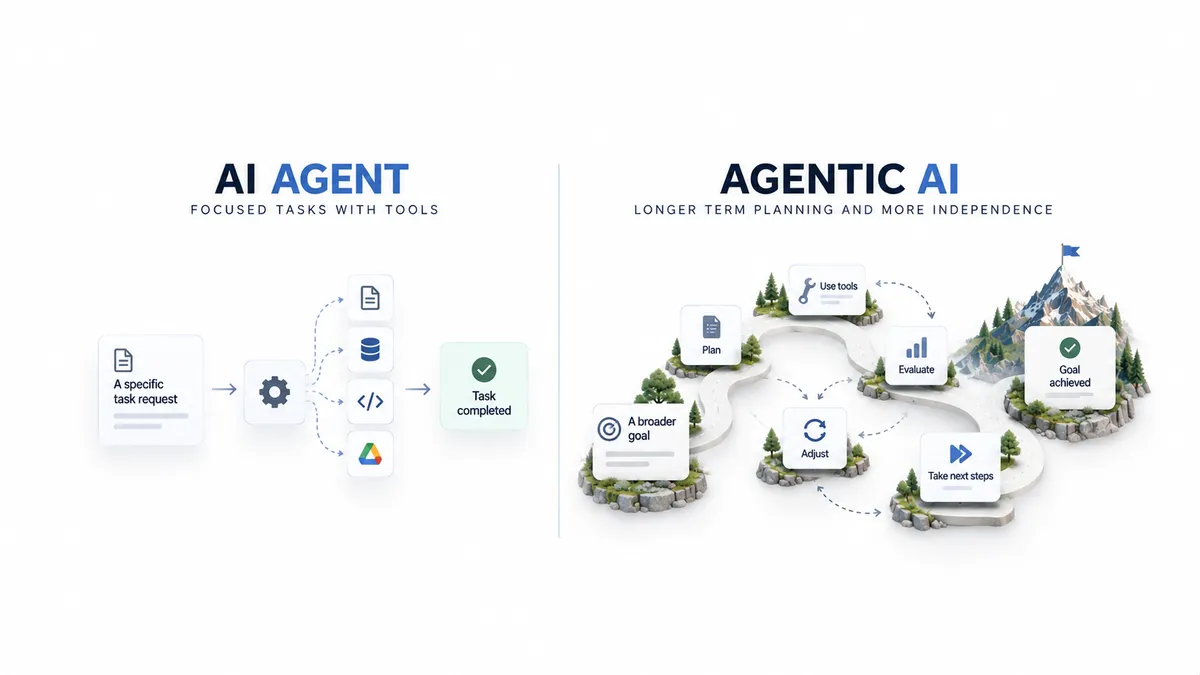
An AI agent understands the request, searches your knowledge, takes approved actions in connected tools and replies, escalating when it should. This is the biggest difference from a basic chatbot: it can resolve things, not just respond. If you want the technical side, see our guide to deploying agentic RAG for customer service, and how AI agents are changing customer support teams.
Voice agents
The same ideas applied to phone calls: an AI voice agent answers calls, books appointments, qualifies leads or covers the phones after hours.
Workflow automation
Behind the scenes, workflows tag tickets, assign owners, send reminders and update your CRM. Many teams start here because it needs no conversation design at all. If you are comparing approaches, our post on intelligent automation, RPA and AI agents explains where each fits.
4. What Should You Automate (and What Should You Not)?
A simple rule: automate what is frequent, predictable and low risk. Keep a human for what is rare, emotional or high stakes.
Good candidates for automation:
- Order status, delivery and tracking questions
- Password resets and account access
- Policy, pricing and product FAQs
- Appointment booking and rescheduling
- Ticket tagging, routing and follow-up reminders
Better left to people:
- Complaints from upset or high-value customers
- Billing disputes and refunds above a set limit
- Complex, unusual or sensitive situations
- Anything where a wrong answer has legal or safety consequences
Most teams start with two or three question types, prove the results, and expand from there.
5. What Customer Support Automation Can Do for Your Business
- Faster first responses. Routine questions get an answer right away, including outside business hours.
- More time for hard problems. Your team spends its effort on conversations where judgement and empathy matter.
- Consistent answers. When answers come from one knowledge base, customers hear the same thing every time.
- Less manual work. Sorting, copying details between tools and updating records can run in the background.
- A way to scale. Support capacity grows without hiring at the same pace as your ticket volume.
We see this in practice. In our Zenva project, an AI support platform for Shopify merchants drafts context-aware replies using live order data and store policies, with support agents reviewing every response. It saves about 50 hours a month for every 2,000 emails. In the Paymate omnichannel support system, first response on email dropped to under a minute, down from hours.

6. Common Mistakes (and How to Avoid Them)
- A messy knowledge base. Automation can only be as good as the content behind it. If your help articles are outdated or contradict each other, automation will repeat those problems faster. Clean the source content first.
- No clear handoff. A bot that traps customers is worse than no bot. Always give an easy way to reach a person, and pass the conversation context along.
- Automating everything at once. Start narrow, learn from real conversations, then expand.
- Letting AI act without limits. Anything that changes data or moves money should have clear rules, and often a human approval step.
- Not measuring. If you do not track results, you cannot tell whether the automation is helping.
7. How to Get Started in Five Steps
- Find your top question types. Look at the last few months of tickets and pick the three to five that come up most and have clear answers.
- Clean up your knowledge. Gather the help articles, policies and product information the system will rely on, and fix gaps or contradictions.
- Choose the right level of tool. Rules for simple needs, agent-assist to speed up your team, an AI agent when you want questions resolved end to end.
- Design the handoff. Decide when the system escalates, to whom, and what context goes with it.
- Pilot, measure, improve. Start with one channel, track how many questions are resolved without a human, how fast first replies are, how often customers escalate and how satisfied they are, then expand.
8. Frequently Asked Questions
Is customer support automation the same as a chatbot?
No. A chatbot is one tool. Customer support automation also includes routing, agent-assist, voice agents and background workflows, and the more capable AI agents can take actions as well as answer.
Will automation replace my support team?
Not in a well-designed setup. It takes the repetitive questions so your team can handle the complex ones. The strongest results come from automation and people working together.
How long does it take to set up?
A focused pilot on a few question types is usually much quicker than a full rollout. The timeline depends on your integrations and how ready your knowledge base is.
What do I need before I start?
A clear list of the questions you want to automate, a reasonably clean knowledge base, and a decision about when the system should hand over to a person.
9. Conclusion
Customer support automation is not magic and it is not all-or-nothing. It is a set of tools that take repetitive work off your team, from simple routing to AI agents that resolve requests. The businesses that benefit most start small, keep a human in the loop, and improve with real data.
If you want to see what this could look like for your business, explore our AI customer support automation services or talk to our team about your support workflow.
Author