Best Affordable Student Support and Communication Tools for Small Online Course Businesses
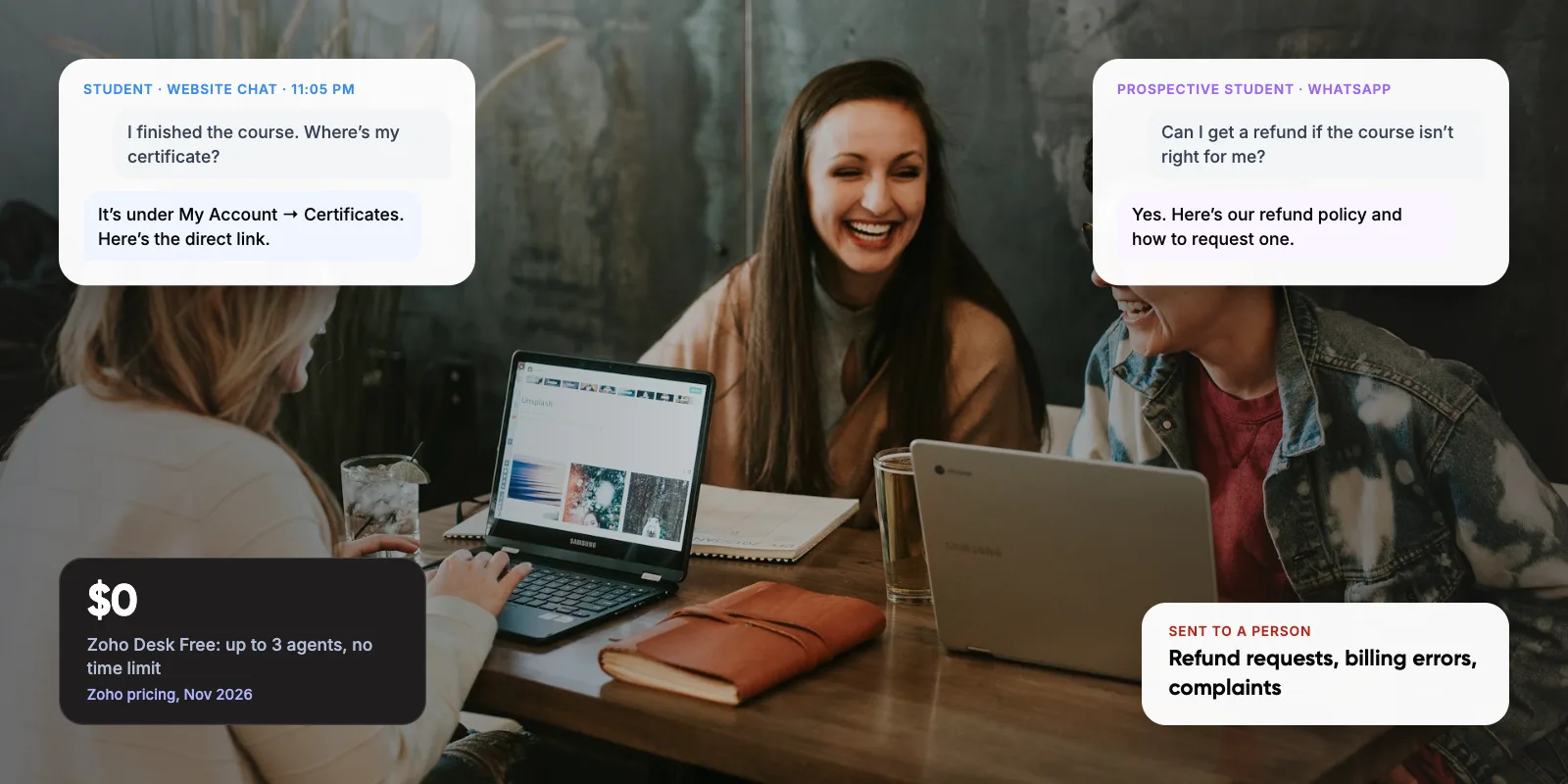
A small online course business can run good student support for $0 to about $135 a month. A free help desk such as Zoho Desk (free for up to 3 agents), a chat widget, WhatsApp for quick replies and a student community cover most questions. You only need paid customer support software when your team or volume outgrows the free tiers.
This guide compares the tools by job, shows what each costs as of November 2026, and gives three starter stacks with a setup plan.
1. What Do Small Course Businesses Need From Support Tools?
Student questions at a small course business fall into a few groups: login and access, payments and refunds, course content, and certificates. They arrive by email, website chat, WhatsApp and comments inside the course. Most need a quick, accurate answer. A few need you or an instructor.
In our view, you need four jobs covered. One tool can often cover two of them, so start by checking what your course platform already includes.

- A shared inbox One place for email and form messages, with saved replies and a full history per student.
- Live chat or a chatbot Fast answers on sales and course pages, especially before a student buys.
- Messaging WhatsApp and email for quick replies, reminders and announcements.
- Self-serve answers A help centre and a community where students find answers without writing to you.

Key takeaways
- Start with one shared inbox. Zoho Desk is free for up to 3 agents with no time limit. Help Scout is free for up to 5 users and 100 contacts a month.
- Freshdesk’s free option is now a six-month program for up to 2 agents, so plan for its $19 Growth plan.
- On the WhatsApp Business Platform, replies within 24 hours of a student’s message are free. You pay only for messages you send first, such as reminders.
- Add AI answers only after your help articles are solid. Help Scout charges $0.75 per AI-resolved conversation; Crisp includes AI credits from its $45 Mini plan.
2. Which Customer Support Software Is Affordable for a Small Team?
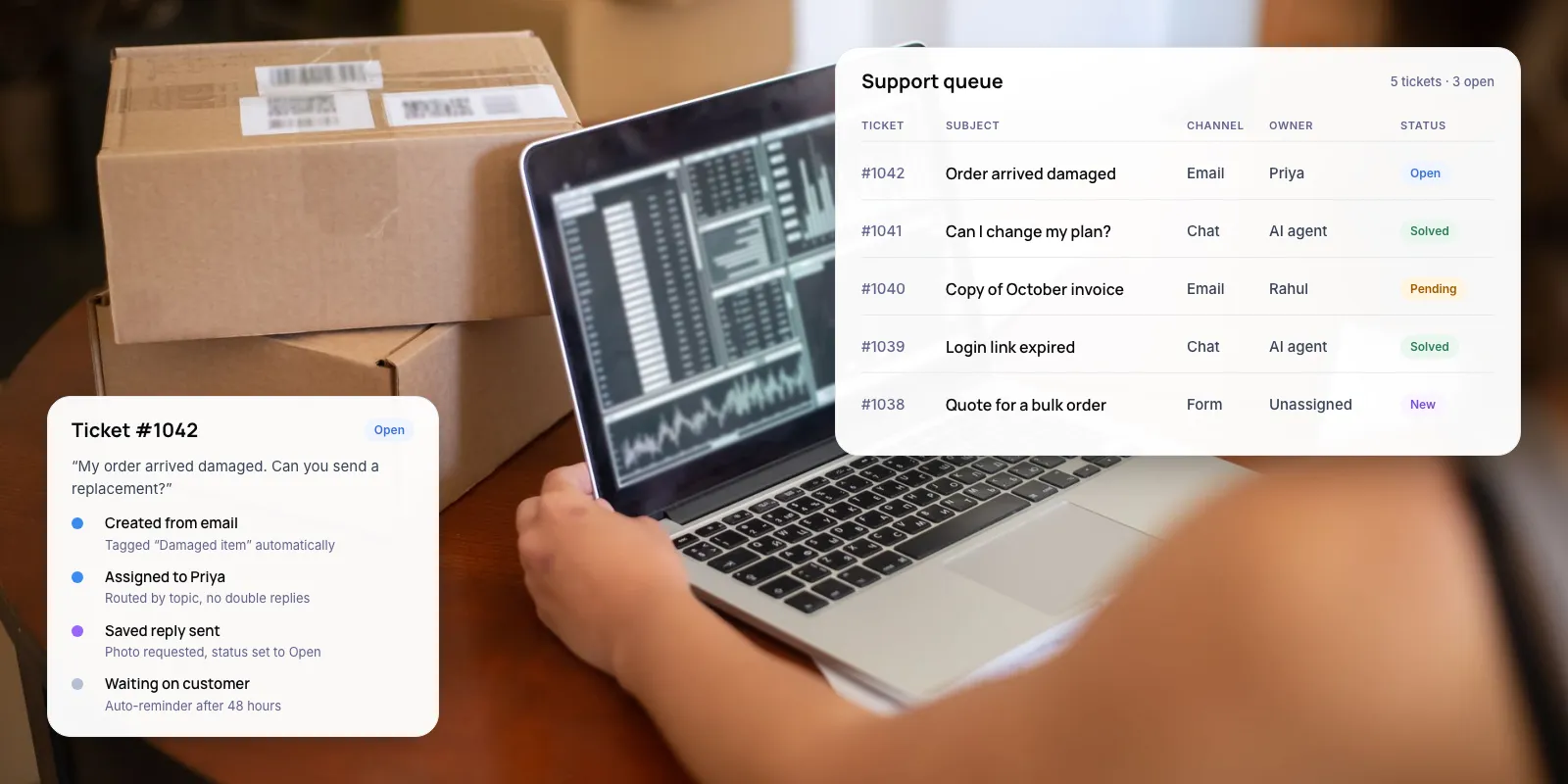
A help desk gives you one shared inbox, saved replies and a history of every conversation with a student. Four tools have free or low-cost entry points that suit a team of one to five people. Prices below are list prices, checked in November 2026. Per-agent prices assume annual billing. Crisp charges a flat monthly fee per workspace.
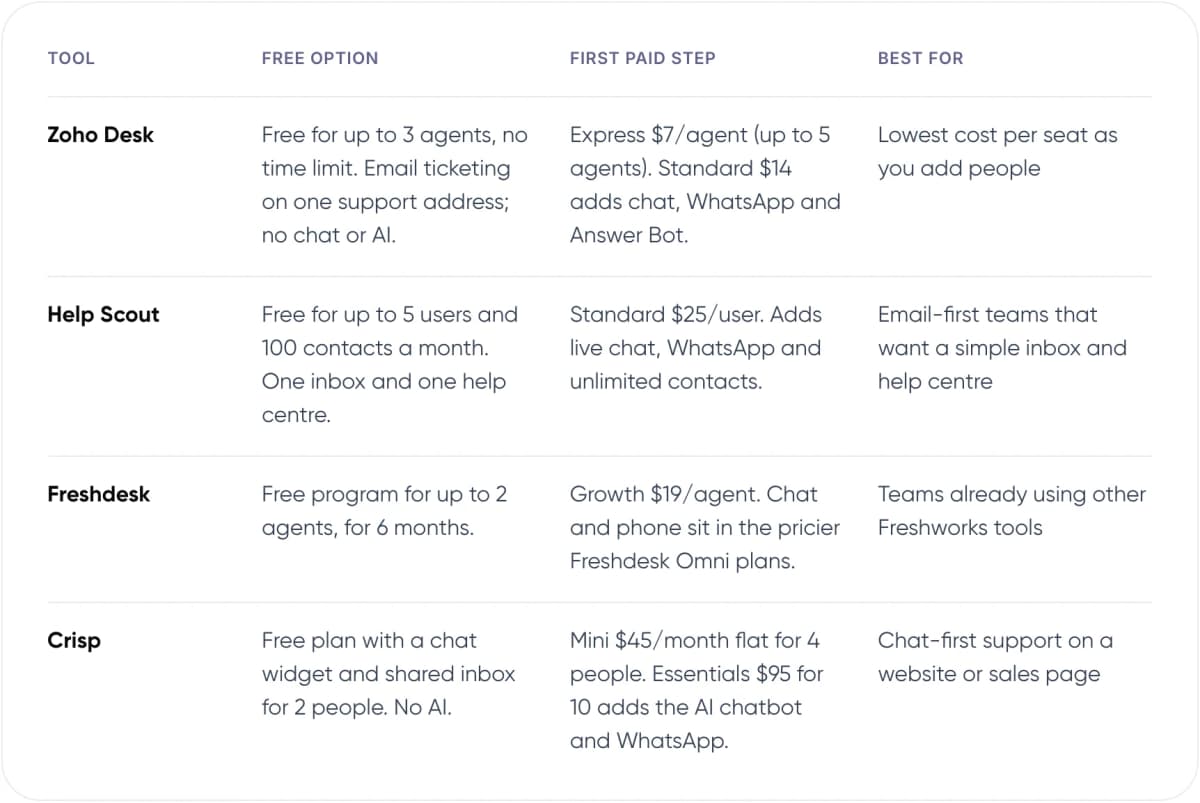
- Zoho Desk — Free option: Free for up to 3 agents, no time limit. Email ticketing on one support address; no chat or AI. First paid step: Express $7/agent (up to 5 agents). Standard $14 adds chat, WhatsApp and Answer Bot. Best for: Lowest cost per seat as you add people.
- Help Scout — Free option: Free for up to 5 users and 100 contacts a month. One inbox and one help centre. First paid step: Standard $25/user. Adds live chat, WhatsApp and unlimited contacts. Best for: Email-first teams that want a simple inbox and help centre.
- Freshdesk — Free option: Free program for up to 2 agents, for 6 months. First paid step: Growth $19/agent. Chat and phone sit in the pricier Freshdesk Omni plans. Best for: Teams already using other Freshworks tools.
- Crisp — Free option: Free plan with a chat widget and shared inbox for 2 people. No AI. First paid step: Mini $45/month flat for 4 people. Essentials $95 for 10 adds the AI chatbot and WhatsApp. Best for: Chat-first support on a website or sales page.
Our recommendation for a solo creator or a team of two: start on Zoho Desk Free or Help Scout Free. Pick Help Scout if most questions come by email and you want the help centre in the same tool. Pick Zoho Desk if you expect to add people, because its paid seats cost less.
Freshdesk is still a capable product, but its free option has shrunk. From November 15, 2024, Freshworks cut the free plan from 10 agents to 2. It now describes it as a six-month Free program, so budget for the $19 Growth plan from month seven.
Tip: Compare the cost at the team size you’ll have in a year, not today. Five people on Help Scout Standard cost $125 a month. On Zoho Desk Standard, the same five cost $70.
3. Which Live Chat and Chatbot Tools Fit a Small Budget?
Live chat helps most on sales pages and during launch weeks, when prospective students ask about content, price and refunds before they buy. Crisp charges per workspace rather than per agent: Free, then Mini at $45, Essentials at $95 and Plus at $295 a month. The free plan gives you the chat widget and a shared inbox for two people, with no AI. Mini covers four people and includes $5 of AI credits, about 90 automated conversations a month. The full AI chatbot and the WhatsApp inbox start on Essentials, which covers ten people and includes about 450 automated conversations.
If you already use Help Scout, its AI Answers feature replies from your help articles. New accounts get it free for three months, then it costs $0.75 for each conversation it resolves without a person stepping in. At 200 such conversations a month, that adds $150 on top of seats. tawk.to is the lowest-cost option: live chat, ticketing and a help centre are free for any number of agents. Its AI Assist add-on is free for up to 100 messages a month, then starts at $29 a month.
The trade-off is simple. A chatbot can only be as good as the answers it can find. If your help articles are thin or out of date, fix those before you switch on AI.
Not sure which tools fit your course business? We can review your student questions with you.
4. Should You Use WhatsApp for Student Support?
If your students are in India, the Gulf or Latin America, many will message you on WhatsApp whether you plan for it or not. You have two options, and the right one depends on how many people answer.
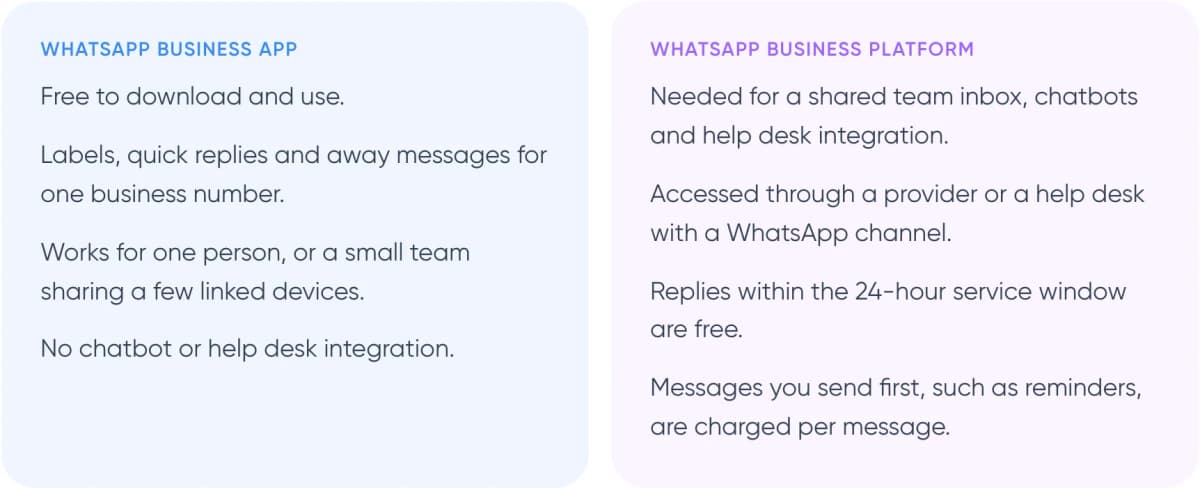
WhatsApp Business app
- Free to download and use.
- Labels, quick replies and away messages for one business number.
- Works for one person, or a small team sharing a few linked devices.
- No chatbot or help desk integration.
WhatsApp Business Platform
- Needed for a shared team inbox, chatbots and help desk integration.
- Accessed through a provider or a help desk with a WhatsApp channel.
- Replies within the 24-hour service window are free.
- Messages you send first, such as reminders, are charged per message.
Platform pricing suits support well. Since November 1, 2024, replies within the 24-hour customer service window have been free, with no monthly cap. On July 1, 2025, Meta moved to per-message pricing for template messages. These are pre-approved messages you send first, such as class reminders or launch announcements. In short, answering students costs nothing, and messages you start are charged at a rate set by country and message type.
Note: You reach the Platform through a provider or a help desk that connects to it. Zoho Desk Standard, Help Scout Standard and Crisp Essentials include a WhatsApp channel, so you may not need a separate tool.
5. Where Does a Student Community Fit?
A community cuts one-to-one questions. Students answer each other, and you answer a common question once, in public, where the next student can find it. It also gives you a steady view of where students get stuck.
Skool costs $9 a month on Hobby, plus 10% and $0.30 on each payment it collects for you. Pro costs $99 a month with a 2.9% plus $0.30 fee. If your community is free for enrolled students, no payment fee applies and Hobby costs $9 a month. Most course platforms also include a community area. We’d use the built-in one unless it lacks something you need, because every extra tool is one more login for students.
Warning: Don’t make the community your only support channel. Payment, refund and account problems involve personal details. Move them to a private inbox and say so in the community rules.
6. What Does an Affordable Student Support Stack Cost?
Three setups cover most small course businesses. Costs are monthly list prices on annual billing. They exclude WhatsApp template fees and your course platform.
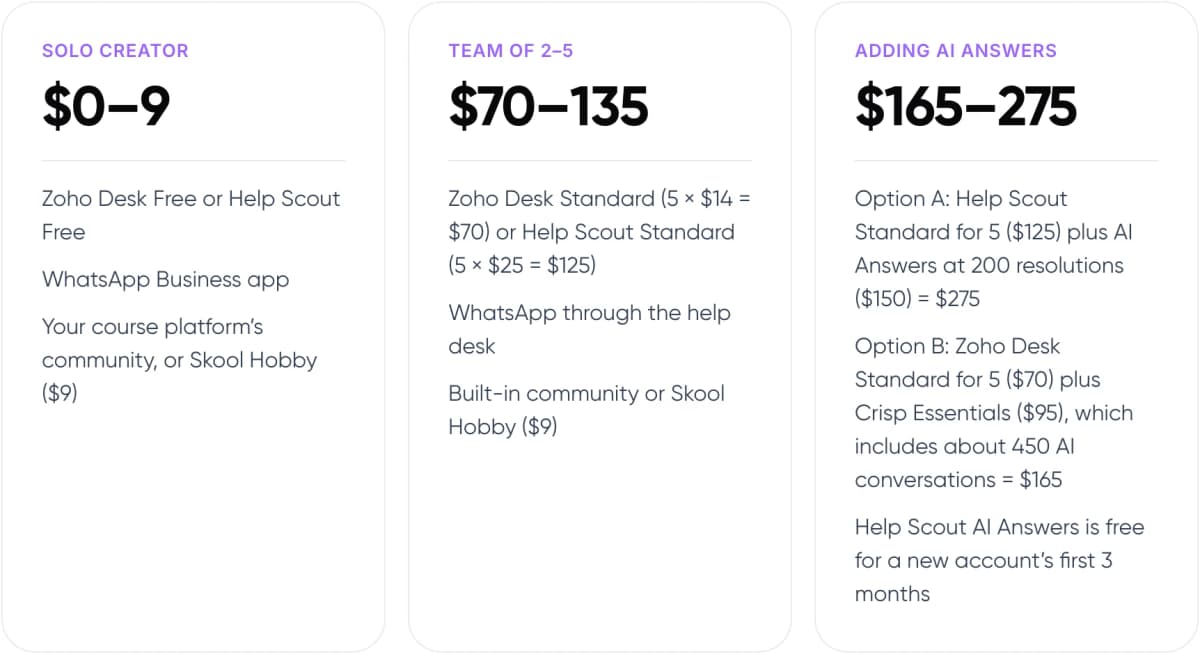
Solo creator · $0–9
- Zoho Desk Free or Help Scout Free
- WhatsApp Business app
- Your course platform’s community, or Skool Hobby ($9)
Team of 2–5 · $70–135
- Zoho Desk Standard (5 × $14 = $70) or Help Scout Standard (5 × $25 = $125)
- WhatsApp through the help desk
- Built-in community or Skool Hobby ($9)
Adding AI answers · $165–275
- Option A: Help Scout Standard for 5 ($125) plus AI Answers at 200 resolutions ($150) = $275
- Option B: Zoho Desk Standard for 5 ($70) plus Crisp Essentials ($95), which includes about 450 AI conversations = $165
- Help Scout AI Answers is free for a new account’s first 3 months
The jump between stages usually comes from people, not features. When a second or third person starts answering students, a shared inbox stops being optional.
7. How Do You Set Up Student Support? 6 Steps
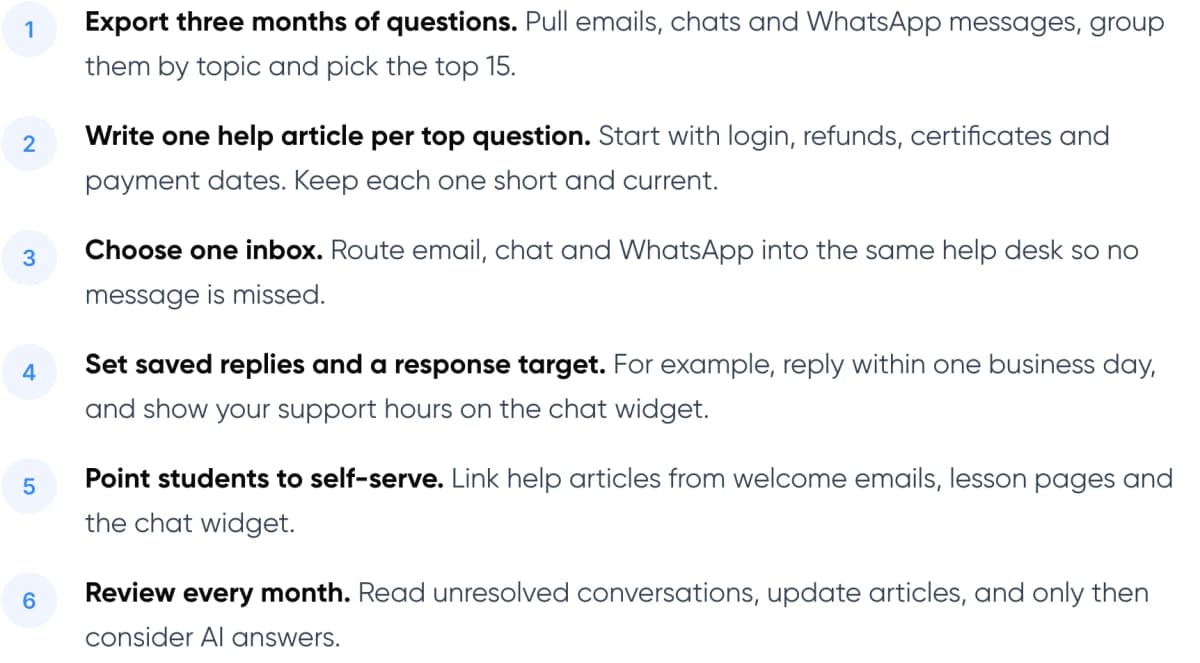
- Export three months of questions. Pull emails, chats and WhatsApp messages, group them by topic and pick the top 15.
- Write one help article per top question. Start with login, refunds, certificates and payment dates. Keep each one short and current.
- Choose one inbox. Route email, chat and WhatsApp into the same help desk so no message is missed.
- Set saved replies and a response target. For example, reply within one business day, and show your support hours on the chat widget.
- Point students to self-serve. Link help articles from welcome emails, lesson pages and the chat widget.
- Review every month. Read unresolved conversations, update articles, and only then consider AI answers.
For the basics of what can be automated and what can’t, see our guide to how customer support automation works.
8. When Is It Worth Adding AI or a Custom Build?
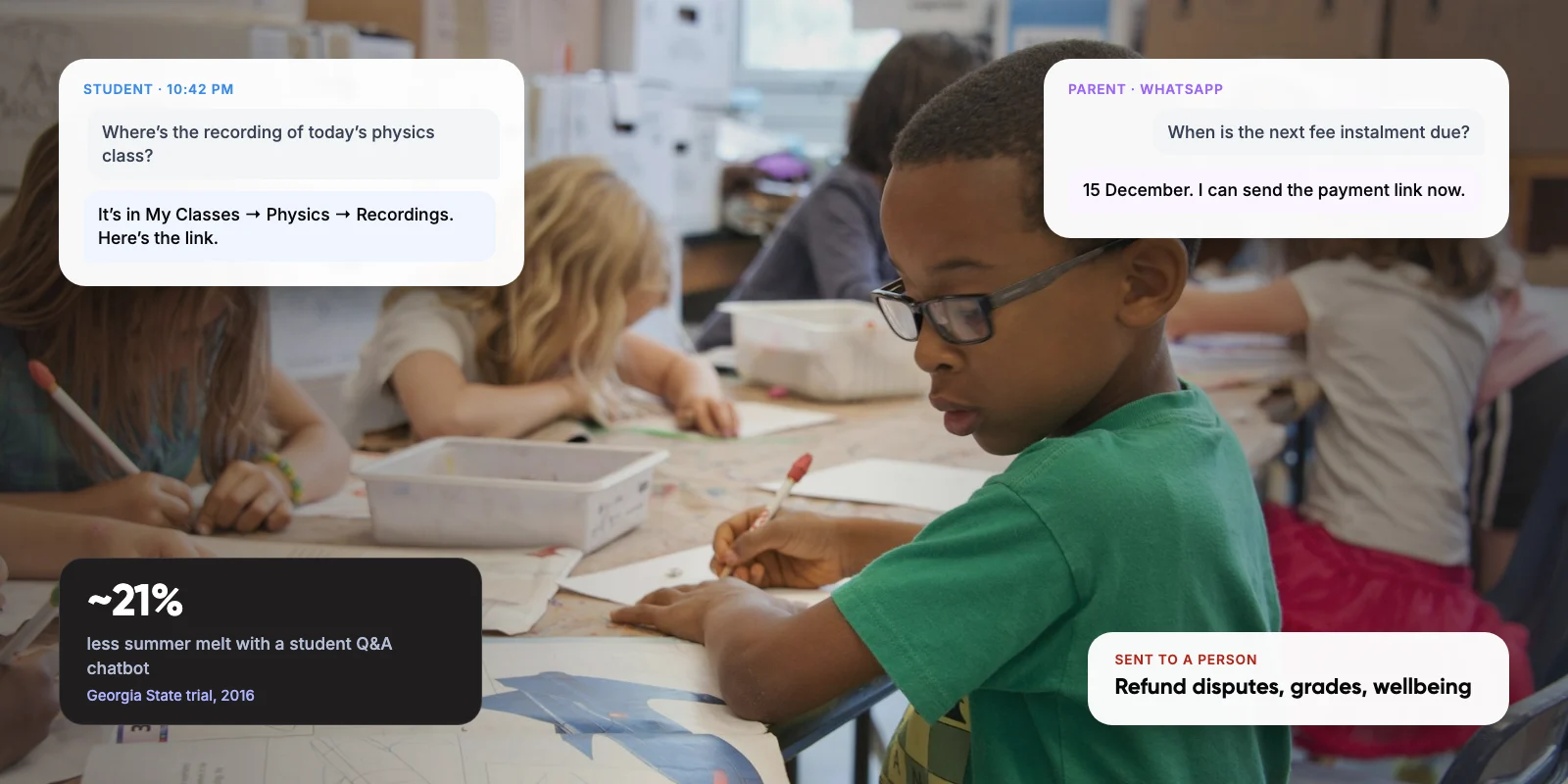
AI answers pay off when the same questions arrive every day and your help articles already answer them well. Education has evidence for this. In 2016, Georgia State University used a texting assistant called Pounce to answer incoming students’ questions. In a randomised trial, it delivered over 200,000 answers in one summer. Students with access were 3.3 percentage points more likely to enrol, a ~21% reduction in “summer melt”. Pounce was simpler than today’s AI tools, but fast answers changed what students did.
Keep a route to a person. Gartner’s 2026 survey found ~87% of customers say access to a human agent is essential when a company uses generative AI for service. When the bot hands over, pass the conversation with it; our post on chatbot handoff and context transfer covers how.
In our view, a custom build only makes sense when off-the-shelf tools can’t reach the data behind the answer. Examples are a student’s progress in your own learning platform, payment status from a custom checkout, or support in several languages. Until then, the tools above are cheaper and faster to run. When you do need it, the assistant has to look up the right record before it answers; our guide to agentic RAG explains how that works.
9. Frequently Asked Questions
What is the cheapest customer support software for a small online course business?
Zoho Desk Free covers up to 3 agents with no time limit, and Help Scout Free covers up to 5 users and 100 contacts a month. Both include email ticketing and a help centre. When you outgrow them, Zoho Desk Express costs $7 per agent a month on annual billing.
Is Freshdesk still free?
Only for a limited time. Since November 2024, Freshdesk’s free option covers up to 2 agents instead of 10, and Freshworks now describes it as a six-month Free program. After that you need a paid plan; Growth costs $19 per agent a month on annual billing.
Do I need the WhatsApp Business API for student support?
Not if one person answers from one number; the free WhatsApp Business app is enough. You need the Business Platform for a shared team inbox, chatbots or help desk integration. Replies within 24 hours of a student’s message are free. Messages you send first, such as reminders, are charged per message.
Should I add an AI chatbot to my course website?
Add one once your help articles answer your top questions well, because the bot answers from them. Costs are modest at small volumes: Help Scout charges $0.75 per AI-resolved conversation, and tawk.to’s AI Assist is free for up to 100 messages a month. Always offer a way to reach a person; Gartner’s 2026 survey found ~87% of customers consider this essential.
Can a student community replace a help desk?
No. A community reduces repeat questions because students answer each other and your answers stay public. But payment, refund and account problems involve personal details and need a private channel. Use the community for course questions and a help desk for everything personal.
10. Conclusion
Most small course businesses don’t need expensive customer support software. A free help desk, a chat widget, WhatsApp replies and a community cover the common questions. Your next step is to export the last three months of student messages and sort them by topic. The top 15 tell you which tool to set up first and which help articles to write.
For an example of our multichannel support work, see Paymate.
When your student questions outgrow off-the-shelf tools, our AI customer support automation service can help. We plan, build and run AI support that answers from your own course data and hands students to your team when needed.
Author