Best Ticketing System for Small Business
The best ticketing system for small business depends on your team size and the tools you already use. For most teams of 2 to 10 people, Zoho Desk and Freshdesk cost the least per agent, Help Scout is the easiest to run, and HubSpot Service Hub suits teams already on HubSpot CRM. Zendesk is the stronger pick once you need chat, phone and AI in one place.
Faster replies are one of the biggest reasons to move off a shared inbox. In Zendesk’s CX Trends 2026 report, 88% of customers said they expect faster responses than a year ago.

- Capture Email, chat and forms become tickets
- Assign Each ticket gets one owner
- Reply Saved replies and AI drafts
- Resolve Track status until it is solved
1. What Is the Best Ticketing System for Small Business?
There is no single winner. The right help desk software supports the channels your customers use, connects to your CRM, and still fits your budget if your team doubles. Here is our pick for each common situation.
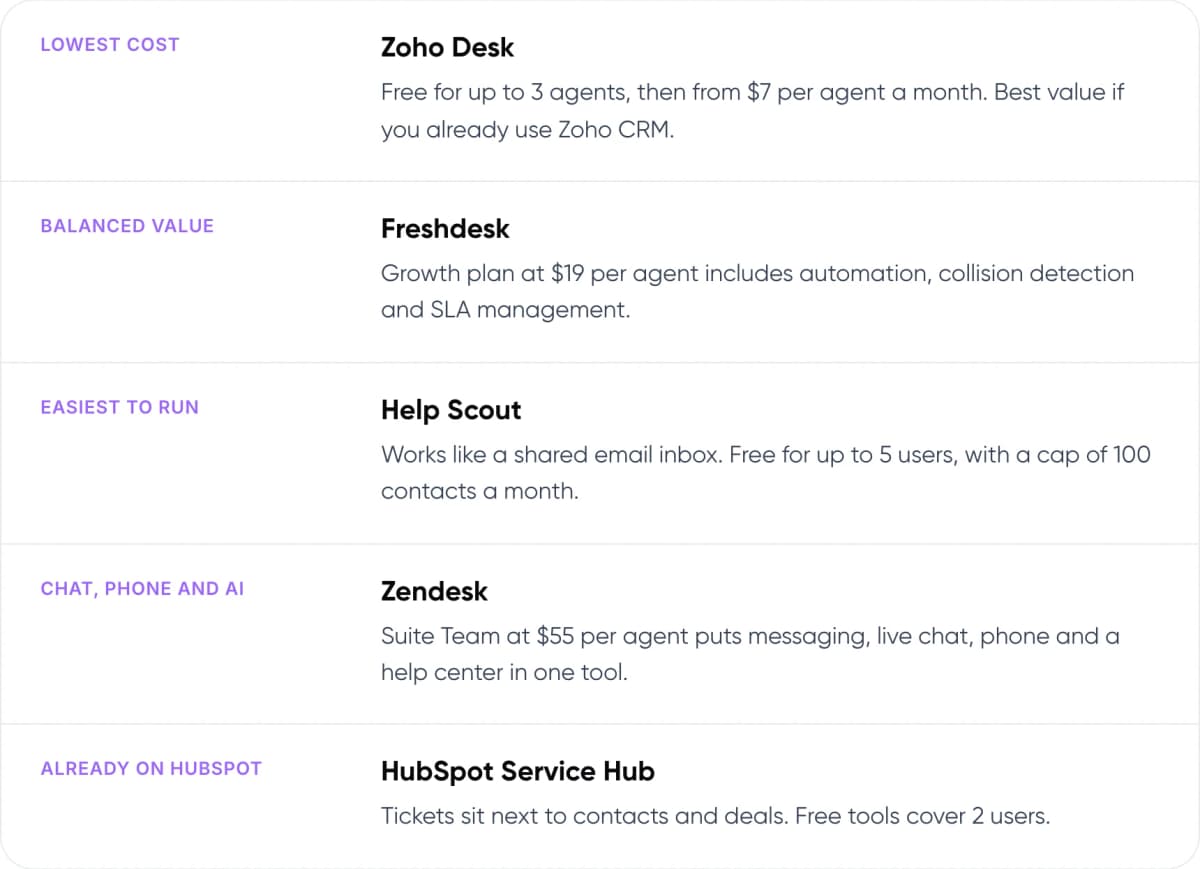
- Lowest cost: Zoho Desk. Free for up to 3 agents, then from $7 per agent a month. Best value if you already use Zoho CRM.
- Balanced value: Freshdesk. Growth plan at $19 per agent includes automation, collision detection and SLA management.
- Easiest to run: Help Scout. Works like a shared email inbox. Free for up to 5 users, with a cap of 100 contacts a month.
- Chat, phone and AI: Zendesk. Suite Team at $55 per agent puts messaging, live chat, phone and a help center in one tool.
- Already on HubSpot: HubSpot Service Hub. Tickets sit next to contacts and deals. Free tools cover 2 users.
Key takeaways
- Entry plans cost $7 to $25 per agent a month on annual billing. Zendesk Suite and HubSpot Professional cost more.
- AI that answers customers is usually billed each time it resolves a conversation: $0.50 on HubSpot, $0.75 on Help Scout, and about $1.50 to $2.00 on Zendesk beyond its allowance.
- Choose by the channels and CRM you already use, not by the longest feature list.
- Trial two tools on real tickets before you commit to annual billing.
2. When Does a Small Business Need a Ticketing System?
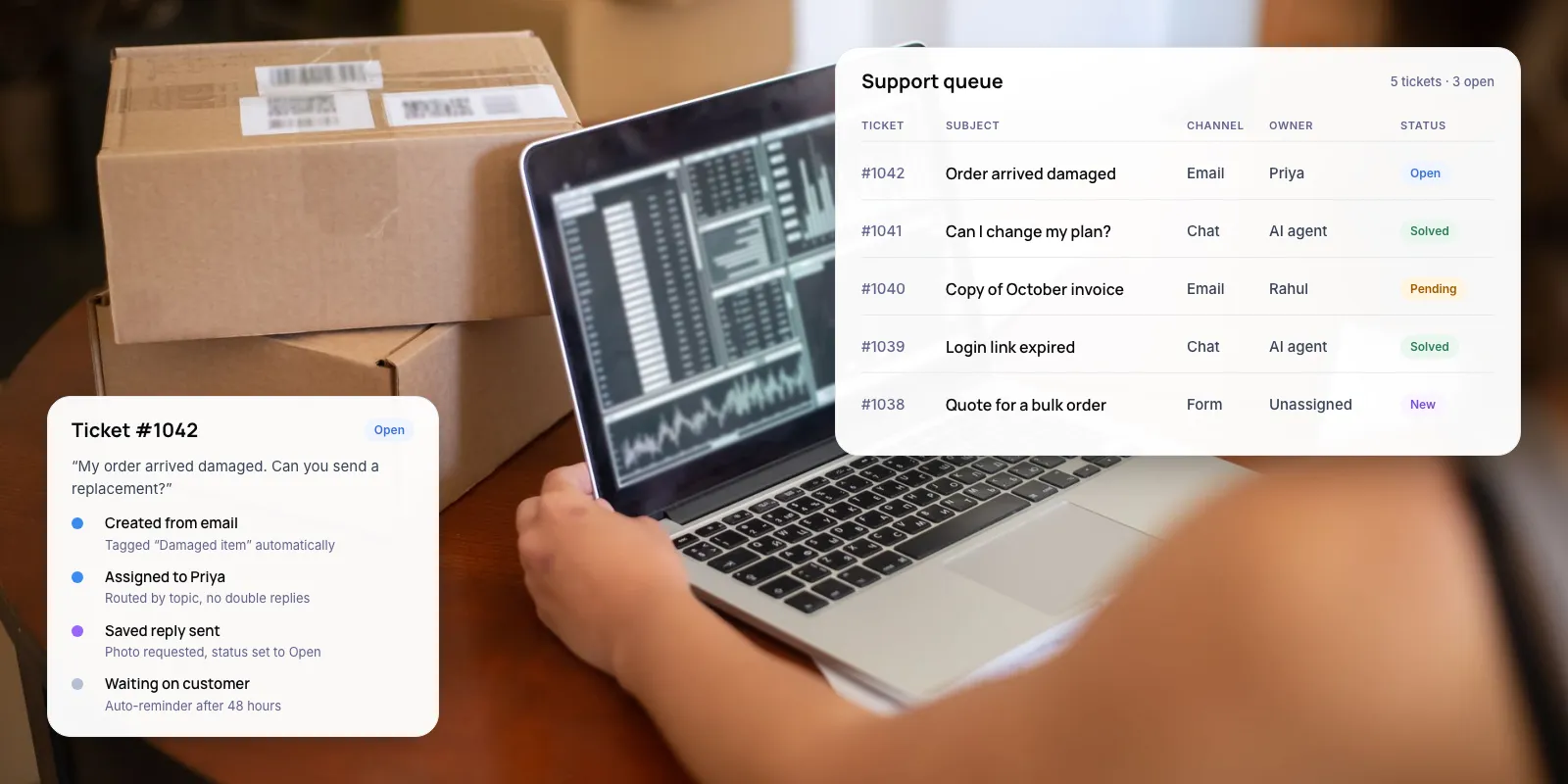
A ticketing system turns every customer email, chat or form into a ticket. Each ticket has one owner, a status and a full history. A shared inbox works until two people answer the same customer, or a request sits unread over a weekend.
Missed requests cost more than they used to. Zendesk’s CX Trends 2026 report surveyed more than 11,000 consumers and customer service professionals. In it, 85% of CX leaders said customers will leave a brand if an issue is not resolved on the first contact.
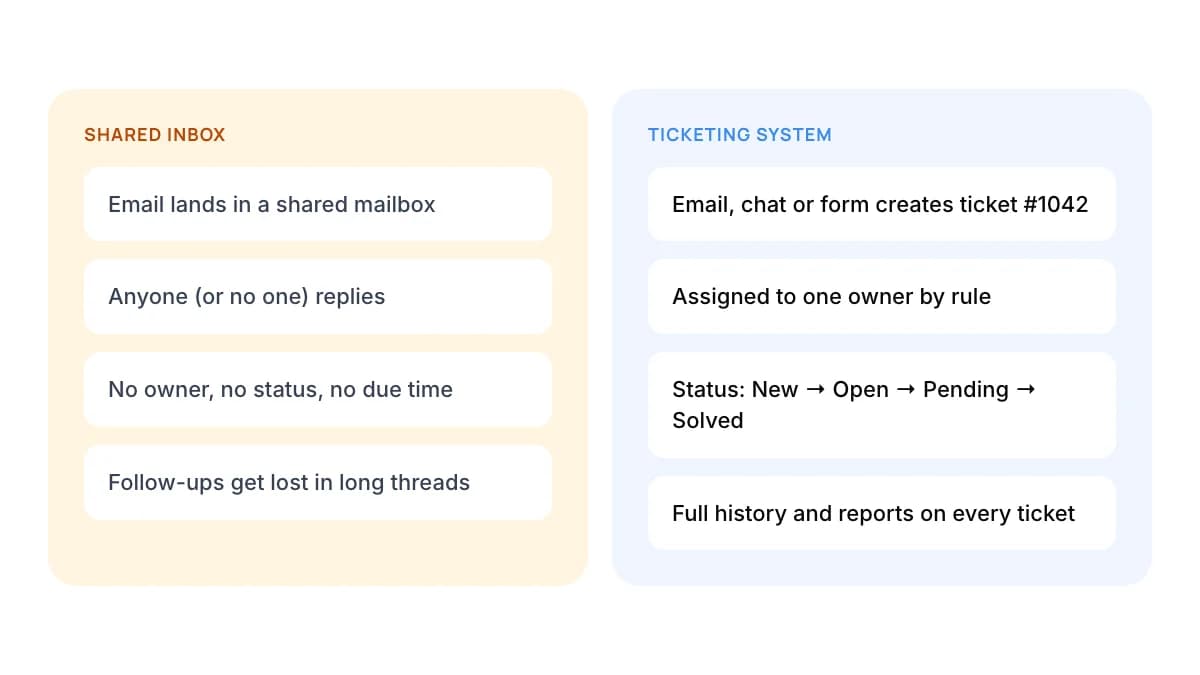
Shared inbox
- Email lands in a shared mailbox
- Anyone (or no one) replies
- No owner, no status, no due time
- Follow-ups get lost in long threads
Ticketing system
- Email, chat or form creates ticket #1042
- Assigned to one owner by rule
- Status: New → Open → Pending → Solved
- Full history and reports on every ticket
You are probably ready to switch if two or more of these are true:
- More than one person answers customer messages.
- You cannot say how many requests are open right now.
- Customers write again to ask whether you got their first message.
- Your team answers the same few questions every day.
Note: In our view, a one-person team with a light, steady load can stay on a well-labelled inbox. The case for a ticketing system starts when a second person begins replying, because that is when ownership gets unclear.
3. Which Help Desk Features Matter for a Small Team?
Small teams use a fraction of what help desk software offers. These six features do most of the work. Anything beyond them is worth paying for only when a real problem demands it.
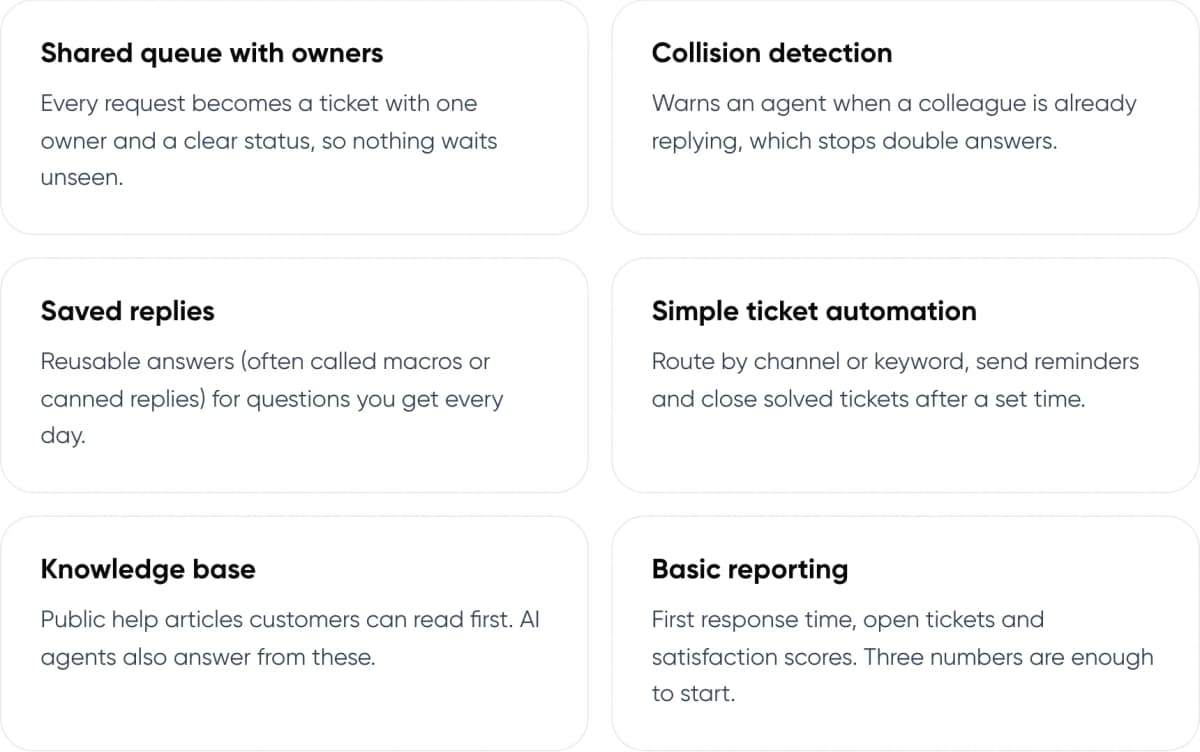
- Shared queue with owners: Every request becomes a ticket with one owner and a clear status, so nothing waits unseen.
- Collision detection: Warns an agent when a colleague is already replying, which stops double answers.
- Saved replies: Reusable answers (often called macros or canned replies) for questions you get every day.
- Simple ticket automation: Route by channel or keyword, send reminders and close solved tickets after a set time.
- Knowledge base: Public help articles customers can read first. AI agents also answer from these.
- Basic reporting: First response time, open tickets and satisfaction scores. Three numbers are enough to start.
Tip: Check channels before price. Zoho Desk’s Free edition covers email only, with live chat from the Standard plan. Freshdesk sells chat and messaging as a separate product, Freshdesk Omni, at a higher price than its email ticketing plans.
4. How Do the Top 5 Ticketing Systems Compare?
We compared the five help desks small businesses shortlist most often. Prices are list prices per agent per month on annual billing, taken from each vendor’s pricing page.
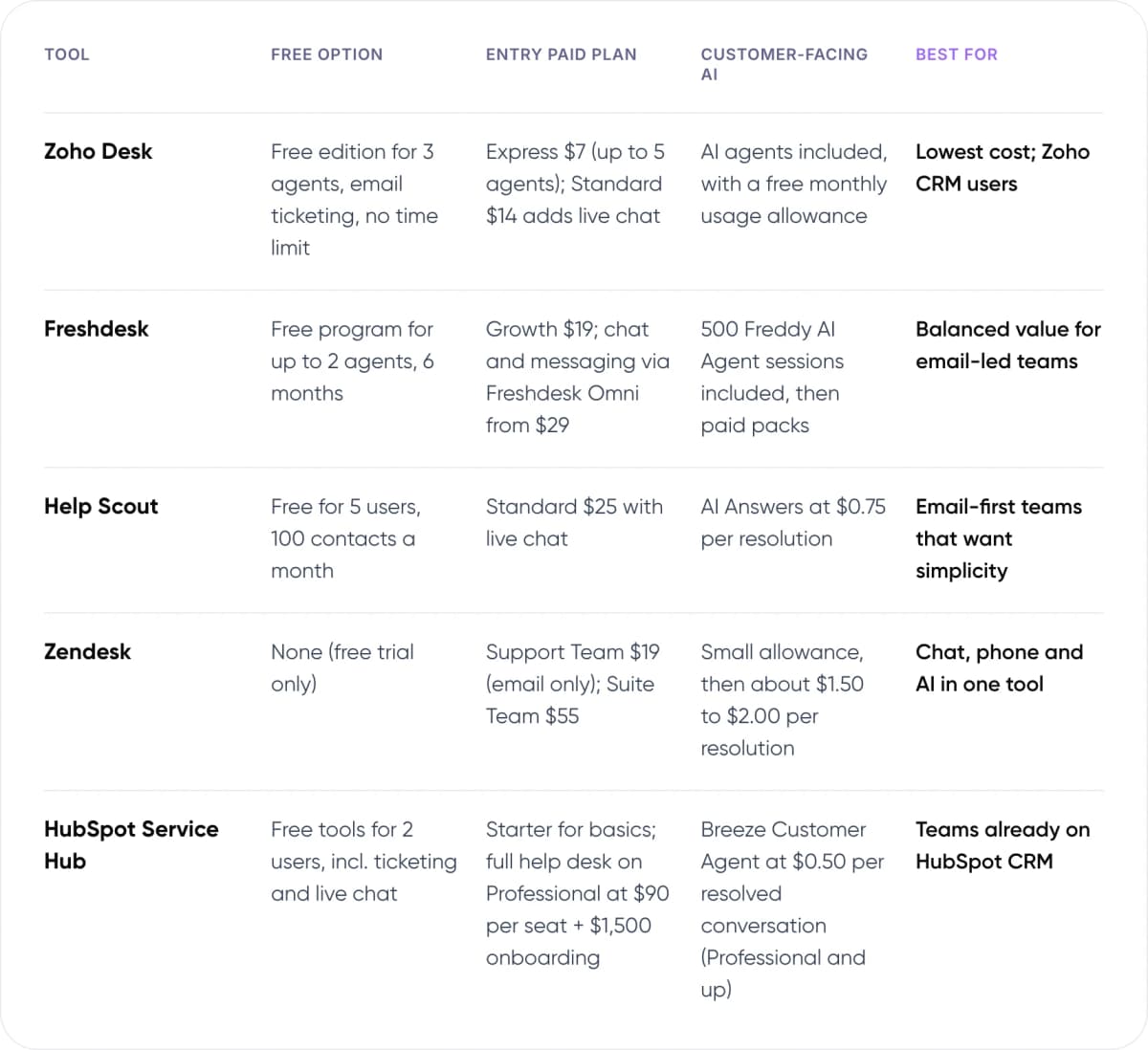
- Zoho Desk — Free option: Free edition for 3 agents, email ticketing, no time limit. Entry paid plan: Express $7 (up to 5 agents); Standard $14 adds live chat. Customer-facing AI: AI agents included, with a free monthly usage allowance. Best for: Lowest cost; Zoho CRM users.
- Freshdesk — Free option: Free program for up to 2 agents, 6 months. Entry paid plan: Growth $19; chat and messaging via Freshdesk Omni from $29. Customer-facing AI: 500 Freddy AI Agent sessions included, then paid packs. Best for: Balanced value for email-led teams.
- Help Scout — Free option: Free for 5 users, 100 contacts a month. Entry paid plan: Standard $25 with live chat. Customer-facing AI: AI Answers at $0.75 per resolution. Best for: Email-first teams that want simplicity.
- Zendesk — Free option: None (free trial only). Entry paid plan: Support Team $19 (email only); Suite Team $55. Customer-facing AI: Small allowance, then about $1.50 to $2.00 per resolution. Best for: Chat, phone and AI in one tool.
- HubSpot Service Hub — Free option: Free tools for 2 users, incl. ticketing and live chat. Entry paid plan: Starter for basics; full help desk on Professional at $90 per seat + $1,500 onboarding. Customer-facing AI: Breeze Customer Agent at $0.50 per resolved conversation (Professional and up). Best for: Teams already on HubSpot CRM.
USD list prices, annual billing, checked November 2026 on each vendor’s pricing page (linked on the tool name). Monthly billing costs roughly 16–20% more. Prices change often, so confirm before you buy.
5. Which Ticketing System Should You Choose?
Each tool below is a sound choice for the right team. The “skip it if” line matters as much as the strengths.
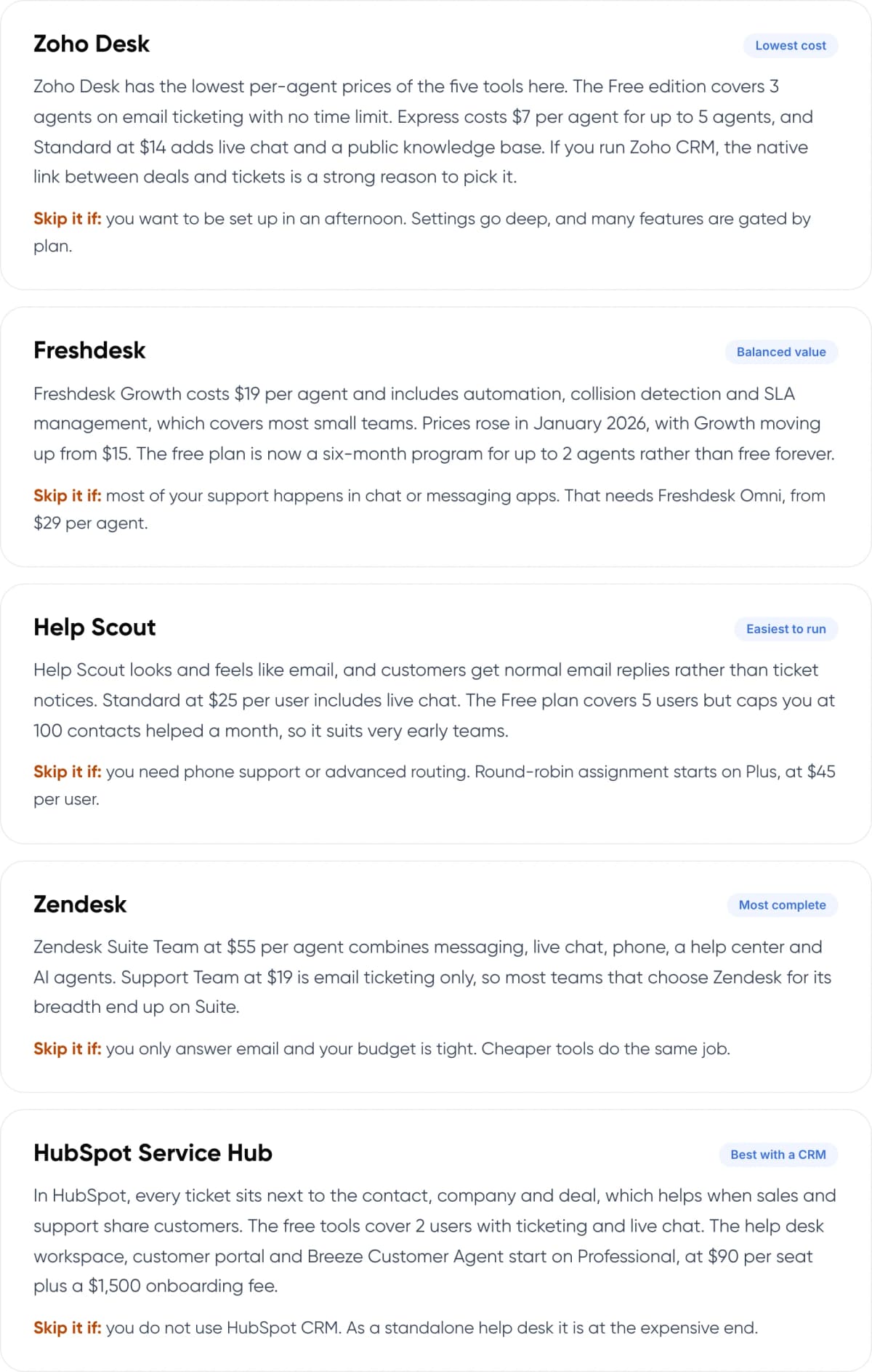
Zoho Desk
Lowest cost
Zoho Desk has the lowest per-agent prices of the five tools here. The Free edition covers 3 agents on email ticketing with no time limit. Express costs $7 per agent for up to 5 agents, and Standard at $14 adds live chat and a public knowledge base. If you run Zoho CRM, the native link between deals and tickets is a strong reason to pick it.
Skip it if: you want to be set up in an afternoon. Settings go deep, and many features are gated by plan.
Freshdesk
Balanced value
Freshdesk Growth costs $19 per agent and includes automation, collision detection and SLA management, which covers most small teams. Prices rose in January 2026, with Growth moving up from $15. The free plan is now a six-month program for up to 2 agents rather than free forever.
Skip it if: most of your support happens in chat or messaging apps. That needs Freshdesk Omni, from $29 per agent.
Help Scout
Easiest to run
Help Scout looks and feels like email, and customers get normal email replies rather than ticket notices. Standard at $25 per user includes live chat. The Free plan covers 5 users but caps you at 100 contacts helped a month, so it suits very early teams.
Skip it if: you need phone support or advanced routing. Round-robin assignment starts on Plus, at $45 per user.
Zendesk
Most complete
Zendesk Suite Team at $55 per agent combines messaging, live chat, phone, a help center and AI agents. Support Team at $19 is email ticketing only, so most teams that choose Zendesk for its breadth end up on Suite.
Skip it if: you only answer email and your budget is tight. Cheaper tools do the same job.
HubSpot Service Hub
Best with a CRM
In HubSpot, every ticket sits next to the contact, company and deal, which helps when sales and support share customers. The free tools cover 2 users with ticketing and live chat. The help desk workspace, customer portal and Breeze Customer Agent start on Professional, at $90 per seat plus a $1,500 onboarding fee.
Skip it if: you do not use HubSpot CRM. As a standalone help desk it is at the expensive end.
6. What Will a Ticketing System Actually Cost?
Per-agent prices look close until you multiply them. Change the team size below to see the monthly seat cost of each tool’s most likely plan for a small team.
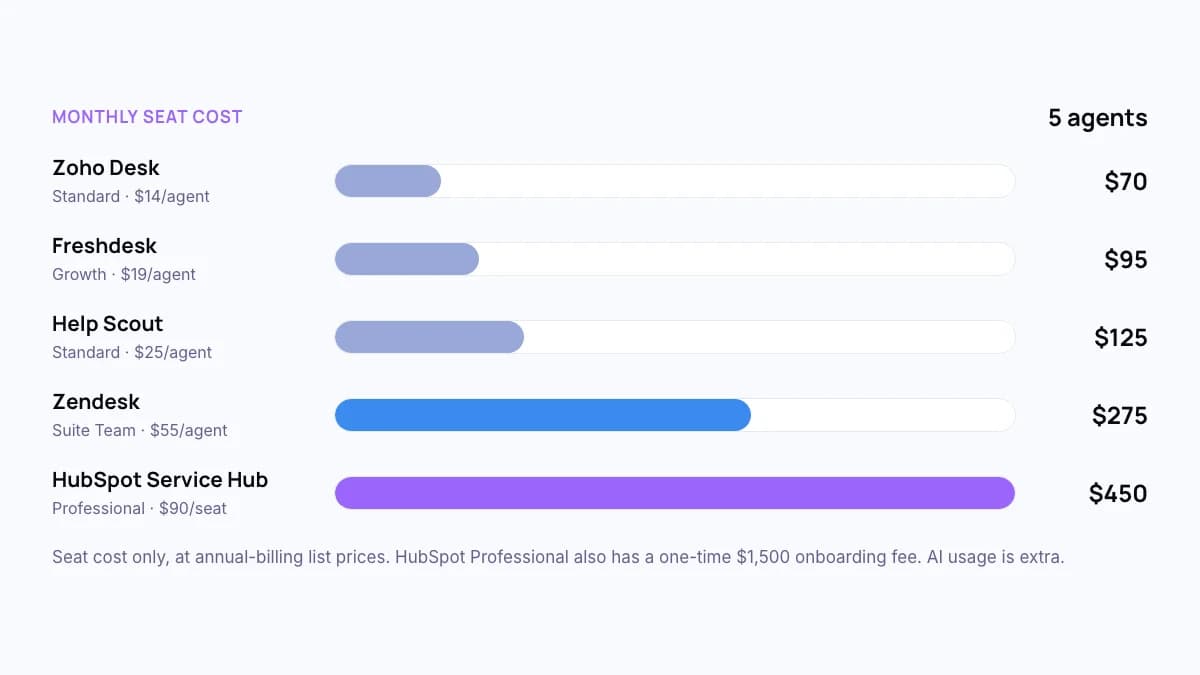
Monthly seat cost · 5 agents
- Zoho Desk (Standard · $14/agent): $70
- Freshdesk (Growth · $19/agent): $95
- Help Scout (Standard · $25/agent): $125
- Zendesk (Suite Team · $55/agent): $275
- HubSpot Service Hub (Professional · $90/seat): $450
Seat cost only, at annual-billing list prices. HubSpot Professional also has a one-time $1,500 onboarding fee. AI usage is extra.
AI is where bills grow. Most tools charge for customer-facing AI each time it fully resolves a conversation. Say an AI agent resolves 300 conversations a month. That adds $225 on Help Scout ($0.75 each, after a three-month free trial) or $150 on HubSpot ($0.50 each, Professional plan and above). Zendesk includes a small monthly allowance, then charges about $1.50 to $2.00 per resolution.
Not sure which help desk fits your team? We can review your ticket volume and channels with you.
7. Should Your Ticketing System Use AI?
All five tools in our comparison now include AI features. Salesforce’s State of Service report (7th edition, 2025) surveyed 6,500 service professionals. They estimated that AI resolved 30% of cases in 2025 and expect that to reach 50% by 2027. Reps using AI spent 20% less time on routine cases, which frees about four hours a week.
For a small team, we recommend starting with AI that helps your agents: drafted replies, ticket summaries and suggested help articles. Turn on a customer-facing AI agent only once your help content answers your top 20 questions. An AI agent working from thin content gives vague answers, and those come back as new tickets.
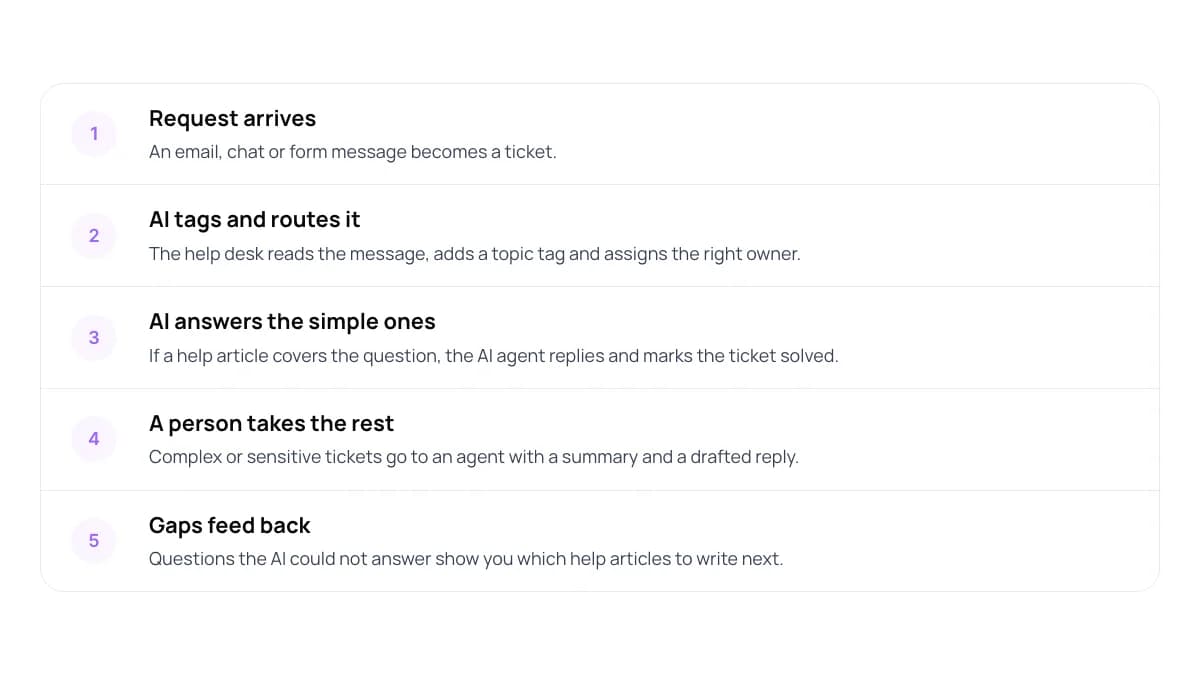
- Request arrives An email, chat or form message becomes a ticket.
- AI tags and routes it The help desk reads the message, adds a topic tag and assigns the right owner.
- AI answers the simple ones If a help article covers the question, the AI agent replies and marks the ticket solved.
- A person takes the rest Complex or sensitive tickets go to an agent with a summary and a drafted reply.
- Gaps feed back Questions the AI could not answer show you which help articles to write next.
Built-in AI has limits. It answers well from your help articles, but it often cannot take action in your other systems, such as checking an order status or changing a booking, unless you connect them. When your customers need that, a custom AI agent connected to your help desk makes sense. Plan the handover to a person carefully. Our guide to chatbot handoff and context transfer covers how.
8. How to Set Up a Ticketing System in 7 Steps
- Count your requests. Export one month of email and chat. Note volume, channels and your 20 most common questions.
- Shortlist two tools. Use the comparison table. Match your channels and the CRM you already use.
- Trial on real tickets. Help Scout and Zoho Desk offer 15-day trials with no card. Run both tools on the same week of tickets.
- Connect your channels. Forward your support email, add the chat widget and link your contact forms.
- Write saved replies and help articles. Cover your top 20 questions. These become the base for AI later.
- Set simple rules. Owners by channel or topic, a first-response target, and auto-close for solved tickets.
- Review weekly. Check first response time, open tickets and repeat questions. Add AI once your help content is solid.
Warning: Annual billing saves roughly 16–20%, but it commits you to the tool for a full year. In our view, pay monthly for the first two or three months, then switch to annual once you know the tool fits your team.
New to the topic? Read what customer support automation is and how it works.
9. Frequently Asked Questions
What is the best free ticketing system for small business?
Zoho Desk’s Free edition covers 3 agents with email ticketing and no time limit. Help Scout’s Free plan covers 5 users but caps you at 100 contacts a month. HubSpot’s free tools cover 2 users with ticketing and live chat. Freshdesk’s free option now lasts six months.
How much does help desk software cost for a small business?
Entry plans cost $7 to $25 per agent a month on annual billing: Zoho Desk Express $7, Freshdesk Growth $19, Zendesk Support Team $19 and Help Scout Standard $25. Plans with chat, phone and AI cost more, such as Zendesk Suite Team at $55. AI resolutions are often billed separately.
What is the difference between a help desk and a ticketing system?
A ticketing system tracks each customer request as a ticket with an owner, a status and a history. Help desk software includes ticketing and adds tools such as a knowledge base, live chat, automation and reporting. For most small businesses, both terms describe the same product.
Is Zendesk too expensive for a small business?
It depends on your channels. Zendesk Support Team costs $19 per agent a month for email ticketing, the same as Freshdesk Growth. Suite Team, at $55, adds messaging, live chat, phone and a help center. If you only answer email, a cheaper tool will cover the same work.
Can AI replace a ticketing system?
No. AI agents work on top of a ticketing system. They answer common questions, tag and route tickets, and pass harder cases to a person. You still need ticket records, owners and reports. In Salesforce’s 2025 State of Service research, service teams expected AI to resolve 50% of cases by 2027, up from 30% in 2025.
10. Conclusion
The best ticketing system for small business is the one your team uses every day, at a price that still works when the team doubles. This week, shortlist two tools from the table and run both on real tickets for a week. Measure first response time and open tickets before you commit. Add customer-facing AI once your help articles answer your most common questions.
Once your ticketing system is running, AI can take on the repetitive questions. Our AI customer support automation service builds AI agents that answer common customer questions inside the tools you already use and pass the rest to your team.
Our service
AI Customer Support Automation
AI agents that answer common questions and pass the rest to your team, inside the tools you already use.
Free savings report
AI ROI Calculator
Enter your monthly tickets and cost per ticket to estimate what automation could save.
Author