How to Automate Returns and Refund Requests With AI for E-commerce
Let AI check eligibility, create the return and answer “where is my refund?”. Keep a person on high-value and suspicious cases.

- Request Customer asks to return an item
- Check AI checks order and policy
- Act Label, exchange or store credit
- Refund Within limits, or sent to a person
1. The Short Answer
To automate customer service for returns and refunds, connect an AI agent to your store, your returns app and your return policy. Let it check eligibility, create the return label and give refund status. Send high-value, damaged or suspicious cases to a person.
The volume is large. The NRF and Happy Returns 2025 Retail Returns Landscape estimates that 19.3% of online sales will be returned in 2025. Total US retail returns are put at $849.9 billion.
Key takeaways
- An estimated 19.3% of online sales will be returned in 2025, according to the NRF and Happy Returns.
- AI can check eligibility, create returns, offer exchanges and answer refund-status questions.
- Keep high-value, damaged and suspicious returns with people. The NRF found 9% of returns are fraudulent.
- Set a refund limit the AI cannot pass, and review its decisions before raising it.
2. Why Automate Returns and Refunds?
Returns are repetitive work for your team and a big moment for your customer. Most requests follow the same few questions: can I return this, how do I send it back, and when will I get my money?
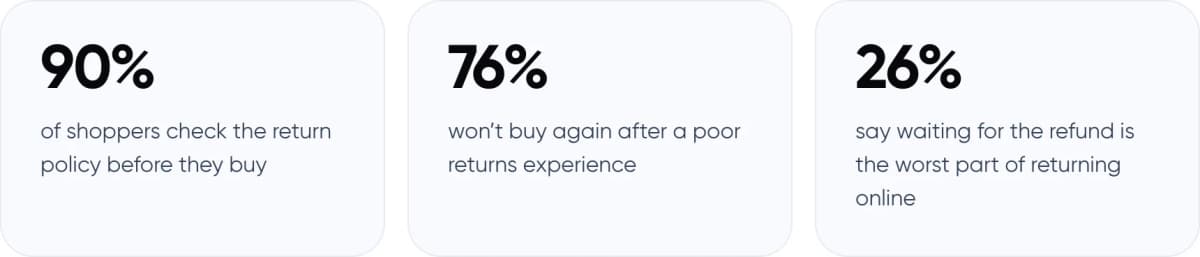
- 90% of shoppers check the return policy before they buy
- 76% won’t buy again after a poor returns experience
- 26% say waiting for the refund is the worst part of returning online
Sources: Narvar 2025 State of Post-Purchase Report (3,461 US shoppers) for 90% and 76%; Narvar consumer research cited on its blog for 26%.
For many shoppers, the wait for the refund is the hardest part. An AI agent can answer refund-status questions instantly, using live order data.
3. Which Return and Refund Requests Can AI Handle?
Group requests by risk. Automate the low-risk ones fully, let AI prepare the medium ones, and keep people on the rest.
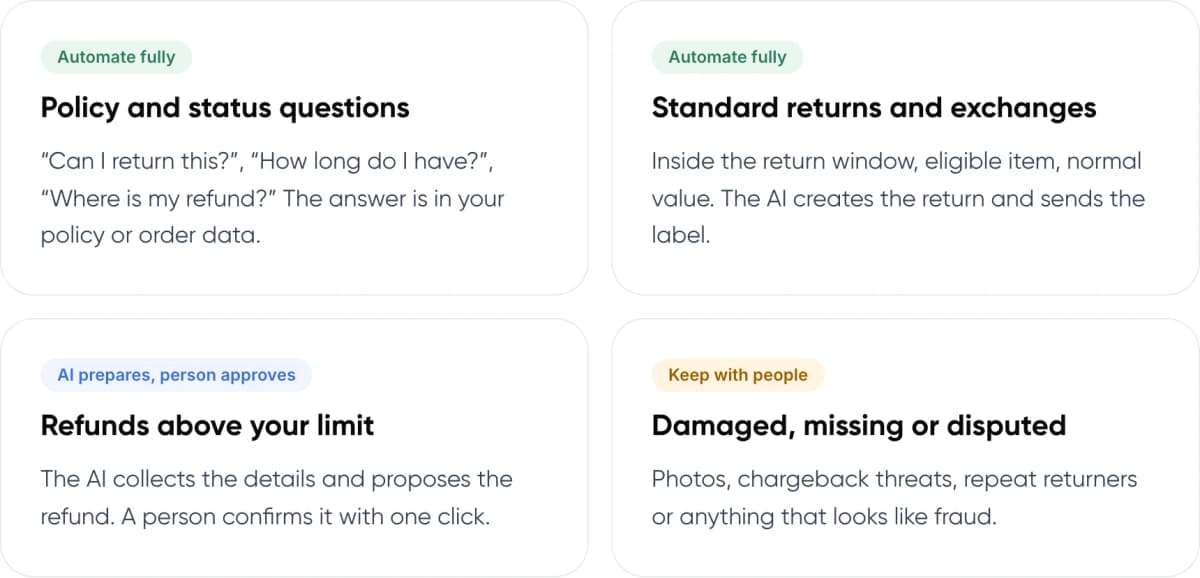
- Policy and status questions (Automate fully): “Can I return this?”, “How long do I have?”, “Where is my refund?” The answer is in your policy or order data.
- Standard returns and exchanges (Automate fully): Inside the return window, eligible item, normal value. The AI creates the return and sends the label.
- Refunds above your limit (AI prepares, person approves): The AI collects the details and proposes the refund. A person confirms it with one click.
- Damaged, missing or disputed (Keep with people): Photos, chargeback threats, repeat returners or anything that looks like fraud.
4. How Does AI Returns Automation Work?
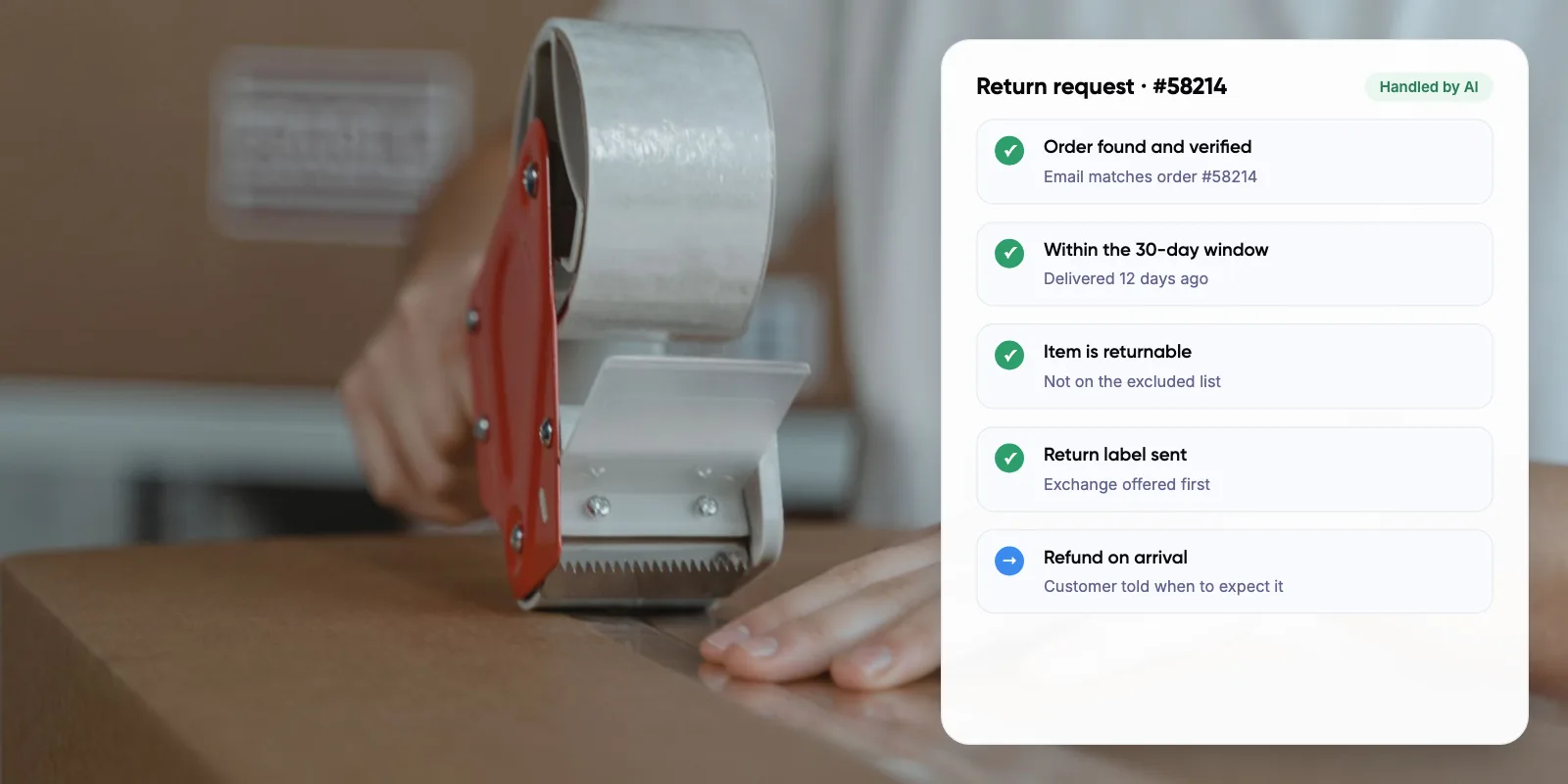
A typical automated return follows five steps, whether the customer writes by chat, email or WhatsApp.
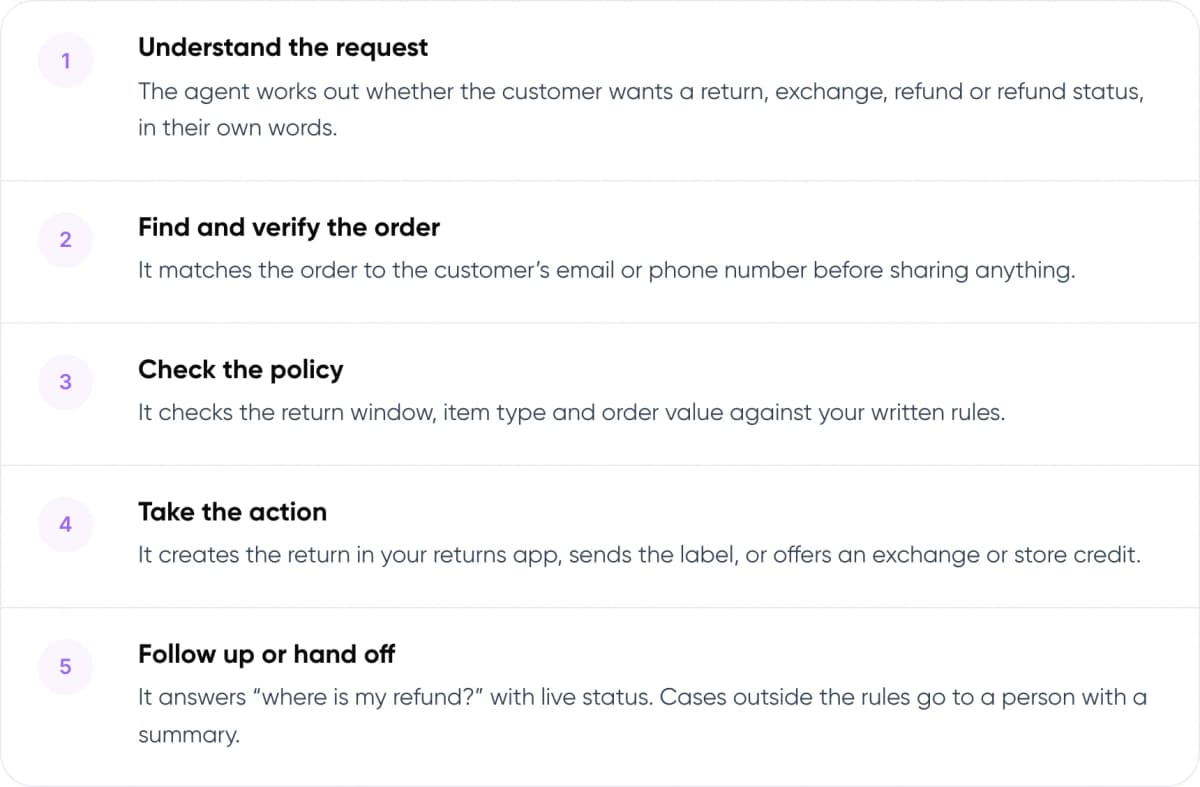
- Understand the request The agent works out whether the customer wants a return, exchange, refund or refund status, in their own words.
- Find and verify the order It matches the order to the customer’s email or phone number before sharing anything.
- Check the policy It checks the return window, item type and order value against your written rules.
- Take the action It creates the return in your returns app, sends the label, or offers an exchange or store credit.
- Follow up or hand off It answers “where is my refund?” with live status. Cases outside the rules go to a person with a summary.
Note: The AI should read your return policy as written rules, not guess from help articles. Store the return window, excluded items and refund method as clear settings it can check.
5. How Do You Keep AI Refunds Safe?
Refunds move money, so they need firm limits. Fraud is part of the picture. The NRF report found 9% of all returns are fraudulent, and 85% of the retailers surveyed said they use AI to detect or prevent it.
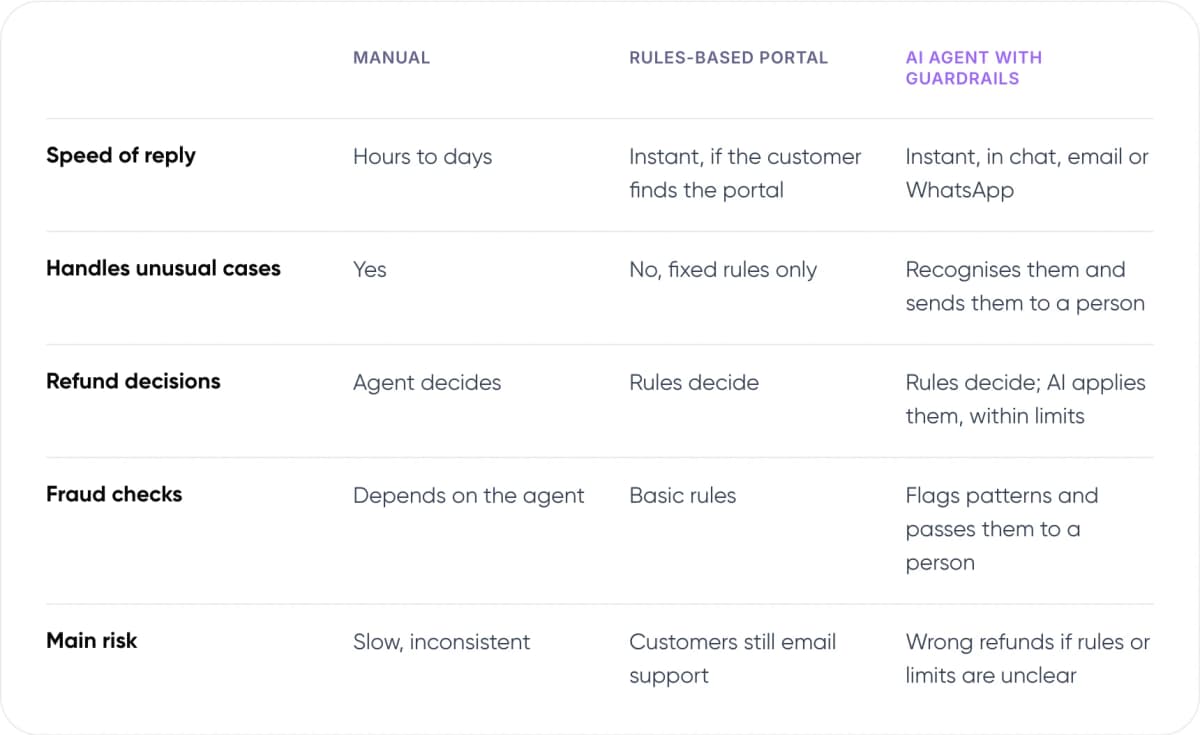
- Speed of reply — Manual: Hours to days. Rules-based portal: Instant, if the customer finds the portal. AI agent with guardrails: Instant, in chat, email or WhatsApp.
- Handles unusual cases — Manual: Yes. Rules-based portal: No, fixed rules only. AI agent with guardrails: Recognises them and sends them to a person.
- Refund decisions — Manual: Agent decides. Rules-based portal: Rules decide. AI agent with guardrails: Rules decide; AI applies them, within limits.
- Fraud checks — Manual: Depends on the agent. Rules-based portal: Basic rules. AI agent with guardrails: Flags patterns and passes them to a person.
- Main risk — Manual: Slow, inconsistent. Rules-based portal: Customers still email support. AI agent with guardrails: Wrong refunds if rules or limits are unclear.
Our assessment of typical setups.
Warning: Set a refund limit the AI cannot pass on its own. In our view, start low, with a cap per order and per customer per month. Raise it only after you have checked a few weeks of AI decisions.
6. Which Tools Can Automate E-commerce Returns?
Many stores combine a returns app with an AI agent in their helpdesk. The returns app handles labels, drop-offs and exchanges. The AI agent talks to the customer and triggers the right action.
For example, Gorgias says its AI Agent Actions can cancel orders and issue refunds, and connect to returns apps such as Loop. Check exactly which refund cases each tool can complete on its own. Some only refund as part of a cancellation, and send refunds on delivered orders to a person.
A custom AI agent makes sense when you sell across several stores or marketplaces, use your own warehouse system, or need refund rules the built-in tools can’t express.

Want to see which of your return requests AI could handle safely? We can review a sample with you.
7. What Results Have Companies Reported?
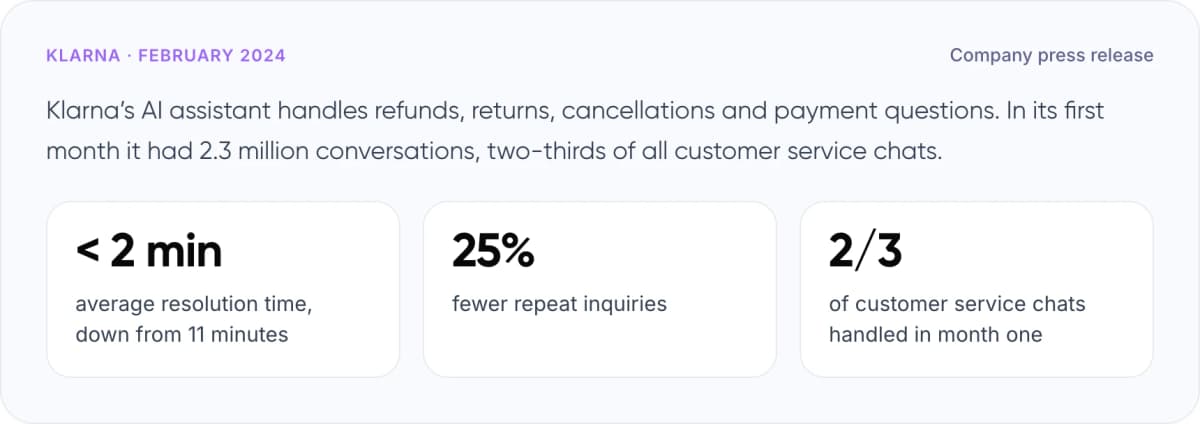
Klarna · February 2024 · Company press release
Klarna’s AI assistant handles refunds, returns, cancellations and payment questions. In its first month it had 2.3 million conversations, two-thirds of all customer service chats.
- < 2 min average resolution time, down from 11 minutes
- 25% fewer repeat inquiries
- 2/3 of customer service chats handled in month one
These are self-reported figures. In 2025 Klarna also said customers would always be able to reach a person, after quality concerns. In our view, the lesson for returns is simple: automate the routine cases and keep a clear path to your team.
8. How to Automate Returns and Refunds in 7 Steps
- Sort your return tickets. Tag 100 recent ones by type and risk, using the four groups above.
- Write your policy as rules. Return window, excluded items, value limits and refund methods, in a form the AI can check.
- Connect your systems. Give the agent access to your store, returns app and helpdesk.
- Set refund limits. Decide the maximum the AI can refund on its own, per order and per customer.
- Define hand-off triggers. Damaged items, high value, repeat returners and angry customers go to a person.
- Test on past tickets. Replay real requests and check every decision before going live.
- Launch on one channel. Start with chat or email, review AI decisions weekly, then expand.
Tip: Offer an exchange or store credit before a refund, but never hide the refund option. Many shoppers accept credit if it arrives instantly.
New to the topic? Read what customer support automation is and how it works.
9. Frequently Asked Questions
Can AI process refunds automatically?
Yes, if you allow it. AI agents in tools like Gorgias can issue some refunds directly in Shopify. We recommend a refund limit per order and per customer, with a person approving anything above it. Check which refund cases your tool can complete on its own.
What return requests should AI not handle alone?
Damaged or missing items, high-value orders, chargeback threats and repeat returners. These need judgement and often photos. Fraud is common: the NRF and Happy Returns found 9% of all returns are fraudulent. Let AI gather the details, then pass the case to a person.
How do you stop AI from approving fraudulent returns?
Give it strict rules and limits. Verify the customer against the order, check the return window and item, and cap refund amounts. Flag repeat returners and unusual patterns for review. In the NRF survey, 85% of retailers said they use AI to detect or prevent return fraud.
Should AI offer an exchange before a refund?
Offering an exchange or store credit first can keep the sale, but the refund option should stay clear. Narvar’s consumer research found 29% of shoppers would prefer instant store credit with no fee. Never make the refund hard to find.
Do I need a custom AI agent for returns?
Not always. A returns app plus your helpdesk’s AI agent covers many single-store setups. A custom agent makes sense when you sell across several stores or marketplaces, use your own warehouse system, or need refund rules built-in tools can’t handle.
10. Conclusion
Returns and refunds are one of the best places to automate customer service in e-commerce, as long as the AI follows clear rules and limits. Start with eligibility checks, return labels and refund-status questions. This week, pull 100 recent return tickets and sort them into the four risk groups in section 3. The low-risk group is your pilot.
If you want help setting this up, our AI customer support automation service builds AI agents for returns, refunds and order questions that work with your store and helpdesk.
- Our service: AI Customer Support Automation — We build AI agents that handle returns, refunds and order questions on top of your current helpdesk and store. See the service →
- Free savings report: AI ROI Calculator — Enter your monthly return tickets and cost per ticket to estimate what automation could save. Get your savings estimate →
See how we have built AI for clients in our AI Voice Assistant and Zenva case studies.
Author