How to Stop Your AI Support Chatbot From Giving Wrong Answers
A customer service chatbot gives wrong answers when it is allowed to guess. To stop it, make it answer only from approved sources and pull account details from live systems. Then treat “I don’t know, let me get a person” as a good answer.
This guide explains why chatbots make things up and gives a 7-step fix. It also covers accuracy testing and two public failures.
1. The Short Answer
Your support chatbot gives wrong answers because nothing stops it from guessing. Ground it in your own documents and connect it to live systems for account data. Then make handing off to a person an acceptable outcome.
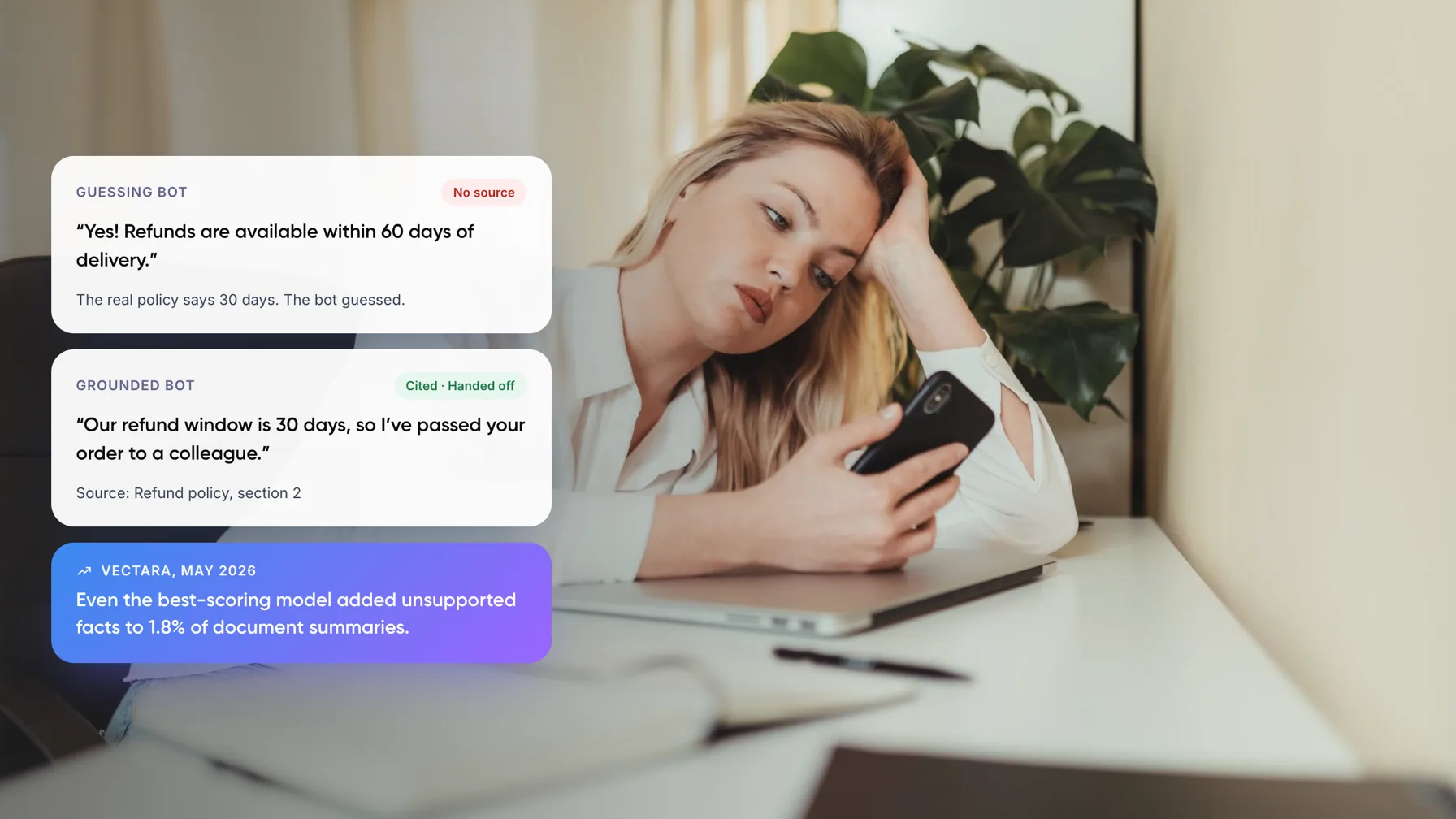
Even with the source in front of them, models still invent details. On Vectara’s hallucination leaderboard (May 2026), models asked to summarize a document using only that document added unsupported facts 1.8% of the time at best.
Key takeaways
- Models guess partly because training and testing reward a guess over “I don’t know”, as OpenAI explained in September 2025.
- In support, most wrong answers trace back to setup: missing or stale documents, weak search, and no route to a person.
- Grounding answers in your own content cuts errors but does not end them. Stanford researchers found grounded legal AI tools still hallucinated on 17% to 33% of queries.
- Order status, balances and prices should come from a live system call, never from the model’s memory.
- Test real questions before every release, and track wrong answers separately from “I don’t know” answers.
2. Why Does a Customer Service Chatbot Give Wrong Answers?
Large language models (LLMs), the engines behind modern chatbots, write the most likely next words. They have no built-in check for whether a sentence is true. OpenAI’s September 2025 research on hallucinations adds a second reason. Accuracy-only tests give no credit for “I don’t know”, so models learn that guessing pays.
The same paper shows the cost of that habit. On one fact test, a model that declined 52% of questions was wrong on 26% of them. A similar model that almost never declined scored slightly higher on accuracy, but was wrong 75% of the time.
In a support setting, the model is rarely the only cause. Wrong answers usually enter at one of these points:
- Missing content. Nobody wrote the answer down, so the model fills the gap.
- Stale or conflicting content. Two versions of the refund policy exist, and search finds the old one.
- Search misses. The right document exists, but the bot pulls the wrong passage.
- Live-data questions. “Where is my order?” cannot be answered from a help article.
- No permission to decline. The prompt says “always be helpful”, so the bot never admits it doesn’t know.
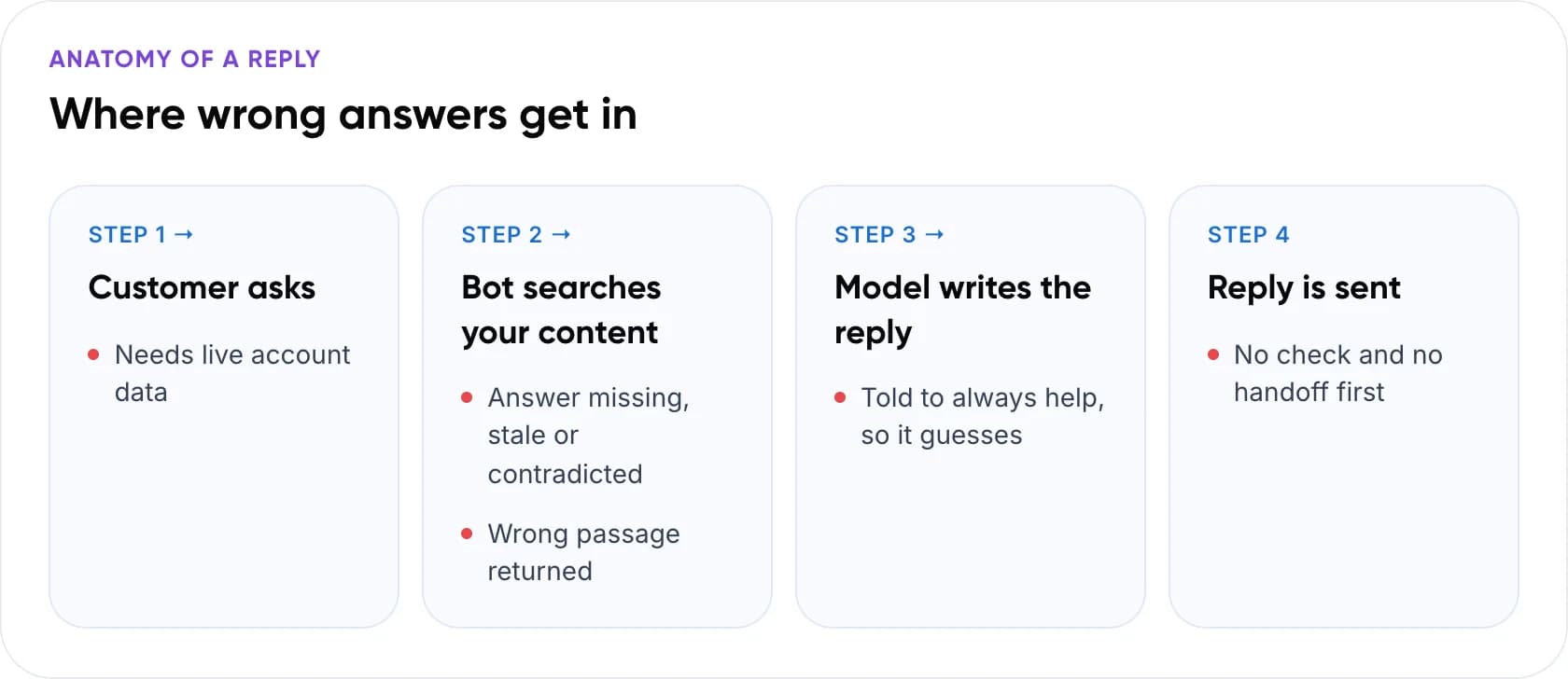
Anatomy of a reply: where wrong answers get in
- Customer asks. Risk: the question needs live account data.
- Bot searches your content. Risk: the answer is missing, stale or contradicted, or the wrong passage is returned.
- Model writes the reply. Risk: it was told to always help, so it guesses.
- Reply is sent. Risk: there is no check and no handoff first.
3. Customer Service Chatbot Examples That Went Wrong
Air Canada: an invented refund rule
After a death in the family, Jake Moffatt asked Air Canada’s website chatbot about bereavement fares. It said the reduced fare could be claimed within 90 days of the ticket being issued. The airline’s real policy did not allow claims after travel.
In February 2024, British Columbia’s Civil Resolution Tribunal ruled against Air Canada. It rejected the airline’s argument that the chatbot was responsible for its own actions. The tribunal found that “Air Canada did not take reasonable care to ensure its chatbot was accurate,” and ordered it to pay C$812.02. The sum was small. The lesson was not: your company answers for what its chatbot says.
Cursor: a policy that never existed
In April 2025, users of the coding tool Cursor kept getting logged out when they switched computers. An AI support agent answering email told them this was expected behavior under a one-device policy. There was no such policy. The logouts were a bug. Co-founder Michael Truell apologized publicly, the user was refunded, and AI email replies are now labeled, The Register reported.
Both bots answered a policy question with confidence and no source. Both incidents would have been a non-event if the bot had said it wasn’t sure and passed the case to a person.
Note: Customers already expect this risk. In a Gartner survey of 5,728 customers published in July 2024, 64% said they would prefer companies didn’t use AI for customer service. AI giving wrong answers was one of their top three concerns.
What the safe version looks like
For e-commerce merchants, we built an AI assistant that drafts replies from Shopify order data. An agent approves each one before it is sent. For a fintech company, we built an omnichannel support system that answers routine email and routes complex cases to the team. Both answer from approved sources and put a person in the loop.
4. How to Stop Wrong Answers in 7 Steps
This is the order we would work in for any AI chatbot for customer support. The early steps are cheap and fix most problems. The later ones matter most for refunds and billing.
- Collect the answers it gets wrong. Export 30 days of conversations and tag every bad answer with one of the five causes above. The tags tell you whether to fix content, search or rules first.
- Fix the knowledge base before the model. Keep one current version of each policy. Give every document an owner and a review date, and archive the rest. A better model cannot fix a wrong document.
- Answer only from retrieved sources. Retrieval-augmented generation (RAG) means the bot searches your approved content first, then writes from what it found. Tell it to use no outside knowledge, as Anthropic’s guide to reducing hallucinations recommends.
- Make “I don’t know” a correct answer. Tell the bot to decline when its sources don’t cover the question. Then hand the chat to a person with the history attached, so the customer never repeats themselves.
- Send account questions to your systems. Order status, refund status, balances and prices should come from an API call to your order, billing or CRM system. The model phrases the result. It never supplies it.
- Require a citation, then check it. Have the bot quote the passage behind each claim and drop any claim it can’t support. For refunds, pricing and legal terms, add a check against the source before sending, or let an agent approve the draft.
- Test before every release, then monitor. Rerun a fixed set of real questions after every change to content, prompts or model. In production, review flagged and low-confidence chats weekly and feed fixes back into step 2.
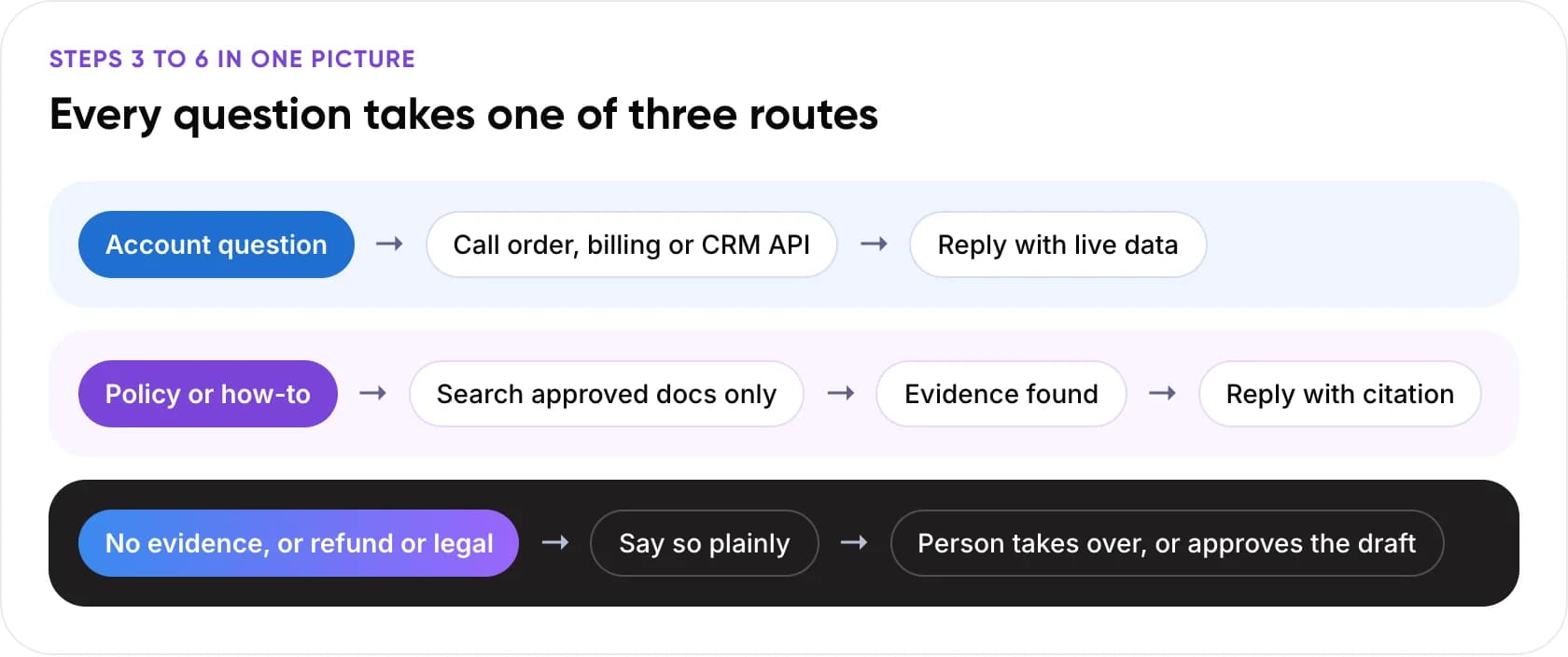
Steps 3 to 6 in one picture: every question takes one of three routes
- Account question: call the order, billing or CRM API, then reply with live data.
- Policy or how-to: search approved docs only; when evidence is found, reply with a citation.
- No evidence, or a refund or legal question: say so plainly, then a person takes over or approves the draft.
Tip: Write the decline message yourself. “I don’t want to give you the wrong refund information, so I’m passing this to a colleague” keeps trust. A generic error message loses it.
5. Which Fix Matches Which Failure?
Once you have tagged your bad answers, use this table to pick the fix. Effort is our rough estimate for a typical help desk setup.
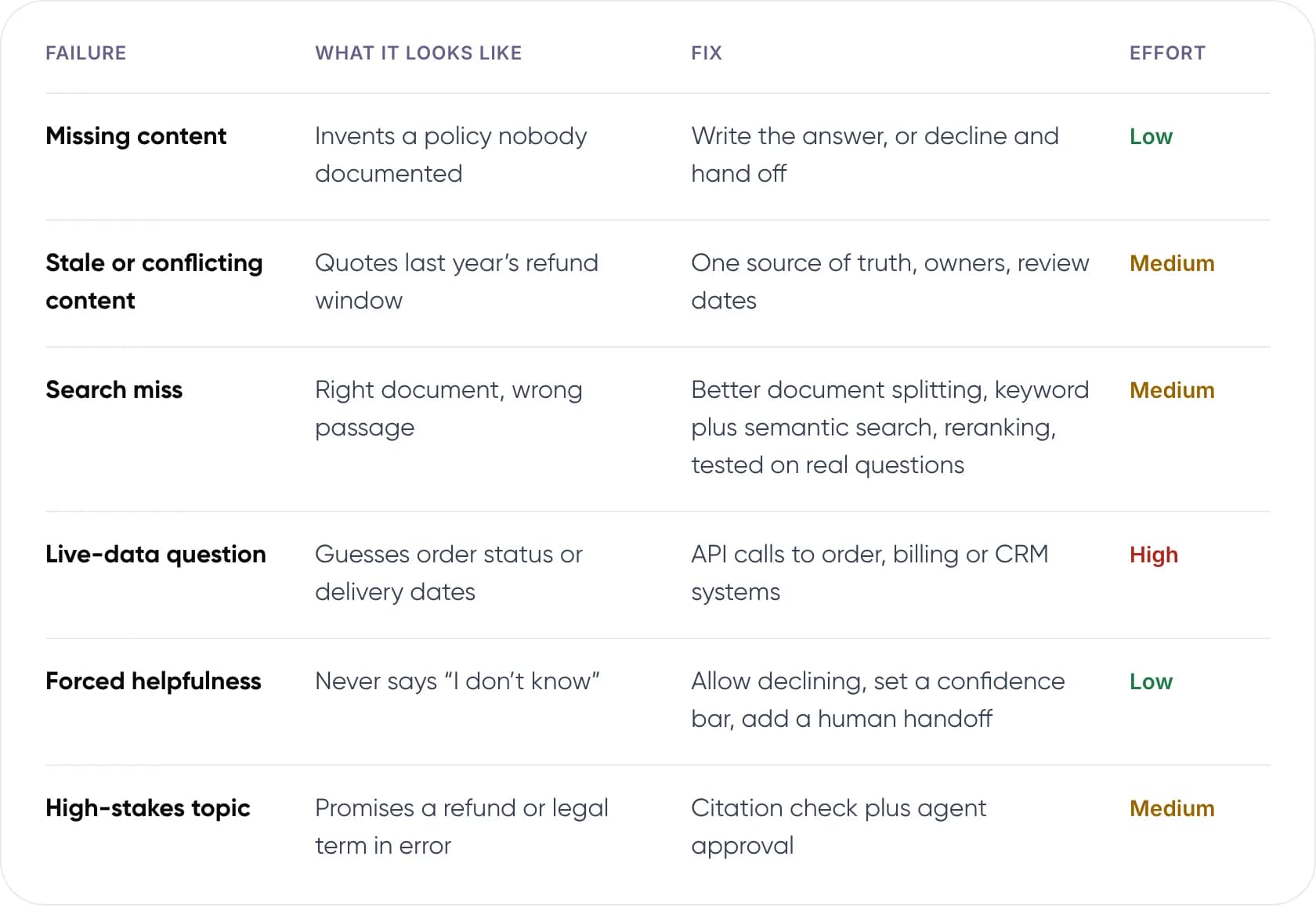
- Missing content: invents a policy nobody documented. Fix: write the answer, or decline and hand off. Effort: low.
- Stale or conflicting content: quotes last year’s refund window. Fix: one source of truth, owners, review dates. Effort: medium.
- Search miss: right document, wrong passage. Fix: better document splitting, keyword plus semantic search, reranking, tested on real questions. Effort: medium.
- Live-data question: guesses order status or delivery dates. Fix: API calls to order, billing or CRM systems. Effort: high.
- Forced helpfulness: never says “I don’t know”. Fix: allow declining, set a confidence bar, add a human handoff. Effort: low.
- High-stakes topic: promises a refund or legal term in error. Fix: citation check plus agent approval. Effort: medium.
Not sure which of these is behind your chatbot’s wrong answers? Book a free AI consultation.
6. How Do You Test Chatbot Accuracy Before Launch?
Build a test set from real tickets, not from questions your team invents. Our recommendation is about 200 questions, each with the correct answer and the document it comes from. Include questions your documents don’t cover, outdated policies, angry customers and attempts to talk the bot into a discount.
Score each reply as correct, correct but unsupported, rightly declined, or wrong. Track the wrong rate on its own. OpenAI’s numbers show why: a single accuracy score hides a model that is wrong nearly three times as often.
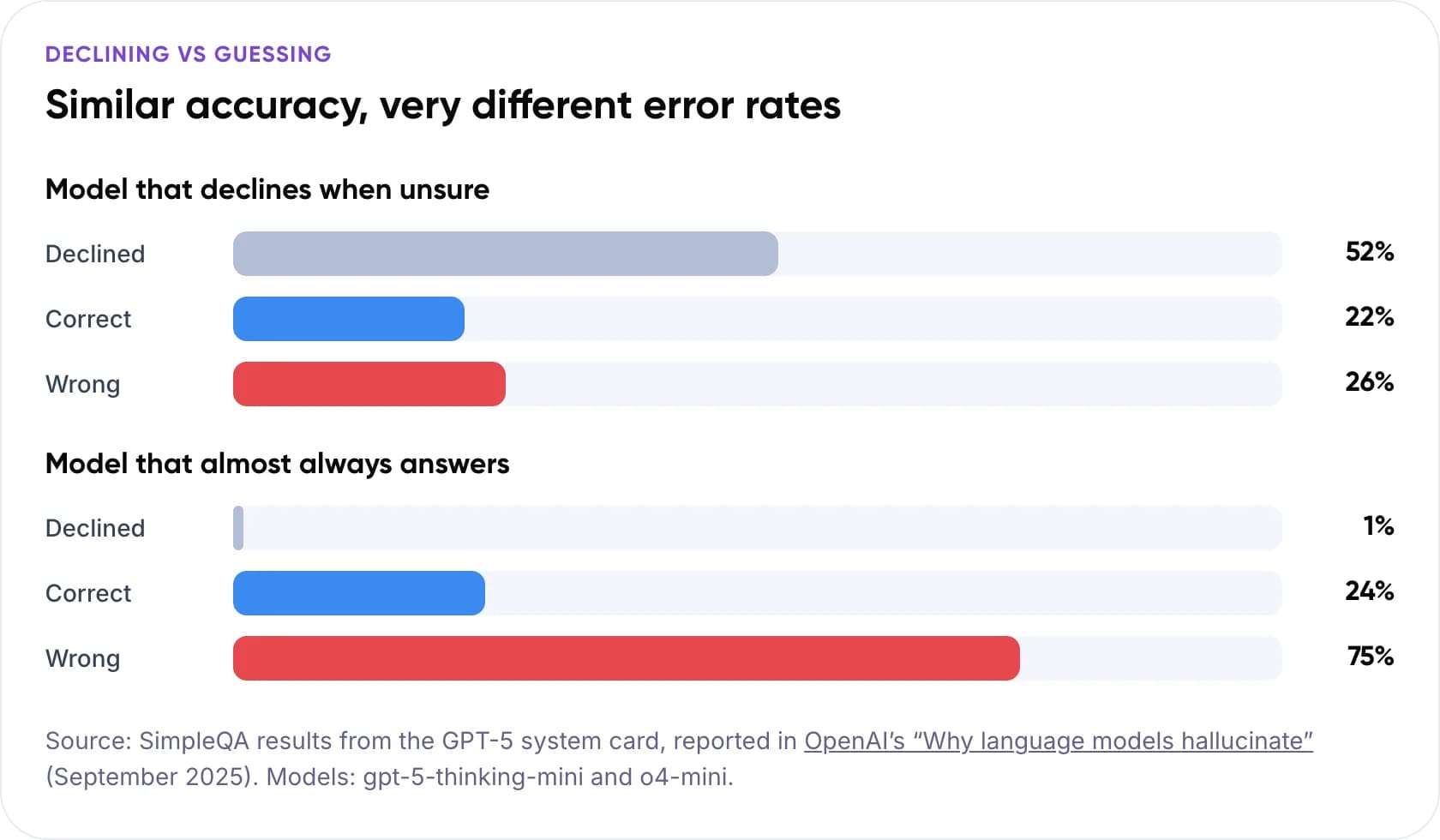
Declining vs guessing: similar accuracy, very different error rates
- Model that declines when unsure: declined 52%, correct 22%, wrong 26%.
- Model that almost always answers: declined 1%, correct 24%, wrong 75%.
Source: SimpleQA results from the GPT-5 system card, reported in OpenAI’s “Why language models hallucinate” (September 2025). Models: gpt-5-thinking-mini and o4-mini.
Decide the pass mark before you test. Our view: for refund, billing and legal questions, accept zero wrong answers in the test set, even if that means more declines. Rerun the full set when you switch models, because error rates vary widely even within one vendor’s line-up.
7. Are You Liable for What Your Chatbot Says?
The Air Canada ruling says yes. The tribunal treated the chatbot as part of the airline’s website, so the airline owned its statements. Hold your own AI customer support to the same standard.
In India, the Reserve Bank of India published its FREE-AI framework in August 2025, with 7 principles and 26 recommendations for AI in financial services. If you serve customers of a bank, NBFC or fintech, build in disclosure, a human route and a log of bot replies.
Note: This is not legal advice. Check the rules for your sector and country with your legal team.
8. Frequently Asked Questions
Why does my AI chatbot make up answers?
Language models predict likely words and have no built-in fact check. OpenAI’s 2025 research adds that training and testing reward guessing over admitting uncertainty. In support, the trigger is usually a gap. Think of a missing or outdated document, a search that pulls the wrong passage, or a question needing live account data.
Can you stop AI hallucinations completely?
No. You can make them rare and catch them before customers see them. A 2024 Stanford study found legal AI tools grounded in their own databases still hallucinated on 17% to 33% of queries. The practical goal is a bot that declines or hands off when unsure, plus checks on high-stakes answers.
Does RAG stop a support chatbot from giving wrong answers?
It reduces them a lot, but not to zero. Retrieval-augmented generation makes the bot answer from your documents instead of memory. It still fails when documents are wrong, when search pulls the wrong passage, or when the model adds details. Pair it with citations, declines and testing. Our guide to fine-tuning vs RAG covers the trade-offs.
How do I test a customer support chatbot’s accuracy?
Use a fixed set of real customer questions, each with a known correct answer and source. Score replies as correct, unsupported, rightly declined or wrong, and track the wrong rate separately. Rerun the set after every change to content, prompts or model, and review flagged live conversations every week.
Is a company responsible for what its chatbot says?
In the Air Canada case, yes. In February 2024, a Canadian tribunal rejected the airline’s claim that its chatbot was a separate entity. It ordered Air Canada to pay C$812.02 for a fare rule the bot invented. Treat every chatbot answer as a statement from your company, and check local rules with a lawyer.
Should a support chatbot say “I don’t know”?
Yes, when its sources don’t cover the question. A clear “I’m not sure, let me get a colleague” costs one handoff. A confident wrong answer can cost a refund, a complaint or a legal claim. In Gartner’s 2026 survey, 87% of customers said companies using GenAI for customer service must provide access to a human agent.
9. Conclusion
A customer service chatbot that gives wrong answers usually has a setup problem you can measure and fix. Start this week: pull 30 days of conversations and tag each bad answer by cause. That list tells you whether to fix your documents, your search or your handoff rules first.
For a deeper build, read how to deploy agentic RAG for customer service, or see our AI customer support automation services.
Get a second opinion on your chatbot. Bring a sample of wrong answers. We’ll show you where they come from and what to fix first. Book a free AI consultation.
Author