How to Calculate the Real ROI of Customer Support Automation
Customer support automation ROI is net savings divided by total cost. The hard part is counting only tickets the AI actually resolves, and every cost it brings with it.
This guide gives you the formula, the costs most business cases leave out, and a worked example you can copy.
1. The Short Answer
Take the support cost you remove each year, subtract everything you spend to run the automation, and divide by that spend. Most vendor numbers skip the second half, which is why so many business cases look better on paper than in production.
There is a real upside to measure. A 2023 NBER study of 5,179 agents found an AI assistant raised resolutions per hour by 14% on average. Your job is to find out how much of that applies to your queue.
Key takeaways
- ROI = (annual net savings − total cost) ÷ total cost. Payback = upfront cost ÷ monthly net savings.
- Count resolved tickets, not deflected ones, and subtract customers who come back.
- Knowledge base work, review time and the human escalation tier belong on the cost side.
- Most savings show up as more capacity for the same team, so model it that way.
2. What Goes Into Customer Support Automation ROI?
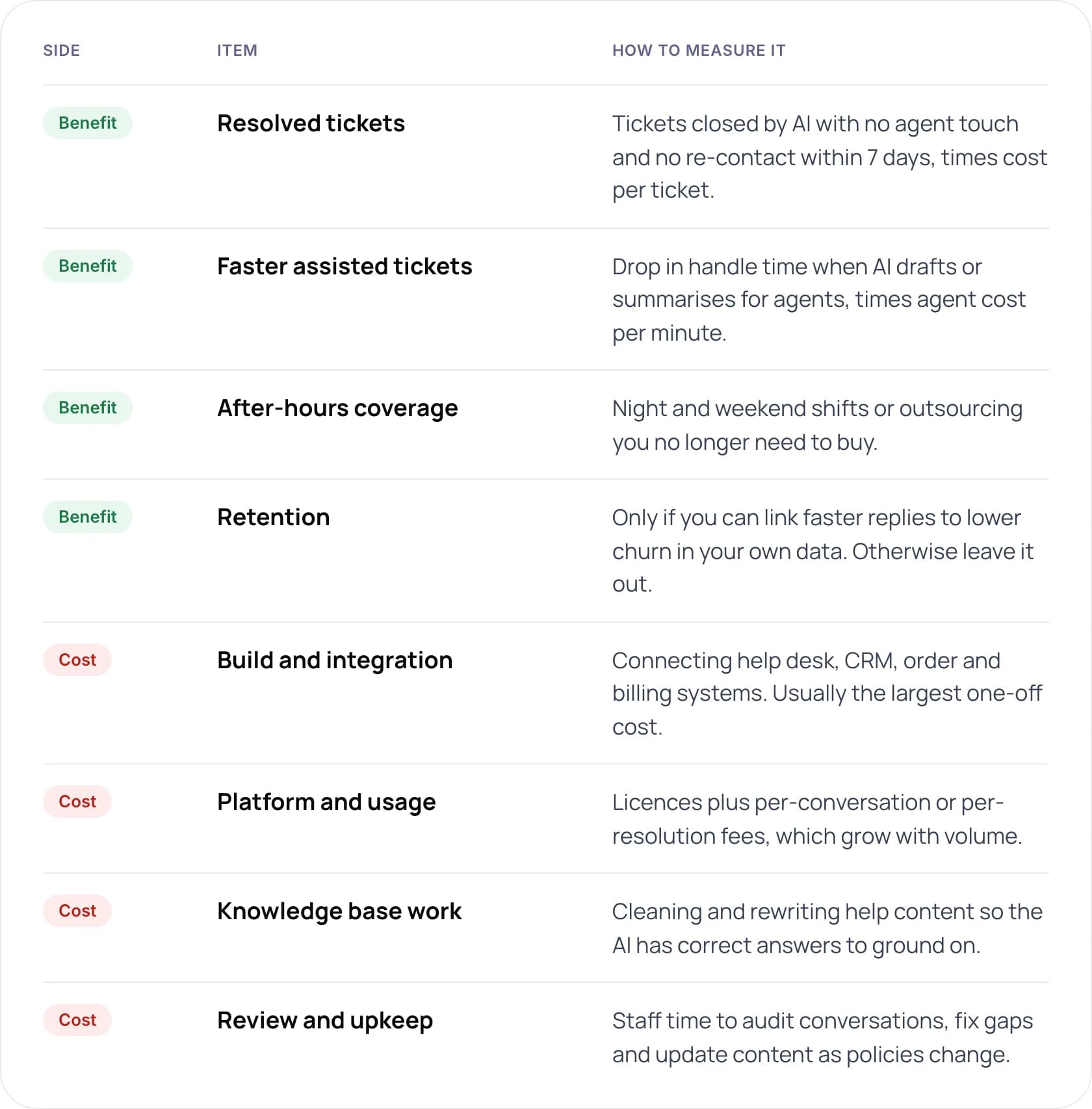
Every business case has two columns. The table lists what we put in each when we model customer service automation for a client, and how to measure it.
Benefits
- Resolved tickets: tickets closed by AI with no agent touch and no re-contact within 7 days, times cost per ticket.
- Faster assisted tickets: drop in handle time when AI drafts or summarises for agents, times agent cost per minute.
- After-hours coverage: night and weekend shifts or outsourcing you no longer need to buy.
- Retention: only if you can link faster replies to lower churn in your own data. Otherwise leave it out.
Costs
- Build and integration: connecting help desk, CRM, order and billing systems. Usually the largest one-off cost.
- Platform and usage: licences plus per-conversation or per-resolution fees, which grow with volume.
- Knowledge base work: cleaning and rewriting help content so the AI has correct answers to ground on.
- Review and upkeep: staff time to audit conversations, fix gaps and update content as policies change.
Note: Deflection means a customer did not reach an agent. Resolution means their problem was solved. Only resolutions save money. A deflected customer who emails again tomorrow costs you twice.
3. How Do You Calculate the ROI of Automated Customer Support?
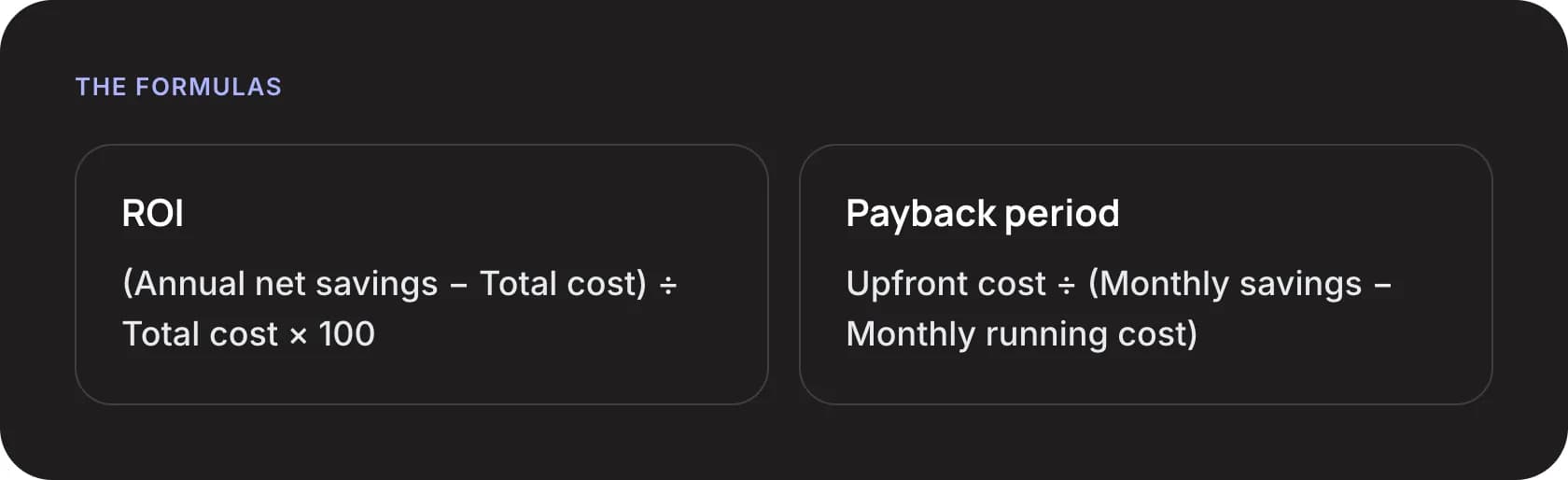
- ROI: (Annual net savings − Total cost) ÷ Total cost × 100
- Payback period: Upfront cost ÷ (Monthly savings − Monthly running cost)
- Find your cost per ticket. Divide total monthly support cost (salaries, benefits, tools, management, outsourcing) by tickets handled.
- Pick the intents to automate. Use a ticket export to find high-volume, rule-based intents such as order status or password resets.
- Estimate a realistic resolution rate. Run a pilot on those intents. Use the measured rate, not a vendor benchmark.
- Subtract re-contacts. Remove tickets where the same customer returns with the same issue within seven days.
- Add up every cost. Build, integration, usage fees, knowledge base work and monthly review time.
- Apply the formulas. Calculate year-1 ROI and payback, then repeat at a lower and higher resolution rate.
You don’t have to do this maths by hand. Enter your team size, hours and costs into our free AI ROI Calculator, and it works out ROI, payback period and hours saved.
4. A Worked Example
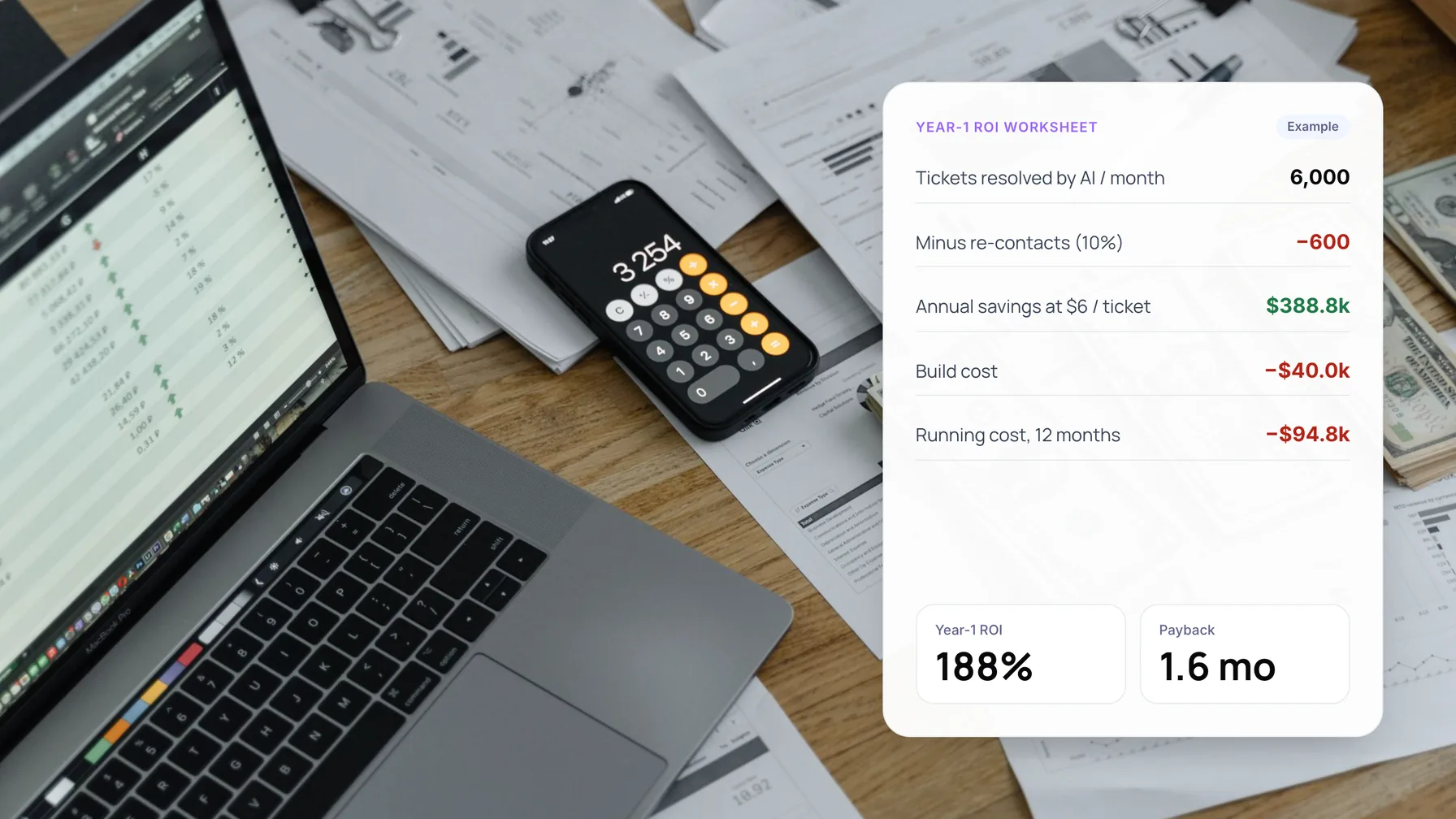
The inputs below are illustrative, not client data. A team handles 20,000 tickets a month at a fully loaded cost of $6 each. AI customer service resolves 30% of them, and 10% of those customers come back with the same issue.
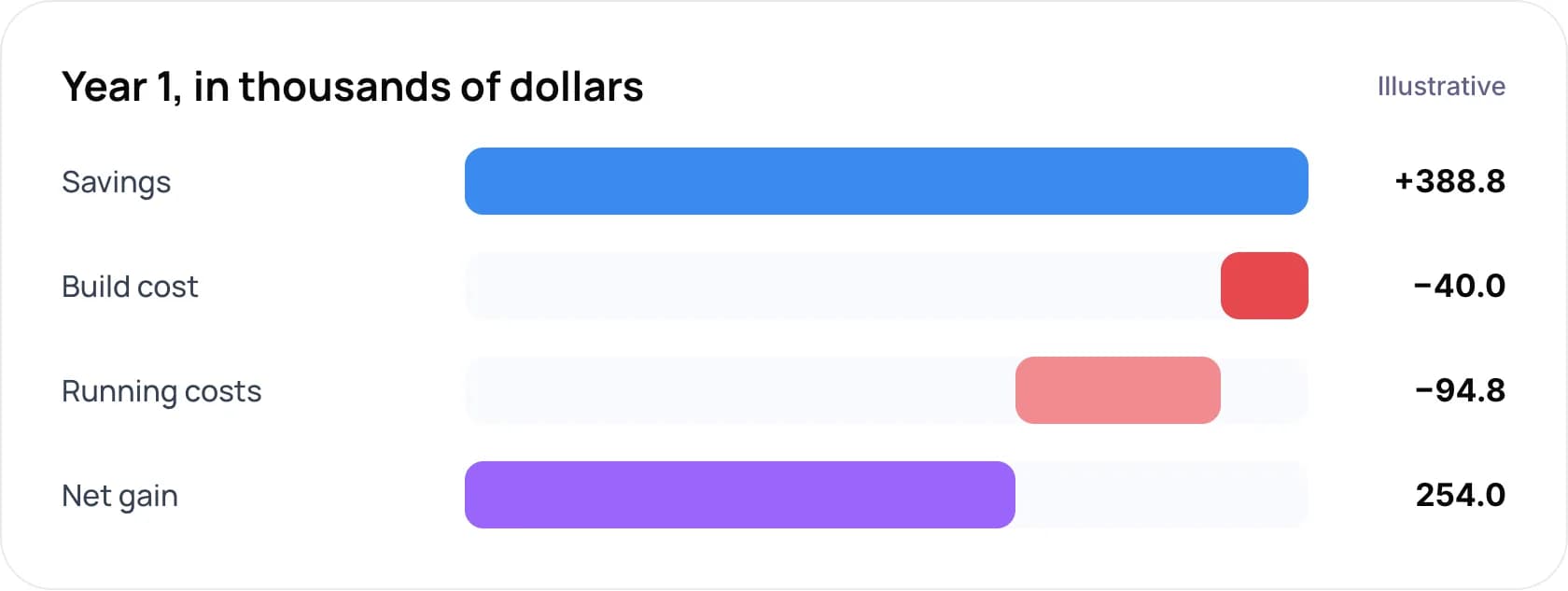
- Savings: +$388.8k (6,000 resolved tickets a month, minus 600 re-contacts, times $6, times 12 months)
- Build cost: −$40.0k
- Running costs: −$94.8k ($1 usage per AI resolution plus $2,500 a month for review and upkeep, over 12 months)
- Net gain: $254.0k
That is $388,800 in savings against $134,800 in cost, a year-1 ROI of 188% and a payback of about 1.6 months. Changing the resolution rate shows how sensitive the result is.
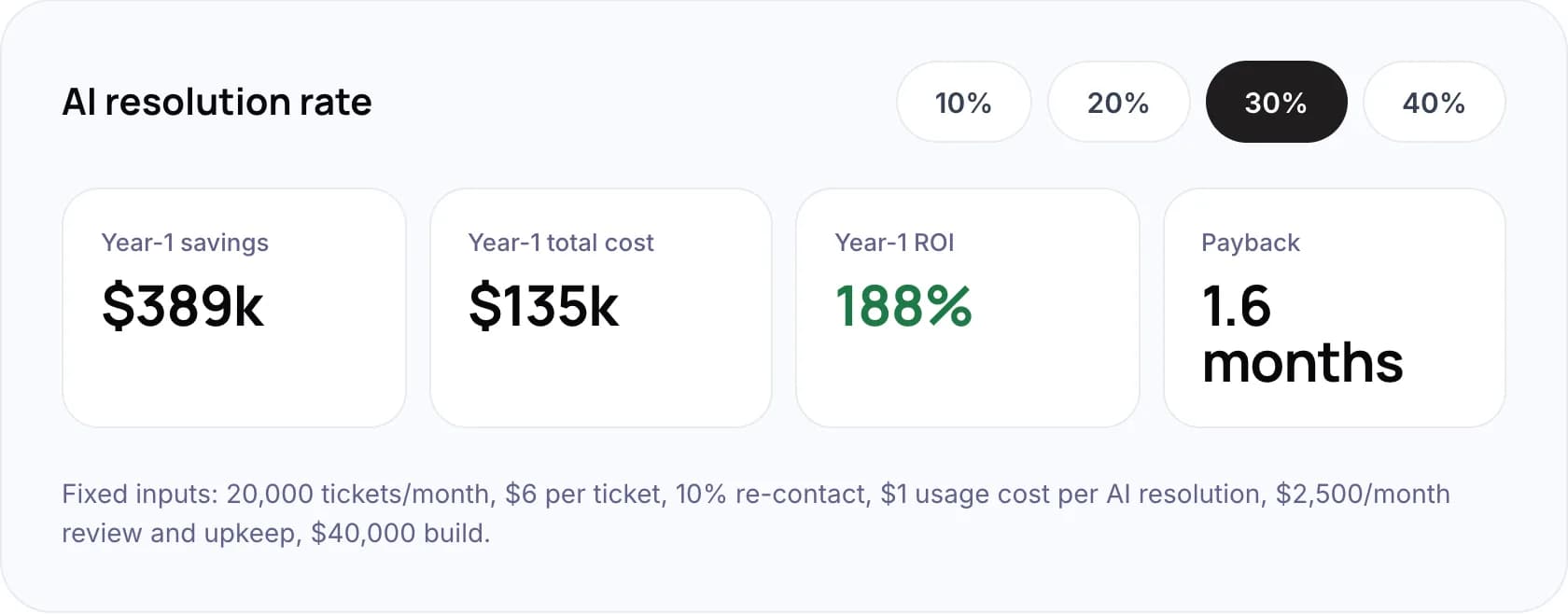
Fixed inputs: 20,000 tickets a month, $6 per ticket, 10% re-contact, $1 usage cost per AI resolution, $2,500 a month review and upkeep, $40,000 build. At each resolution rate:
- 10%: $130k savings, $92k total cost, 41% ROI, payback 6.2 months.
- 20%: $259k savings, $113k total cost, 129% ROI, payback 2.6 months.
- 30%: $389k savings, $135k total cost, 188% ROI, payback 1.6 months.
- 40%: $518k savings, $156k total cost, 231% ROI, payback 1.2 months.
Want this model built on your own ticket data? Book a free AI consultation.
5. Which Costs Do Business Cases Leave Out?
Licence fees are easy to find. These four are not, and in our view they decide whether the project pays back in months or in years.
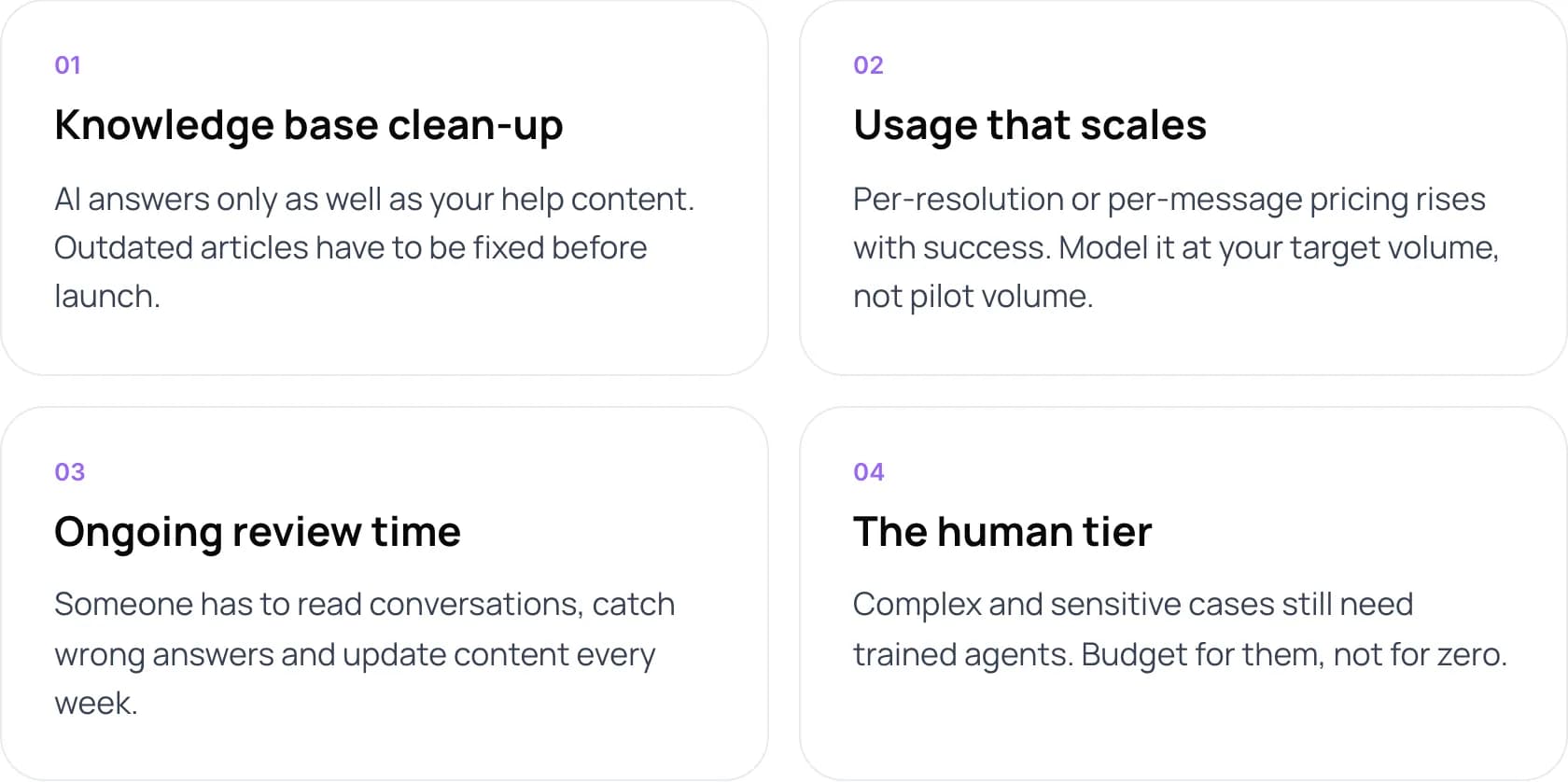
- Knowledge base clean-up. AI answers only as well as your help content. Outdated articles have to be fixed before launch.
- Usage that scales. Per-resolution or per-message pricing rises with success. Model it at your target volume, not pilot volume.
- Ongoing review time. Someone has to read conversations, catch wrong answers and update content every week.
- The human tier. Complex and sensitive cases still need trained agents. Budget for them, not for zero.
Warning: Customer goodwill is a cost too. In a 2024 Gartner survey, 64% of customers said they would prefer companies did not use AI for service. A bot that blocks access to a person can cost more in churn than it saves.
6. What Do Real AI Customer Support Results Look Like?
Klarna published one of the most detailed public cases. In February 2024 it said its AI assistant handled two-thirds of service chats in its first month, cut average resolution time from 11 minutes to under 2, and was expected to add about $40 million to 2024 profit.
That number came with a correction. In 2025 Klarna began hiring human agents again so customers could always reach a person. A real ROI model keeps a budget line for that human tier.
Wider data points the same way. Gartner’s December 2025 survey found only 20% of service leaders had reduced headcount because of AI. Most savings show up as more tickets handled by the same team, not fewer salaries.
On our own e-commerce email support build, AI drafts replies that agents approve. For one store with 2,000 customer emails a month, the estimate is about 50 hours of support effort saved each month.
7. Mistakes That Inflate Customer Service Automation ROI
Do
- Measure resolution and re-contact from real pilot data.
- Use fully loaded agent cost, not just salary.
- Show ROI at low, expected and high resolution rates.
- Re-run the model every quarter with actuals.
Don’t
- Treat every deflected chat as a saved ticket.
- Assume headcount drops on day one.
- Leave out integration and content work.
- Count revenue gains you cannot trace in your data.
New to the topic? Start with what customer support automation is and how it works.
8. Frequently Asked Questions
How do you calculate customer service automation ROI?
Subtract the total cost of the automation from the annual savings it produces, then divide by the total cost and multiply by 100. Savings are tickets the AI fully resolves, minus re-contacts, times your cost per ticket. Costs include build, integration, usage fees, content work and review time.
What is a good payback period for automated customer support?
It depends on ticket volume and how many intents are rule-based. High-volume teams with simple, repetitive questions can see payback within months. Low-volume teams with complex tickets may take more than a year. Model your own numbers at several resolution rates before you commit.
What are the benefits of customer service automation beyond cost?
Instant replies at any hour, consistent answers and more agent time for complex cases. Klarna reported in 2024 that average resolution time fell from 11 minutes to under 2 after launching its AI assistant. Only count these in ROI if you can measure them.
Does AI customer service reduce headcount?
Usually not right away. Gartner’s December 2025 survey found only 20% of service leaders had cut headcount because of AI. Most teams use the freed capacity to absorb growth or improve service. Klarna began hiring human agents again in 2025.
What is the difference between deflection and resolution?
Deflection means the customer did not reach an agent. Resolution means the problem was solved. A customer who gives up on a chatbot and emails later counts as deflected but not resolved. Only resolutions reduce cost, so base your ROI on them.
9. Conclusion
The real ROI of customer support automation comes from resolved tickets, minus re-contacts, against the full cost of running the system. Pull last quarter’s ticket export, tag the intents you could automate, and run those volumes through the formula in section 3.
Tip: Have your ticket volume and cost per ticket ready? Our free AI ROI Calculator turns them into a payback estimate in under a minute.
To build and measure it with us, see our AI customer support automation services. For typical savings ranges and a comparison with outsourcing, read how much customer support automation can save.
Author