How to Integrate AI Support Agents with Zendesk and Freshdesk
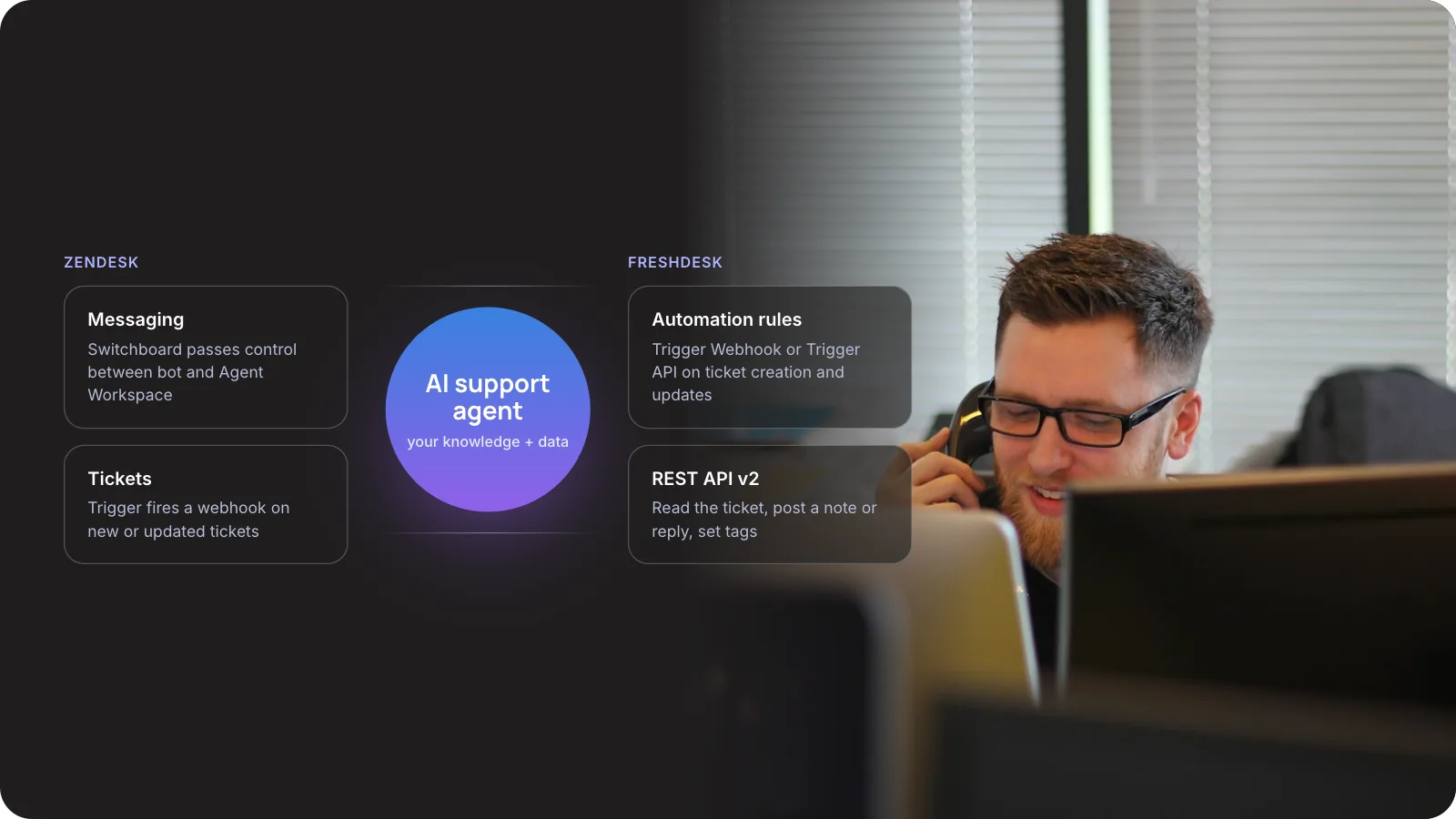
An AI support agent connects to Zendesk or Freshdesk in one of two places: inside the live chat, where it answers first and hands over to a person, or on the ticket, where a webhook sends each new ticket to the AI and the reply comes back through the API.
This guide covers both patterns on each platform, the limits that catch teams out, and a rollout plan you can hand to your developers.
1. The Short Answer
To integrate an AI support agent with Zendesk or Freshdesk, decide where it works first. On chat, it joins the conversation and passes control to a person when needed. On email and web-form tickets, an automation sends each ticket to your AI service, which writes back a draft or a reply through the help desk API.
Context is what customers judge you on. In Zendesk’s CX Trends 2026 research, 81% of consumers said they want agents to continue the conversation without backtracking. That makes the handoff the most important part of the integration.
Key takeaways
- Choose the pattern first. Chat needs a bot that can pass control to a person. Email and web forms need a webhook that sends each ticket to your AI and writes the result back.
- Zendesk messaging routes chats through a switchboard. Freshdesk ticket automations call your service through Trigger Webhook, or Trigger API from the Pro plan.
- API limits are per account and shared with every app. Freshdesk Growth allows 100 calls a minute and Zendesk Suite Team allows 200.
- Begin with private-note drafts that agents approve. Switch to public replies one queue at a time once agents accept most drafts unchanged.
2. Should You Use the Built-in AI Agent or Your Own?
Both platforms sell their own AI agents. Zendesk bills its AI agents per automated resolution, and Freshdesk bills its Freddy AI Agent per session. A custom agent costs more to build. In exchange, you choose the model, connect it to your own systems, and pay for compute instead of per outcome.
- Setup time: built-in agent, days (configure inside the admin centre); custom agent, weeks (you build and host a service).
- Pricing unit: built-in, Zendesk per automated resolution and Freshdesk per session; custom, model and hosting costs plus build time.
- Data it can use: built-in, help centre articles and the platform’s own data plus the connectors each vendor offers; custom, any system you can call, such as orders, billing, CRM and product docs.
- Model choice: built-in, set by the vendor; custom, your choice, and you can switch later.
- Best fit: built-in, answers that come straight from help articles; custom, answers that depend on account data, or teams running both platforms.
Our view: start with the built-in agent if most of your answers come straight from help articles. Build your own when answers depend on order, billing or account data held outside the help desk, or when you serve customers on both platforms.
3. How Does an AI Support Agent Connect to a Help Desk?
There are two patterns. Most teams end up running both, because chat and email behave differently.
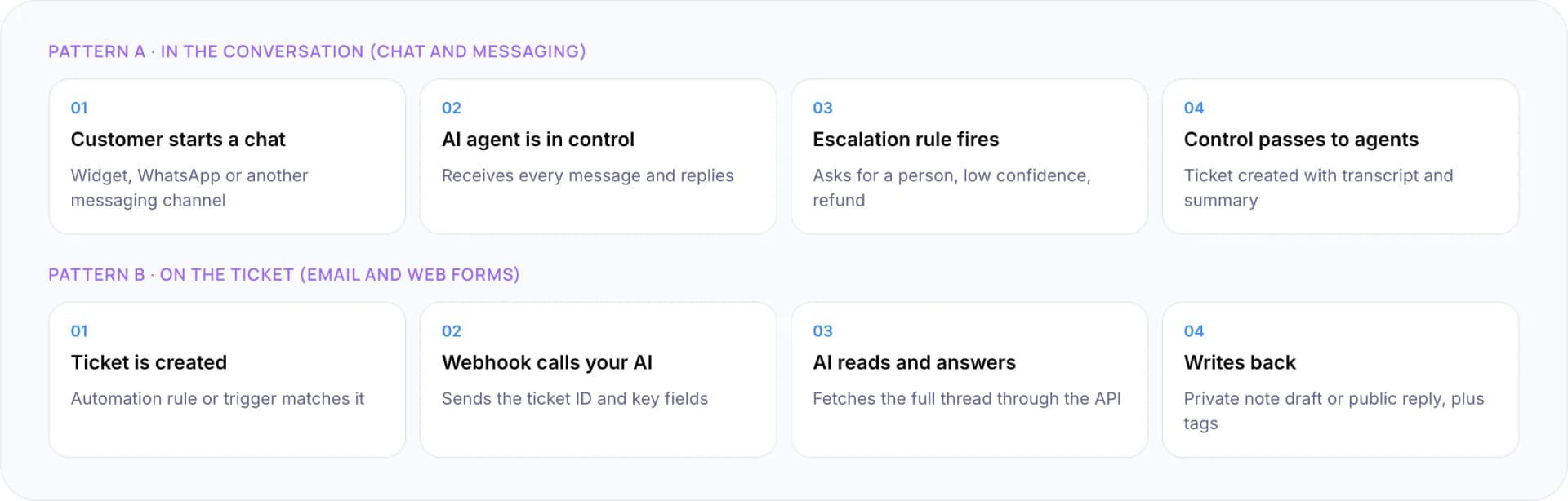
Pattern A: in the conversation (chat and messaging)
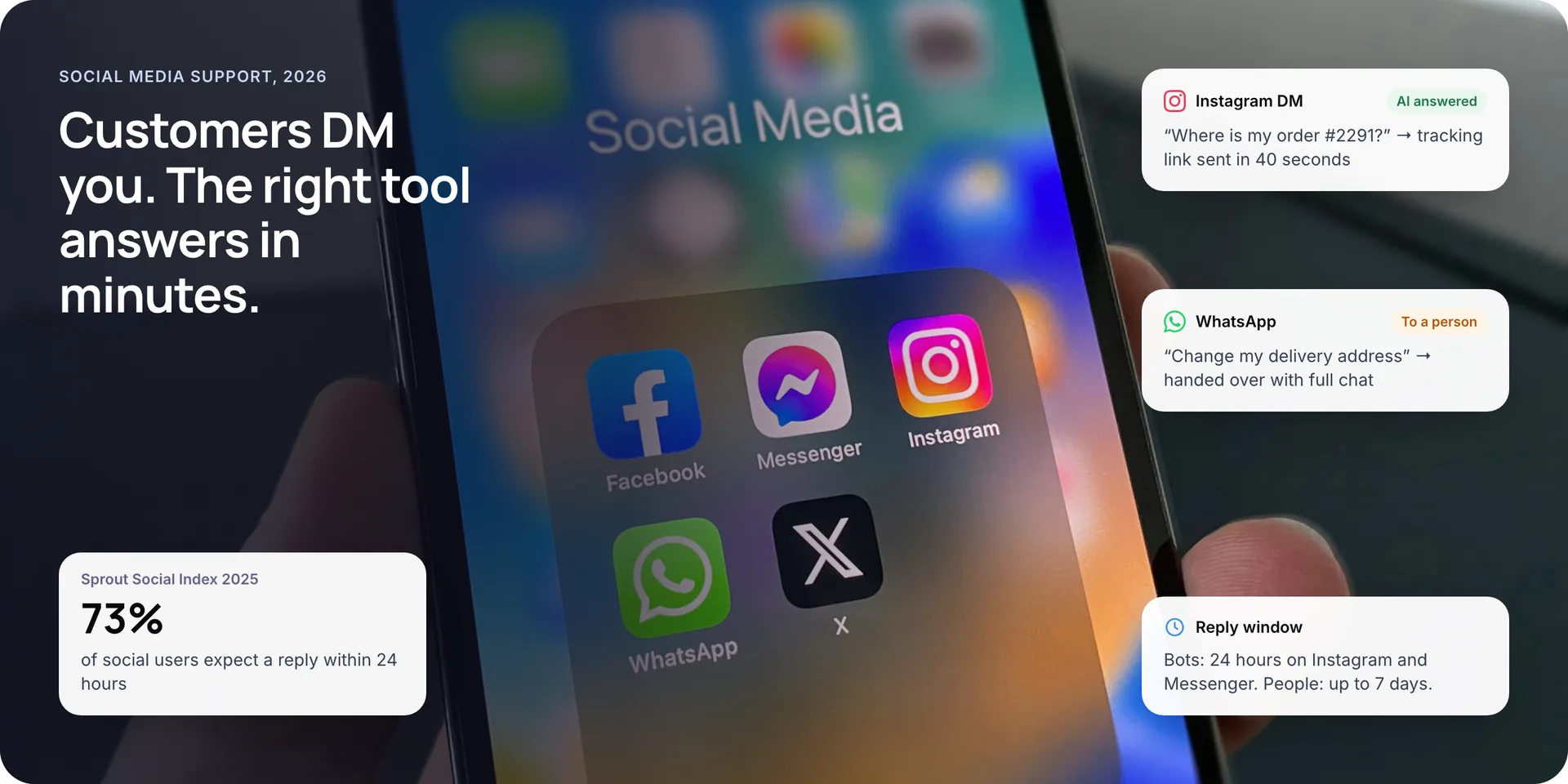
- Customer starts a chat: on the widget, WhatsApp or another messaging channel.
- AI agent is in control: it receives every message and replies.
- Escalation rule fires: the customer asks for a person, confidence is low, or the topic is a refund.
- Control passes to agents: a ticket is created with the transcript and a summary.
Pattern B: on the ticket (email and web forms)
- Ticket is created: an automation rule or trigger matches it.
- Webhook calls your AI: it sends the ticket ID and key fields.
- AI reads and answers: it fetches the full thread through the API.
- Writes back: a private-note draft or a public reply, plus tags.
Pattern A: the AI agent in the conversation
In Zendesk messaging, a component called the switchboard decides which system owns each conversation. Your bot receives every customer message while it is in control. To escalate, it calls passControl, and the conversation moves to the Agent Workspace, where a ticket is created.
One detail surprises teams. Zendesk’s help centre says that once you install a third-party bot, it becomes the main bot for every messaging channel. To use different bots for different brands, your bot has to check the source and pass control onwards itself.
Pattern B: the AI agent on the ticket
For email and web forms, the help desk calls your service when a ticket event happens. In Freshdesk you add a Trigger Webhook action to an automation rule that runs on ticket creation or update. Freshdesk also offers Trigger API from the Pro plan, for when a later action needs the response. In Zendesk, a trigger notifies a webhook in the same way.
Your service then reads the full ticket through the API and generates an answer. It writes that answer back as a private note for an agent to approve, or as a public reply.
Note: Freshdesk does not let one automation trigger another. If the AI’s reply should start a second step, have your service set a tag or field, and write a separate ticket-update rule that watches for it.
4. Zendesk vs Freshdesk: What Changes for the Integration?
The architecture is the same on both platforms. The differences are in the hooks, the limits and the way each vendor bills for its own AI.
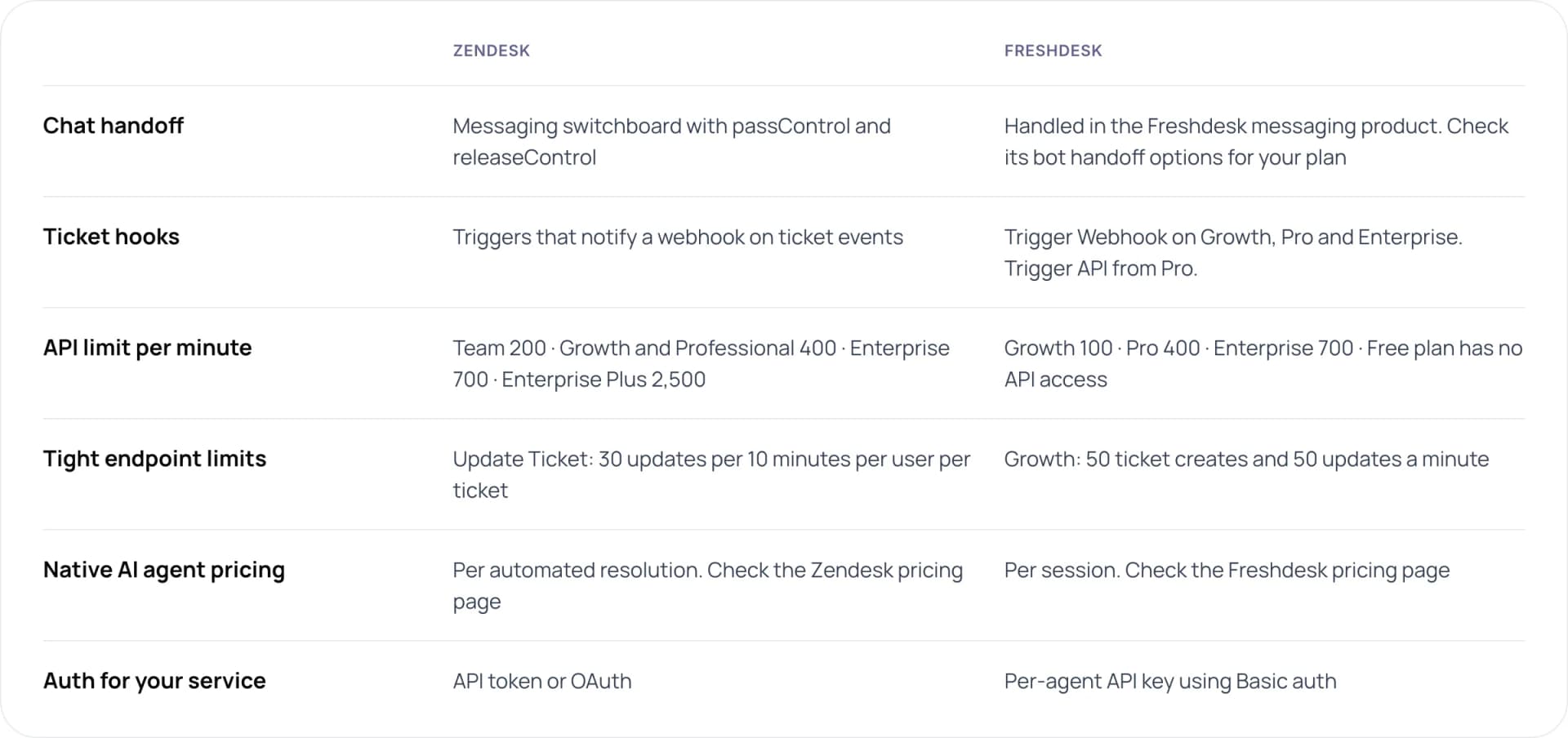
- Chat handoff: Zendesk uses the messaging switchboard with passControl and releaseControl. Freshdesk handles it in its messaging product, so check the bot handoff options for your plan.
- Ticket hooks: Zendesk triggers notify a webhook on ticket events. Freshdesk offers Trigger Webhook on Growth, Pro and Enterprise, and Trigger API from Pro.
- API limit per minute: Zendesk Team 200, Growth and Professional 400, Enterprise 700, Enterprise Plus 2,500. Freshdesk Growth 100, Pro 400, Enterprise 700, and the Free plan has no API access.
- Tight endpoint limits: Zendesk allows 30 Update Ticket calls per 10 minutes per user per ticket. Freshdesk Growth allows 50 ticket creates and 50 updates a minute.
- Native AI agent pricing: Zendesk bills per automated resolution and Freshdesk bills per session. Check the vendors’ pricing pages before you budget, because prices change often.
- Auth for your service: Zendesk uses an API token or OAuth. Freshdesk uses a per-agent API key with Basic auth.
Sources: Zendesk rate limits, Freshdesk rate limits, and the Zendesk and Freshdesk pricing pages.
5. How to Integrate an AI Support Agent in 7 Steps
- Pick one queue and one channel. Email order-status tickets or web-chat FAQs are good first targets. Write down the result you expect, such as the share answered without an agent.
- Create a dedicated AI user. Give it its own seat and the narrowest role that works. Store its API key or OAuth token in a secrets manager, never in the rule itself.
- Wire the event. On Freshdesk, add a ticket-creation rule with a Trigger Webhook action. On Zendesk, create a webhook and a trigger that notifies it. For chat, register your bot in the messaging switchboard.
- Build the AI service. Fetch the full ticket and the customer’s history, retrieve the right help articles and account data, then generate an answer. Respond to the webhook quickly and do the work in a queue.
- Write back as a private note first. Post the draft as an internal note with a tag such as ai-draft. Agents edit and send it, and every edit tells you where the model is wrong.
- Add handoff rules. Escalate on request, on low confidence, after two failed attempts, and on refunds, legal or account changes. Pass a summary with each handoff.
- Measure, then widen. Track draft acceptance, reopen rate and satisfaction by queue. Move a queue to public replies only when its numbers hold for a few weeks.
Tip: In Freshdesk, each API key belongs to one agent and carries that agent’s role. Create a dedicated agent seat for the AI with the narrowest role that works, so its actions show up clearly in the audit log.
Planning an AI agent on Zendesk or Freshdesk? Book a free AI consultation.
6. Will Your AI Agent Hit API Rate Limits?
Both platforms cap API requests per minute for the whole account. Your AI agent shares that cap with every other app and script you run. A single ticket usually needs several calls: read the ticket, read its comments, look up the customer, write the reply and update tags.
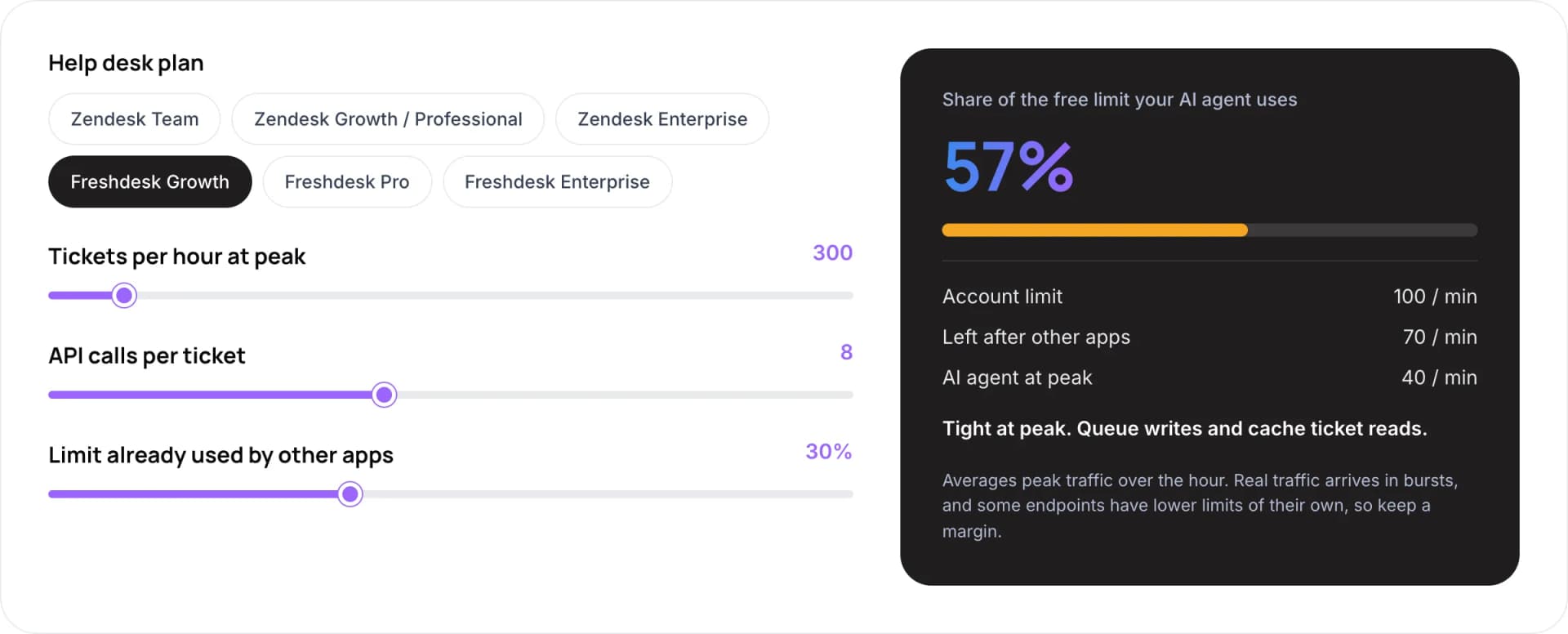
The calculator takes your help desk plan, tickets per hour at peak, API calls per ticket and the share of the limit already used by other apps. Here it runs at its default settings:
- Plan: Freshdesk Growth, an account limit of 100 calls a minute.
- Traffic: 300 tickets an hour at peak, 8 API calls per ticket, so the AI agent needs 40 calls a minute at peak.
- Other apps: 30% of the limit is already used, which leaves 70 calls a minute.
- Result: the AI agent uses 57% of the free limit. Tight at peak, so queue writes and cache ticket reads.
The calculator averages peak traffic over the hour. Real traffic arrives in bursts, and some endpoints have lower limits of their own, so keep a margin.
Endpoint limits bite before account limits do. On Freshdesk Growth, ticket updates are capped at 50 a minute even though the account allows 100. On Zendesk, a single user can update the same ticket only 30 times in 10 minutes. Queue your writes, read the rate-limit headers, and back off when you get an HTTP 429 response.
7. How Should the Handoff to Human Agents Work?
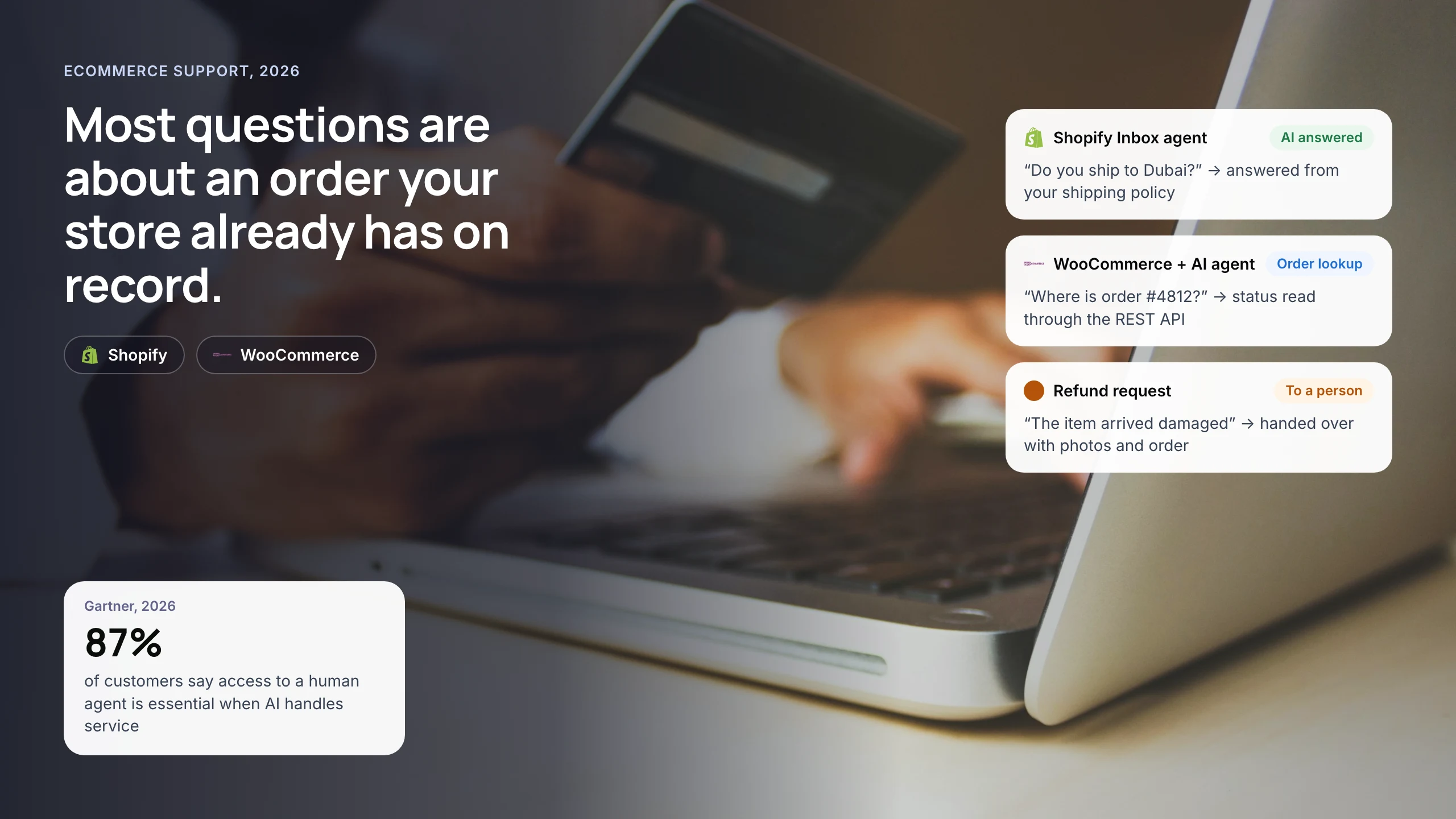
The agent should never start from zero. In the same Zendesk research, 74% of consumers said they are frustrated when they have to repeat information. Every handoff should carry the following:
- A two-line summary. What the customer wants and what the AI has already tried.
- The full transcript. Attached to the ticket, not linked somewhere else.
- Facts the AI looked up. Order number, plan, last payment, written to ticket fields so agents can filter on them.
- Why it escalated. A tag such as ai-escalated-refund. This makes reporting by reason possible.
- The right group. Route billing to billing. A handoff that lands in the general queue adds a second wait.
Plan for the return trip too. When a messaging ticket closes or an agent ends the session, Zendesk sends a releaseControl event. Your bot should use it to reset its state, so the customer’s next visit starts fresh.
8. What This Looks Like in Practice
Take an online retailer on Freshdesk Pro. A rule on ticket creation sends every order-status email to the AI service. The service pulls the order from the store’s API and posts a reply with the tracking link. It tags the ticket ai-resolved and sets it to Resolved. Refund requests get a private note with a drafted reply and the tag ai-draft, and a second rule routes those to the billing group.
We have built this kind of setup for clients. For a payments company, we built an omnichannel support system that answers routine questions and routes complex cases to the team. For ecommerce merchants, we built an assistant that drafts replies from live order data, with an agent approving each one.
9. Common Mistakes
- Replying publicly on day one. Start with private notes. You learn the failure cases without customers seeing them.
- Ignoring shared rate limits. Your AI competes with CRM syncs and reporting exports for the same per-minute limit.
- Doing the AI work inside the webhook request. Model calls can take seconds. Acknowledge the webhook, queue the job and write back when it finishes.
- One bot for every brand by accident. On Zendesk messaging, a third-party bot becomes the main bot for all channels unless it routes by source.
- No loop protection. If the AI’s own update matches the rule again, it can reply to itself. Exclude tickets tagged by the AI in your conditions.
10. Frequently Asked Questions
Can I use my own AI model with Zendesk or Freshdesk?
Yes. Both platforms expose REST APIs and can call an external service through webhooks. Your service can use any model you choose, because the help desk only sees the replies and notes it writes back. On Zendesk messaging, you register the bot as a switchboard integration so it can take and pass control.
What is the difference between Zendesk automation and an AI support agent?
Zendesk automation means triggers, automations and macros that run fixed rules, such as routing by keyword. An AI support agent reads the request, finds an answer in your content or systems, and writes a reply. In practice, triggers often start the AI agent, so the two work together.
Does Freshdesk automation support webhooks on every plan?
Freshdesk documents the Trigger Webhook action for its Growth, Pro and Enterprise plans, on rules that run at ticket creation or update. The Trigger API action, which lets later steps use the response, starts on Pro. The Free plan has no API access, so it cannot support a custom AI agent.
How many API calls does an AI support agent need per ticket?
It depends on your design, but a typical flow reads the ticket, its comments and the customer, then writes a note and updates tags. That is five to ten calls. Multiply by peak tickets per hour and compare the result with your plan’s per-minute limit, leaving room for other apps.
Should the AI agent reply directly or draft for agents?
Start with drafts as private notes. Agents keep control, and their edits show you where answers fall short. Move to direct replies one queue at a time, beginning with low-risk requests like order status, once agents accept most drafts without changes.
11. Conclusion
A working AI support agent integration comes down to three choices: where the agent sits, how it hands over, and how it stays inside the API limits. Start with a ticket webhook that writes private-note drafts on one queue. Once agents accept most drafts unchanged, let it reply directly on that queue.
See our AI customer support automation services or custom AI agent development, or read how to deploy agentic RAG for customer service.
Author