What Tools Can Automate Social Media Customer Support?
Four kinds of tool do the job: the platforms’ own inboxes and AI agents, social media management suites, help desks with social channels, and custom builds. Which one fits depends on the channels your customers use.
This guide covers what Instagram, Facebook, WhatsApp, X and TikTok each let you automate, what the main tools cost in 2026, and how to choose.
1. The Short Answer
The customer support automation tools that work on social media are Meta’s own Business Agent, social suites such as Sprout Social, help desks such as Zendesk and Intercom, and custom AI agents built on each platform’s API.
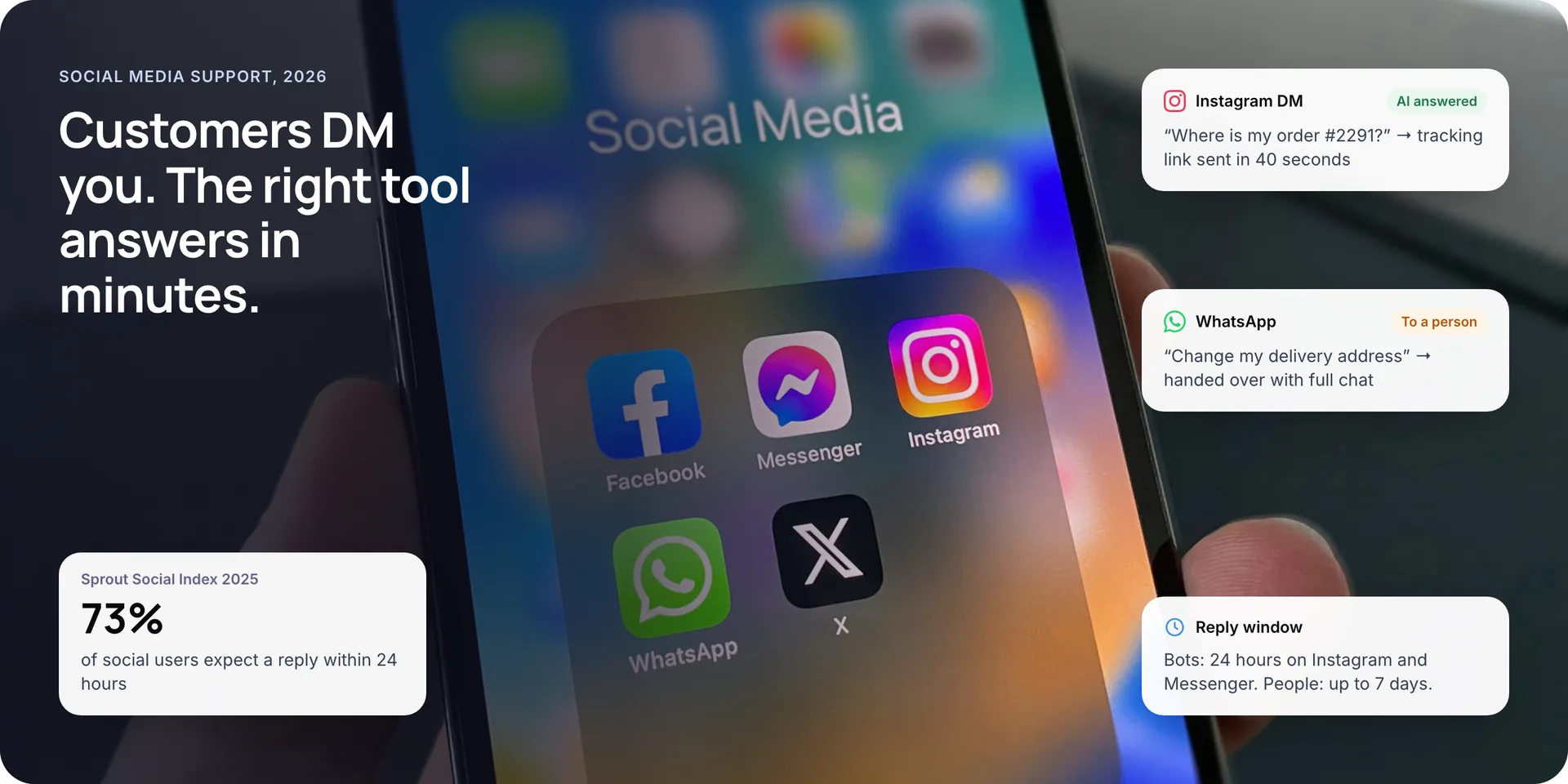
Speed is the reason to automate. The 2025 Sprout Social Index found that 73% of social users expect a reply within 24 hours, and 73% say they will buy from a competitor if a brand does not respond. Each platform also sets its own rules for when and how a bot may reply, so the right tool depends on where your customers write.
Key takeaways
- Check each platform’s reply rules first. On Instagram and Messenger, bots get 24 hours, and only people can reply after that, for up to 7 days.
- Meta’s Business Agent now runs on WhatsApp Business and Instagram DMs worldwide, so Meta-heavy teams can start without a new tool.
- Social suites such as Sprout Social charge per seat, from $199 a month on Standard. AI help desks such as Intercom add $0.99 per resolved conversation.
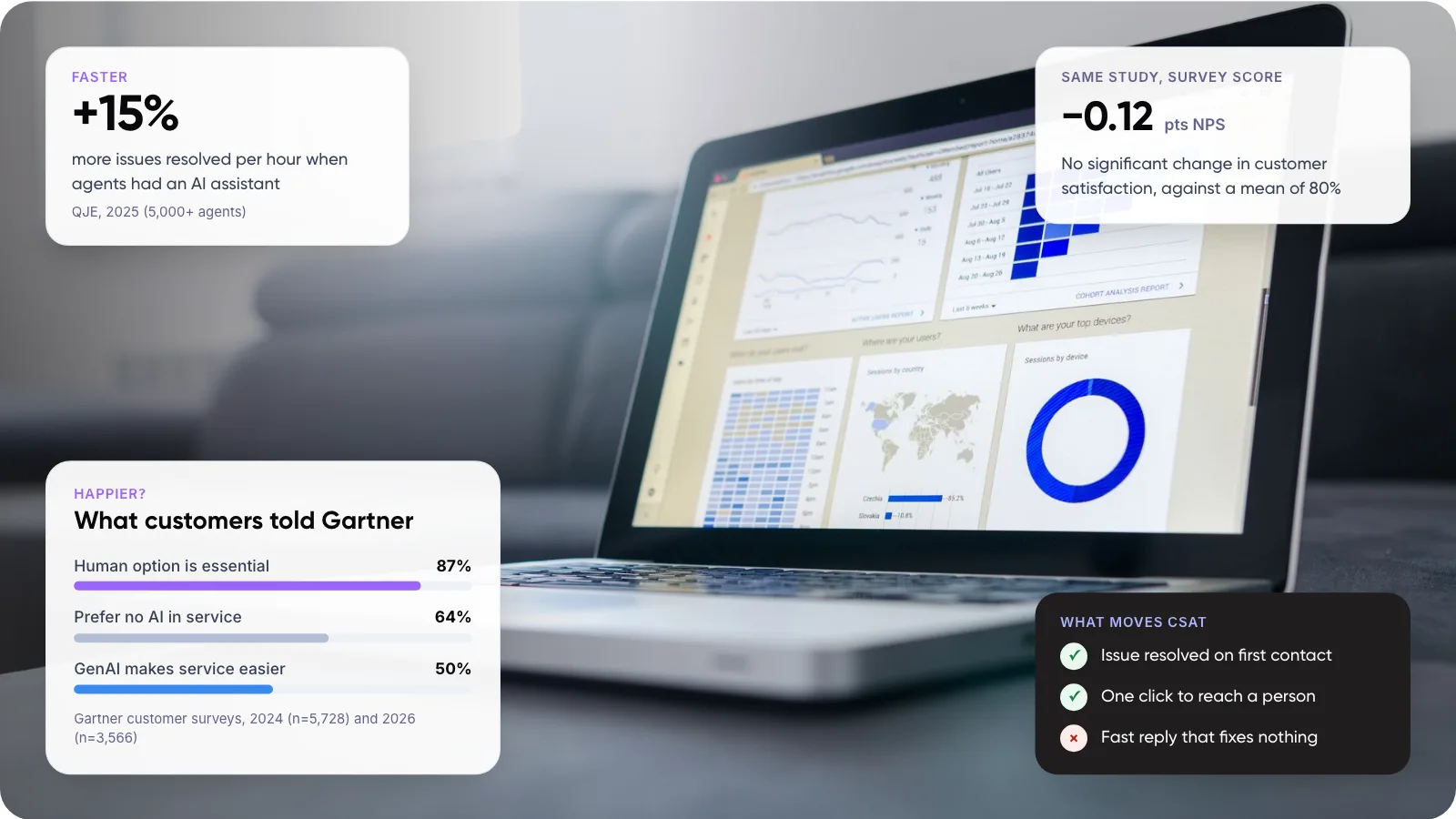
- Keep a person within reach. 87% of customers in a 2026 Gartner survey said human access is essential when AI handles service.
2. Where Do Customers Ask for Help on Social Media?
Not only on your biggest channel. In Sprout Social’s 2026 pulse survey, consumers named TikTok and Facebook most often as the first place they go for customer service.
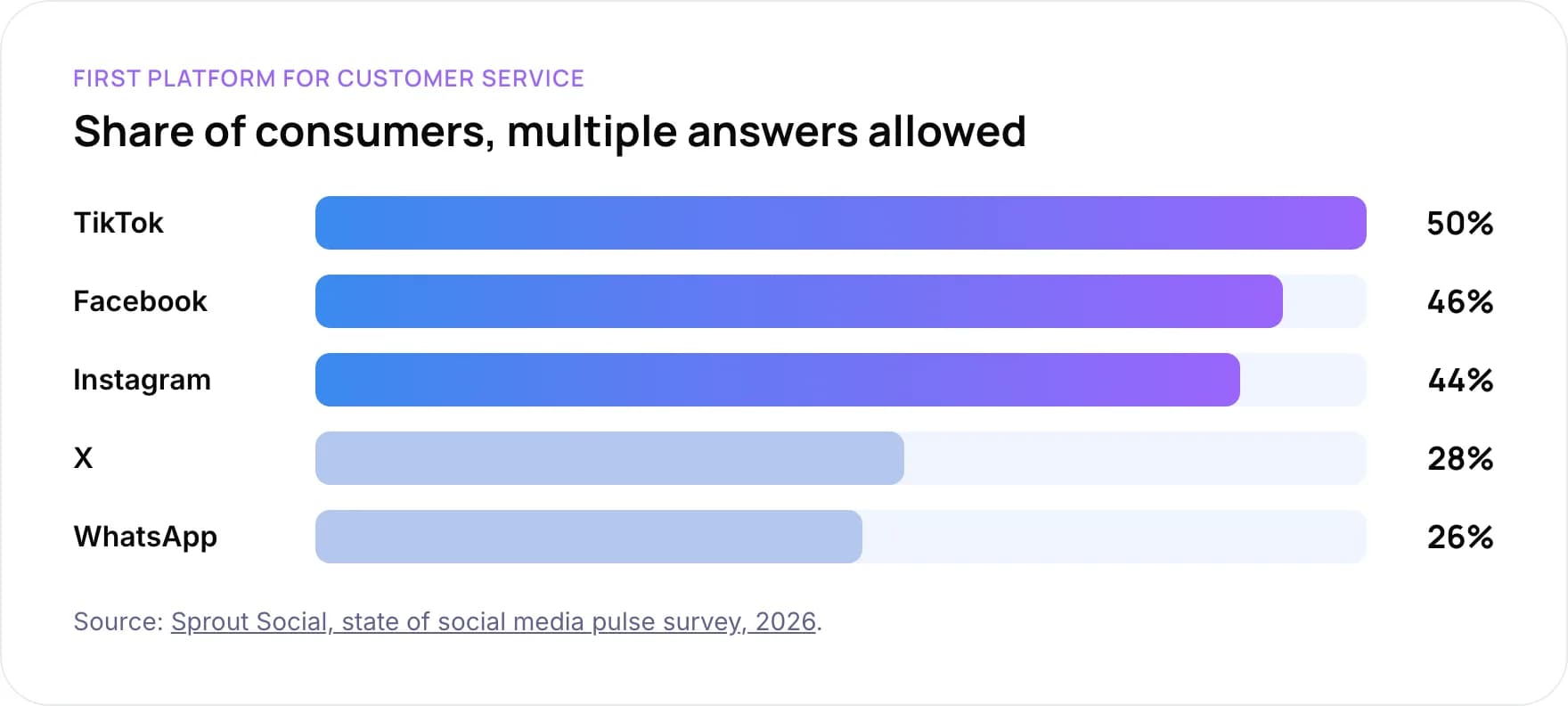
- TikTok: 50%
- Facebook: 46%
- Instagram: 44%
- X: 28%
- WhatsApp: 26%
Share of consumers, multiple answers allowed. Source: Sprout Social, state of social media pulse survey, 2026.
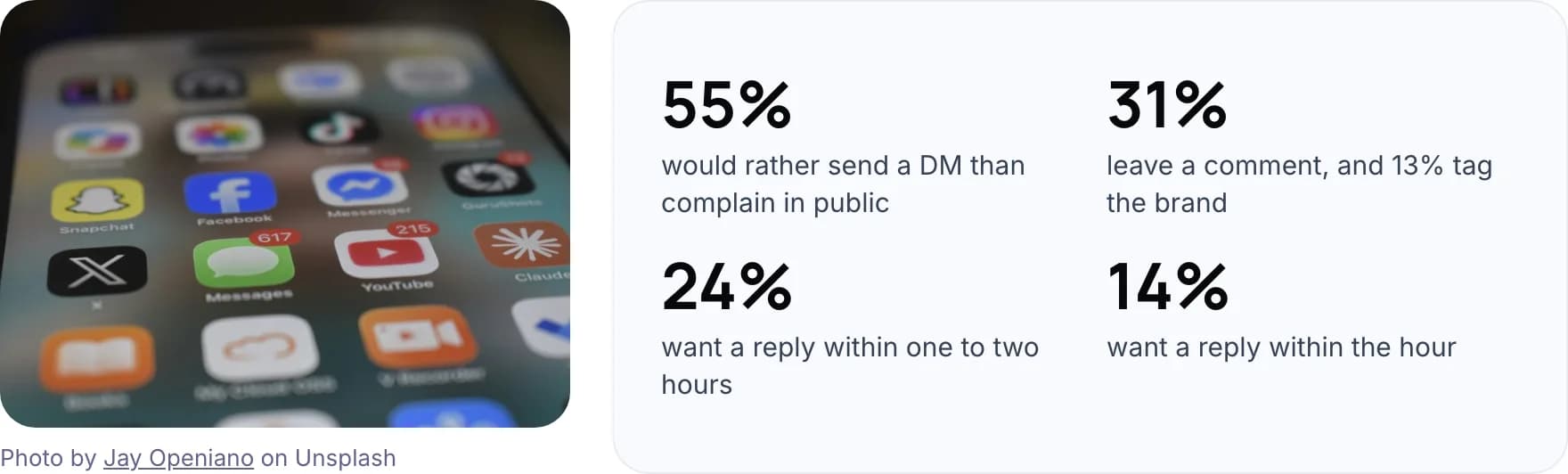
- 55% would rather send a DM than complain in public.
- 31% leave a comment, and 13% tag the brand.
- 24% want a reply within one to two hours.
- 14% want a reply within the hour.
Photo by Jay Openiano on Unsplash.
Sprout sells social media software, so read these as vendor research. They still match what we see: private messages carry most of the support load, and public comments need a fast first touch.
3. What Can You Automate on Each Channel?
Every platform controls what a bot may send through its API (the official connection tools use). Check these rules before you pick a tool, because no tool can get around them.
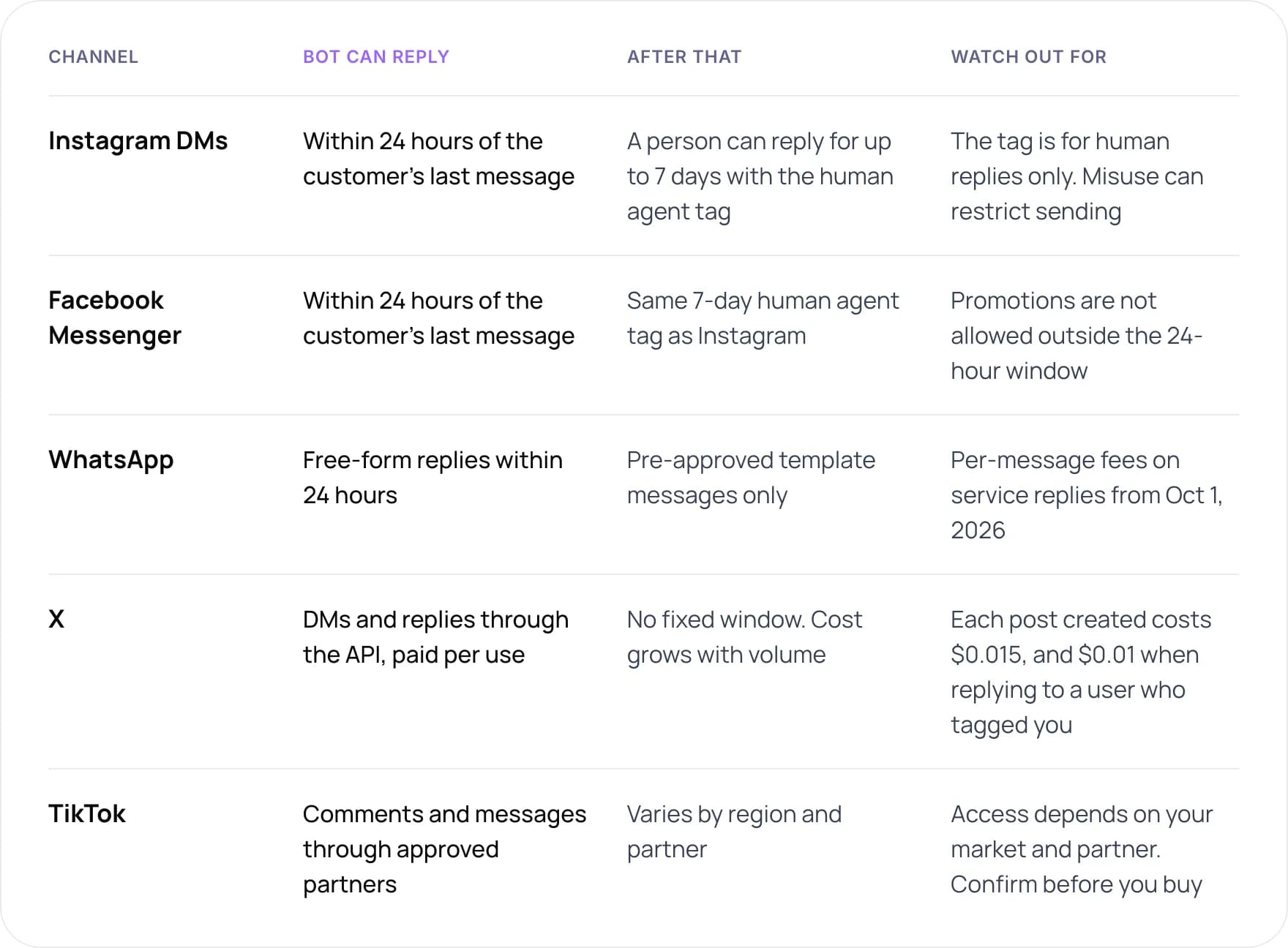
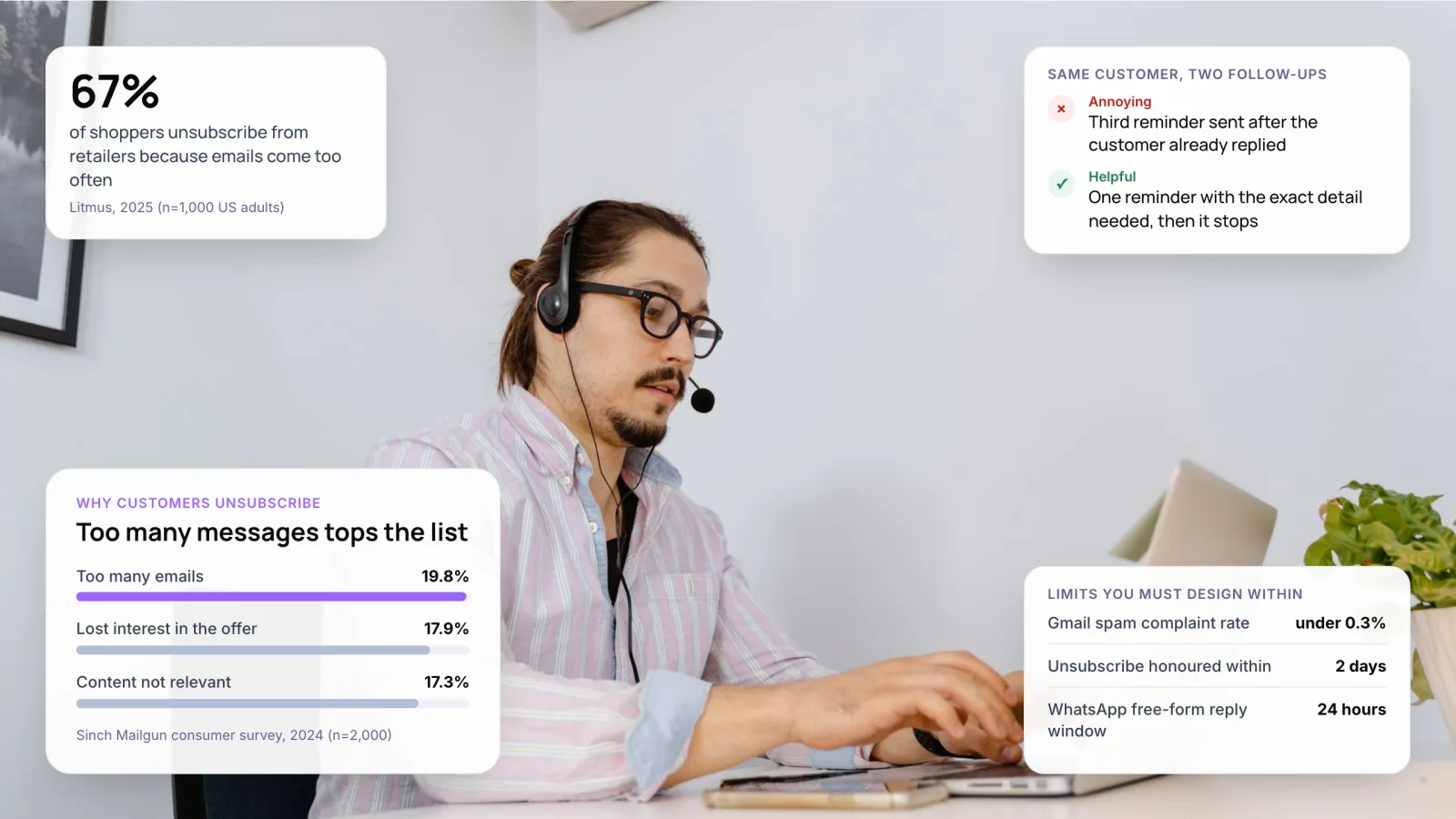
- Instagram DMs: a bot can reply within 24 hours of the customer’s last message. After that, a person can reply for up to 7 days with the human agent tag. The tag is for human replies only, and misuse can restrict sending.
- Facebook Messenger: same 24-hour bot window and the same 7-day human agent tag as Instagram. Promotions are not allowed outside the 24-hour window.
- WhatsApp: free-form replies within 24 hours, then pre-approved template messages only. Per-message fees apply on service replies from October 1, 2026.
- X: DMs and replies through the API, paid per use. There is no fixed window, so cost grows with volume. Each post created costs $0.015, and $0.01 when replying to a user who tagged you.
- TikTok: comments and messages through approved partners. Rules vary by region and partner, so access depends on your market. Confirm before you buy.
On Messenger and Instagram, Meta’s messaging policy gives you 24 hours to reply after a customer writes. A human agent tag extends that to 7 days, but only for replies a person writes. Meta does not allow it for bot messages.
Note: From October 1, 2026, Meta charges per message for WhatsApp service replies that used to be free inside the 24-hour window. Budget for it if WhatsApp is a main support channel, as it often is in India and the UAE.
4. Which Customer Support Automation Tools Fit Each Channel?
There are four groups of tools. They overlap, and many teams use two: one for social engagement and one for support tickets. Prices are list prices checked in October 2026.
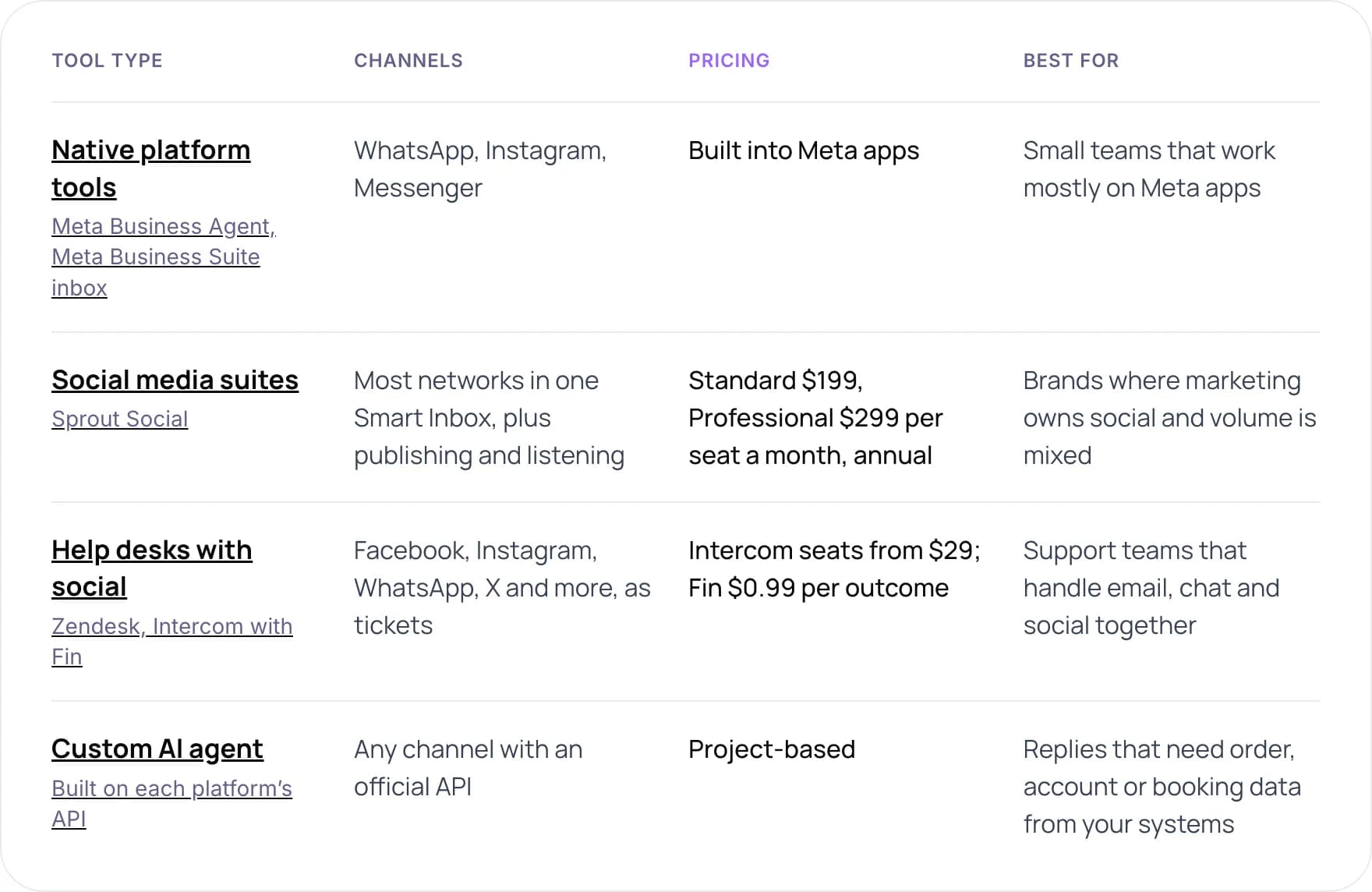
- Native platform tools (Meta Business Agent, Meta Business Suite inbox): WhatsApp, Instagram and Messenger. Built into Meta apps. Best for small teams that work mostly on Meta apps.
- Social media suites (Sprout Social): most networks in one Smart Inbox, plus publishing and listening. Standard $199, Professional $299 per seat a month, billed annually. Best for brands where marketing owns social and volume is mixed.
- Help desks with social (Zendesk, Intercom with Fin): Facebook, Instagram, WhatsApp, X and more, as tickets. Intercom seats from $29, Fin $0.99 per outcome. Best for support teams that handle email, chat and social together.
- Custom AI agent (built on each platform’s API): any channel with an official API. Project-based. Best when replies need order, account or booking data from your systems.
Sources: Sprout Social pricing, Meta Business Agent launch, Zendesk social messaging.
Native platform tools
In June 2026, Meta made its Business Agent available globally on WhatsApp Business and Instagram DMs. It answers questions, recommends products, books appointments and hands chats to a person when needed. It is the quickest start for a small team that lives on Meta apps. It only covers Meta channels, and it only knows what you give it.
- Answer customer questions
- Recommend products
- Book appointments
- Hand chats to a person
Photo by Alexander Shatov on Unsplash.
Social suites and help desks
Social suites such as Sprout Social put comments, mentions and DMs from many networks in one inbox, with publishing and listening on top. Help desks treat each message as a ticket. Zendesk connects Facebook, X, WhatsApp, Instagram Direct, LINE and WeChat, but its Support-only plans add public channels only. Pick the suite if marketing owns social. Pick the help desk if support does.
5. How to Choose a Tool in 5 Steps
- Count messages by channel. Export last month’s DMs, comments and mentions. Most teams find two channels carry most of the load.
- Sort them by intent. Group into order status, billing, product questions and complaints. The large, repeatable groups are what you automate.
- Check each channel’s rules. Match your intents against the reply windows and fees in section 3, so the tool you pick can actually send those replies.
- Decide who owns social. If marketing owns it, a social suite fits. If support owns it, a help desk keeps all tickets in one queue.
- Run a two-week pilot on one channel. Measure first-reply time, resolution and handoffs before you add the next channel.
Tip: Ask every vendor which channels use the official API and which use a workaround. Unofficial connections can break without warning or put your account at risk.
6. How to Automate Comments and DMs Without Losing the Human Touch
A public complaint is the riskiest message to automate. Our view is that a bot should acknowledge it in public and move the detail to a private message, where it can look up the order and a person can step in.
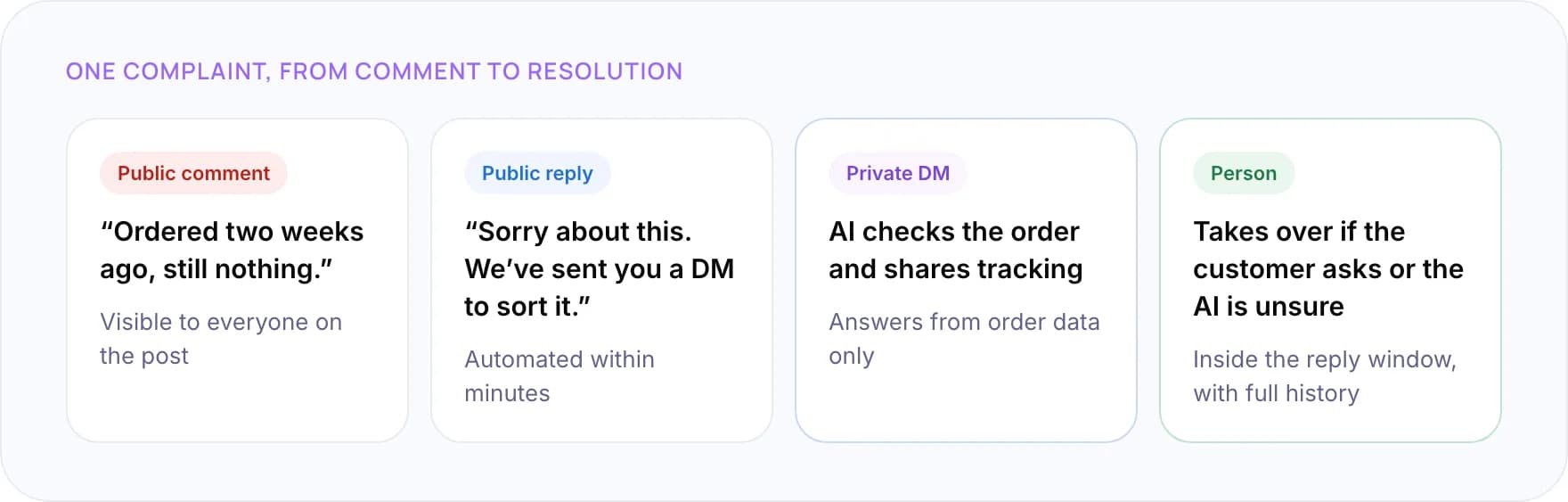
- Public comment: “Ordered two weeks ago, still nothing.” Visible to everyone on the post.
- Public reply: “Sorry about this. We’ve sent you a DM to sort it.” Automated within minutes.
- Private DM: the AI checks the order and shares tracking. It answers from order data only.
- Person: takes over if the customer asks or the AI is unsure, inside the reply window and with the full history.
- Reply in public once, then move to DM. Never post order numbers or account details in a comment thread.
- Label AI replies. Customers should know when they are talking to a bot.
- Route by reply window. Sort the queue so messages close to the 24-hour limit reach a person first.
- Keep complaints and refunds with people. Let the AI gather details, then hand over with the full conversation.
Keeping a person in reach matters. In 2026, Gartner found 87% of customers say access to a human agent is essential when companies use generative AI for service.
Want a second opinion on your social support setup? Book a free AI consultation.
7. What Do Social Support Tools Cost?
Social suites charge per seat. AI help desks often add a fee per resolved conversation. The estimate below uses October 2026 list prices with annual billing and leaves out taxes, add-ons and channel fees such as WhatsApp messages.
- Sprout Social Standard: $199 per seat a month. Chatbot features sit on higher tiers.
- Sprout Social Professional: $299 per seat a month.
- Intercom Essential seat plus Fin: $29 per seat a month, with Fin billed at $0.99 per outcome.
Worked example: three people answering social, 1,500 support conversations a month, 30% resolved by AI. Sprout Standard comes to $597 a month in seats. Intercom comes to $87 in seats plus about $446 for 450 AI resolutions, roughly $533 in total, leaving 1,050 conversations for your team. These are list-price estimates, not quotes.
If you build on X directly, there is no subscription. Since February 2026 the X API is pay-per-use, and from April 20, 2026 each post created costs $0.015, with replies to a user who tagged your account at $0.01. To weigh these costs against the hours your team saves, try our free AI ROI Calculator.
8. Real Examples of Social Support Automation
OLIPOP: support where customers already are
OLIPOP’s eCommerce manager told Sprout Social that at least half of its customers message or comment with questions on Facebook and Instagram. The team aims to reply instantly, or the same day at the latest. At that volume, a shared inbox and saved replies are the minimum.
How we approach it
When social messages need answers from your own systems, a custom agent is usually the better fit. For a payments company, we built an omnichannel customer support system that cut first-response time on high-confidence email queries from hours to under one minute and routes complex cases to the team. For ecommerce merchants, we built an AI assistant that drafts replies from live order data, with an agent approving each one. For one store with 2,000 customer emails a month, we estimate it saves about 50 hours of support effort each month.
9. Common Mistakes
- Picking a tool before counting channels. Teams pay for six networks when two carry nearly all support.
- Using the human agent tag for bot messages. Meta allows it only for replies written by people.
- Answering account issues in public. Move them to a private message after the first reply.
- Ignoring channel fees. WhatsApp service replies and X API posts are both billed per message in 2026.
- Splitting social and email into separate teams with no shared history. Customers repeat themselves and get different answers.
10. Frequently Asked Questions
What are the best customer support automation tools for social media?
It depends on your channels. Meta’s Business Agent suits teams that work mainly on WhatsApp and Instagram. Sprout Social suits brands where marketing runs many networks. Zendesk or Intercom suit support teams that want social messages as tickets. A custom AI agent fits when replies need data from your own systems.
Can you automate Instagram DMs for customer support?
Yes, through Meta’s official Instagram messaging API or a tool built on it. A bot can reply within 24 hours of the customer’s last message. After that, only a person can reply, for up to 7 days, using Meta’s human agent tag. Unofficial automation tools risk restrictions on your account.
How do I automate WhatsApp customer support?
Use the WhatsApp Business app’s built-in tools for a small team, or the WhatsApp Business API through a help desk or provider for higher volume. Free-form replies are allowed within 24 hours. Outside it, you need approved templates. From October 1, 2026, Meta charges per message for service replies.
How much do social media customer service tools cost?
Sprout Social lists $199 per seat a month on Standard and $299 on Professional, billed annually. Intercom seats start at $29, with its Fin AI agent at $0.99 per resolved conversation. Meta’s native tools are built into its apps. Channel fees, such as WhatsApp messages and X API posts, come on top.
Should a bot reply to public comments?
A short, automated public reply is fine if it acknowledges the issue and moves the conversation to a private message. Detailed answers, refunds and anything with personal data should stay private. In Sprout Social’s 2026 survey, 33% of people who complain in public want a reply directing them to DMs.
Can one tool handle every social channel?
Social suites and help desks cover most major networks in one inbox, but each still follows the platform’s rules. Coverage of newer channels such as TikTok varies by vendor and region, so confirm channel support and API access before you sign a contract.
11. Conclusion
The best customer support automation tools for social media are the ones that cover your busiest channels within each platform’s rules. Start by counting last month’s support messages by channel. If most arrive on Meta apps, try the native tools first. If they span many networks or need data from your systems, compare a help desk with a custom build.
See our AI customer support automation services or custom AI agent development, read how customer support automation works, or book a free AI consultation.
Author