Custom AI Support Agent vs. Off-the-Shelf Chatbot Tools: How to Choose
Buy an off-the-shelf customer service chatbot when most tickets are answered from your help center. Build a custom AI support agent when tickets need actions inside your own systems, or when per-resolution fees outgrow a build.
This guide compares both on cost, control and risk, with published pricing, two public examples and a seven-step way to decide.
The decision in four steps
- Tag your tickets: questions vs tasks.
- Trial a tool: 30 days on real traffic.
- Price both paths: over 24 months.
- Decide per intent: buy, build or hybrid.
1. The Short Answer
Start with an off-the-shelf customer service chatbot if your tickets are mostly questions. Build a custom AI agent when they are mostly tasks. A question is “What is your returns policy?” A task is “Refund order 4471 to my card.”
The stakes are rising on both sides. Gartner predicted in March 2025 that by 2029 agentic AI will resolve 80% of common service issues without a person, cutting operating costs by 30%.
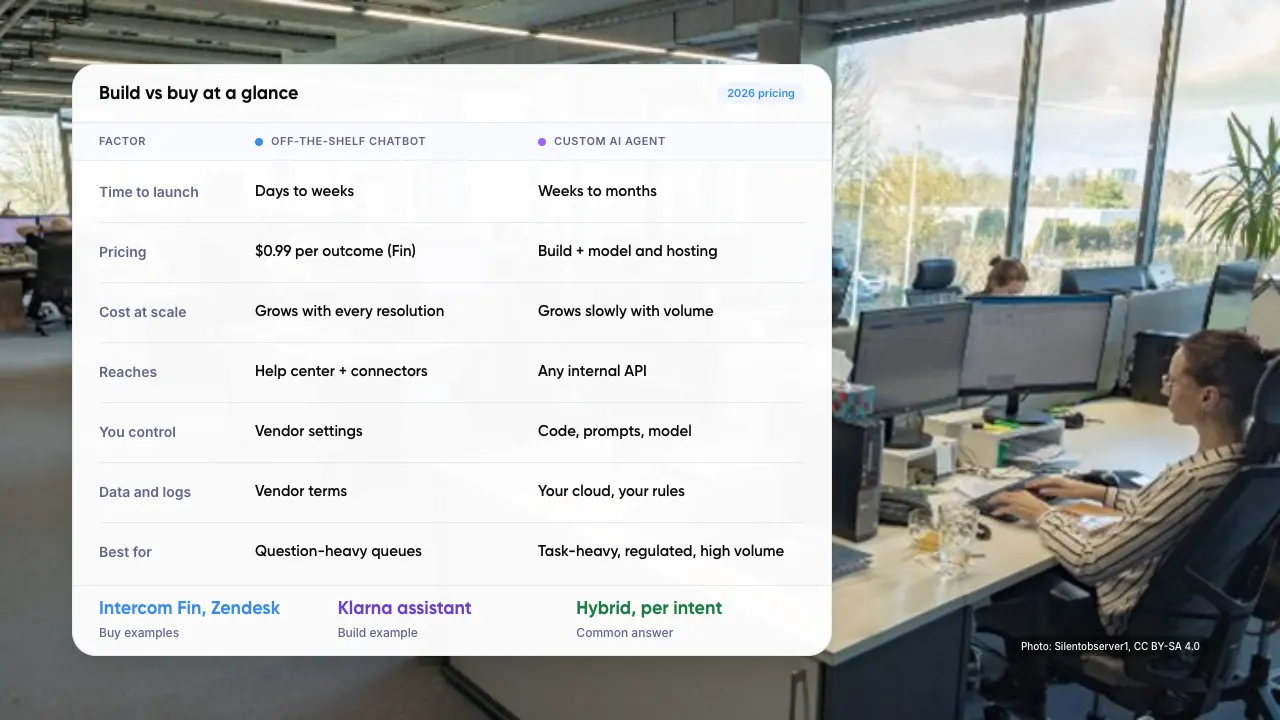
Build vs buy at a glance
- Time to launch: chatbot days to weeks; custom agent weeks to months.
- Pricing: chatbot $0.99 per outcome (Fin); custom agent build plus model and hosting.
- Cost at scale: chatbot grows with every resolution; custom agent grows slowly with volume.
- Reaches: chatbot help center plus connectors; custom agent any internal API.
- You control: chatbot vendor settings; custom agent code, prompts and model.
- Data and logs: chatbot vendor terms; custom agent your cloud, your rules.
- Best for: chatbot question-heavy queues; custom agent task-heavy, regulated, high volume.
Key takeaways
- If most tickets are questions, an off-the-shelf customer service chatbot is the faster, cheaper start.
- If most tickets are tasks in your own systems, a custom AI agent gives you control over actions and logs.
- Intercom Fin charges $0.99 per outcome, so the bill rises in step with volume.
- You are liable for what your bot says, whichever option you choose.
- Decide per intent. Many teams run both.
2. What Is the Difference Between a Chatbot and an AI Agent?
A customer service chatbot answers. It reads your help center and replies in plain language. An AI agent also acts: it calls your order system, checks a policy and issues the refund. Gartner draws the same line, describing agentic AI as tools that resolve requests rather than only supply information.
The line between buy and build is now blurred. Helpdesk tools such as Intercom Fin can run workflows, which Intercom calls Procedures. So the real question is how deep into your systems the agent must reach, and who controls it.
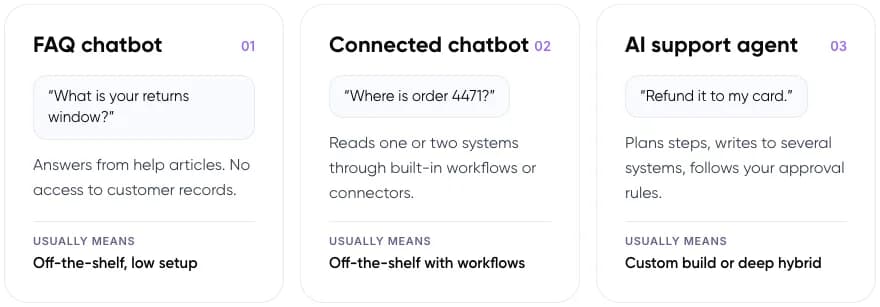
- 01 FAQ chatbot. “What is your returns window?” Answers from help articles. No access to customer records. Usually means off-the-shelf, low setup.
- 02 Connected chatbot. “Where is order 4471?” Reads one or two systems through built-in workflows or connectors. Usually means off-the-shelf with workflows.
- 03 AI support agent. “Refund it to my card.” Plans steps, writes to several systems, follows your approval rules. Usually means a custom build or deep hybrid.
Definition: Retrieval-augmented generation (RAG) means the model looks up your documents before it answers, instead of relying on what it learned in training. Both options use it.
3. How Much Does Each Option Cost?
Off-the-shelf tools now charge per resolved conversation. That keeps the first bill small, and it grows in a straight line with volume. Intercom lists its Fin AI agent at $0.99 per outcome.
Intercom counts an outcome when the customer confirms the issue is solved, asks for nothing more after Fin replies, or Fin completes a workflow. Zendesk bills automated resolutions and charges more for pay-as-you-go overage than for resolutions bought ahead.
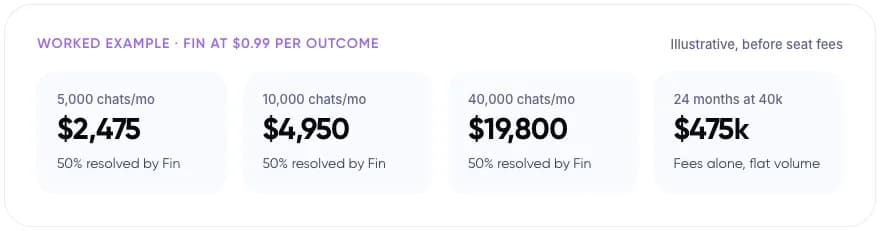
Worked example: Fin at $0.99 per outcome (illustrative, before seat fees)
- 5,000 chats a month: $2,475, with 50% resolved by Fin.
- 10,000 chats a month: $4,950, with 50% resolved by Fin.
- 40,000 chats a month: $19,800, with 50% resolved by Fin.
- 24 months at 40,000: about $475k in fees alone, at flat volume.
A custom agent flips the shape: a larger upfront build, then model and hosting costs that rise slowly with volume. In our view, the crossover sits where 24 months of per-resolution fees exceed the build plus 24 months of running costs. Run that sum with your own numbers before you talk to any vendor, us included.
4. Custom AI Agent vs Customer Service Chatbot, Side by Side
Most of the difference shows up after launch: who changes the logic, where conversation data lives, and what happens when you switch helpdesks.
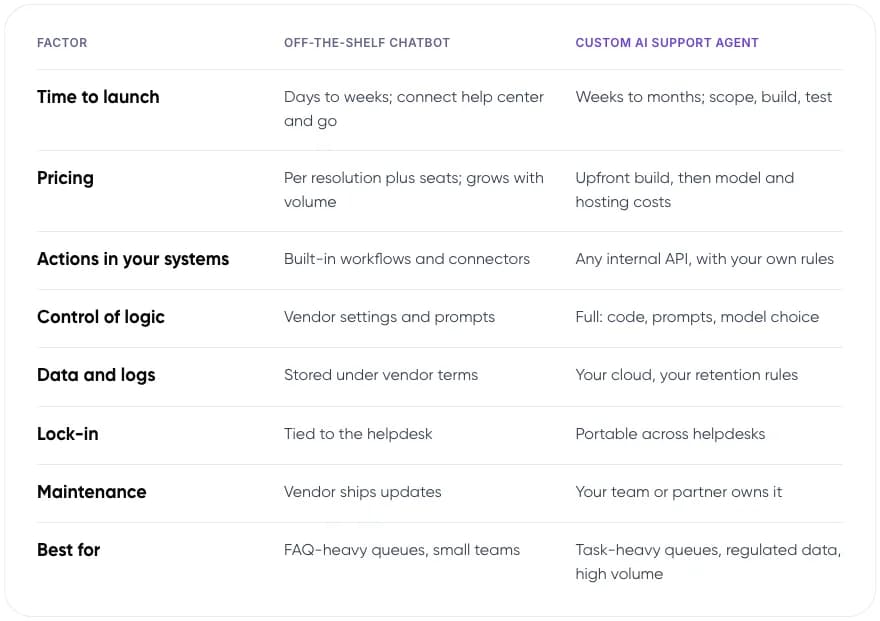
- Time to launch: chatbot days to weeks, connect the help center and go. Custom agent weeks to months: scope, build, test.
- Pricing: chatbot per resolution plus seats, grows with volume. Custom agent upfront build, then model and hosting costs.
- Actions in your systems: chatbot built-in workflows and connectors. Custom agent any internal API, with your own rules.
- Control of logic: chatbot vendor settings and prompts. Custom agent full control: code, prompts, model choice.
- Data and logs: chatbot stored under vendor terms. Custom agent your cloud, your retention rules.
- Lock-in: chatbot tied to the helpdesk. Custom agent portable across helpdesks.
- Maintenance: chatbot vendor ships updates. Custom agent your team or partner owns it.
- Best for: chatbot FAQ-heavy queues, small teams. Custom agent task-heavy queues, regulated data, high volume.
Our assessment of typical setups, not a survey.
5. Which One Fits Your Support Team?
Find the situation closest to yours to see what we would recommend and why. Scenarios are illustrative.
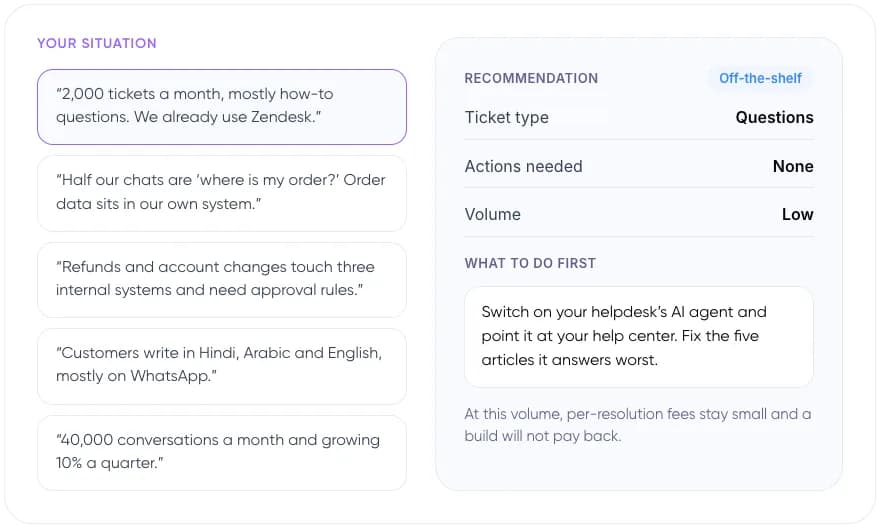
“2,000 tickets a month, mostly how-to questions. We already use Zendesk.”
Off-the-shelf. Switch on your helpdesk’s AI agent and point it at your help center. Fix the five articles it answers worst. At this volume, per-resolution fees stay small and a build will not pay back.
“Half our chats are ‘where is my order?’ Order data sits in our own system.”
Hybrid. Try the tool’s built-in workflows against your order API first. Build a small custom service only if the API is messy. One clean read-only lookup rarely justifies a full custom agent.
“Refunds and account changes touch three internal systems and need approval rules.”
Custom build. Build a custom agent with explicit approval limits, full audit logs and a human check above a set refund value. This is where control over logic and logs matters most.
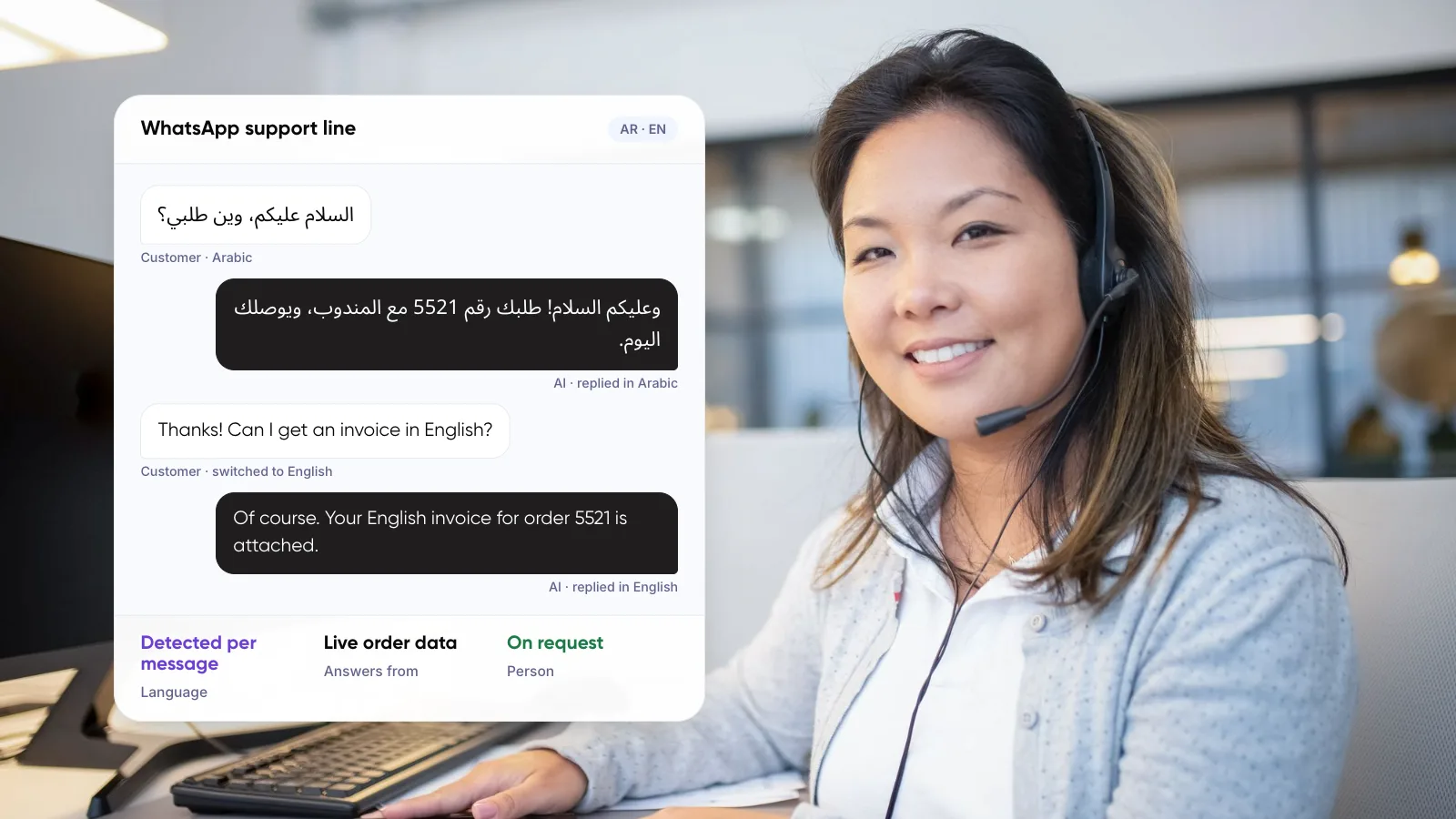
“Customers write in Hindi, Arabic and English, mostly on WhatsApp.”
Test first. Run 200 real past conversations through the tool before signing. Build custom only if mixed-language accuracy falls short. Vendor demos rarely use code-mixed messages like real customers send.
“40,000 conversations a month and growing 10% a quarter.”
Run the numbers. Model 24 months of per-resolution fees against a build plus running costs. Volume like this is where custom often wins. At 50% resolved, 40,000 chats is about $19,800 a month in Fin fees alone.
Tip: Many teams end up hybrid. The helpdesk’s AI agent handles FAQs, and a custom service behind it handles the few high-value tasks the tool cannot reach.
6. What Happened When Companies Built Their Own?
Klarna built its own assistant on OpenAI models and handles refunds, returns, payments and disputes inside its app. It published first-month results in February 2024.
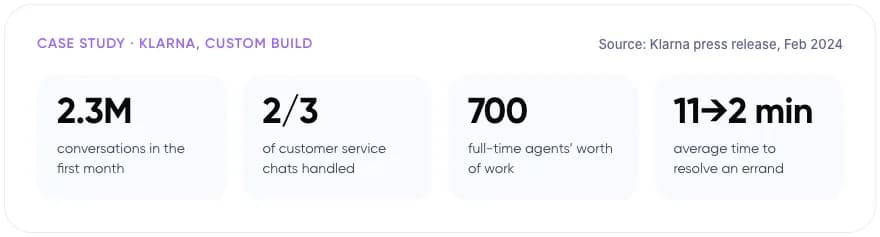
- 2.3M conversations in the first month.
- 2/3 of customer service chats handled.
- 700 full-time agents’ worth of work.
- 11 to 2 minutes: average time to resolve an errand.
These are Klarna’s own figures. In May 2025 the company began hiring human agents again so customers can always reach a person, CX Dive reported. The assistant kept running. The lesson is about scope, not about abandoning AI.
That matches what customers say. In a Gartner survey of 5,728 customers released in July 2024, 64% said they would prefer companies did not use AI for service. Their top worry was that reaching a person would get harder.
Weighing a build against your helpdesk’s AI add-on? Book a free AI consultation.
7. How to Choose in Seven Steps
- Export three months of tickets. Tag each one by intent, such as refund, order status, how-to or complaint.
- Mark the tasks. For each intent, note whether it needs an action in your systems or only an answer.
- Trial your helpdesk’s AI agent for 30 days. Use your own help center and real traffic, not the vendor demo.
- Measure resolution on real conversations. Read 100 transcripts by hand. Count wrong answers, not only closed chats.
- Price both paths over 24 months. Use projected volume, seat fees, build cost and model costs.
- Check data and compliance. Confirm where transcripts are stored, retention, and duties under laws such as India’s DPDP Act.
- Decide per intent. Buy for questions, build for high-value tasks, and keep a clear route to a person.
If you build, the retrieval layer decides answer quality. Our guide to agentic RAG for customer service automation covers how to set it up.
8. Who Is Liable When the Bot Gets It Wrong?
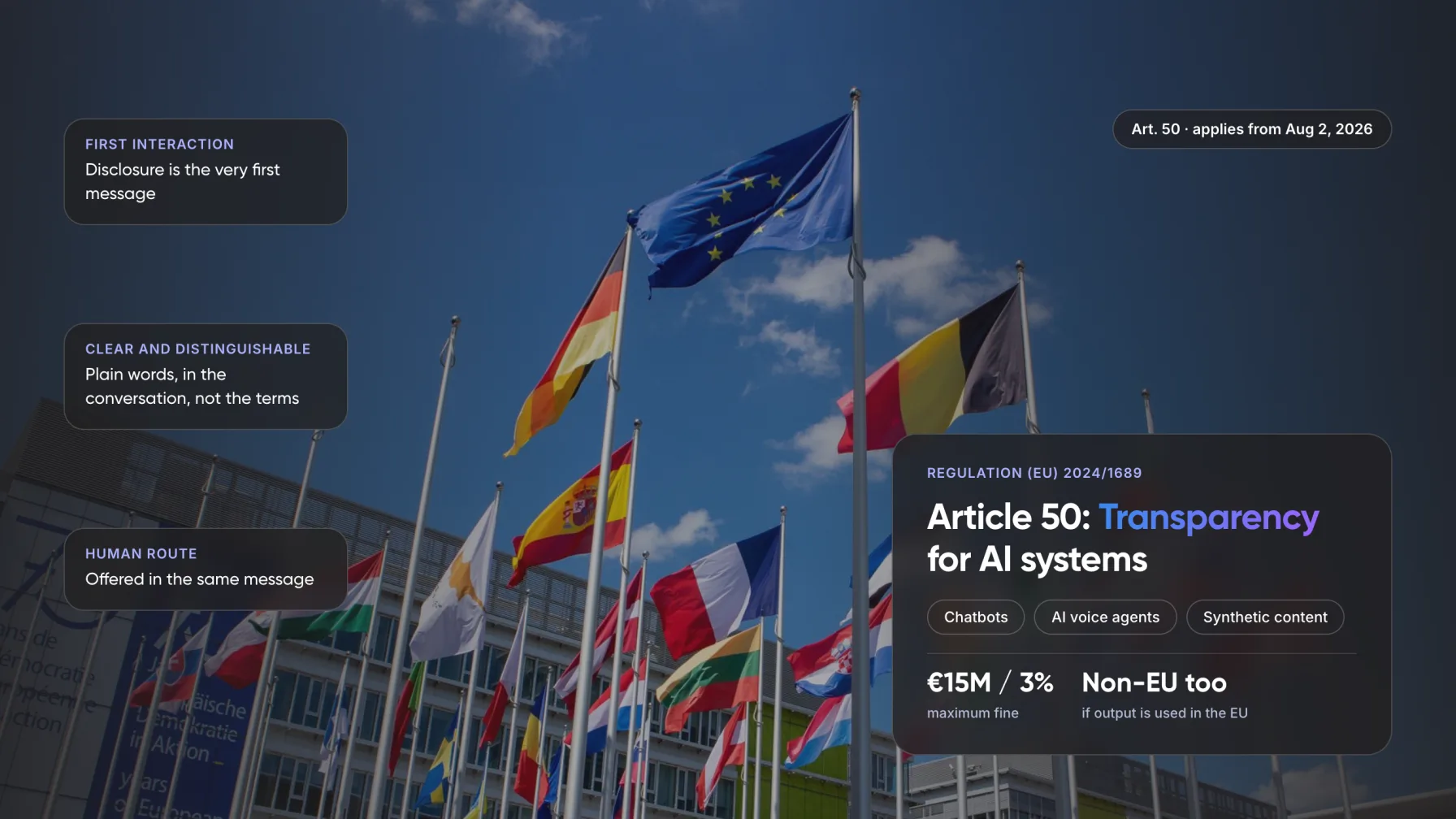
You are, whichever option you pick. In Moffatt v. Air Canada (2024), a British Columbia tribunal held the airline responsible for a wrong bereavement-fare answer from its website chatbot. It rejected the argument that the bot was a separate entity and awarded about CA$812.
Data rules add a second layer. India notified its Digital Personal Data Protection Rules on 13 November 2025, with core duties phasing in by May 2027. A custom build lets you choose where transcripts are stored and for how long. With a vendor, you inherit its terms.
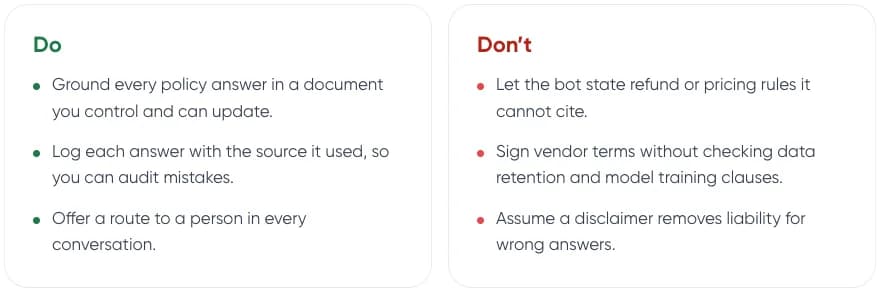
Do
- Ground every policy answer in a document you control and can update.
- Log each answer with the source it used, so you can audit mistakes.
- Offer a route to a person in every conversation.
Don’t
- Let the bot state refund or pricing rules it cannot cite.
- Sign vendor terms without checking data retention and model training clauses.
- Assume a disclaimer removes liability for wrong answers.
This is general information, not legal advice.
9. Common Mistakes
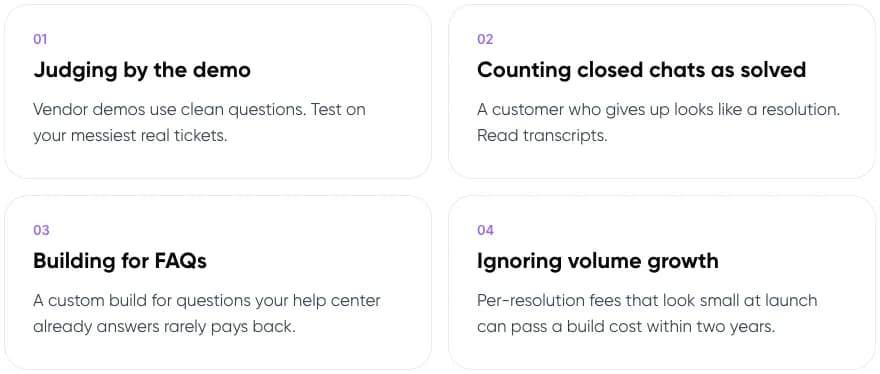
- Judging by the demo. Vendor demos use clean questions. Test on your messiest real tickets.
- Counting closed chats as solved. A customer who gives up looks like a resolution. Read transcripts.
- Building for FAQs. A custom build for questions your help center already answers rarely pays back.
- Ignoring volume growth. Per-resolution fees that look small at launch can pass a build cost within two years.
New to the topic? Start with what customer support automation is and how it works.
10. Frequently Asked Questions
What is the difference between a chatbot and an AI agent for customer support?
A customer service chatbot answers questions from your help content. An AI support agent also takes actions, such as checking an order or issuing a refund, across your systems. Gartner describes agentic AI as resolving requests on the customer’s behalf, rather than only supplying information.
How much does an AI customer service chatbot cost?
Most helpdesk tools now charge per resolution. Intercom lists Fin at $0.99 per outcome, on top of seat fees. Zendesk bills automated resolutions, with overage priced higher than prepaid resolutions. Model the cost at your expected monthly volume, not your launch volume.
When is a custom AI agent worth building?
In our view, when most tickets need actions in internal systems, when you must control where data is stored, or when 24 months of per-resolution fees exceed the build and running costs. For FAQ-heavy queues, an off-the-shelf tool is usually the better first step.
Are companies liable for what their chatbot says?
In the leading case, yes. In Moffatt v. Air Canada (2024), a British Columbia tribunal held the airline responsible for its chatbot’s wrong fare advice and rejected the idea that the bot was a separate entity. Ground answers in approved documents and log sources.
What are the pros and cons of automated customer service?
Pros: instant replies at any hour and lower cost per ticket. Cons: wrong answers carry legal risk, and customers worry about reaching a person. A 2024 Gartner survey found 64% of customers would prefer companies did not use AI for service, so keep a human route.
11. Conclusion
A customer service chatbot from your helpdesk is the fastest start when most tickets are questions. A custom AI agent earns its cost when tickets are tasks in your own systems, or when per-resolution fees pass the build cost. Tag three months of tickets this week; the share of tasks tells you which path to price first.
Tip: Once you know your monthly ticket volume, our free AI ROI Calculator estimates hours saved and payback.
To scope a build with us, see our AI agent development services and AI customer support automation.
Author