How E-Commerce Brands Can Automate WISMO (“Where Is My Order?”) Tickets
To automate customer service for WISMO tickets, connect an AI agent to your order system and carrier tracking. It answers status questions with live data and sends lost or damaged parcels to a person.
This guide covers which WISMO tickets to automate, how the setup works, what brands have reported and a seven-step rollout.
1. The Short Answer
Connect an AI agent to your order system and carrier tracking, let it answer status questions with live data, and send lost or damaged parcels to a person. Automating customer service this way works because WISMO is a large, predictable slice of the inbox.
Gorgias’s helpdesk data puts it at 18% of incoming requests on average, and the same page calls it the most common question in e-commerce support.
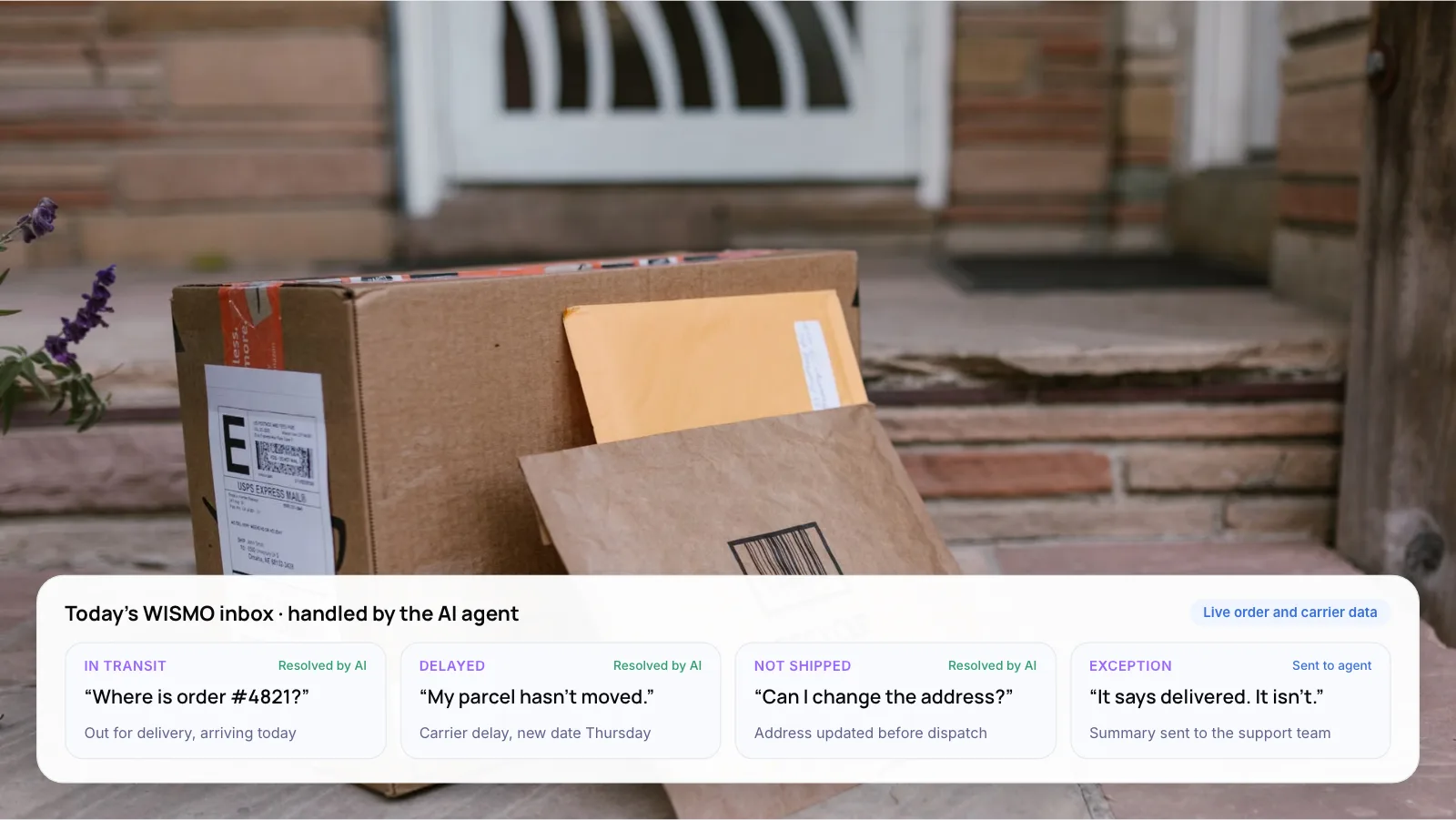
Four example tickets (illustrative), and what an AI agent does with each:
- In transit: “Where is order #4821?” The agent replies that it is out for delivery and arriving today. Resolved by AI.
- Delayed: “My parcel hasn’t moved.” The agent explains the carrier delay and gives the new date. Resolved by AI.
- Not shipped: “Can I change the address?” The agent updates it before dispatch, if your rules allow. Resolved by AI.
- Exception: “It says delivered. It isn’t.” The agent sends a summary to the support team. Sent to a person.
Key takeaways
- WISMO averages 18% of incoming requests in Gorgias’s helpdesk data. Measure your own share before setting targets.
- In-transit and delayed orders can be answered from data. Lost, damaged and disputed parcels should go to a person.
- Two-thirds of US online shoppers feel anxious after buying, and 38% say frequent tracking updates help (Narvar, 2025).
- Orthofeet automated 56% of all support tickets in under two months, according to its helpdesk vendor Gorgias.
- Test the agent on your own past tickets before you set an automation target.
2. What Is a WISMO Ticket?
WISMO stands for “Where is my order?”. It covers any contact about an order that has already been placed: has it shipped, where is it now, why the tracking has not moved, and when it will arrive.
Its returns twin is WISMR, “Where is my refund?” or “Where is my return?”. Both follow the same pattern. The answer already sits in a system you own, and the customer cannot see it.
Note: Published WISMO shares vary, so measure your own first. Tag a sample of 200 recent tickets and count the order-status ones.
3. Why Do Customers Keep Asking “Where Is My Order?”
Uncertainty drives the contact. Narvar’s 2025 State of Post-Purchase Report, a survey of 3,461 US online shoppers, found two-thirds feel anxious after they click “buy”.
- 2 in 3 US online shoppers feel anxious after clicking “buy”.
- 38% say frequent tracking updates reduce that anxiety.
- 40% won’t buy if no estimated delivery date is shown.
Source: Narvar, 2025 State of Post-Purchase Report (published November 2025).
That points to two levers. Proactive updates stop many WISMO tickets from being written. An AI agent answers the ones that still arrive, in seconds and with the real tracking status.
4. Which WISMO Tickets Can AI Resolve?
Not every order-status ticket is the same. Split them by what the answer needs, then automate from the top down.
- Automate first: in transit, on time. The order shipped and tracking is moving. The agent shares the status, link and expected date. Needs: order system and tracking data.
- Automate first: delayed or stuck. Tracking has not moved or the carrier reported a delay. The agent explains why and gives the new date. Needs: carrier events and a delay policy.
- Automate next: not yet shipped. Customers ask when it ships, or ask to change the address or cancel before dispatch. Needs: write access to orders and clear rules.
- Keep with people: lost, damaged or disputed. Marked delivered but missing, damaged on arrival, or a chargeback threat. The AI’s role: gather details, summarize and transfer.
How much of your WISMO volume you can automate depends on how clean your carrier feeds are, so test it on your own tickets before you set a target.
5. How Does WISMO Automation Work?
Every automated WISMO reply runs through the same five steps, whether the customer writes by email, chat or WhatsApp.
- Detect the intent. The agent recognizes an order-status question, however it is phrased, in any language you support.
- Find and verify the order. It matches the order number, email or phone to the customer asking. If nothing matches, it asks one short question.
- Pull live status. It reads fulfillment status from your store (for example Shopify) and the latest scan from the carrier or tracking platform.
- Reply in plain language. It gives the status, the tracking link and an expected delivery date, and explains any delay the carrier reported.
- Act or hand off. It can cancel an unshipped order or update an address if your rules allow. Lost, damaged or disputed parcels go to a person with a summary.
Tip: Match the order to the customer before replying. Only answer about an order whose email or phone number matches the person asking, and never read back a full delivery address.
On Shopify? Our guide on how to automate “Where is my order?” and returns emails on Shopify with AI goes deeper on the reply steps.
6. Proactive Alerts vs Tracking Pages vs AI Agents
These three tools work best together. Alerts prevent tickets, tracking pages let customers check for themselves, and an AI agent answers what still comes in.
- What it does. Proactive alerts send shipped, delayed and delivered updates before anyone asks. A tracking page or chat widget lets customers check status themselves. An AI agent reads the question, looks up the order and replies or acts.
- Stops tickets. Alerts: before they are written. Tracking pages: when customers think to check. AI agent: after they arrive.
- Handles exceptions. Alerts: only if carrier events flag them. Tracking pages: no. AI agent: spots them and routes to a person.
- Channels. Alerts: email, SMS, WhatsApp. Tracking pages: web and chat. AI agent: email, chat, WhatsApp, voice.
- Setup effort. Alerts: low. Tracking pages: low. AI agent: medium, because it needs order, carrier and helpdesk access.
- Main risk. Alerts: alert fatigue or wrong dates. Tracking pages: customers still email instead. AI agent: confident wrong answers if data is stale.
This is our assessment of typical setups, not a survey.
7. What Results Have Brands Reported?
Footwear brand Orthofeet is one of the clearest public examples. According to Gorgias, it consolidated several tools into one helpdesk and automated 56% of its support tickets in under two months.
- 56% Orthofeet: support tickets automated in under two months (Gorgias).
- 27% Obvi: automation rate within two weeks, with 150+ tickets a day and no new hires (Gorgias). Read the Gorgias post.
- 2/3 Klarna: customer service chats handled by its AI assistant in its first month, 2024 (Klarna). Read the Klarna release.
Orthofeet and Obvi figures cover all automated tickets, not only WISMO. Klarna’s covers all customer service chats, including refunds and returns. All three are self-reported, so treat them as achievable outcomes rather than averages.
Klarna also shows the limit. After its assistant took on two-thirds of chats in its first month in 2024, CX Dive reported in 2025 that the company wants customers to always have the option to speak with a human.
From our own work: Zenva is an AI customer support platform we built for Shopify and e-commerce merchants. It brings customer emails, Shopify order data and store policy documents into one workflow, and the AI drafts replies that support agents review and approve.
Want to know how many of your WISMO tickets an AI agent could close? We can review a ticket sample with you. Book a free AI consultation.
8. How to Automate WISMO Tickets in 7 Steps
- Measure your WISMO share. Tag 200 recent tickets by type. Note the channel and whether the order was on time, late or lost.
- Connect order and tracking data. Give the agent read access to your store and carrier or tracking platform. Without live data it can only guess.
- Write the reply rules. Decide what to say for each status, how to word delays, and when to offer a refund or reship.
- Set the hand-off triggers. Lost, damaged, high-value or angry contacts go straight to a person, with the order summary attached.
- Turn on proactive alerts. Send shipped, delayed and delivered messages on the channel customers prefer, such as SMS or WhatsApp.
- Test on past tickets. Replay 100 real WISMO tickets, including odd phrasing and wrong order numbers. Fix errors before launch.
- Launch on one channel, then expand. Start with email or chat, compare resolution and reopen rates with the human queue, then add channels.
Warning: An agent that replies with a help-center article when the customer asked about a specific order counts as a deflection, not a resolution. Measure resolved tickets that are not reopened within 72 hours.
New to the wider topic? Read what customer support automation is and how it works.
9. Frequently Asked Questions
What does WISMO mean in e-commerce?
WISMO stands for “Where is my order?”. It covers every contact about the status, location or delivery date of an order already placed. Gorgias’s helpdesk data puts it at 18% of incoming requests on average, making it the most common single question in e-commerce support.
Can AI really automate WISMO tickets?
Yes for the routine ones, once the agent reads live order and carrier data. In-transit and delayed orders can be answered from data. Lost or damaged parcels still need a person. How much you can automate depends on carrier data quality, so test on past tickets first.
How do you reduce WISMO tickets?
Combine three things. Send proactive shipped, delayed and delivered alerts. Offer self-service tracking in chat and on your site. Use an AI agent to answer what still arrives. Narvar’s 2025 survey found 38% of shoppers say frequent tracking updates reduce their anxiety.
Which tools automate order-status questions?
Helpdesks such as Gorgias offer rules and AI agents for e-commerce support, and tracking platforms send proactive alerts. A custom AI agent can suit brands with several stores, warehouses or carriers that off-the-shelf integrations don’t cover.
Should customers be able to reach a person?
Yes. Gartner’s 2024 survey of 5,728 customers found 64% would prefer companies didn’t use AI for service, and the top concern was that it would get harder to reach a person. Klarna said in 2025 that it wants customers to always have the option to speak with a human, even as its AI handled much of its chat volume.
10. Conclusion
WISMO is a good place to start automating customer service in e-commerce, because the answer already exists in your order and carrier data. This week, tag 200 recent tickets by type and work out what share are order-status questions. Then split them into in-transit, delayed and exception cases. The first two are your pilot.
Tip: Put your monthly ticket volume and cost per ticket into our free AI ROI Calculator before setting an automation target.
To build it with us, see our AI customer support automation services. Or book a free AI consultation.
Author