24/7 AI Support Included Instead of a Ticket Queue
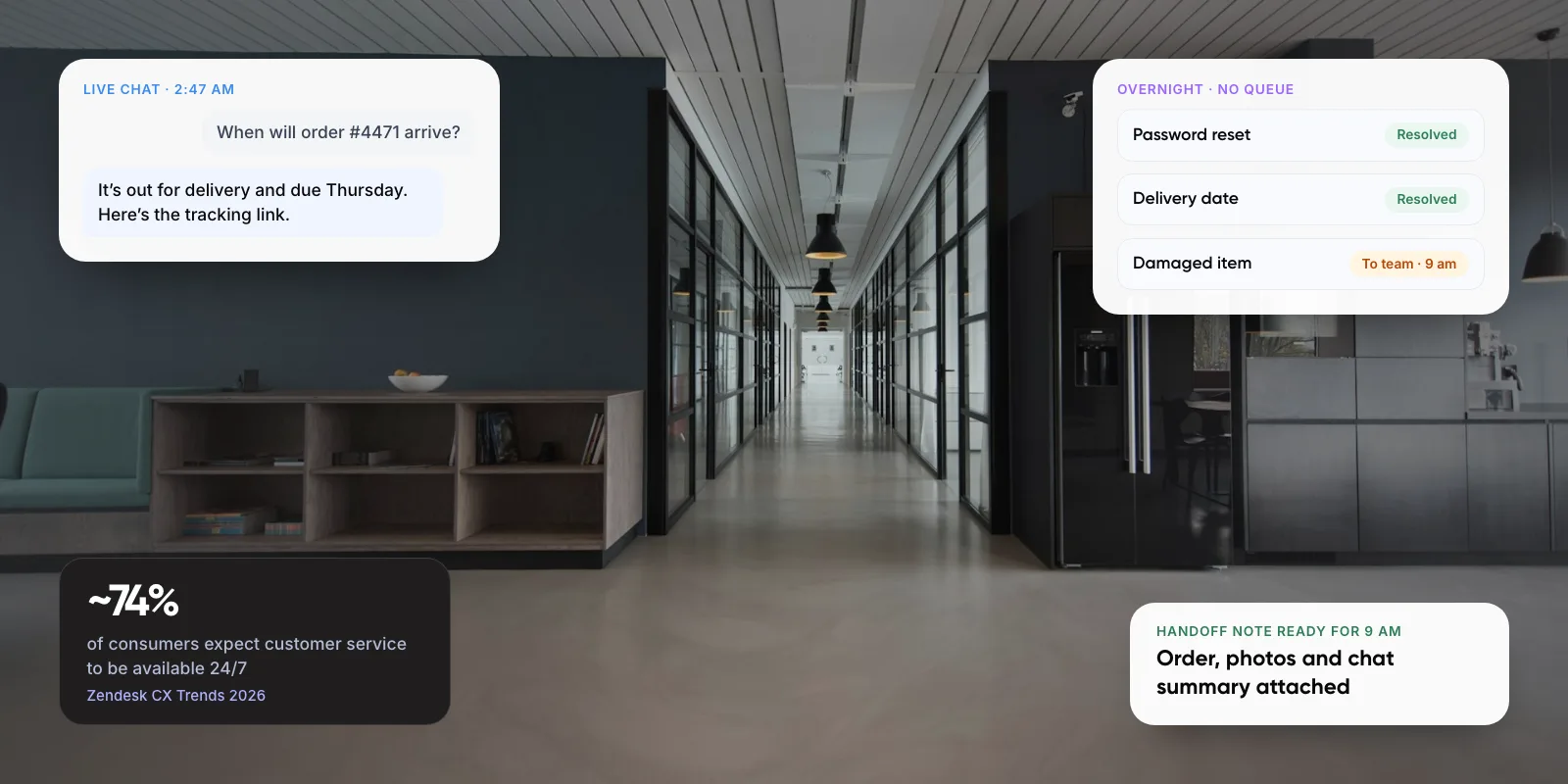
24/7 AI customer support means an AI agent answers routine questions from your own knowledge and systems at any hour. Anything it can’t resolve goes to your team with the context attached. Customers expect this: Zendesk’s CX Trends 2026 report found ~74% of consumers now expect service to be available around the clock.
This guide compares it with a ticket queue, shows what to keep with people, and gives a six-step setup with the metrics that tell you it works.
1. What Does “24/7 AI Support Included” Actually Mean?
In a ticket queue, every message becomes a ticket and waits for a person. Outside office hours, the customer usually gets an auto-reply and an answer the next working day. With 24/7 AI support, an AI agent replies first. It answers from your help articles and policies, and looks up order, booking or account data where it is connected.
The ticket system doesn’t disappear. It becomes the place where handed-over conversations wait for a person. So the real difference is what happens to routine questions. In a queue they wait. With AI support they get a full answer within seconds, while your team works on the cases that need judgement.
Note: An instant auto-reply that says “we’ll get back to you” is not 24/7 support. Ask any vendor whether their AI resolves the question or only acknowledges it.
Key takeaways
- 24/7 AI support puts an AI agent in front of your ticket system. It resolves routine questions at any hour and hands the rest to people.
- Customers expect it: ~74% expect round-the-clock service (Zendesk CX Trends 2026).
- Keep an easy route to a person. ~87% of customers say human access is essential when companies use generative AI (Gartner, 2026).
- Measure whether issues were actually solved, not just how many chats avoided a person. Only ~4% of service teams have hit their expected AI ROI (Gartner, 2026).
2. Ticket Queue vs 24/7 AI Customer Support
The two models fail in different ways. A queue fails slowly, as backlogs and next-day replies. An AI agent fails quickly, as a confident wrong answer or a loop with no way out. You need to plan for both.
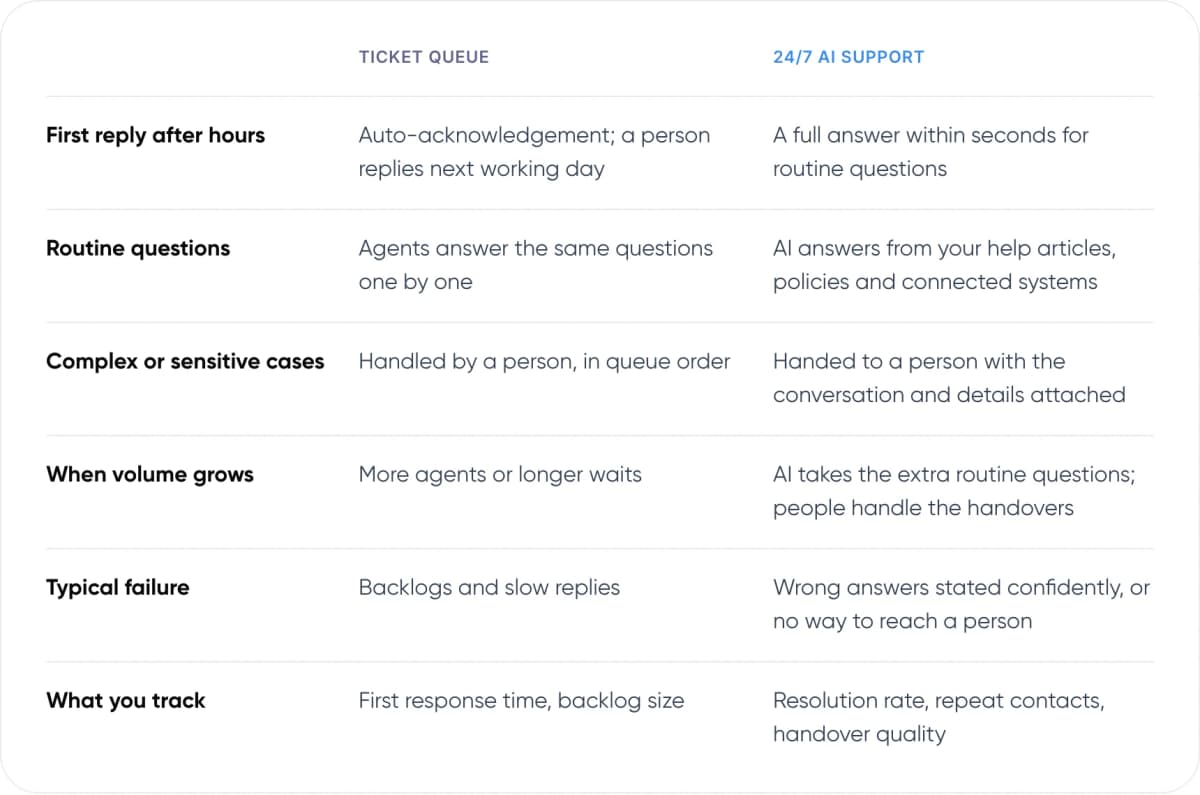
- First reply after hours — Ticket queue: Auto-acknowledgement; a person replies next working day. 24/7 AI support: A full answer within seconds for routine questions.
- Routine questions — Ticket queue: Agents answer the same questions one by one. 24/7 AI support: AI answers from your help articles, policies and connected systems.
- Complex or sensitive cases — Ticket queue: Handled by a person, in queue order. 24/7 AI support: Handed to a person with the conversation and details attached.
- When volume grows — Ticket queue: More agents or longer waits. 24/7 AI support: AI takes the extra routine questions; people handle the handovers.
- Typical failure — Ticket queue: Backlogs and slow replies. 24/7 AI support: Wrong answers stated confidently, or no way to reach a person.
- What you track — Ticket queue: First response time, backlog size. 24/7 AI support: Resolution rate, repeat contacts, handover quality.
In our view, the AI model is worth it when a large share of your volume is repeat questions with one correct answer. If most of your tickets are custom, technical or emotional, a better-run queue with good macros may serve you better.
3. Why Are Businesses Moving Away From Ticket Queues?
Customers have less patience for waiting. Zendesk’s CX Trends 2026 report surveyed over 11,000 consumers, CX leaders and agents. It found that ~88% of customers expect faster responses than a year ago. It also found that ~85% of CX leaders say one unresolved issue is enough to lose a customer.
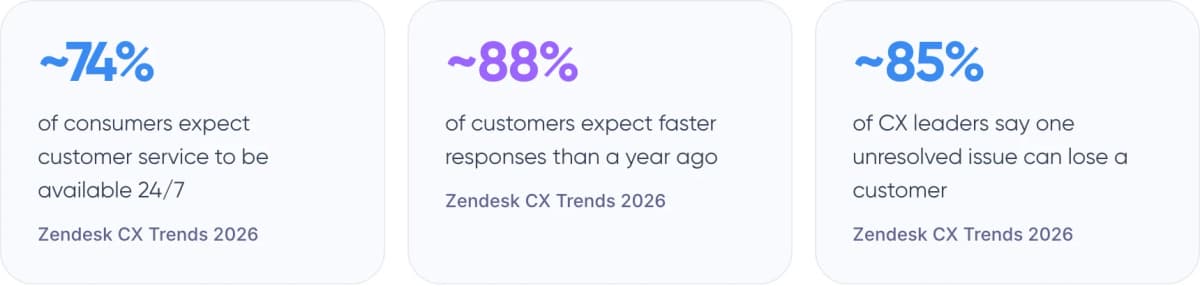
- ~74% of consumers expect customer service to be available 24/7 (Zendesk CX Trends 2026)
- ~88% of customers expect faster responses than a year ago (Zendesk CX Trends 2026)
- ~85% of CX leaders say one unresolved issue can lose a customer (Zendesk CX Trends 2026)
Budgets are moving too. A Gartner survey from August 2026 found service leaders raised AI spending by ~38%, while their overall budgets grew by only ~2%. Spending is not the same as results, though, as section 7 shows.
4. What Can AI Resolve at 3 am, and What Should Wait?
A good rule: let the AI answer when the correct answer already exists in your documents or systems. Hand over when the answer needs a decision, an exception or empathy.
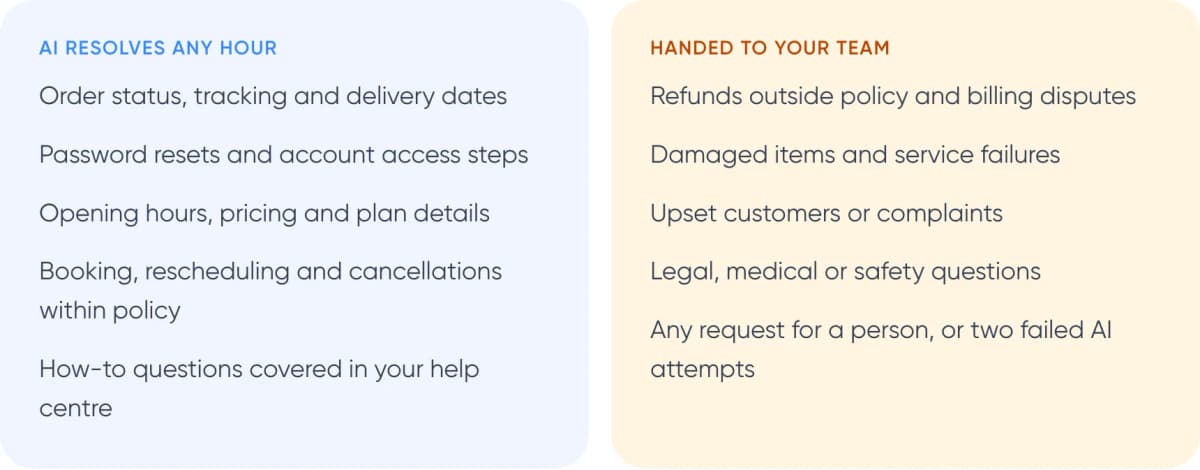
AI resolves any hour
- Order status, tracking and delivery dates
- Password resets and account access steps
- Opening hours, pricing and plan details
- Booking, rescheduling and cancellations within policy
- How-to questions covered in your help centre
Handed to your team
- Refunds outside policy and billing disputes
- Damaged items and service failures
- Upset customers or complaints
- Legal, medical or safety questions
- Any request for a person, or two failed AI attempts
Customers want that exit. Gartner’s 2026 customer survey found ~87% of customers say access to a human agent is essential when a company uses generative AI for service. After hours, be honest about timing: “Our team will reply by 9 am” beats a fake “connecting you now”. Our guide to chatbot handoff and context transfer explains how to pass the conversation over cleanly.

Warning: You are responsible for what your AI says. In Moffatt v. Air Canada (2024), a British Columbia tribunal held the airline liable after its website chatbot gave wrong bereavement-fare advice. It rejected the argument that the chatbot was a separate entity. Keep refund and policy-exception decisions with people.
Want to know which of your tickets AI could resolve tonight? We can review a sample with you.
5. Real Example: What Klarna Learned
Klarna, the payments company, launched an OpenAI-powered assistant in its app in early 2024. It is available around the clock in 23 markets and over 35 languages. Klarna’s February 2024 announcement reported these first-month results:
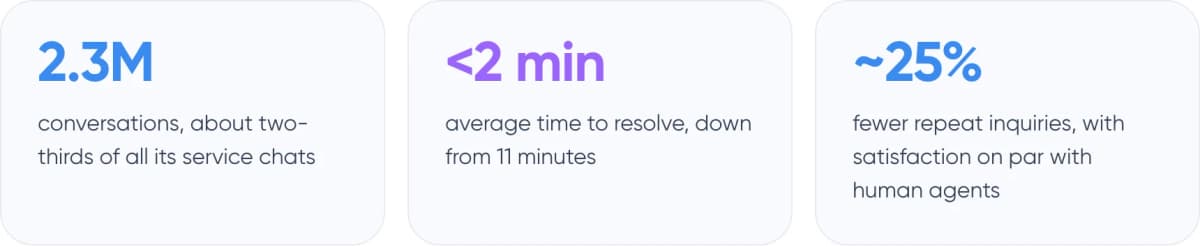
- 2.3M conversations, about two-thirds of all its service chats
- <2 min average time to resolve, down from 11 minutes
- ~25% fewer repeat inquiries, with satisfaction on par with human agents
The second part of the story matters as much. In May 2025, Klarna told Bloomberg it would recruit more people for customer service so customers could always reach a human. The assistant stayed and, per the company, still handles about two-thirds of inquiries. The lesson we take from it: AI can carry the routine volume, but the human path has to stay open and staffed.
6. How to Set Up 24/7 AI Support in 6 Steps
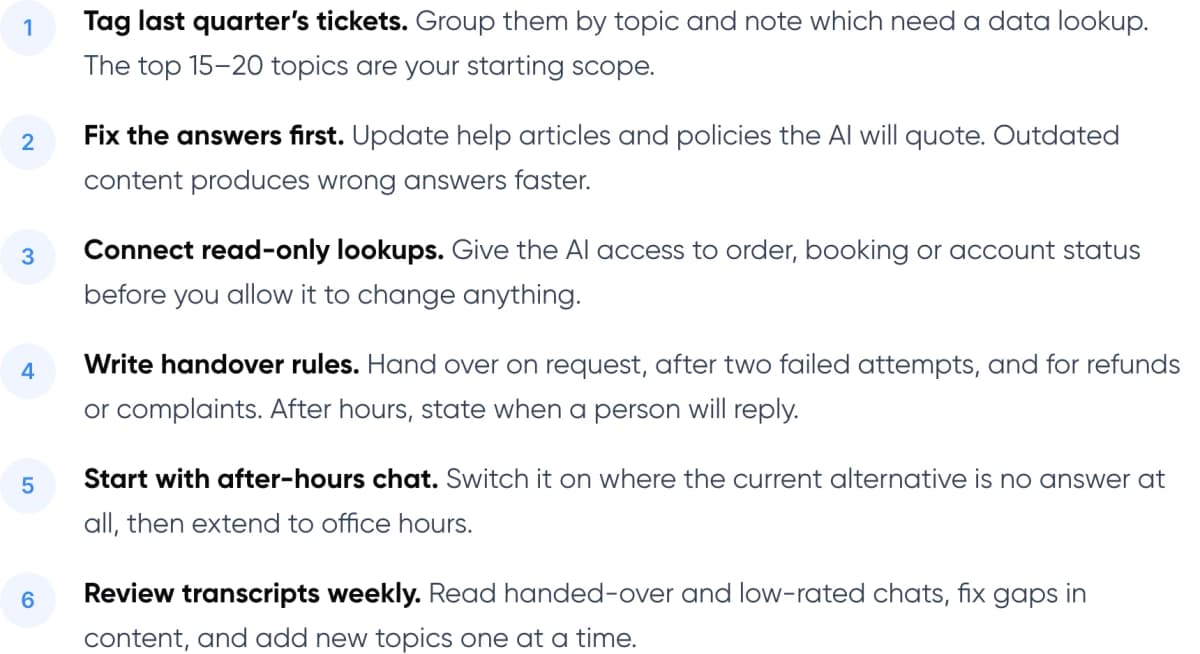
- Tag last quarter’s tickets. Group them by topic and note which need a data lookup. The top 15–20 topics are your starting scope.
- Fix the answers first. Update help articles and policies the AI will quote. Outdated content produces wrong answers faster.
- Connect read-only lookups. Give the AI access to order, booking or account status before you allow it to change anything.
- Write handover rules. Hand over on request, after two failed attempts, and for refunds or complaints. After hours, state when a person will reply.
- Start with after-hours chat. Switch it on where the current alternative is no answer at all, then extend to office hours.
- Review transcripts weekly. Read handed-over and low-rated chats, fix gaps in content, and add new topics one at a time.
Accurate answers depend on retrieval, meaning how the AI finds the right document or record before it replies. Our guide to agentic RAG for customer service covers how that works.
7. How Do You Know It’s Working?
Most teams don’t get the return they planned. A Gartner survey published in November 2026 found only ~4% of service organisations have achieved the ROI they expected from AI. In our view, one common cause is measuring the wrong thing. Many teams track “deflection”, the share of customers who never reached a person. That number also counts customers who simply gave up.
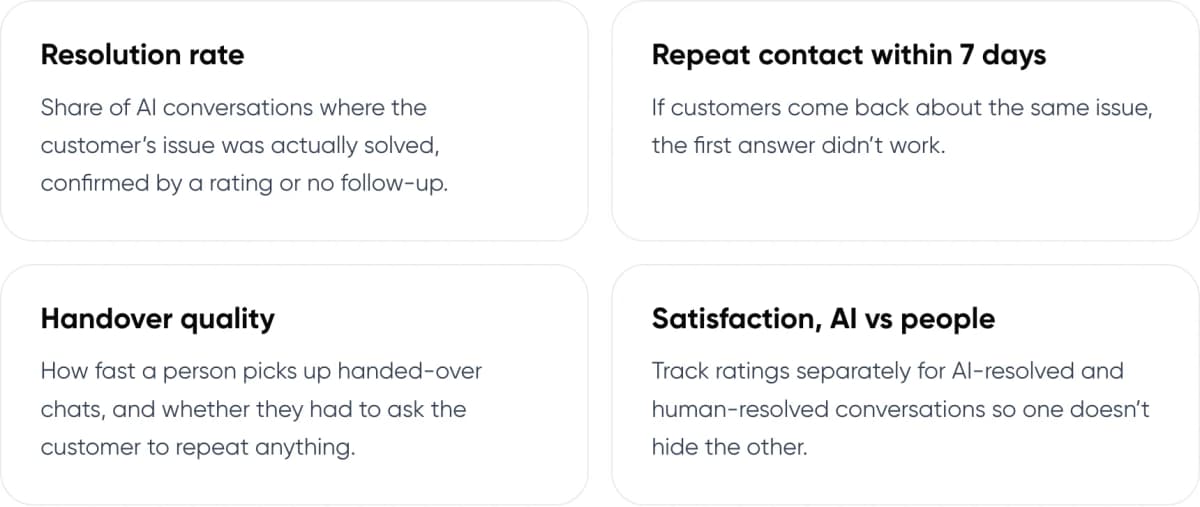
- Resolution rate: Share of AI conversations where the customer’s issue was actually solved, confirmed by a rating or no follow-up.
- Repeat contact within 7 days: If customers come back about the same issue, the first answer didn’t work.
- Handover quality: How fast a person picks up handed-over chats, and whether they had to ask the customer to repeat anything.
- Satisfaction, AI vs people: Track ratings separately for AI-resolved and human-resolved conversations so one doesn’t hide the other.
Reliability matters more than reach. Gartner’s September 2026 survey found only ~27% of customers would try a chatbot again after a bad experience. A narrow AI that answers correctly is better than a broad one that guesses.
8. Frequently Asked Questions
Is 24/7 AI customer support really available around the clock?
The AI is. It can answer documented questions and look up connected data at any hour. Cases it can’t resolve wait for a person, unless you also staff nights. Good setups tell the customer exactly when a person will reply, rather than pretending someone is online.
Does AI customer support replace the ticket system?
No. The AI sits in front of it. Routine questions are resolved without becoming tickets, and everything handed over still lands in your help desk, such as Zendesk or Freshdesk, with the conversation attached. Your team keeps working in the same tool.
What happens when the AI can’t answer at night?
It should say so, collect the details a person will need, and create a ticket for the morning. Gartner’s 2026 survey found only ~27% of customers would try a chatbot again after a bad experience, so an honest handover beats a guess.
Is a company responsible for what its AI support says?
In Moffatt v. Air Canada (2024), a British Columbia tribunal held the airline liable for wrong advice from its website chatbot. It is a small-claims decision, not binding elsewhere, but it shows the risk. Keep policy exceptions and refunds with people.
Will customers actually use AI support?
Many are willing but few do today. Gartner’s 2026 survey of 3,566 customers found ~49% would have used a company chatbot, yet only ~7% did in their last service interaction. Accurate answers and a visible route to a person drive adoption.
9. Conclusion
24/7 AI customer support works best as a front door, not a replacement for your team. It resolves routine questions at any hour and hands the rest to people with the context attached. Start by tagging last quarter’s tickets and switching the AI on for after-hours chat only, where the alternative is no answer at all.
For an example of our support work, see Paymate.
Need this set up for your business? Our AI customer support automation service builds 24/7 AI support connected to your help desk, orders or accounts, with handover to your team.
Author