Best CSAT Survey Tools for Small Businesses (2026): Free and Paid Compared
For most small businesses, the best CSAT survey tools in 2026 are Tally or Google Forms if you want to pay nothing, Typeform or SurveyMonkey if you want a polished standalone survey, and the CSAT built into Zendesk or Freshdesk if you already run support there.
This guide compares six options on price, response limits and setup effort, so you can start measuring customer satisfaction this week.

1. What Is a CSAT Survey Tool?
CSAT (customer satisfaction score) measures how happy a customer was with one interaction, such as a support ticket or a delivery. You ask one question, usually on a 1 to 5 scale. Your score is the share of 4 and 5 ratings out of all ratings, shown as a percentage.
A CSAT survey tool sends that question at the right moment and adds up the answers. Survicate’s 2025 CSAT benchmark, based on 1,259 surveys, put the median CSAT score at ~80% and the median response rate at ~7.5%. Survicate sells survey software, so read these as one vendor’s dataset, but they give you a useful baseline.
Key takeaways
- Tally is the strongest free option: unlimited forms and submissions within fair use, with Pro at $29 a month.
- Typeform’s free plan stops at 10 responses a month; Basic is $28 a month billed yearly for 100.
- Zendesk includes CSAT from Suite Growth upward, not on Suite Team.
- Delighted, a popular CSAT tool, shut down on June 30, 2026, so check how you would export your data before you commit.
- Survicate’s 2025 benchmark puts the median CSAT score at ~80% and the median response rate at ~7.5%.
2. Which CSAT Survey Tools Are Best for Small Businesses?
The six tools below fall into two groups. Form builders like Tally and Typeform send surveys anywhere, but you connect them to your support tool yourself. Helpdesks like Zendesk and Freshdesk send the survey automatically when a ticket closes, but only on certain plans.
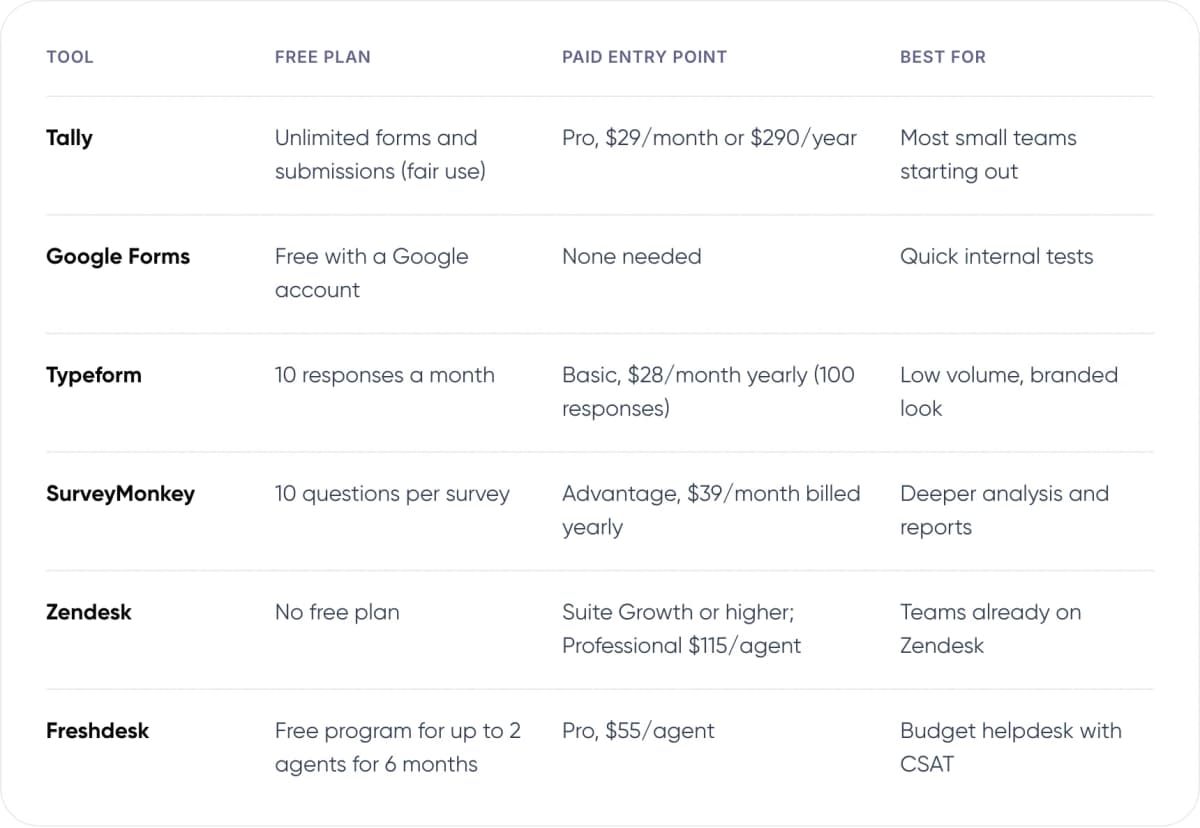
- Tally — Free plan: Unlimited forms and submissions (fair use). Paid entry point: Pro, $29/month or $290/year. Best for: Most small teams starting out.
- Google Forms — Free plan: Free with a Google account. Paid entry point: None needed. Best for: Quick internal tests.
- Typeform — Free plan: 10 responses a month. Paid entry point: Basic, $28/month yearly (100 responses). Best for: Low volume, branded look.
- SurveyMonkey — Free plan: 10 questions per survey. Paid entry point: Advantage, $39/month billed yearly. Best for: Deeper analysis and reports.
- Zendesk — Free plan: No free plan. Paid entry point: Suite Growth or higher; Professional $115/agent. Best for: Teams already on Zendesk.
- Freshdesk — Free plan: Free program for up to 2 agents for 6 months. Paid entry point: Pro, $55/agent. Best for: Budget helpdesk with CSAT.
US prices as listed in November 2026. Form tools are priced per account; helpdesks per agent. Prices change often, so check each vendor’s pricing page before you buy.
3. What Are the Best Free CSAT Survey Tools?
Tally is our pick for a free CSAT survey. Tally’s features page offers unlimited forms and submissions at no cost, within its fair-use guidelines. Conditional logic and webhooks are on the free plan, so you can send each rating to Slack or a spreadsheet. Pro costs $29 a month or $290 a year and removes the “Made with Tally” badge.
Google Forms is free with any Google account and has no response cap. It works for a basic 1 to 5 question, and answers land in Google Sheets. The trade-off is design: forms always show Google branding, and putting one-click rating buttons inside an email takes manual work.
Tip: Free tools don’t know who the customer is. Add a hidden field with the ticket or order ID to the survey link, so you can trace a low score back to the conversation.
4. Typeform vs SurveyMonkey: Which Paid Tool Fits?
Typeform prices by responses. Its pricing page lists Basic at $28 a month billed yearly ($39 monthly) for 100 responses a month. Plus, at $56 yearly, raises that to 1,000 and removes Typeform branding. The free plan allows only 10 responses a month, which is a trial rather than a working plan.
SurveyMonkey suits teams that want stronger analysis. On SurveyMonkey’s pricing page, Advantage costs $39 a month, billed as $468 a year. Team plans start at $30 per user a month, with a three-user minimum and annual billing. The free Basic plan caps each survey at 10 questions.
In our view, Typeform Basic is enough if you expect fewer than 100 survey responses a month. Above that, Tally Pro costs less than either and has no response cap within its fair-use rules.
5. Do Zendesk and Freshdesk Include CSAT Surveys?
Yes, but not on every plan. Zendesk’s help centre lists CSAT on Suite Growth and above, and on Support Professional and above. Suite Team ($55 per agent a month) doesn’t include it. For email tickets, Zendesk sends the survey about 24 hours after a ticket is marked Solved by default, and the rating is saved on the ticket.
Freshdesk lists Growth at $19 and Pro at $55 per agent a month, billed annually. Several pricing reviews place customer satisfaction surveys on Pro, so confirm the plan with Freshworks before you buy.
For a three-agent team on annual billing, Zendesk Suite Professional comes to $4,140 a year and Freshdesk Pro to $1,980. Pay that only if you also need the helpdesk. If you just want CSAT, a form tool linked from your closing email costs far less.
Note: Built-in helpdesk CSAT ties each score to an agent and a ticket automatically. With a form tool, you have to pass that information in the survey link yourself.
6. What Can Small Businesses Learn From the Delighted Shutdown?
Delighted was a popular CSAT and NPS tool for small teams. Qualtrics, which bought it in 2018, announced in 2025 that it would sunset the product. Annual renewals stopped from July 1, 2025, and access ended on June 30, 2026. Customers had to export their survey history before that date or lose it.
The lesson is about your data, not one vendor. Whatever tool you pick, check three things before you commit:
- Export format. Can you download every response, with dates and customer IDs, as CSV?
- Ownership. Is the tool a core product for its owner, or a side product that could be retired?
- Backups. Send each response to a sheet or your CRM as well, so you hold your own copy.
7. How Do You Set Up a CSAT Survey in 5 Steps?
- Choose one moment to measure. For most small businesses, this is right after a support ticket is solved.
- Write one question. For example, “How satisfied were you with our support today?” on a 1 to 5 scale.
- Add one optional follow-up. Ask “What could we have done better?” only when the rating is 3 or below.
- Send it automatically. Use your helpdesk’s CSAT setting, or link a form from your closing email with the ticket ID attached.
- Review low scores every week. Read each 1 or 2 rating, reply to the customer and fix the cause.

Want help connecting CSAT to your support stack? Talk to our AI consulting team.
8. What Response Rate Should You Expect?
Published benchmarks vary widely because they measure different things. SurveyMonkey’s 2025 platform data shows customer feedback surveys averaging a ~31.81% response rate. Those surveys were sent by SurveyMonkey customers to their own audiences, who already know the sender. Survicate’s CSAT-only median is far lower, at ~7.5%.
Our view: track your own rate from week one and improve on it, rather than chasing an industry number. The levers that usually matter most are sending soon after the interaction, asking one question, and putting the rating buttons inside the email so customers don’t need to open a new page.
9. Frequently Asked Questions
What is the best free CSAT survey tool?
For most small businesses, Tally. Its free plan includes unlimited forms and submissions within fair use, plus conditional logic and webhooks. Google Forms is also free with no response cap, but it gives you less control over design and always shows Google branding.
How do you calculate a CSAT score?
Count the responses rated 4 or 5 on a 5-point scale, divide by the total number of responses, then multiply by 100. For example, 82 satisfied ratings out of 100 responses gives a CSAT score of ~82%. Zendesk’s classic survey uses a Good or Bad scale and divides Good ratings by all ratings.
Does Zendesk include CSAT surveys on every plan?
No. Zendesk lists CSAT on Suite Growth, Professional, Enterprise and Enterprise Plus, and on Support Professional or Enterprise. Suite Team and Support Team do not include it. For email tickets, the survey goes out about 24 hours after a ticket is marked Solved by default.
What is a good CSAT score for a small business?
Survicate’s 2025 benchmark of 1,259 surveys found a median CSAT score of ~80%. Treat that as a rough reference, since scores vary by industry, scale and survey timing. The more useful target is steady improvement against your own score from month to month.
When should you send a CSAT survey?
Send it soon after the interaction you want to measure, such as a solved support ticket or a completed delivery. For email tickets, Zendesk’s default is about 24 hours after a ticket is solved. Keep it to one question, and add a short follow-up only for low ratings.
10. Conclusion
The best CSAT survey tools for small businesses are the ones that send a single question at the right moment and keep your data exportable. Start free with Tally or Google Forms. Move to built-in helpdesk CSAT once you need scores tied to agents and tickets. Pick one tool this week, send it after every solved ticket, and review the low scores every Friday.
If low scores keep pointing to slow replies, our AI customer support automation service can help. It answers and routes routine questions, so your team has more time for the harder ones.
Author