Best CRM Automation Tools for Small Business
For most small businesses, the strongest CRM automation tools in 2026 are Zoho CRM, HubSpot, Pipedrive and Freshsales, with Zoho’s Bigin as a low-cost option. The biggest difference between them is which paid plan lets you build automated workflows. On several of these tools, the cheapest plan doesn’t include them.
This guide compares the five on price, automation limits and fit, so you can pick one for a team of 2 to 20 people.
1. What Is CRM Automation?
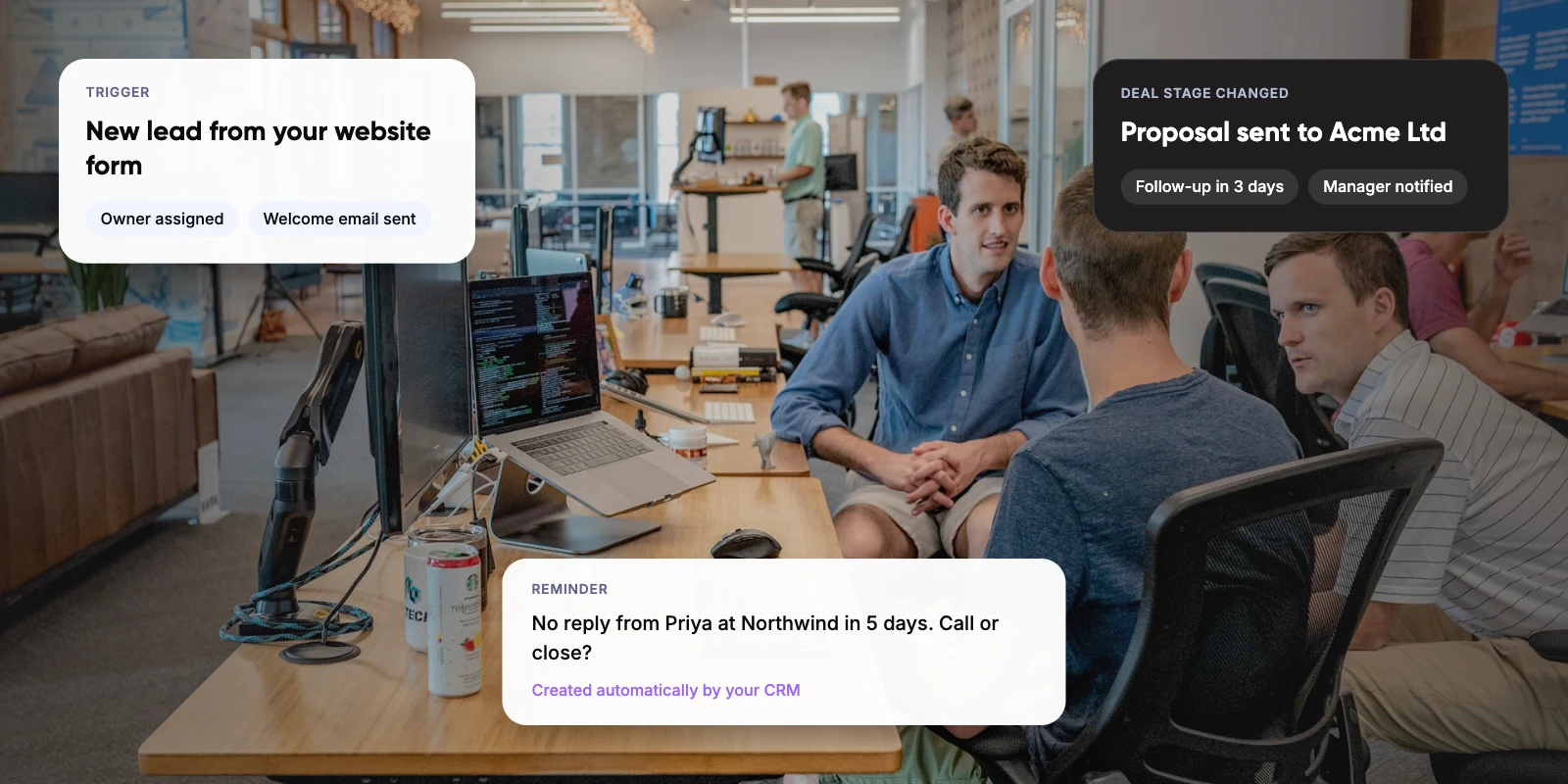
A CRM (customer relationship management) system stores your contacts, deals and conversations in one place. CRM automation is the set of rules that act on that data without anyone clicking. Each rule has a trigger, such as “deal moved to Proposal”, and one or more actions, such as “create a follow-up task in 3 days”.
The case for it is time. Salesforce’s State of Sales report (7th edition, February 2026) found reps spend ~40% of their week selling. The other ~60% goes on work like data entry, research and internal meetings. In a small business, that admin often lands on the founder.
Key takeaways
- On several CRMs the cheapest paid plan has little or no workflow automation, so compare the price of the plan that does.
- Zoho CRM Standard ($14) and Freshsales Growth ($9) are the cheapest full CRMs with workflow rules included.
- HubSpot’s full workflows start on Sales Hub Professional at $90 per seat plus a $1,500 onboarding fee.
- Pipedrive Growth ($39) includes 50 automations shared across the company; Lite has none.
- Start with three rules: lead assignment, stage-based follow-ups and stale-deal alerts.
2. Which CRM Automation Tools Are Best for Small Business?
We compared five widely used CRMs. The column to watch is the second one: the first plan that lets you build workflow rules. If you need automation, that is the price you will actually pay, not the lowest price on the page.
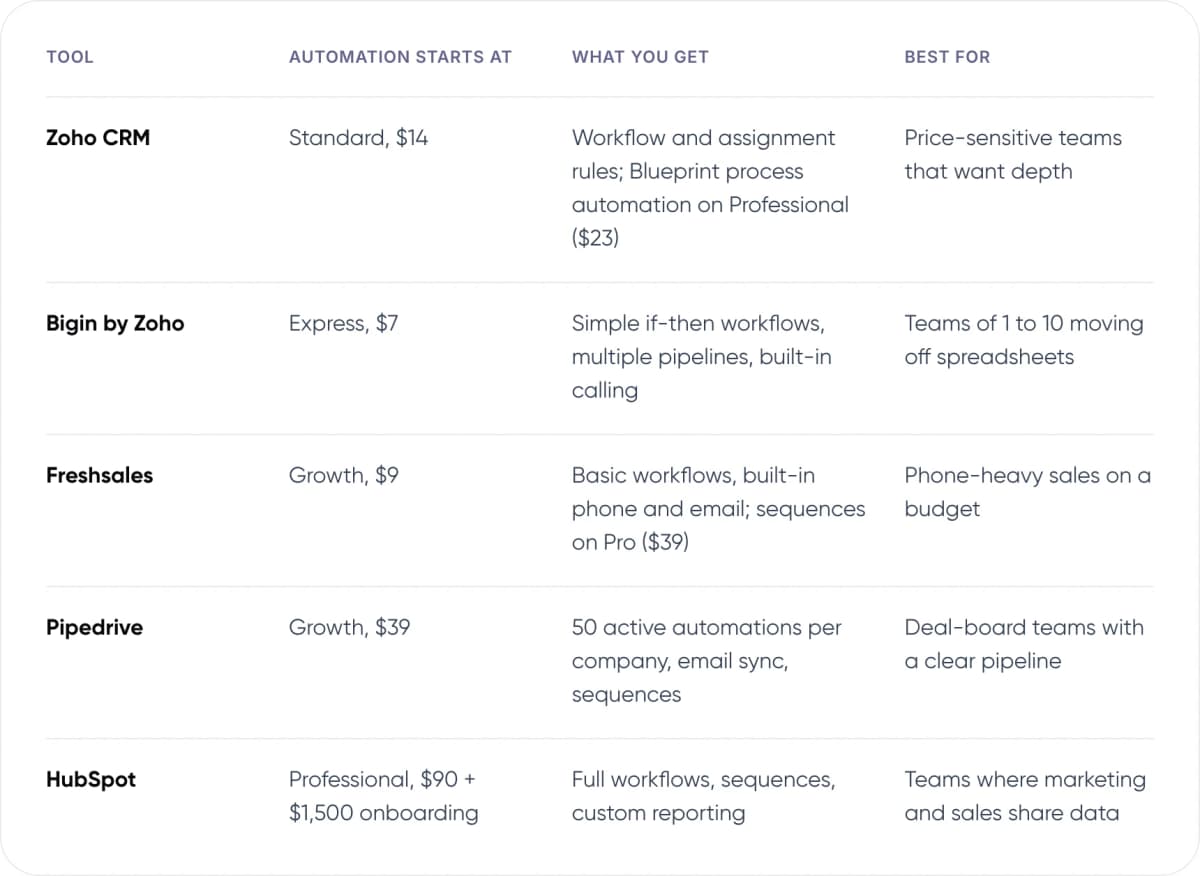
- Zoho CRM — Automation starts at: Standard, $14. What you get: Workflow and assignment rules; Blueprint process automation on Professional ($23). Best for: Price-sensitive teams that want depth.
- Bigin by Zoho — Automation starts at: Express, $7. What you get: Simple if-then workflows, multiple pipelines, built-in calling. Best for: Teams of 1 to 10 moving off spreadsheets.
- Freshsales — Automation starts at: Growth, $9. What you get: Basic workflows, built-in phone and email; sequences on Pro ($39). Best for: Phone-heavy sales on a budget.
- Pipedrive — Automation starts at: Growth, $39. What you get: 50 active automations per company, email sync, sequences. Best for: Deal-board teams with a clear pipeline.
- HubSpot — Automation starts at: Professional, $90 + $1,500 onboarding. What you get: Full workflows, sequences, custom reporting. Best for: Teams where marketing and sales share data.
US prices per user per month, billed annually, as listed in November 2026. Prices change often and vary by region, so check each vendor’s pricing page before you buy.
3. Zoho CRM and Bigin: Most Automation per Dollar
Zoho CRM’s pricing page lists Standard at $14 and Professional at $23 per user per month, billed annually. Standard already includes workflow rules and assignment rules. Professional adds Blueprint, Zoho’s tool for enforcing a step-by-step sales process, plus quotes and invoices.
Bigin is Zoho’s lighter CRM for very small teams. Paid plans start at $7 per user per month, and its workflows cover simple if-then rules such as “stage changed, notify owner”. If you need branching logic or long delayed sequences, plan to move up to Zoho CRM.
In our view, Zoho is the best value if you are price-sensitive and comfortable with a busier interface. The trade-off is setup time: Zoho gives you many settings, and someone has to own them.
4. HubSpot: Easiest to Start, Costly to Automate
HubSpot’s free CRM is the easiest place to start, and many small teams already use it for contacts. The catch is automation. On HubSpot’s Sales Hub pricing page, Starter lists at $20 per seat (with a lower promotional price for new customers on annual billing) and includes only simple automation. Fully customisable workflows sit on Professional at $90 per seat per month, billed annually, plus a one-time $1,500 onboarding fee.
For 5 users, that is $5,400 a year in seats plus $1,500 in the first year. The same team on Zoho CRM Professional would pay $1,380 a year. HubSpot earns the premium if marketing and sales share one database and you want polished reporting with little admin.
Tip: Before you pay for Professional, list the five automations you would build in month one. If they are all “create task” or “send email” rules, a cheaper tool will likely cover them.
5. Pipedrive and Freshsales: Built Around the Pipeline
Pipedrive is built for teams that live in a deal board. Its pricing page lists Lite at $14 and Growth at $39 per seat per month, billed annually. Lite has no workflow automations. Growth includes 50 active automations, and that limit is shared across the whole company, not per user.
Freshsales from Freshworks is the cheapest way into automation among the full CRMs here. Freshworks lists Growth at $9 per user per month, billed annually, with basic workflows, built-in phone and email. Pro at $39 adds sales sequences and multiple pipelines.
Note: Monthly billing costs more on every tool here. Pipedrive Growth, for example, is $49 per seat on monthly billing versus $39 on annual. Check which rate a quote is using.
6. What Does CRM Automation Look Like in Practice?
Sea Lanes Brighton is one of Bigin’s published customers. Bigin’s website credits it with a ~232% revenue increase in its first three months on the CRM, from May to July 2024. Zoho publishes this result itself, so treat it as one company’s experience, not a typical outcome.
Results like that depend on much more than software. In our view, most small businesses see their first real gains from three simple automations:
- Lead assignment. New form or email leads go to an owner straight away, with a first task due today.
- Stage-based follow-ups. When a deal moves to “Proposal”, the CRM creates a follow-up task a few days later.
- Stale-deal alerts. Deals with no activity for a set number of days get flagged to the owner or manager.

7. How Do You Choose a CRM Automation Tool in 5 Steps?
- Write down your sales stages. Use the steps a deal really goes through, not an ideal process.
- List the five automations you need first. For each, note the trigger and the action, for example “form submitted, assign owner”.
- Find the plan that unlocks them. Check workflow limits as well as price, since some caps are per company, not per user.
- Cost it for 12 months. Multiply seats by the annual rate, then add onboarding fees and any paid add-ons.
- Trial two tools on real deals. Build your five rules in each during the free trial and keep the one your team actually updates.
Want a second opinion on your shortlist? Talk to our AI consulting team.
8. When Is Built-in CRM Automation Not Enough?
Rule-based workflows work well when the trigger is a clean field change. They struggle when the input is messy: a long email thread, a call recording or a WhatsApp message. Deciding whether a reply means “interested” or “not now” needs judgement, not a rule.
That is where an AI agent helps: software built on a large language model (LLM) that reads unstructured text and updates the CRM through its API. Typical jobs include logging call notes, qualifying inbound leads and drafting follow-ups for a rep to approve. Several CRMs now include AI features, such as Zia in Zoho, but these mainly work with data inside that CRM.
Our view: don’t start here. Get the basic rules running for 2 to 3 months first. If reps still spend hours copying data between your CRM, inbox and other tools, a custom AI agent is worth costing out.
9. Frequently Asked Questions
What is the best CRM automation tool for a small business?
It depends on budget and how you sell. Zoho CRM gives the most automation per dollar, with workflow rules on its $14 Standard plan. Pipedrive suits teams that work from a deal board. HubSpot is the easiest to start with for free, but its full workflows need Professional at $90 per seat.
Is there a free CRM with automation?
Free plans are limited. HubSpot’s free CRM covers contacts and deals but not full workflows. Bigin’s free plan allows one user and very limited automation. Zoho CRM has a free edition for up to three users, with basic features. For dependable workflow rules, expect to pay from about $7 to $14 per user per month.
How much does CRM automation cost for a 5-person team?
On annual billing, a 5-person team pays about $840 a year on Zoho CRM Standard, $540 on Freshsales Growth, $2,340 on Pipedrive Growth and $5,400 on HubSpot Sales Hub Professional, plus HubSpot’s $1,500 onboarding fee. Check each vendor’s current pricing page before you budget.
What should I automate first in a CRM?
Start with lead assignment, follow-up tasks when a deal changes stage, and alerts for deals with no recent activity. These three rules stop leads being missed and need no complex logic, so they work on entry-level automation plans. Add email sequences once the basics run reliably.
Do small businesses need AI in their CRM?
Not at first. Rule-based workflows cover most early needs. AI helps when inputs are unstructured, such as summarising calls or reading email replies to update a deal. Salesforce’s 2026 State of Sales report found reps spend only ~40% of their week selling. Cutting the rest of that admin is the main reason to add AI later.
10. Conclusion
The best CRM automation tools for small business are the ones whose automation tier you can afford at your team size. Zoho and Freshsales get you there for the least money, Pipedrive suits deal-board teams, and HubSpot fits when marketing and sales share one system. Write down your first five automations, then trial your top two against them before you sign an annual plan.
For an example of AI connected across several business systems, see Paymate, one AI support system across voice, email and chat that we built.
If customer questions also take up your team’s time, our AI customer support automation service connects to your CRM and helpdesk to answer and route them.
Author