When Does It Make Sense to Build Your Own Customer Support Chatbot Instead of Buying One?
For most companies, buying a customer service chatbot is the right first step. Building your own makes sense when the chatbot must act inside your own systems, when your volume makes per-resolution fees expensive, or when no product fits your channels and languages.
Even then, the evidence favours building with an experienced partner over building entirely in-house.
1. What Are Your Three Options?
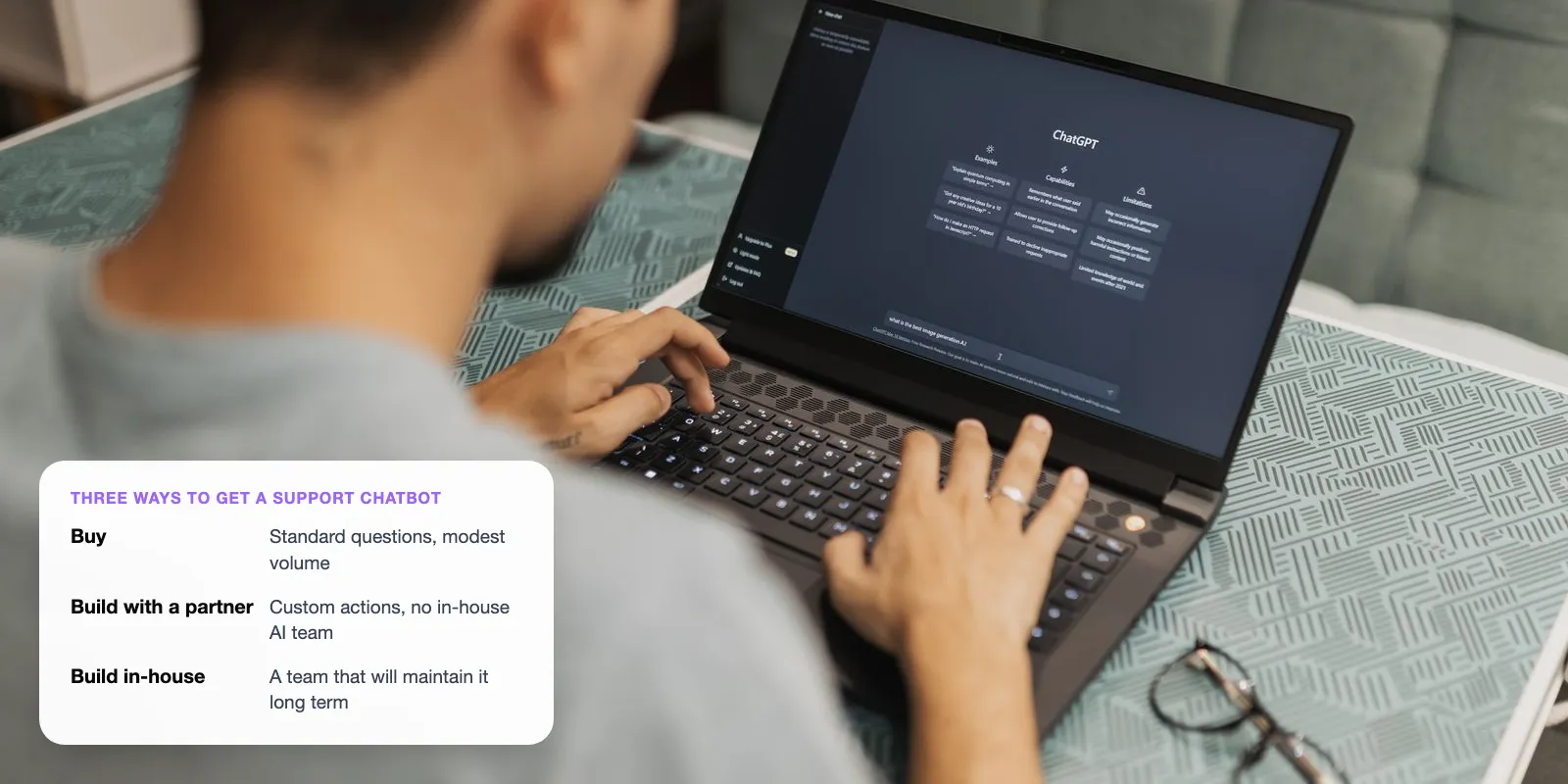
MIT NANDA’s 2025 report, The GenAI Divide, studied more than 300 public AI projects. As Fortune reported in August 2025, AI tools bought from specialist vendors or built through partnerships succeeded about ~67% of the time. Tools companies built on their own succeeded only about a third as often. So the real choice has three options, not two.
Key takeaways
- Buy first if your questions are mostly standard, you use a mainstream help desk and you handle fewer than about 1,000 AI conversations a month.
- Build when the chatbot must act in your own systems, when volume makes per-resolution fees expensive, or when no product fits your channels and languages.
- In MIT’s 2025 research, vendor and partner-led projects succeeded about three times as often as projects companies built alone.
- The cheapest option at launch is rarely the cheapest at scale. Model your cost at today’s volume and at three times today’s.
- What it means — Buy: Subscribe to a vendor such as Intercom, Zendesk or Freshdesk · Build in-house: Your engineers build on an AI model such as GPT or Claude · Build with a partner: A specialist builds a system you own, often with your team
- Time to launch — Buy: Days to weeks · Build in-house: Usually months · Build with a partner: Weeks to months, depending on scope
- Cost shape — Buy: Low upfront; seats plus a fee per resolution · Build in-house: High upfront (salaries); low cost per conversation · Build with a partner: Fixed build cost; monthly running and support
- Fit to your systems — Buy: Limited to the vendor’s connectors · Build in-house: Full · Build with a partner: Full
- Who maintains it — Buy: The vendor · Build in-house: Your team · Build with a partner: The partner, your team, or both
- Main risk — Buy: Fees grow with volume; less control · Build in-house: Stalls after the pilot; upkeep falls on a busy team · Build with a partner: Depends on the partner’s quality and handover
Our view: the most common mistake is building in-house without anyone to maintain it. A chatbot is not a one-off project. Help content, AI models and customer questions all change every week.
2. When Should You Buy a Customer Service Chatbot?
Buy when the job is standard. If most questions are answered by help articles and you already use a mainstream help desk, a bought chatbot will be live faster and cost less in the first year. The vendor has also done the integration and improvement work that internal projects often skip.
Buy if most of these are true
- Fewer than about 1,000 AI conversations a month
- Your channels are web chat and email, on a help desk the vendor supports
- Answers come from help content, not from your own databases
- English, or another language the vendor already handles well
- No engineers free to maintain an AI system
Note: Gartner said in June 2025 that only about 130 of the thousands of vendors claiming “agentic AI” are real. Many are rebranded chatbots. Ask any vendor to complete a real action, such as a refund, in a live demo.
3. When Does Building Make Sense?
Building pays off when a product cannot do the job, or when it can but the bill grows too large. Three situations come up most often.
- It must act in your systems: Partial refunds, rebooking or account changes in your own billing or ERP system need custom integration.
- Your volume is high: Bought AI agents charge per resolution. At some volume, a build with little or no per-resolution fee costs less.
- No product fits: WhatsApp-first support, Arabic and English together, strict data rules, or several products from one inbox.

To see how volume matters: Intercom charges $0.99 per outcome for its Fin AI agent. An outcome is a resolved conversation, or a handoff Fin completes through a set workflow. At 5,000 outcomes a month, that is about $4,950 a month, or roughly $59,400 a year, before seats and add-ons.
4. What Does It Cost to Build a Customer Service Chatbot?
There is no single price. The biggest factor is how many of your systems the chatbot has to connect to. Intercom estimates a fully in-house build at $300,000 to $500,000 or more in year one, mainly engineering salaries, plus $150,000 to $250,000 a year to maintain. Intercom sells the “buy” option, so treat these as upper estimates for a full in-house team. A partner build with a narrow scope usually costs less.
- Upfront — Buy: Setup and configuration, often internal time · Build: Design, development, integration and testing
- Per conversation — Buy: Vendor fee per resolution or session · Build: AI model usage plus hosting
- Monthly fixed — Buy: Seats and add-ons · Build: Monitoring, support and updates
- Hidden — Buy: Overages, minimums, channel fees · Build: Knowledge-base work, security reviews, staff time
A simple break-even check
Divide the build’s first-year cost by the vendor’s fee per resolution. The answer is the number of resolutions at which both options cost the same. Example, using a made-up $40,000 build and $0.99 per outcome: $40,000 ÷ $0.99 ≈ 40,400 resolutions a year, or about 3,400 a month. Below that, buying is cheaper in year one. Above it, building is. Swap in a real quote before you rely on it.
5. Why Do In-House Builds Fail More Often?
MIT’s researchers found the gap was not about which AI model teams used. It came from what happens after the demo. Internal projects often stall when the chatbot has to connect to live systems, handle unusual cases and keep improving. Specialist vendors and partners tend to do that work as part of the job.
Gartner sees the same pattern. In June 2025 it predicted over ~40% of agentic AI projects will be cancelled by the end of 2027, because of rising costs, unclear value or weak risk controls.
What a build needs to succeed
- A clear, measurable goal, such as resolution rate on order-status questions
- A narrow first scope, not “answer everything”
- A named owner for the chatbot after launch
- Weekly review of real conversations
- A clear handover to a person when the chatbot is unsure
Not sure which side of the line you’re on? Bring your ticket volume and the systems involved.
6. Real Examples: Klarna and Paymate
Klarna built its own assistant on OpenAI models. In its February 2024 announcement, Klarna said the assistant handled 2.3 million conversations in its first month, two-thirds of its service chats. Resolution time fell from 11 minutes to under 2. These are Klarna’s own figures. In 2025, its CEO said in interviews that focusing on cost had lowered service quality, and Klarna began hiring human agents again so customers could always reach a person. The lesson: even a large custom build needs a clear route to a human.
Case study · Paymate
Source: Neura Dynamics
Paymate supports several software products by voice, email and chat in English, Spanish and French. An off-the-shelf tool would have needed a separate setup per product. We built one system that identifies the product, answers from that product’s knowledge base and checks its answer. After three low-confidence attempts, it hands over to a person. For high-confidence email queries, first response time fell from hours to under a minute.
For ecommerce, we built Zenva, which drafts Shopify support replies from live order data for agents to approve.
7. A 5-Step Way to Decide
- Count your volume. Estimate how many tickets an AI could resolve each month, today and at three times today’s volume.
- List the actions. Write down what the chatbot must do, and mark each as “vendor connector exists” or “needs custom work”.
- Price both options. Get a vendor quote at your volume, including overages, and a build quote. Run the break-even check.
- Check your team. Name who will own the chatbot after launch. If nobody can, buy or use a partner with ongoing support.
- Start narrow. Launch on one high-volume, low-risk topic, such as order status, and measure for a month before expanding.
Tip: Ask for an exit plan either way. With a vendor, confirm you can export conversations and help content. With a build, confirm you own the code, prompts and data.
8. Is There a Middle Path?
Yes, and it is often the best answer. Buy the chatbot from a vendor, and build only the part that connects it to your own systems. For example, your help desk’s AI answers from help content, while a custom service checks refund eligibility in your billing system.
The trade-off is two systems to manage. Make sure the vendor’s AI can call your service, and that both log to one place. Our AI customer support agent cost guide breaks down both routes.
9. Frequently Asked Questions
How do you build a customer service chatbot?
Start with one narrow goal, such as order-status questions. Connect an AI model to your approved help content and the systems it needs, with read-only access first. Add a confidence check and a handover to people. Test with real past questions, launch on one channel, then review conversations weekly.
How much does it cost to build a customer service chatbot?
It depends on scope and integrations. Intercom estimates a fully in-house build at $300,000 to $500,000 or more in year one, mostly salaries, plus yearly upkeep. Narrow partner builds usually cost less. Running costs add AI model usage, hosting and support. Compare a real quote with vendor fees at your volume.
Is it cheaper to build or buy a chatbot?
Buying is usually cheaper at low volume and in the first year. Building can be cheaper at high volume, because bought AI agents often charge per resolution. Divide the build’s yearly cost by the vendor’s per-resolution fee to find your break-even volume.
What are the pros and cons of automated customer service?
The pros are instant replies at any hour, lower cost per simple ticket and consistent answers. The cons are wrong answers when the chatbot isn’t grounded in approved content, frustration with no route to a person and ongoing upkeep. Klarna’s 2025 return to hiring humans shows why handover matters.
How long does it take to build a custom support chatbot?
A narrow first version that answers from help content and hands over to people can take weeks. A chatbot that acts in several internal systems takes longer, because each integration needs building and testing. Bought tools can go live in days.
Can I switch from a bought chatbot to a custom one later?
Yes, if you plan for it. Keep your help content in a format you control and make sure you can export conversation history. Many teams start with a bought tool to learn which questions matter, then build once volume or integration needs justify it.
10. Next Step
Buy a customer service chatbot when your questions are standard and your volume is modest. Build when it must act in your own systems, when per-resolution fees outgrow a build or when no product fits, and build with people who will maintain it. Start by counting three months of tickets and listing the actions the chatbot must take.
Need help deciding, or building?
Our AI customer support automation team builds custom support chatbots and connects bought tools to your own systems.
Author