How to Automate Ticket Tagging, Routing and Priority in Your Helpdesk (Step-by-Step)
Set up your helpdesk so every new ticket gets the right tag, reaches the right agent and lands in the right priority, without anyone sorting the inbox by hand.
1. The Short Answer
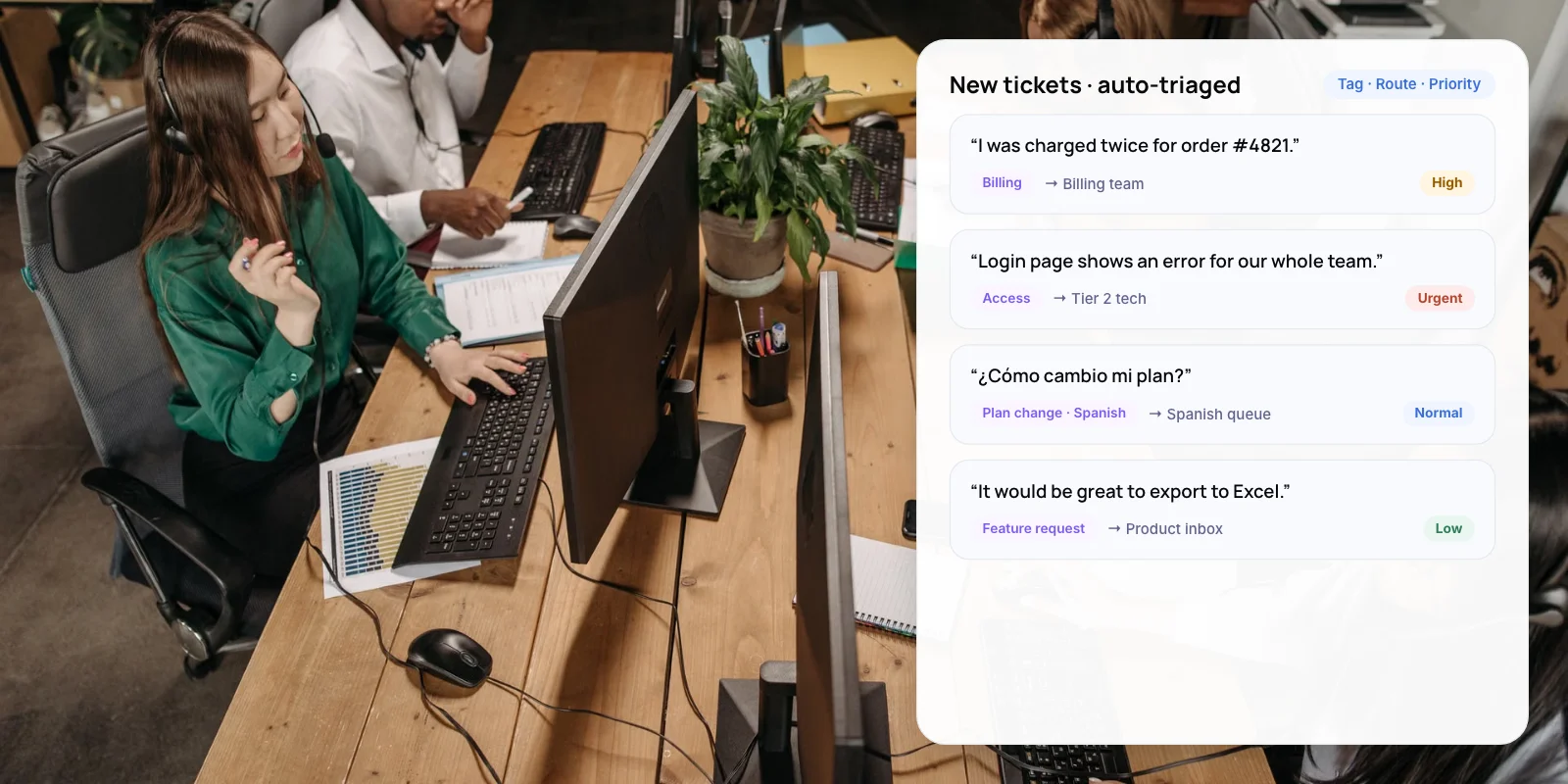
Helpdesk automation for triage works in three layers. Tag each new ticket by topic, route it to the team or agent who can solve it, and set its priority so urgent tickets come first. Use simple rules for clear cases and AI classification for messy, free-text ones.
The time saved adds up. Zendesk says its intelligent triage saves agents 30 to 60 seconds per ticket by identifying and routing tickets automatically. At 5,000 tickets a month, that is roughly 40 to 80 agent hours.
Key takeaways
- Tag first. Routing and priority are only as good as the topic on the ticket.
- Use rules for clear cases and AI for free-text emails and chats. Most teams need both.
- Zendesk says intelligent triage saves agents 30 to 60 seconds per ticket.
- Run AI in the background for two weeks and compare it with hand tags before it routes anything.
2. What Are Tagging, Routing and Priority?
Together they are called triage: deciding what a ticket is, who handles it and how soon. Each step depends on the one before it, so get tagging right first.
- 01 Tagging — Labels the ticket with a topic, and often a language and sentiment. Example: “Billing · Refund · English”
- 02 Routing — Sends the ticket to a team, then to an agent with the right skill and free capacity. Example: Billing team → agent with Refunds skill
- 03 Priority — Sets how soon the ticket needs a reply, usually tied to a service level target. Example: High, reply within 4 hours
3. Why Automate Ticket Triage?
Manual sorting slows the first reply and sends tickets to the wrong people. Customers notice both. Zendesk’s CX Trends 2025 research surveyed more than 10,000 consumers and business leaders across 22 countries.
- Over half of customers will switch to a competitor after one bad experience
- 70% of customers expect anyone they talk to to have full context
- 30–60s saved per ticket by Zendesk intelligent triage, according to Zendesk
Sources: Zendesk customer experience statistics, 2026; Zendesk help centre, 2026.
Good tags also give you better data. Once every ticket carries a reliable topic, you can see which issues are growing and which ones are worth automating next.
4. Rules or AI: Which Should You Use?
Rules match fixed conditions, such as the form a customer picked or a keyword in the subject. AI reads the full message and predicts its topic, sentiment and language. In our view, most teams need both.
- How it decides — Rules only: Fixed conditions: form, channel, keyword, customer field · AI classification: Reads the whole message and predicts topic, sentiment, language · Rules + AI: Rules for clear cases, AI for free text
- Best for — Rules only: Structured forms, VIP accounts, known keywords · AI classification: Emails and chats written in the customer’s own words · Rules + AI: Most support teams
- Accuracy risk — Rules only: Misses tickets that don’t use the expected words · AI classification: Weaker on topics specific to your product · Rules + AI: Lower, if AI only acts above a confidence level
- Upkeep — Rules only: Rules pile up and start to conflict · AI classification: Review predictions and retrain topics · Rules + AI: Both, but each rule set stays small
- Explainability — Rules only: Easy: you can see which rule fired · AI classification: Harder: check the confidence score · Rules + AI: Log which layer made each decision
Our assessment of typical setups.
5. What Can Zendesk and Freshdesk Do Out of the Box?
Both helpdesks can tag, route and prioritise tickets natively. The catch is that the stronger features sit on higher plans.
- Zendesk — Triggers tag and route tickets on conditions you set. Intelligent triage uses AI to label new tickets with a topic, sentiment and language. Omnichannel routing then assigns them by agent availability, capacity, skills and priority. Plan: Intelligent triage: Suite and Support Professional plans and above
- Freshdesk — Ticket creation rules tag and assign new tickets. Omniroute then picks the agent by round-robin, current load or skills, and only assigns to agents who are available. It can order the queue by ticket age or SLA priority. Plan: Basic rules on all plans; load-based and skill-based assignment on higher plans
Note: Some guides say routing on Zendesk’s AI predictions needs the paid Copilot add-on. Plans and add-ons change often, so confirm on Zendesk’s and Freshdesk’s pricing pages before you budget.
A custom AI layer makes sense when built-in topics don’t fit your product, when tickets mix languages such as Hinglish, or when routing must check data in other systems, such as contract tier or order value.
6. How to Automate Ticket Tagging, Routing and Priority in 8 Steps
- Audit 200 recent tickets. Hand-tag each one by topic, team and urgency. This becomes your test set.
- Build a short tag list. Aim for 15 to 25 topics that don’t overlap. Merge any that agents confuse.
- Add structure at intake. Use a required topic field on web forms. Every structured answer is one less guess.
- Write rules for the clear cases. Route by form choice, channel, customer tier and obvious keywords such as “invoice” or “refund”.
- Turn on AI classification for free text. Let it fill in topic, language and sentiment, but don’t route on it yet.
- Compare for two weeks. Check AI tags against your agents’ tags. Only route on topics where it is right most of the time.
- Set routing and priority. Map each topic to a team, add skills for language and product, and apply the priority levels in section 7.
- Review every month. Track reassigned tickets and first reply time by topic. Fix the rules that cause the most reassignments.
Tip: Keep your tag list short. Twenty clear topics that agents agree on beat 200 overlapping ones. AI classifiers also perform better when categories don’t overlap.

7. How Should You Set Ticket Priority?
Base priority on impact and urgency, not on how loudly the customer writes. Sentiment can raise a ticket one level, but it should not decide priority alone. The levels below are an example to adapt; set your own response targets.
- Urgent — When: Many customers blocked, or money or security at risk · Example: Payments failing, data breach report, outage · Example: reply within 1 hour
- High — When: One customer blocked from a core task · Example: Can’t log in, order charged twice, VIP account issue · Example: reply within 4 hours
- Normal — When: Problem with a workaround, or a how-to question · Example: Report not exporting, how to add a user · Example: reply within 1 business day
- Low — When: Feedback or requests with no deadline · Example: Feature idea, general feedback · Example: reply within 3 business days
Warning: If everything is urgent, nothing is. Review how many tickets land in each level every month. If more than a small share are Urgent, tighten the rule.
8. What Results Have Companies Reported?
Both examples below are published by the software vendors involved, so read them as results from deployments that went well.
- Travel · SentiSum: James Villas put frustrated customers first — The holiday rental company used AI tagging to spot customers in high-frustration situations and move them to a priority queue. SentiSum reports reply time to urgent requests fell by 46% and CSAT rose 11%. Lesson: start with one topic that hurts customers most. Source
- Retail · Zendesk: Grove Collaborative routes by request type — Zendesk says Grove Collaborative uses intelligent triage and AI agents to capture request types, route tickets more effectively and reduce manual work for its agents. Lesson: reliable request types make every later step easier. Source
Want your tags and routing rules tested on real tickets before you switch them on? We can review them with you.
New to the topic? Read what customer support automation is and how it works.
9. Frequently Asked Questions
What is ticket routing in a helpdesk?
Ticket routing sends each new ticket to the team or agent best placed to solve it. Rules route on fixed conditions such as form or channel. AI routing reads the message, predicts its topic and language, and then assigns it based on agent skills and availability.
How does AI tag support tickets?
An AI model reads the ticket text and predicts labels such as topic, sentiment and language, each with a confidence score. Zendesk intelligent triage works this way. Route only on predictions above a confidence level you trust, and send the rest to a person to tag.
Should I use rules or AI for ticket triage?
Use both. Rules are predictable and easy to explain, so use them for forms, customer tiers and clear keywords. AI handles free-text emails and chats that rules miss. In our view, start with rules and add AI where rules keep failing.
How do I set ticket priority automatically?
Define three or four levels based on impact and urgency, then map topics and customer tiers to each level. Let sentiment raise a ticket by one level at most. Review the share of tickets in each level monthly so Urgent stays rare.
Can Freshdesk assign tickets automatically?
Yes. Ticket creation rules can tag and assign new tickets on every plan. Omniroute adds smarter assignment by round-robin, agent load or skills, and only assigns to agents who are available. These advanced options sit on higher plans, so check Freshdesk’s pricing page before you buy.
10. Conclusion
Helpdesk automation for triage starts with a clean tag list, not with AI. Hand-tag 200 recent tickets this week, agree on your topics, and switch on rules for the clear cases. Then run AI classification in the background for two weeks and compare it with your hand tags before letting it route.
- Our service: AI Customer Support Automation — We set up ticket tagging, routing and AI agents on top of your existing helpdesk, or build a custom layer where the built-in tools fall short. See the service →
- Free savings report: AI ROI Calculator — Enter your monthly ticket volume and cost per ticket to see what automating triage could save your team. Get your savings estimate →
See how we have built AI for clients in our AI Voice Assistant and Zenva case studies.
Author