Best Support Tools for Bootstrapped Businesses
For most bootstrapped teams, the best place to start is a free AI help desk plan: Zoho Desk if you need several agents on email, Help Scout if you want the simplest shared inbox, and Tidio if most questions arrive through website chat. All three have free plans with no time limit. The bigger difference is how each one charges once you add AI answers.
This guide compares five tools on what the free plan really includes, what you pay at three agents, and what AI answers cost once you switch them on. Prices are list prices as published in 2026.
1. What Should a Bootstrapped Team Look for in a Support Tool?
When you pay for tools out of revenue, the sticker price matters less than how the bill grows. Support tools charge in three ways: per agent, per conversation, or per AI answer. A plan that looks free can become expensive when you add a fourth teammate or a busy sales month.
Customers also expect more from small companies than they used to. Zendesk’s CX Trends 2026 report found ~88% of customers expect faster responses than a year ago, and ~74% now expect round-the-clock service because of AI. A lean team can only meet that with good self-service and some automation.
So check four things before you sign up: how long the free plan lasts, which channels it covers, what the first paid step costs per agent, and how AI is billed.
Key takeaways
- Zoho Desk, Help Scout, HubSpot and Tidio all have free plans with no end date. Freshdesk’s free option lasts six months.
- At three agents, the cheapest paid plans run from about $21 to $75 a month on published 2026 prices.
- AI is billed separately: per resolution on Help Scout ($0.75), per conversation on Tidio, or by plan tier on Zoho, HubSpot and Freshdesk.
- Write 15 to 20 help articles before turning on AI. The bot can only answer from what you have written.
2. Which Support Tools Have the Best Free Plans?
Four of the five tools below have a free plan with no end date. Freshdesk is the exception: its free option now covers one or two agents for six months, after which you move to a paid plan.
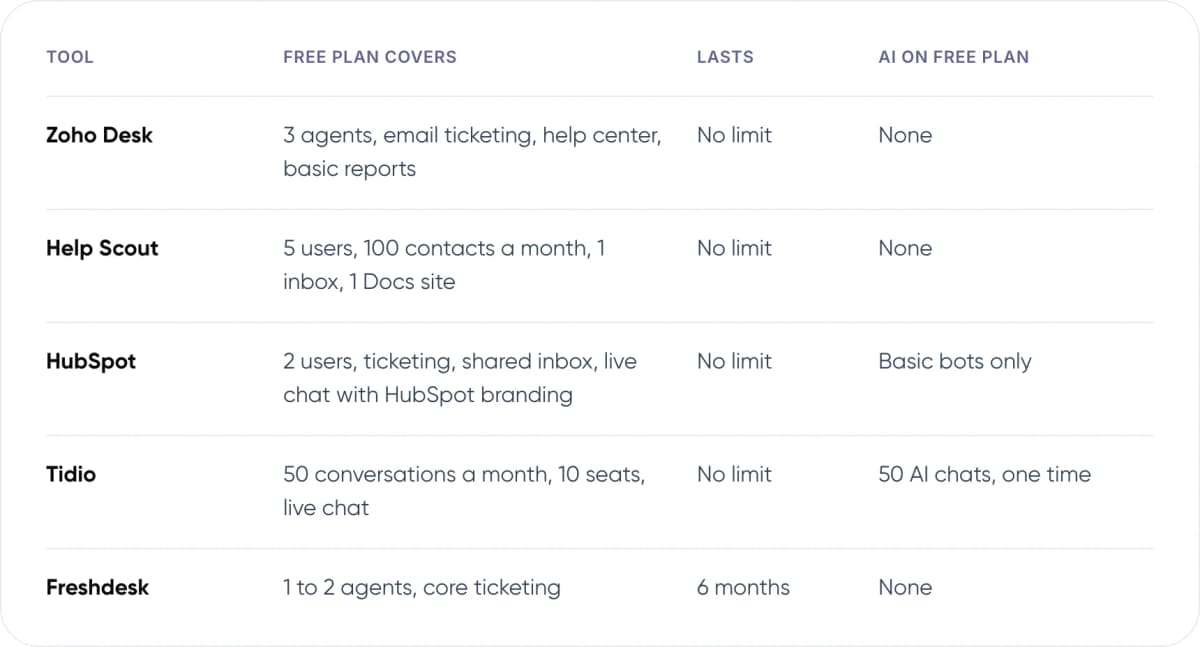
- Zoho Desk — Free plan covers: 3 agents, email ticketing, help center, basic reports. Lasts: No limit. AI on free plan: None.
- Help Scout — Free plan covers: 5 users, 100 contacts a month, 1 inbox, 1 Docs site. Lasts: No limit. AI on free plan: None.
- HubSpot — Free plan covers: 2 users, ticketing, shared inbox, live chat with HubSpot branding. Lasts: No limit. AI on free plan: Basic bots only.
- Tidio — Free plan covers: 50 conversations a month, 10 seats, live chat. Lasts: No limit. AI on free plan: 50 AI chats, one time.
- Freshdesk — Free plan covers: 1 to 2 agents, core ticketing. Lasts: 6 months. AI on free plan: None.
Note: Vendors change plan limits often. Freshdesk’s free tier went from unlimited agents to two agents in a few years. Check each pricing page on the day you sign up.
3. The 5 Tools, Reviewed
Each review covers who the tool suits, the first paid step and the catch you will hit first. Paid prices are per agent per month on annual billing unless stated.

01 Zoho Desk
Small teams that need several agents
The cheapest full help desk here. The free edition covers three agents on email with a help center. Express adds social channels, web forms and workflows. It pays off most if you already use Zoho CRM or Zoho Books.
- First paid step: Express, $7 per agent
- AI answers: Answer Bot from Standard ($14)
- Watch out for: Express is capped at 5 users
02 Help Scout
Email-first teams that want simplicity
A shared inbox that feels like email, plus a help center. The free plan allows five users but caps you at 100 contacts a month. Paid plans remove that cap. The AI answer bot sits in a website widget and is billed only when it resolves a question.
- First paid step: Standard, $25 per user
- AI answers: $0.75 per resolution
- Watch out for: 100-contact cap on the free plan
03 HubSpot Service Hub
Teams already on HubSpot CRM
Free tools give two users ticketing, a shared inbox and live chat, all tied to the free CRM. That means every reply shows the customer’s deals and history. Starter removes HubSpot branding and adds routing.
- First paid step: Starter, $20 per seat (monthly billing)
- AI answers: Customer Agent needs Professional ($90)
- Watch out for: Big price jump from Starter to Pro
04 Tidio
Online stores where chat is the main channel
Live chat first, with rule-based Flows and the Lyro AI agent. Pricing is by conversation, not by seat, so a growing team does not raise the bill. A busy month does. Strong Shopify and WordPress fit.
- First paid step: Starter, $29 a month (monthly billing)
- AI answers: Lyro from $39 a month for 50 chats
- Watch out for: The 50 free AI chats are one-time
05 Freshdesk
Teams that will pay within six months
A mature ticketing tool with a large app marketplace. The free program suits a trial period rather than a long-term home. Chat and messaging sit in the separate, pricier Omni product.
- First paid step: Growth, $19 per agent
- AI answers: AI Agent on Pro ($55): 500 free sessions once, then $49 per 100
- Watch out for: Free program ends after 6 months
4. How Much Does an AI Help Desk Cost per Answer?
This is where tools that look alike start to differ. Some charge only when the AI resolves a conversation. Others charge for every conversation the AI joins, or lock AI behind a higher plan. The unit you pay for decides whether your bill follows the help you give or simply how busy you are.
Two terms to know: a resolution is a conversation the AI closes without passing it to a person. A session or AI conversation is any chat the AI takes part in, whether or not it solves the problem.
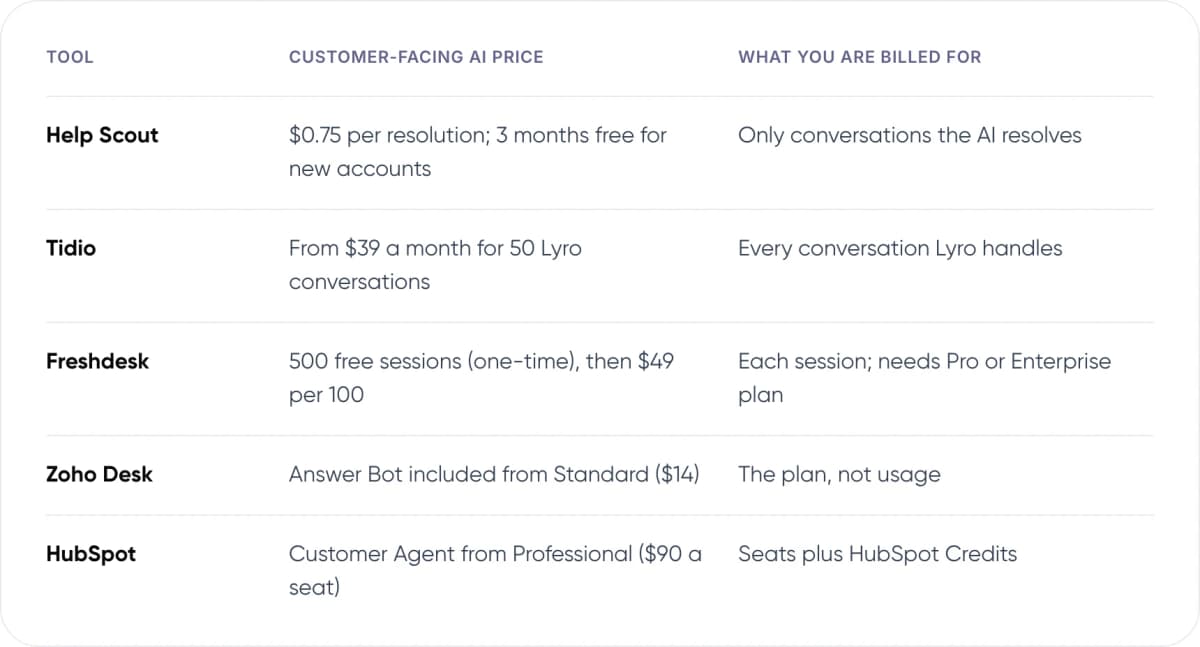
- Help Scout — Customer-facing AI price: $0.75 per resolution; 3 months free for new accounts. What you are billed for: Only conversations the AI resolves.
- Tidio — Customer-facing AI price: From $39 a month for 50 Lyro conversations. What you are billed for: Every conversation Lyro handles.
- Freshdesk — Customer-facing AI price: 500 free sessions (one-time), then $49 per 100. What you are billed for: Each session; needs Pro or Enterprise plan.
- Zoho Desk — Customer-facing AI price: Answer Bot included from Standard ($14). What you are billed for: The plan, not usage.
- HubSpot — Customer-facing AI price: Customer Agent from Professional ($90 a seat). What you are billed for: Seats plus HubSpot Credits.
In our view, pay-per-resolution pricing suits a bootstrapped team best, because you pay only when the AI saves a reply. Per-conversation pricing is fine if your help content is good enough that most AI chats end in an answer. Either way, set a monthly spending cap before you turn AI on.
Not sure an off-the-shelf bot fits your questions? We can review your tickets with you.
5. What Will You Pay With Three Agents?
Three people sharing support is a common point where free plans stop fitting. Here is the cheapest paid plan for each tool at that size, worked out from published 2026 prices. It is our calculation, not a vendor quote, and taxes are not included.
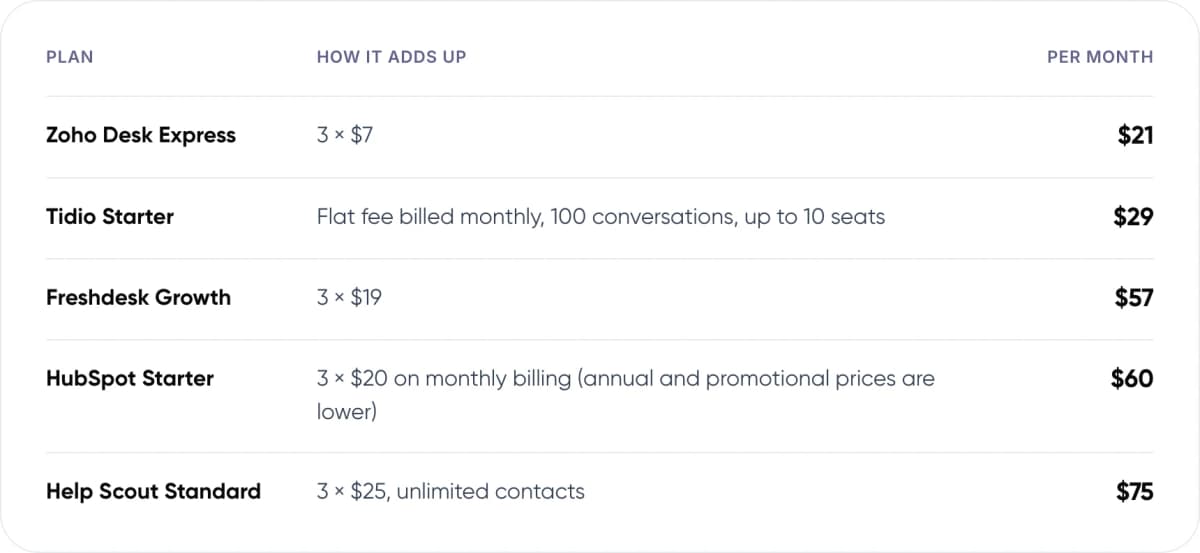
- Zoho Desk Express — How it adds up: 3 × $7. Per month: $21.
- Tidio Starter — How it adds up: Flat fee billed monthly, 100 conversations, up to 10 seats. Per month: $29.
- Freshdesk Growth — How it adds up: 3 × $19. Per month: $57.
- HubSpot Starter — How it adds up: 3 × $20 on monthly billing (annual and promotional prices are lower). Per month: $60.
- Help Scout Standard — How it adds up: 3 × $25, unlimited contacts. Per month: $75.
Now add AI. Suppose the AI resolves 200 conversations a month. On Help Scout that adds $150 (200 × $0.75), taking the total to $225. On Tidio, AI conversations are bought in bundles from $39 for 50, so check the bundle that covers 200 on the pricing page. On Zoho Desk, the Answer Bot needs the Standard plan at $14, which makes three agents $42.
6. How Do You Choose and Set Up Your First Tool? 6 Steps
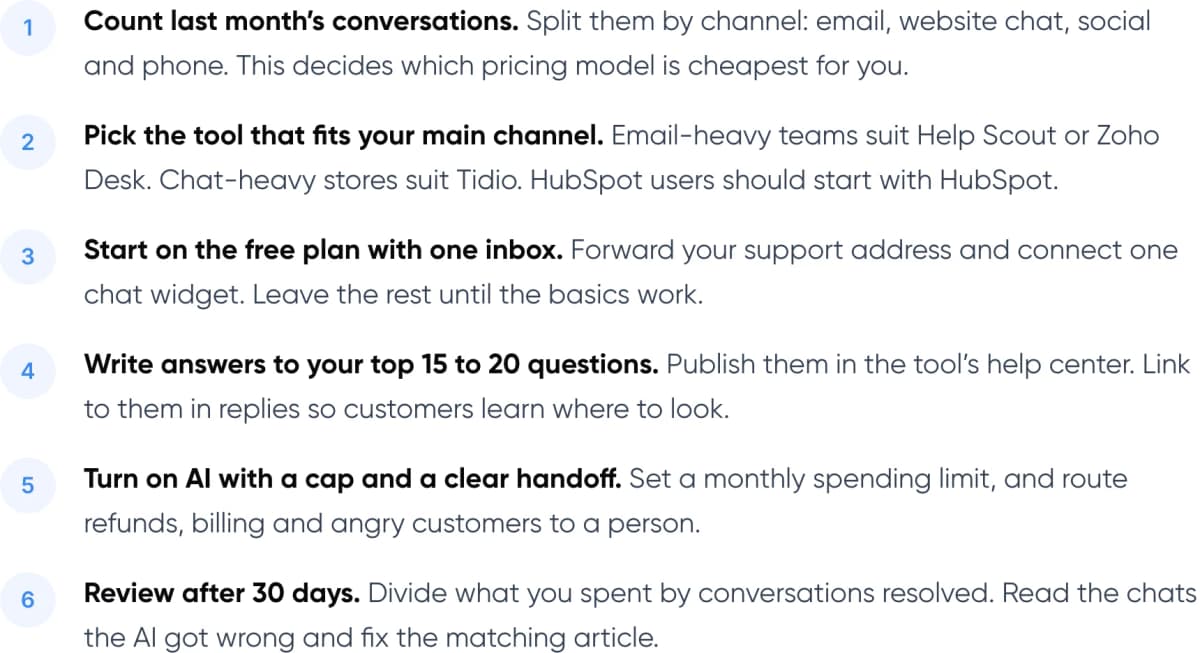
- Count last month’s conversations. Split them by channel: email, website chat, social and phone. This decides which pricing model is cheapest for you.
- Pick the tool that fits your main channel. Email-heavy teams suit Help Scout or Zoho Desk. Chat-heavy stores suit Tidio. HubSpot users should start with HubSpot.
- Start on the free plan with one inbox. Forward your support address and connect one chat widget. Leave the rest until the basics work.
- Write answers to your top 15 to 20 questions. Publish them in the tool’s help center. Link to them in replies so customers learn where to look.
- Turn on AI with a cap and a clear handoff. Set a monthly spending limit, and route refunds, billing and angry customers to a person.
- Review after 30 days. Divide what you spent by conversations resolved. Read the chats the AI got wrong and fix the matching article.
If you are new to the idea, our explainer on how customer support automation works covers the basics before you pick a tool.
7. When Should You Wait Before Adding AI?
AI answers come from your help content. If you have only a handful of articles, the bot will either give vague answers or hand most chats back to you. As a rough rule (our view, not a vendor figure), cover your 15 to 20 most common questions first. Those articles also cut tickets on their own, because customers find answers before they write in.
Wait as well if your volume is tiny. At 50 conversations a month, a founder can answer every one and learn from it. Those early conversations show what customers find confusing, which is worth more than the time saved.
When you do add AI, make reaching a person easy. Gartner’s 2026 survey found ~87% of customers say access to a human agent is essential when a company uses generative AI for service. Our guide to chatbot handoff and context transfer covers how to pass the conversation over cleanly.
Warning: Keep refunds, billing disputes and account access changes with a person, even when the AI could look up the answer. Mistakes here cost more than the reply saves.
8. Frequently Asked Questions
What is the best free help desk for a small business?
It depends on your team and channel. Zoho Desk’s free edition covers three agents on email with no time limit. Help Scout’s free plan allows five users but caps you at 100 contacts a month. Tidio’s free plan suits stores that mostly use website chat, with 50 conversations a month.
Is Freshdesk still free?
Only for a limited time. Freshdesk’s free program now covers one or two agents for six months, after which you choose a paid plan. Growth starts at $19 per agent per month on annual billing. Its earlier free plan allowed far more agents, so older reviews may be out of date.
How much does an AI help desk cost for a small team?
Expect two costs: seats and AI usage. At three agents, entry plans run from about $21 a month (Zoho Desk Express) to $75 (Help Scout Standard). AI is extra. Help Scout charges $0.75 per resolved conversation. Tidio sells Lyro conversations in bundles, starting at $39 for 50.
Do I need AI in my support tool from day one?
Usually not. AI answers depend on your help content, so write answers to your top 15 to 20 questions first. At very low volume, answering every message yourself shows what customers find confusing. Add AI when repeat questions take up a meaningful share of your week.
Can I switch support tools later?
Yes. Most help desks can import tickets and help articles from competitors, though history and automations rarely move over cleanly. Keeping your help content in plain, well-structured articles makes a later move easier. Pick a tool that fits the next 12 months, not the next five years.
9. Conclusion
A bootstrapped team can run good support for $0 to about $75 a month at three agents. Pick the AI help desk that matches your main channel, stay on the free plan until a limit actually hurts, and add AI only once your help content can support it. This week, count last month’s conversations by channel; that number tells you which free plan fits.
For an example of our multichannel support work, see Paymate.
When your questions outgrow a standard help desk, for example when answers need data from your own order, billing or booking systems, take a look at our customer support automation service. We plan, build and run AI support that connects to the tools you already use.
Author