Best Affordable Customer Support Software With Reporting and Analytics
For most small and mid-size teams, Zoho Desk Standard is the cheapest customer support software with custom reports, at $14 per agent per month on annual billing. Help Scout Plus ($45) and Freshdesk Pro ($55) are the next steps up. Zendesk and HubSpot put their deepest analytics on plans that cost $90 to $115 per agent.
This guide compares five tools on one question: what do you pay before you can build the reports you need?

1. What Makes Customer Support Software Affordable?
Almost every help desk advertises a low entry price. The catch is that reporting is one of the main features vendors use to separate their plans. The entry plan usually gives you pre-built charts. Custom reports, which let you choose your own metrics, filters and time ranges, often sit one or two tiers higher.
So the useful question is not “what is the cheapest plan?” It is “what is the cheapest plan that answers the questions my manager asks every week?” This matters more now that budgets are tight. A Gartner survey of 199 service leaders (August 2026) found AI spending up 38% while overall service budgets grew just 2%. With budgets this tight, paying for a higher plan only to get one report is hard to justify.
Key takeaways
- Reporting is one of the main features help desk vendors use to separate plans. Check where custom reports start, not the entry price.
- Zoho Desk Standard ($14 per agent, annual) is the cheapest plan in this comparison with custom reports.
- Help Scout Plus ($45) and Freshdesk Pro ($55) are the mid-priced options. Zendesk and HubSpot put advanced analytics on $90–$115 plans.
- For 10 agents, first-year licence costs range from about $1,680 to $13,800.
- Get your core reports right before paying for AI. Gartner found only 4% of service leaders have achieved the AI ROI they expected.
2. Which Reports Does a Support Team Actually Need?
Before comparing tools, write down the reports you will open every week. For most teams it is a short list. Gartner’s survey of 321 service leaders, published February 2026, found their top priorities were customer satisfaction, operational efficiency and self-service success. Each of those maps to a metric your help desk should report without exports.
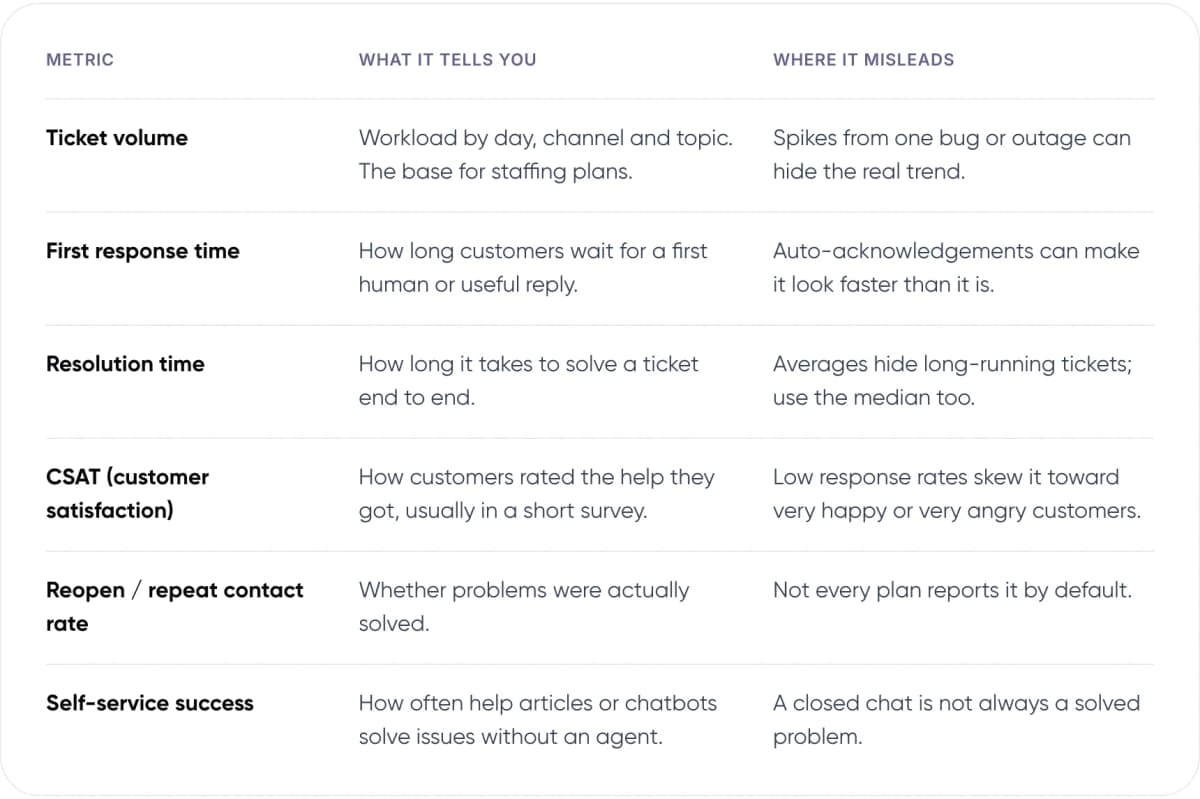
- Ticket volume — What it tells you: Workload by day, channel and topic. The base for staffing plans. Where it misleads: Spikes from one bug or outage can hide the real trend.
- First response time — What it tells you: How long customers wait for a first human or useful reply. Where it misleads: Auto-acknowledgements can make it look faster than it is.
- Resolution time — What it tells you: How long it takes to solve a ticket end to end. Where it misleads: Averages hide long-running tickets; use the median too.
- CSAT (customer satisfaction) — What it tells you: How customers rated the help they got, usually in a short survey. Where it misleads: Low response rates skew it toward very happy or very angry customers.
- Reopen / repeat contact rate — What it tells you: Whether problems were actually solved. Where it misleads: Not every plan reports it by default.
- Self-service success — What it tells you: How often help articles or chatbots solve issues without an agent. Where it misleads: A closed chat is not always a solved problem.
Note: Pre-built reports cover the first three rows on almost every plan. You need custom reports when you want to slice those numbers by your own fields, such as product line, customer tier or country.
3. How Do the 5 Most Affordable Help Desk Tools Compare?
We picked five widely used help desk software products that publish their prices. The table shows each tool’s cheapest paid plan and the first plan that lets you build custom reports. Prices are per agent (one support team member) per month, in US dollars, as listed in November 2026.
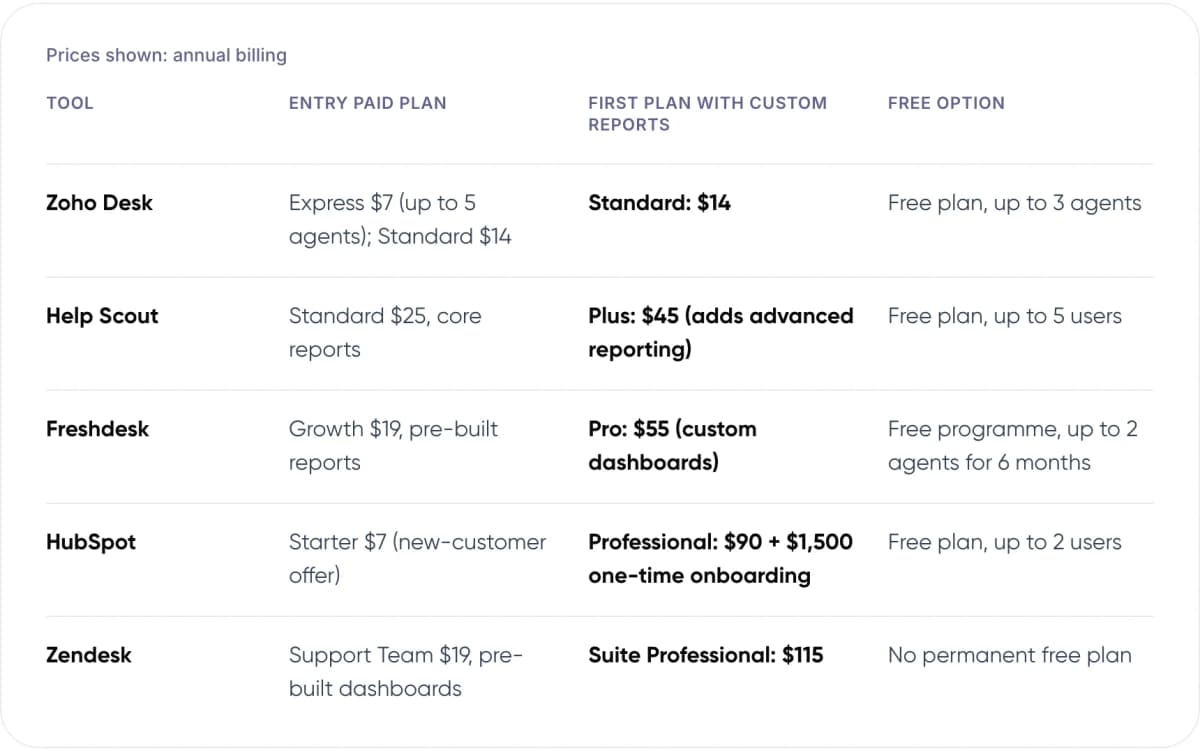
Prices shown: annual billing
- Zoho Desk — Entry paid plan: Express $7 (up to 5 agents); Standard $14. First plan with custom reports: Standard: $14. Free option: Free plan, up to 3 agents.
- Help Scout — Entry paid plan: Standard $25, core reports. First plan with custom reports: Plus: $45 (adds advanced reporting). Free option: Free plan, up to 5 users.
- Freshdesk — Entry paid plan: Growth $19, pre-built reports. First plan with custom reports: Pro: $55 (custom dashboards). Free option: Free programme, up to 2 agents for 6 months.
- HubSpot — Entry paid plan: Starter $7 (new-customer offer). First plan with custom reports: Professional: $90 + $1,500 one-time onboarding. Free option: Free plan, up to 2 users.
- Zendesk — Entry paid plan: Support Team $19, pre-built dashboards. First plan with custom reports: Suite Professional: $115. Free option: No permanent free plan.
Sources: Zoho Desk, Freshdesk, Help Scout, HubSpot and Zendesk pricing pages. Vendors change prices and run promotions; check before you buy.

- Zoho Desk Standard $14
- Help Scout Plus $45
- Freshdesk Pro $55
- HubSpot Service Hub Pro $90
- Zendesk Suite Professional $115
Per agent / month, annual billing, Nov 2026
4. What Does Each Tool Do Well, and Where Does It Fall Short?
Price is only half the decision. Each tool below suits a different kind of team, and each has a limit you should know before you sign an annual contract.

- Zoho Desk (Lowest cost): Custom reports from the $14 Standard plan, plus an Answer Bot that suggests help articles to customers. Professional ($23) adds telephony, round-robin assignment and Zoho’s Zia AI. Strong fit for teams already using other Zoho apps. Watch out: Express ($7) is capped at five agents, and telephony through Zoho Voice costs extra.
- Help Scout (Simplest to use): A simple, email-style shared inbox. Standard includes core reports. The more detailed reports on customer satisfaction and team productivity come with Plus ($45). Watch out: Standard stops at 25 users and Plus at 50. AI Answers is billed at $0.75 per resolution.
- Freshdesk (Balanced): Growth ($19) includes pre-built reports on ticket volume and agent performance. Pro ($55) adds custom dashboards and round-robin routing (sharing tickets evenly between agents). Watch out: Chat and messaging need Freshdesk Omni ($29–$119), a separate product line. Freddy AI is sold separately.
- HubSpot Service Hub (Best with HubSpot CRM): Support tickets sit on the same contact record as sales and marketing data, so you can report on support by deal size or lifecycle stage. Custom reporting starts on Professional. Watch out: Starter to Professional is a large jump, plus a $1,500 one-time onboarding fee.
- Zendesk (Deepest analytics): In our view, the most flexible reporting of the five, through its Explore analytics tool. Support Team ($19) includes pre-built dashboards for email ticketing. Watch out: Live chat needs Suite Team ($55), and Explore Professional only comes with Suite Professional ($115).
In our view, Zoho Desk Standard is the best value if reporting is your main need and you don’t already run another CRM. If your sales team already lives in HubSpot, Service Hub can still be the cheaper choice overall, because one record per customer saves integration work that a cheaper help desk would need.
5. What Will Customer Support Software Cost a 10-Agent Team?
Per-agent prices look small until you multiply them. Here is the first-year licence cost for a 10-agent team on the cheapest plan of each tool that includes custom reports. It excludes taxes, add-ons and AI usage.

- Zoho Desk: $1,680 ($14 × 10 × 12)
- Help Scout: $5,400 ($45 × 10 × 12)
- Freshdesk: $6,600 ($55 × 10 × 12)
- HubSpot: $12,300 (incl. $1,500 onboarding)
- Zendesk: $13,800 ($115 × 10 × 12)
Annual billing list prices, November 2026. Monthly billing costs more on every tool.
The gap between the cheapest and most expensive option is roughly eight times. Two pricing rules change the maths as you grow. Help Scout Standard stops at 25 users, so the 26th agent moves the whole team onto Plus. HubSpot charges a one-time onboarding fee on Professional.
Tip: Ask about “light” seats for people who only view or comment on tickets. Zoho Desk and Help Scout (on Plus and Pro) sell them for less than a full agent seat, and Freshdesk sells short-term passes. Check whether these seats can open reports before you rely on them.
Not sure which plan your reporting needs? We can review your setup with you.
6. Do You Need an AI Help Desk to Get Useful Analytics?
No. Standard reports on volume, response time and CSAT work without any AI. AI help desk features add two things: automated answers that solve some tickets without an agent, and automatic summaries or tags that make reports easier to filter. Both are usually priced on top of the seat.
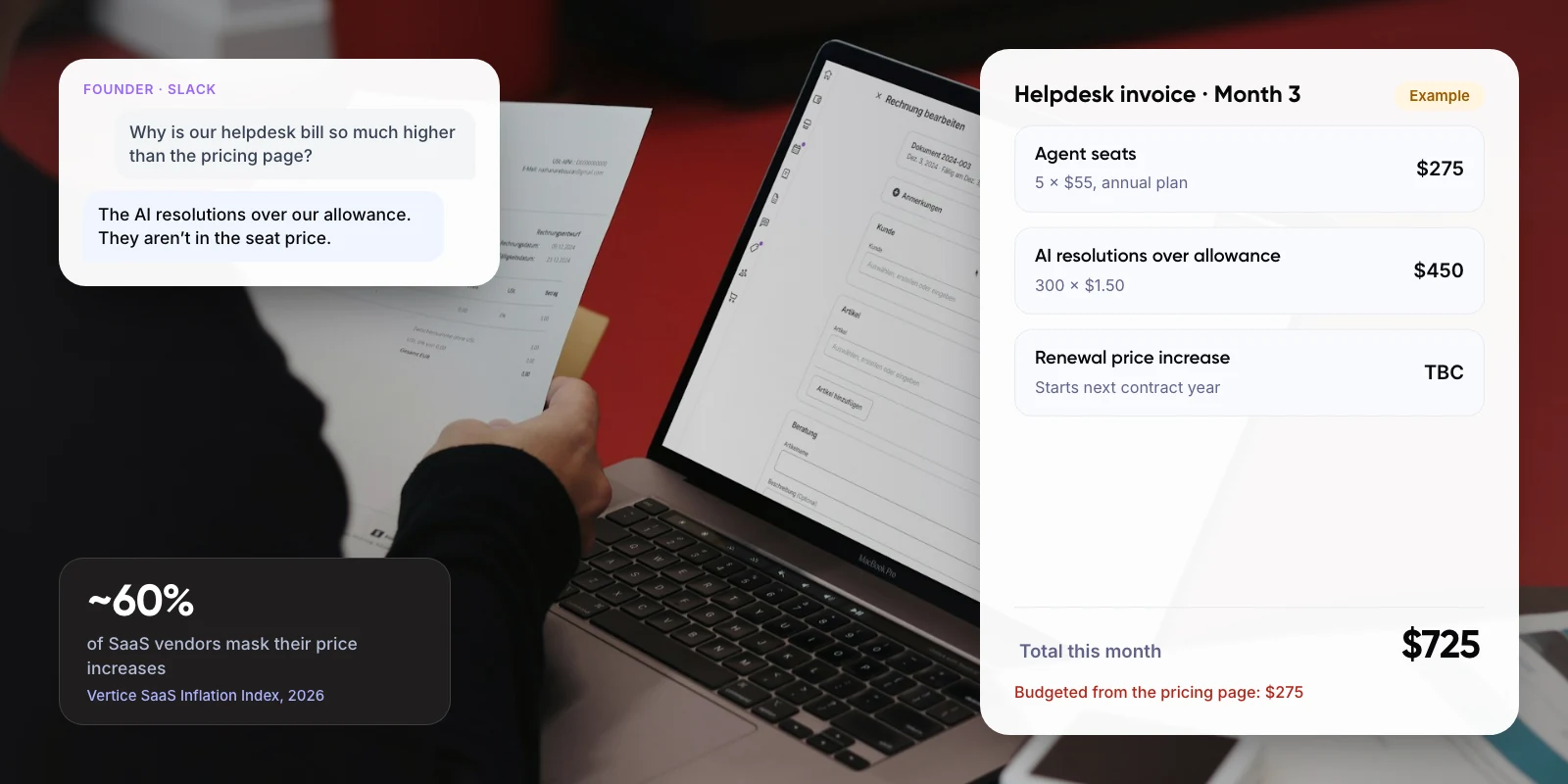
Pricing models vary. Help Scout lists AI Answers at $0.75 per resolution. Zoho Desk includes its Answer Bot from Standard. Freshdesk sells Freddy AI separately from its plans. HubSpot draws AI usage from monthly credits included with each plan. Model these costs at your real ticket volume, not the vendor’s example.
Be realistic about returns. A Gartner survey of 275 service leaders, released November 2026, found just 4% had achieved the ROI they expected from AI. Your reports are what tell you whether you are in that 4%, so get them right first.
Warning: An AI resolution rate on its own can mislead. A bot that closes a conversation is not always a bot that solved it. Track repeat contacts within seven days next to any automated-resolution figure.
Customers also want a way out. Gartner found that ~87% of customers say access to a human agent is essential when a company uses generative AI for service. Our guide to chatbot handoff and context transfer covers how to design that step.
7. How Do You Choose the Right Tool? 6 Steps
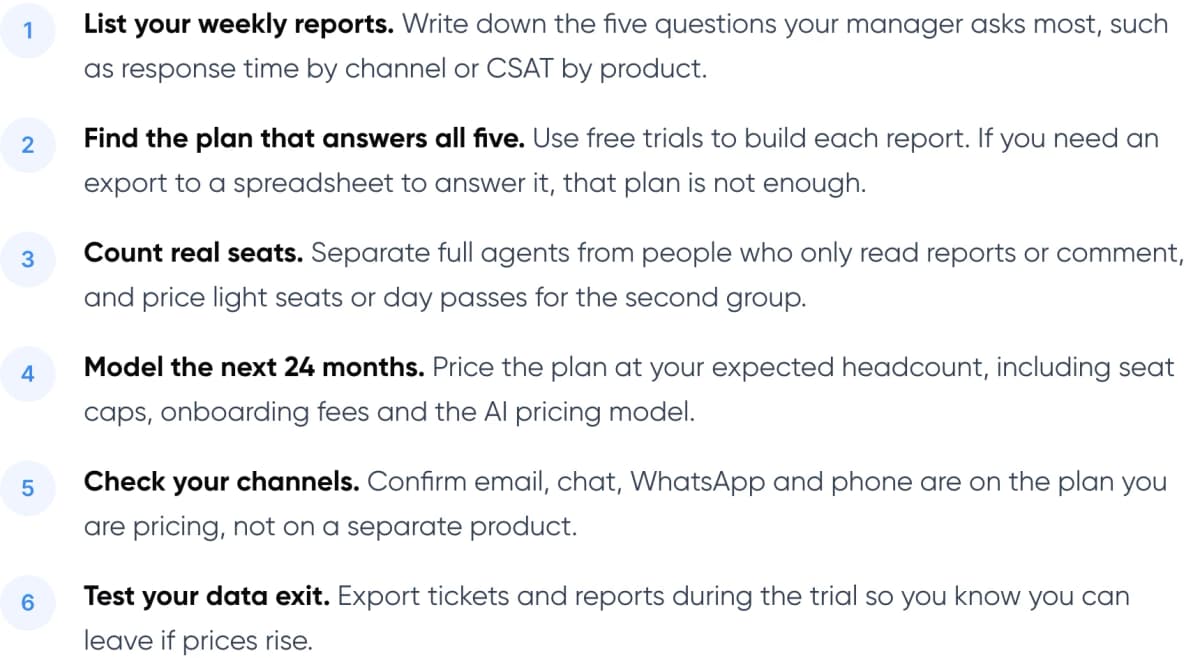
- List your weekly reports. Write down the five questions your manager asks most, such as response time by channel or CSAT by product.
- Find the plan that answers all five. Use free trials to build each report. If you need an export to a spreadsheet to answer it, that plan is not enough.
- Count real seats. Separate full agents from people who only read reports or comment, and price light seats or day passes for the second group.
- Model the next 24 months. Price the plan at your expected headcount, including seat caps, onboarding fees and the AI pricing model.
- Check your channels. Confirm email, chat, WhatsApp and phone are on the plan you are pricing, not on a separate product.
- Test your data exit. Export tickets and reports during the trial so you know you can leave if prices rise.
If you plan to add automation once reporting is in place, start with how customer support automation works.
8. Frequently Asked Questions
What is the cheapest customer support software with custom reports?
In our comparison, Zoho Desk Standard is the cheapest, at $14 per agent per month on annual billing ($20 monthly), as listed in November 2026. It includes custom reports and an Answer Bot. Zoho also has a free plan for up to three agents, with more limited features.
Which help desk software has the best reporting and analytics?
In our view, Zendesk has the most flexible analytics, through Explore Professional, but it comes with Suite Professional at $115 per agent per month on annual billing. HubSpot Service Hub Professional suits teams that want support, sales and marketing data in one CRM.
Is free help desk software good enough for reporting?
Only for very small teams. Zoho Desk (up to 3 agents), Help Scout (up to 5 users) and HubSpot (up to 2 users) have free plans, but they are built for basic ticketing. Custom reports, satisfaction surveys and response-time targets (SLAs) need a paid plan.
Do I need an AI help desk to get good analytics?
No. Core reports on volume, response time, resolution time and CSAT work without AI. AI adds automated answers and tagging, usually priced per resolution or through credits. Gartner found in 2026 that only 4% of service leaders had achieved the AI ROI they expected.
How much does help desk software cost for 10 agents?
On the cheapest plans with custom reports and annual billing, a 10-agent team pays about $1,680 a year on Zoho Desk, $5,400 on Help Scout, $6,600 on Freshdesk, $12,300 on HubSpot including onboarding, and $13,800 on Zendesk, before taxes and add-ons.
9. Conclusion
The cheapest customer support software is the one whose lowest plan already answers your weekly questions. For reporting on a budget, Zoho Desk Standard leads on price, with Help Scout Plus and Freshdesk Pro as stronger mid-priced options. This week, write down the five reports your team opens most and check which plan in the table covers all five.
How we can help
Once your help desk and reports are in place, the next step is often automating the repeat questions. Our AI customer support automation service builds AI assistants that work with the help desk you already use, hand complex cases to your team, and report on what they resolve. For an example of our work, see Paymate.
Author