Should You Let AI Handle Refund Requests? A Simple Decision Guide for Small Businesses
Yes, you can let AI handle refund requests, but only the ones your policy already decides. AI works well for explaining your policy, collecting order details and approving clear cases under a set amount. Anything that needs judgment, such as a missing parcel, a high-value order or an upset customer, should go to a person.
The stakes are real. The National Retail Federation’s 2025 returns report found retailers estimate ~9% of all returns are fraudulent. This guide shows how to split refund work between AI and your team, with a decision table and a six-step setup.

1. What Does It Mean to Let AI Handle Refund Requests?
“Handling” can mean four different jobs, and each carries a different level of risk. Answering a question about your policy costs nothing if it goes wrong once. Sending money back to a card cannot be undone.
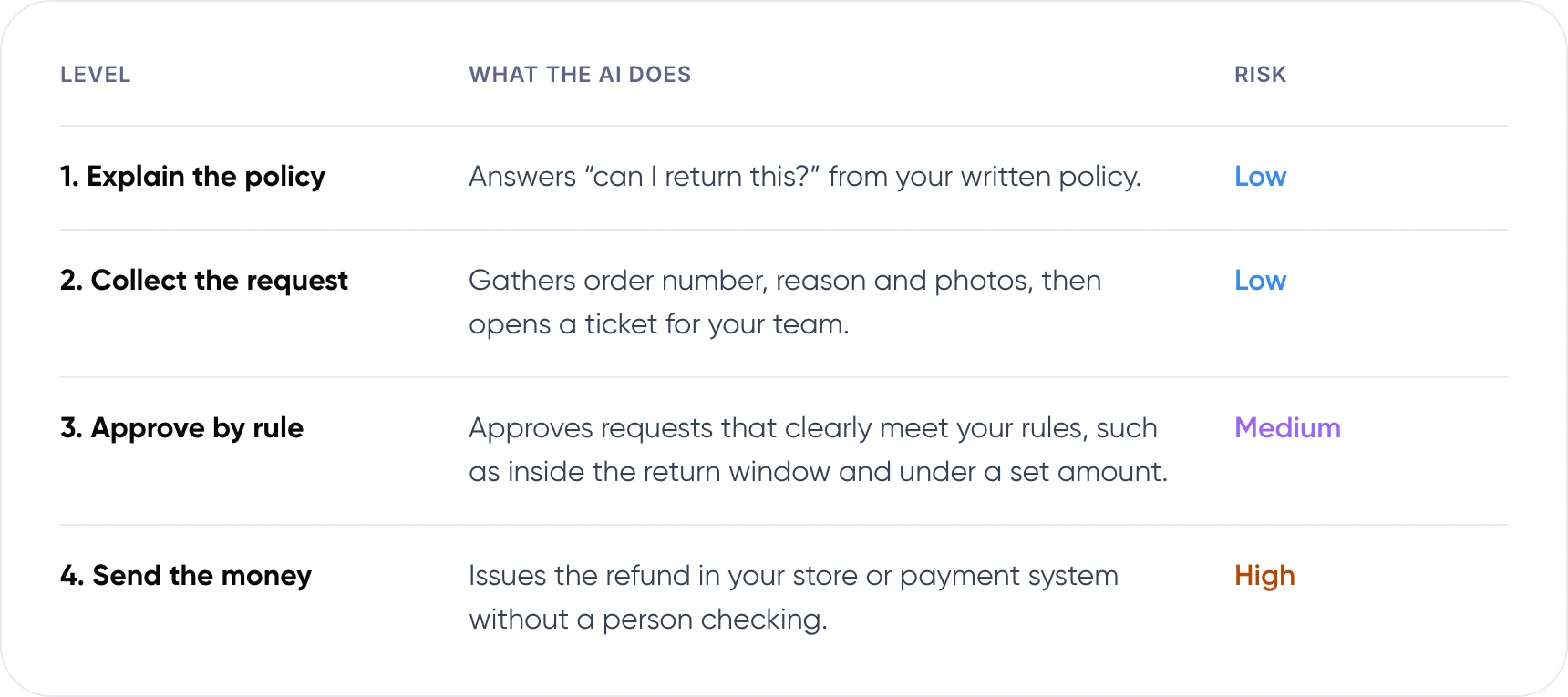
- 1. Explain the policy — What the AI does: Answers “can I return this?” from your written policy. Risk: Low.
- 2. Collect the request — What the AI does: Gathers order number, reason and photos, then opens a ticket for your team. Risk: Low.
- 3. Approve by rule — What the AI does: Approves requests that clearly meet your rules, such as inside the return window and under a set amount. Risk: Medium.
- 4. Send the money — What the AI does: Issues the refund in your store or payment system without a person checking. Risk: High.
In our view, most small businesses should start at levels 1 and 2. The AI explains the policy, gathers the order number, reason and photos, and hands a complete case to a person. Your team then starts each case with the details it needs instead of asking for them.
Key takeaways
- Let AI explain your refund policy and collect order details first. These carry the least risk.
- Allow AI to approve only clear cases inside your written policy and below a set amount.
- Send missing parcels, faulty goods, high-value orders and repeat requests to a person.
- What your AI says can count as what your business said. Air Canada had to pay after its chatbot gave wrong advice about claiming a reduced fare.
2. Which Refund Requests Can AI Approve on Its Own?
A good test is simple: could a new hire on their first day decide this case using only your written policy and the order record? If yes, AI can usually decide it too. If the answer depends on who the customer is, what they say happened or how angry they are, keep a person in the loop.
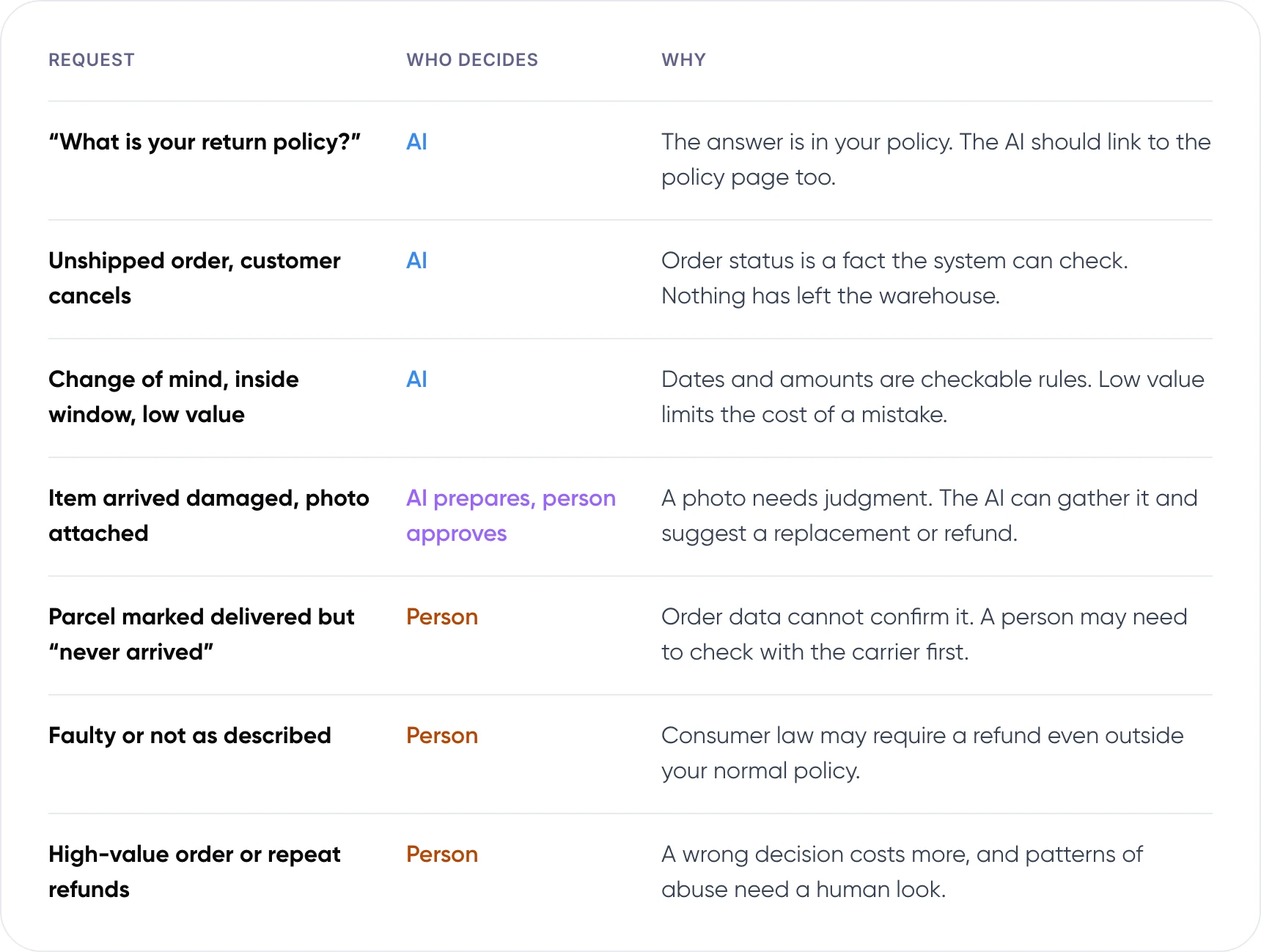
- “What is your return policy?” — Who decides: AI. Why: The answer is in your policy. The AI should link to the policy page too.
- Unshipped order, customer cancels — Who decides: AI. Why: Order status is a fact the system can check. Nothing has left the warehouse.
- Change of mind, inside window, low value — Who decides: AI. Why: Dates and amounts are checkable rules. Low value limits the cost of a mistake.
- Item arrived damaged, photo attached — Who decides: AI prepares, person approves. Why: A photo needs judgment. The AI can gather it and suggest a replacement or refund.
- Parcel marked delivered but “never arrived” — Who decides: Person. Why: Order data cannot confirm it. A person may need to check with the carrier first.
- Faulty or not as described — Who decides: Person. Why: Consumer law may require a refund even outside your normal policy.
- High-value order or repeat refunds — Who decides: Person. Why: A wrong decision costs more, and patterns of abuse need a human look.
Tip: Pick a refund limit you would be comfortable losing on a wrong decision, such as your average order value. Below it, the AI approves clear cases. Above it, the AI prepares the case and a person clicks approve.
3. What Can Go Wrong When AI Talks About Refunds?
The best-known case started with a question about getting money back on a fare. In November 2022, Jake Moffatt asked Air Canada’s website chatbot about bereavement fares. It told him he could book at full price and apply for the reduced fare within 90 days of the ticket being issued. Air Canada’s own policy page said the discount could not be claimed after travel, and the airline refused his request.
In February 2024, British Columbia’s Civil Resolution Tribunal ruled against the airline in Moffatt v. Air Canada. It found Air Canada had not taken reasonable care to make sure its chatbot was accurate, and awarded C$650.88 in damages plus interest and fees. The tribunal also said a customer has no reason to know which part of a company’s website is right and which is not.
This was one small-claims decision in Canada, not a rule that applies everywhere. Still, the lesson for a small business is clear: what your AI tells a customer about refunds can be treated as what your business told them. The AI should only answer from your current policy, and it should never promise a refund it cannot check.
The second risk is abuse. In the same NRF report, ~45% of shoppers said it is acceptable to “bend the rules” when returning items. An AI that approves any request worded the right way is easy to game. Checks on order history, the number of past returns and the refund amount make that much harder.
4. What Do Refund Laws Expect From You?
Automation does not change your legal duties, so your AI’s rules must sit inside them. Two examples show how different they can be.
In the UK, the Consumer Contracts Regulations 2013 give most online shoppers 14 days to cancel. According to the UK government’s guidance for traders, you must then refund within 14 days of receiving the goods back, or of receiving proof they were sent if that comes first.
In India, the Consumer Protection (E-Commerce) Rules, 2020 require accepted refunds to be paid within a reasonable period, with no fixed number of days. Sellers also cannot refuse a refund for goods that are defective, not as described or delivered late.
Warning: Never let the AI decline a refund that the law requires, such as a faulty item, just because it falls outside your normal policy. Route every “faulty” or “not as described” claim to a person. This section is general information, not legal advice.
Want to map which of your refund cases AI can safely take on? We can go through them with you.
5. How Do You Set Up AI Refund Handling? 6 Steps
Most of the work is writing your policy as clear rules. The AI part comes later and is smaller than most people expect.
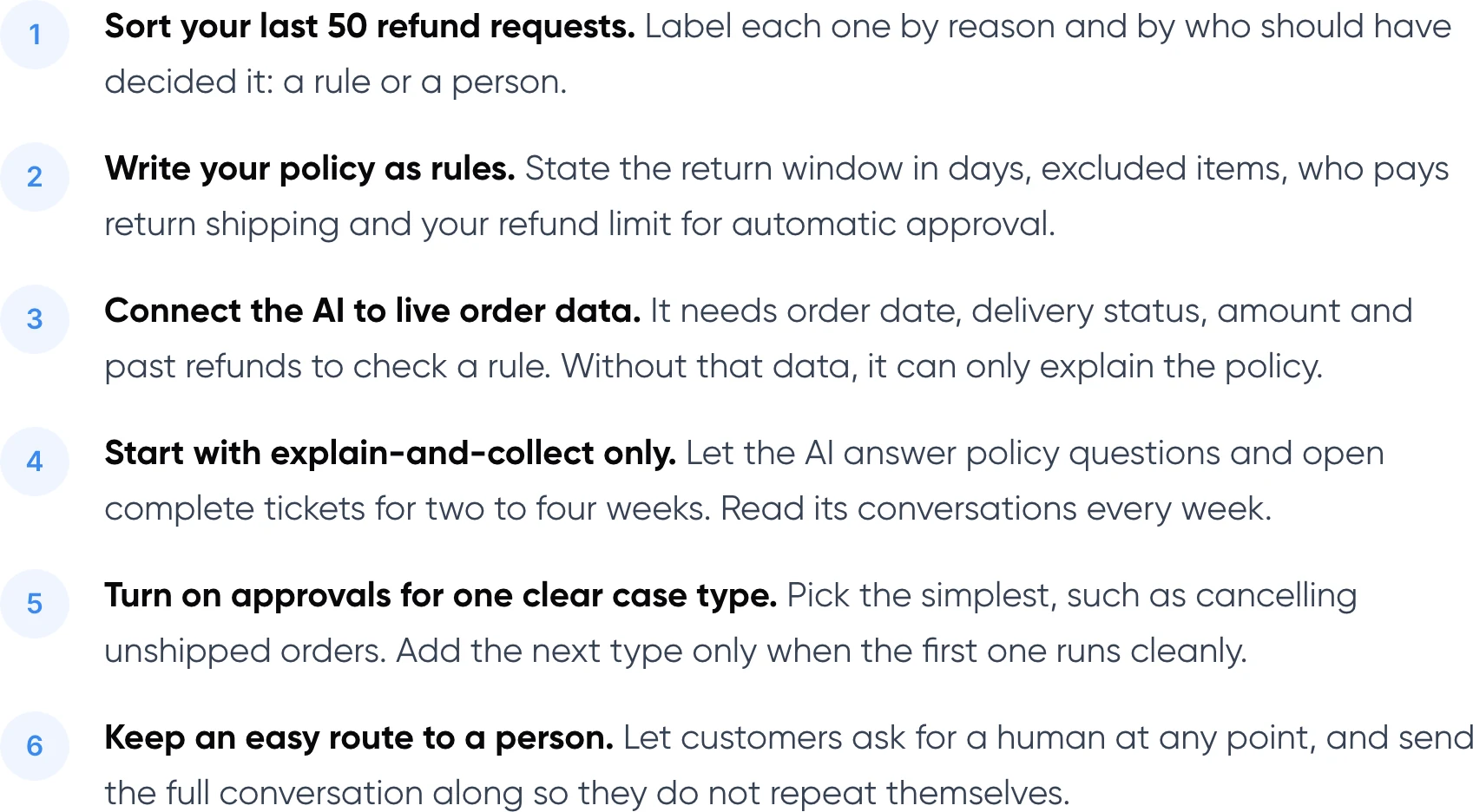
- Sort your last 50 refund requests. Label each one by reason and by who should have decided it: a rule or a person.
- Write your policy as rules. State the return window in days, excluded items, who pays return shipping and your refund limit for automatic approval.
- Connect the AI to live order data. It needs order date, delivery status, amount and past refunds to check a rule. Without that data, it can only explain the policy.
- Start with explain-and-collect only. Let the AI answer policy questions and open complete tickets for two to four weeks. Read its conversations every week.
- Turn on approvals for one clear case type. Pick the simplest, such as cancelling unshipped orders. Add the next type only when the first one runs cleanly.
- Keep an easy route to a person. Let customers ask for a human at any point, and send the full conversation along so they do not repeat themselves.
Your store and help desk decide how much of this you can do without custom work. With Shopify’s self-serve returns, customers request a return from their order page and you approve or decline it. Its return rules are saved to each order when it is placed, so a policy change only applies to future orders. Help desks such as Gorgias connect to Shopify so your team can refund or cancel an order from inside the ticket.
6. When Should Refunds Stay Fully Human?
Customers are still wary of AI in service. In a Gartner survey of 5,728 customers, published in July 2024, ~64% said they would prefer companies did not use AI for customer service. Their top worry was that it would become harder to reach a person.
That worry matters most when money is involved. Gartner’s 2026 survey found ~87% of customers say access to a human agent is essential when a company uses generative AI for service. Our guide to chatbot handoff and context transfer covers how to pass the case over without the customer repeating themselves.
We would keep refunds fully human if you get only a handful a week, if most orders are high-value or custom-made, or if your policy has many exceptions that live in someone’s head. In those cases, writing the rules takes longer than answering the requests.
7. Frequently Asked Questions
Can AI approve refunds automatically?
Yes, if it is connected to your order data and you set clear rules. Keep automatic approval to simple cases, such as unshipped orders or change-of-mind returns inside your window and below a set amount. Send missing parcels, faulty goods and high-value orders to a person.
Is a business responsible for what its chatbot says about refunds?
In the Air Canada case, yes. In 2024 a Canadian tribunal held the airline responsible for wrong refund advice from its website chatbot and awarded the customer C$650.88 plus interest and fees. It is one small-claims decision in Canada, so check the rules where you sell, but it is the case most often cited on this question.
How do I stop customers from abusing AI refunds?
Give the AI rules it cannot talk its way around: a refund limit, a return window, a cap on refunds per customer and a check on order history. Send anything outside those rules to a person. NRF’s 2025 report found retailers estimate ~9% of returns are fraudulent, so checks matter.
What refund requests should always go to a human?
Faulty or not-as-described goods, parcels marked delivered that the customer says never arrived, high-value orders, repeat refund requests and upset customers. These need judgment, and some carry legal duties. For example, UK rules require refunds within 14 days of receiving returned goods for most online cancellations.
Do I need a custom AI agent for refunds?
Not always. If you sell on Shopify and use a help desk with a Shopify connection, your team can already handle refunds from the ticket. A custom agent makes sense when refunds depend on several systems, such as a separate payment provider, warehouse or subscription tool.
8. Conclusion
Letting AI handle refund requests works when your policy is written as clear rules and the AI only acts inside them. Start with explaining the policy and collecting details, then allow approvals below a set amount once the rules hold up. This week, pull your last 50 refund requests and sort them into “rule decides” and “person decides”. That split tells you how much AI can take on.
For an example of our multichannel support work, see Paymate.
If you would like help putting this in place, our customer support automation service sets up AI agents that follow your refund rules, work with your store and pass complex cases to your team.
Author