How to Set Up an AI Chatbot Trained on Your Own Documents: No-Code vs. Custom Build
An AI chatbot trained on your own documents is usually not trained at all. It searches your files for the passages that match a question, then asks a language model to answer from those passages. A no-code tool can do this in an afternoon. A custom build takes weeks, but gives you control over accuracy, data and cost at scale.
This guide explains how it works, compares the two routes on cost and control, and gives you the setup steps for each.
1. The Short Answer
Start with a no-code tool if your documents are public help content, you need a bot this month, and a wrong answer is an inconvenience rather than a risk. Tools such as Chatbase let you upload files or a website and embed a chat widget the same day, from about $40 a month.
Choose a custom build when the bot needs to read private or permission-based documents, act in your own systems, or meet strict accuracy and data rules. Expect a few weeks of engineering, plus ongoing work to test and maintain it.
Key takeaways
- Most "trained on your documents" chatbots use retrieval-augmented generation (RAG): they search your files, then answer from what they find.
- No-code tools are fastest and cheapest to start; Chatbase plans run from $40 to $500 a month on monthly billing.
- A custom build pays off when you need private or permission-based documents, deep integrations or strict data rules.
- RAG reduces wrong answers but does not remove them, so test against real questions and show sources.
- Document quality decides accuracy. Clean, current, well-titled files matter more than the tool you pick.
2. How Does a Chatbot “Trained” on Your Documents Work?
Almost every document chatbot uses retrieval-augmented generation, or RAG. The model itself is not changed. Instead, your documents are prepared once, and each question triggers a search before the model writes an answer.
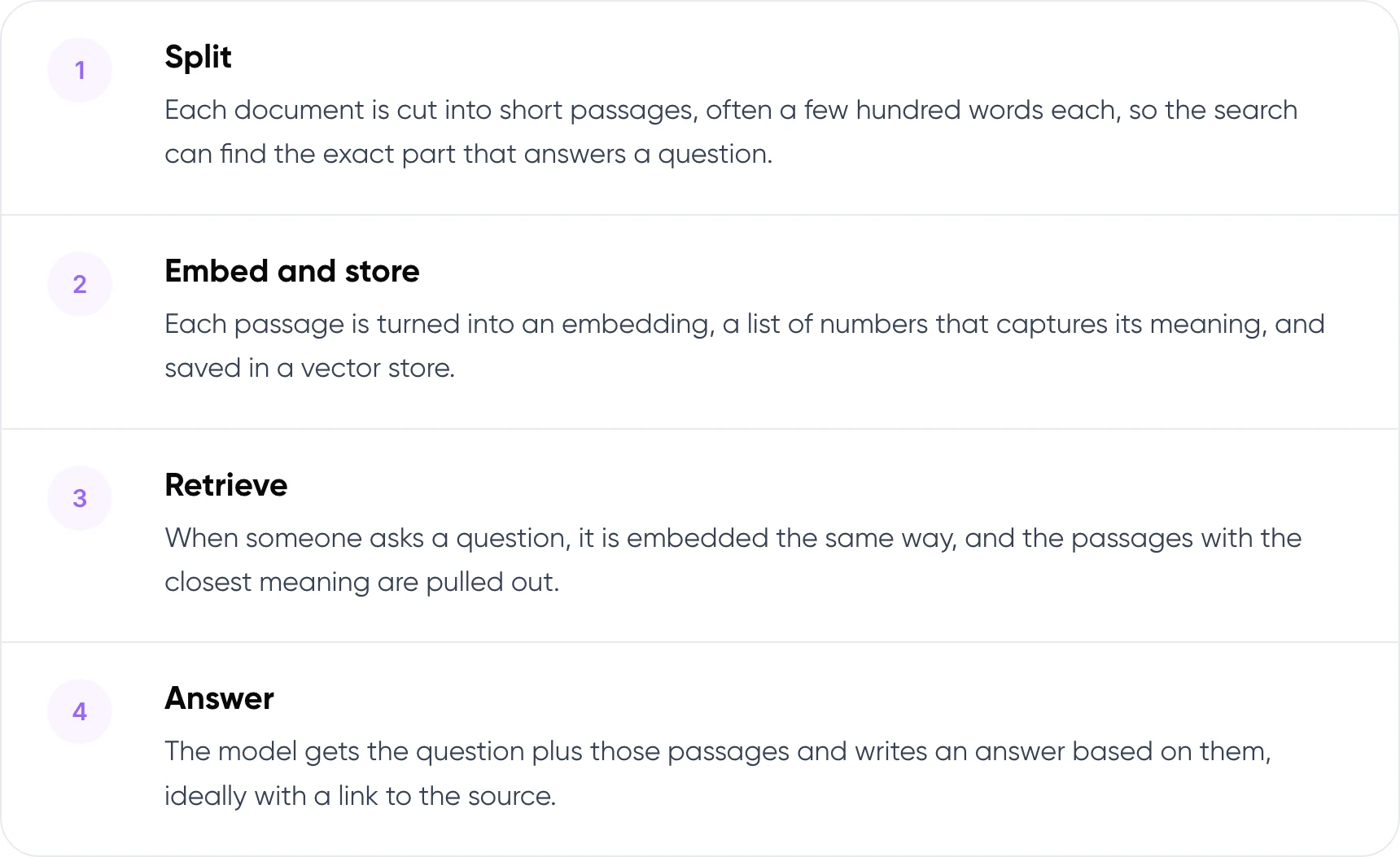
- Split Each document is cut into short passages, often a few hundred words each, so the search can find the exact part that answers a question.
- Embed and store Each passage is turned into an embedding, a list of numbers that captures its meaning, and saved in a vector store.
- Retrieve When someone asks a question, it is embedded the same way, and the passages with the closest meaning are pulled out.
- Answer The model gets the question plus those passages and writes an answer based on them, ideally with a link to the source.
How OpenAI describes its hosted version: OpenAI, file search in the Responses API (2025).
Note: Fine-tuning, which really does retrain a model, is a different technique. It teaches tone and format well but is a poor way to store facts that change, such as prices or policies. For answering from your documents, RAG is the standard approach because you can update a file and the bot uses the new version on the next question.
3. No-Code vs. Custom Build: What’s the Difference?
Both routes use the same RAG pattern. The difference is who controls each step, and how much that control is worth to you.
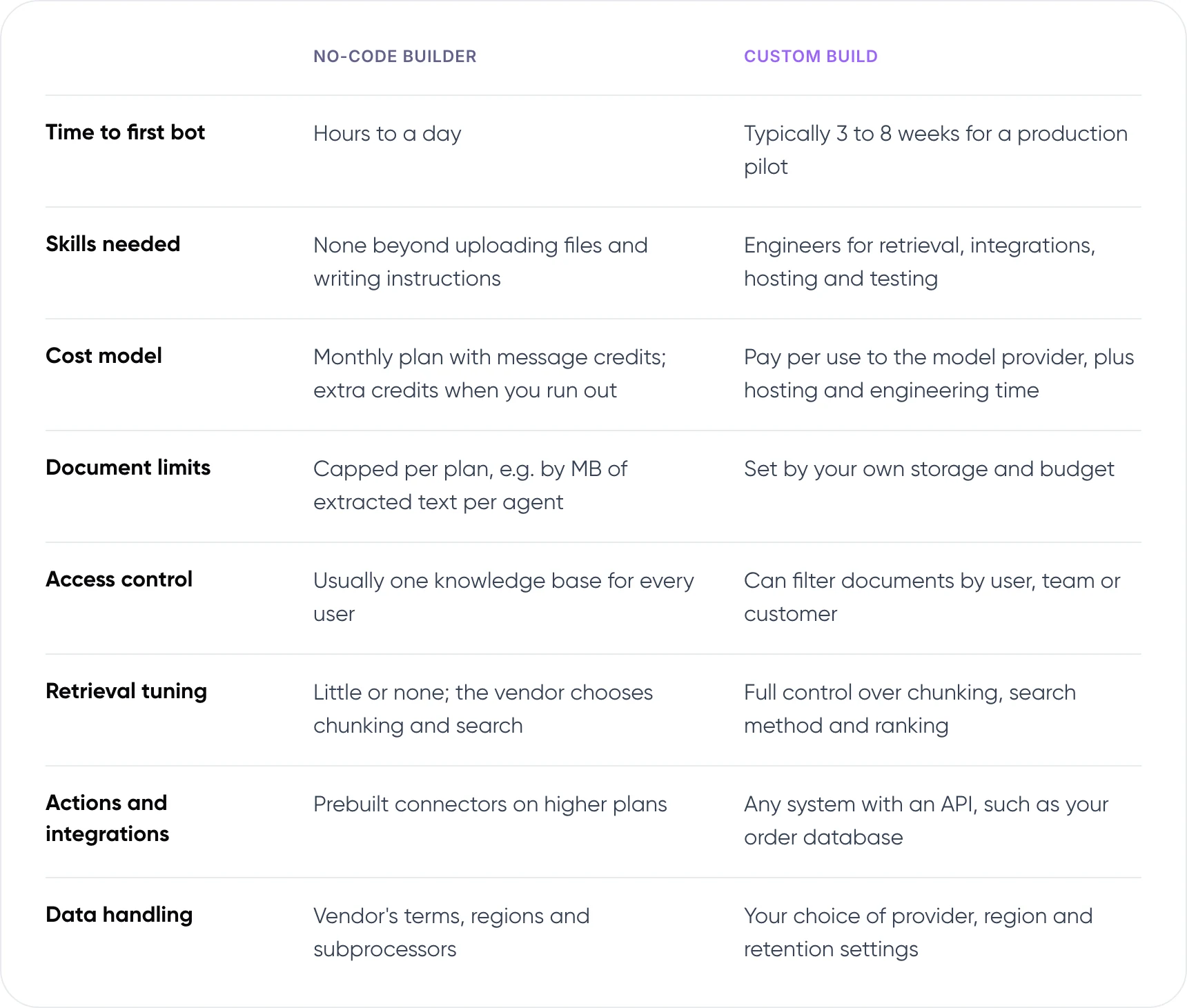
- Time to first bot — No-code builder: Hours to a day. Custom build: Typically 3 to 8 weeks for a production pilot.
- Skills needed — No-code builder: None beyond uploading files and writing instructions. Custom build: Engineers for retrieval, integrations, hosting and testing.
- Cost model — No-code builder: Monthly plan with message credits; extra credits when you run out. Custom build: Pay per use to the model provider, plus hosting and engineering time.
- Document limits — No-code builder: Capped per plan, e.g. by MB of extracted text per agent. Custom build: Set by your own storage and budget.
- Access control — No-code builder: Usually one knowledge base for every user. Custom build: Can filter documents by user, team or customer.
- Retrieval tuning — No-code builder: Little or none; the vendor chooses chunking and search. Custom build: Full control over chunking, search method and ranking.
- Actions and integrations — No-code builder: Prebuilt connectors on higher plans. Custom build: Any system with an API, such as your order database.
- Data handling — No-code builder: Vendor's terms, regions and subprocessors. Custom build: Your choice of provider, region and retention settings.
No-code column based on Chatbase’s published plans (checked November 2026). Custom column reflects a typical build on a model API with your own retrieval layer; timelines are our estimate.
4. What Does Each Option Cost?
No-code tools charge a monthly plan with a fixed number of message credits. A custom build pays the model provider per use, so the API bill is often small. The larger cost is the engineering time to build, test and maintain it.
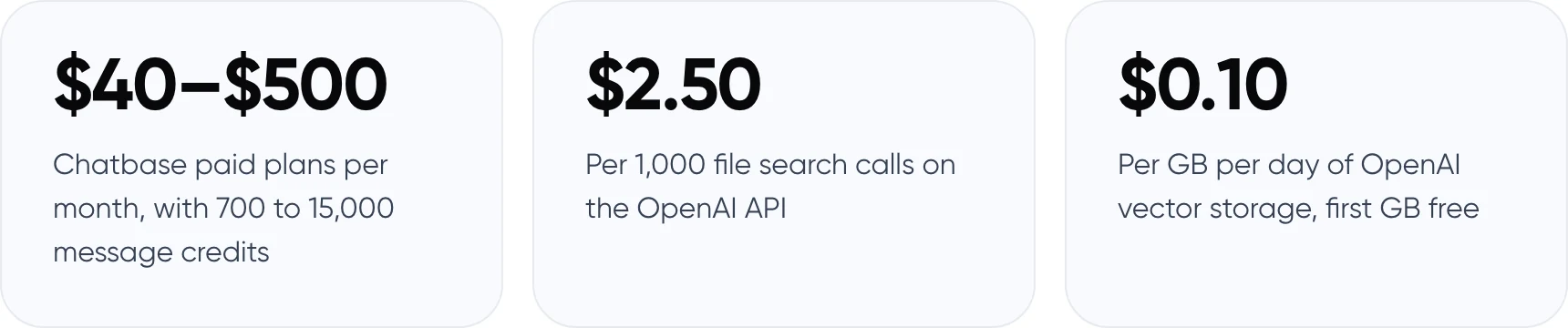
- $40–$500 — Chatbase paid plans per month, with 700 to 15,000 message credits
- $2.50 — Per 1,000 file search calls on the OpenAI API
- $0.10 — Per GB per day of OpenAI vector storage, first GB free
Sources: Chatbase pricing (monthly billing, November 2026; credits used per reply depend on the model); OpenAI API pricing, file search tool.
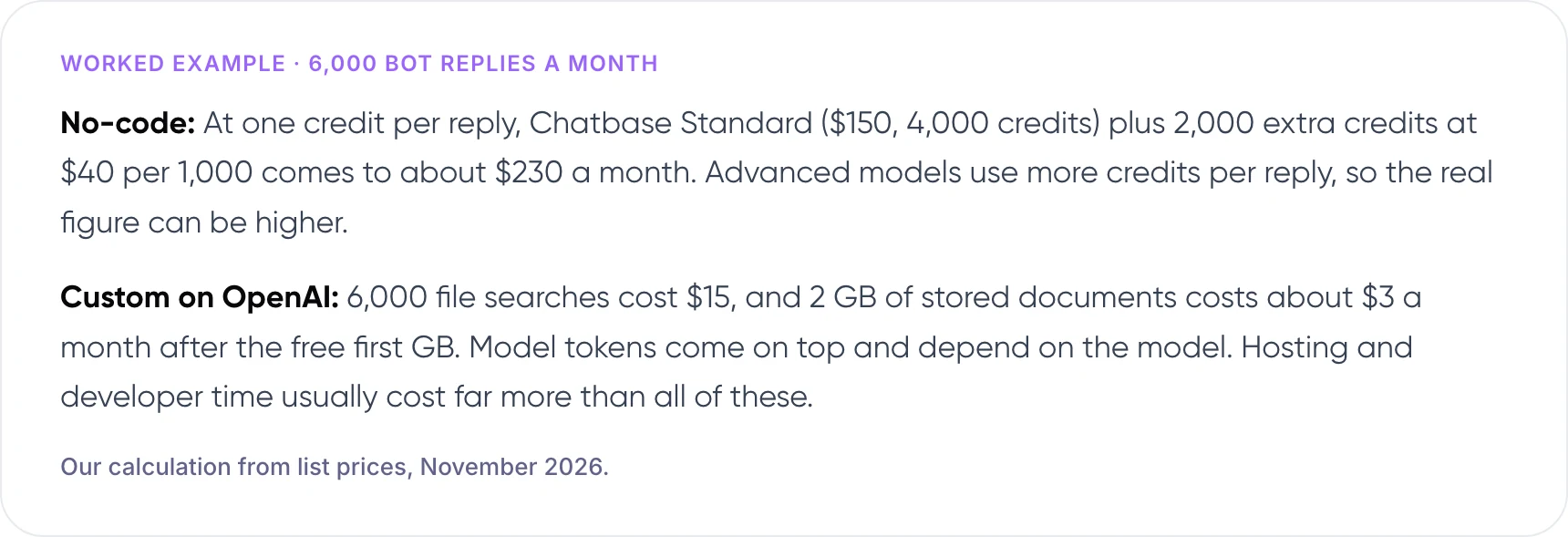
Worked example · 6,000 bot replies a month
No-code: At one credit per reply, Chatbase Standard ($150, 4,000 credits) plus 2,000 extra credits at $40 per 1,000 comes to about $230 a month. Advanced models use more credits per reply, so the real figure can be higher.
Custom on OpenAI: 6,000 file searches cost $15, and 2 GB of stored documents costs about $3 a month after the free first GB. Model tokens come on top and depend on the model. Hosting and developer time usually cost far more than all of these.
Our calculation from list prices, November 2026.
Not sure which route fits your documents and volume? We can map it out with you in one call.
5. How to Set Up a No-Code Document Chatbot in 7 Steps
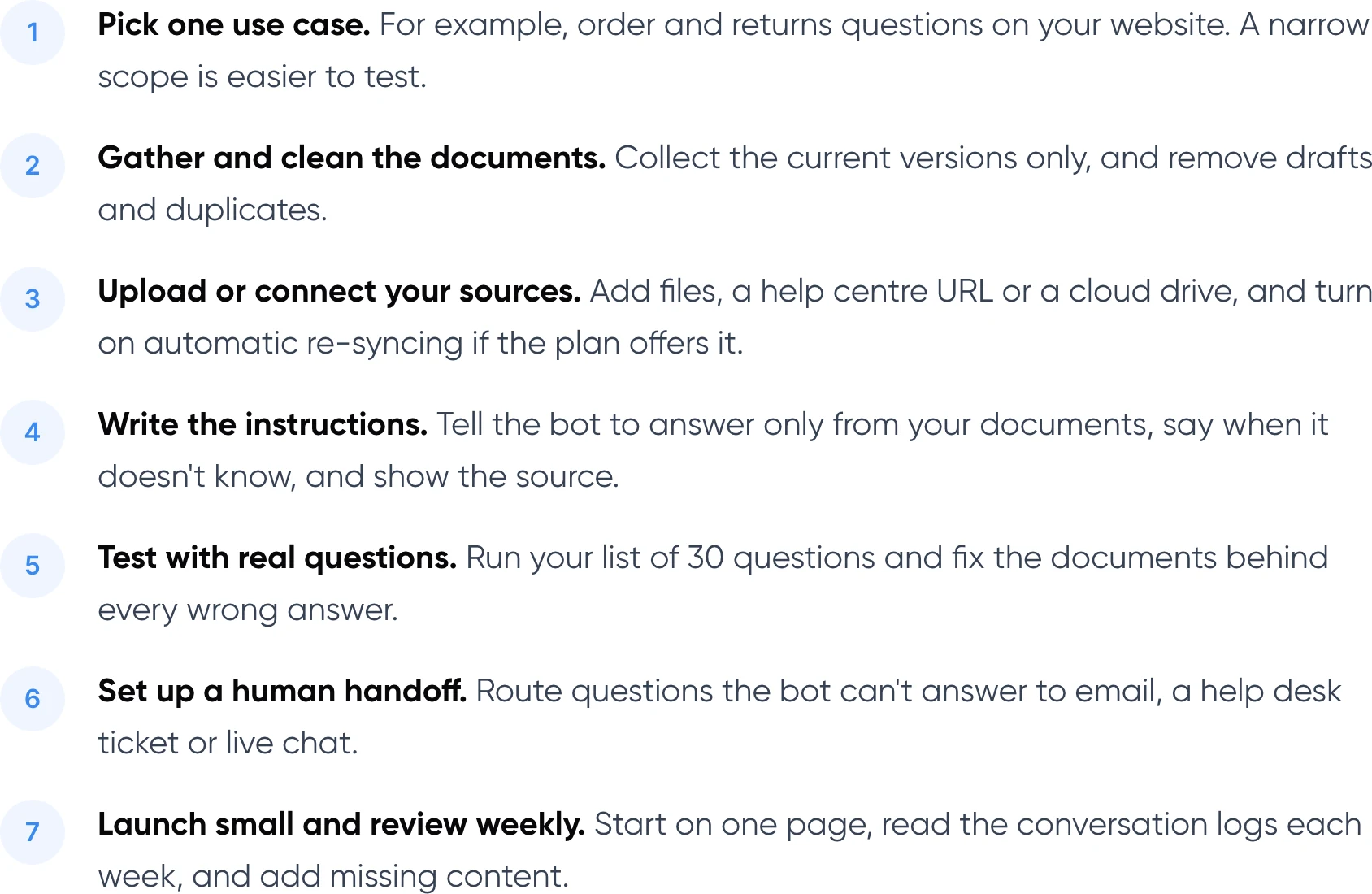
- Pick one use case. For example, order and returns questions on your website. A narrow scope is easier to test.
- Gather and clean the documents. Collect the current versions only, and remove drafts and duplicates.
- Upload or connect your sources. Add files, a help centre URL or a cloud drive, and turn on automatic re-syncing if the plan offers it.
- Write the instructions. Tell the bot to answer only from your documents, say when it doesn't know, and show the source.
- Test with real questions. Run your list of 30 questions and fix the documents behind every wrong answer.
- Set up a human handoff. Route questions the bot can't answer to email, a help desk ticket or live chat.
- Launch small and review weekly. Start on one page, read the conversation logs each week, and add missing content.
Tip: Before you upload anything, write down 30 real questions from your inbox with the correct answers. Test the bot against this list after every change to the documents or settings. It is the fastest way to see whether an edit made things better or worse.
6. When Should You Build a Custom Chatbot Instead?
In our view, a custom build is worth it when one of these is true. The reason is the same each time: a no-code tool hides the steps you would need to change.
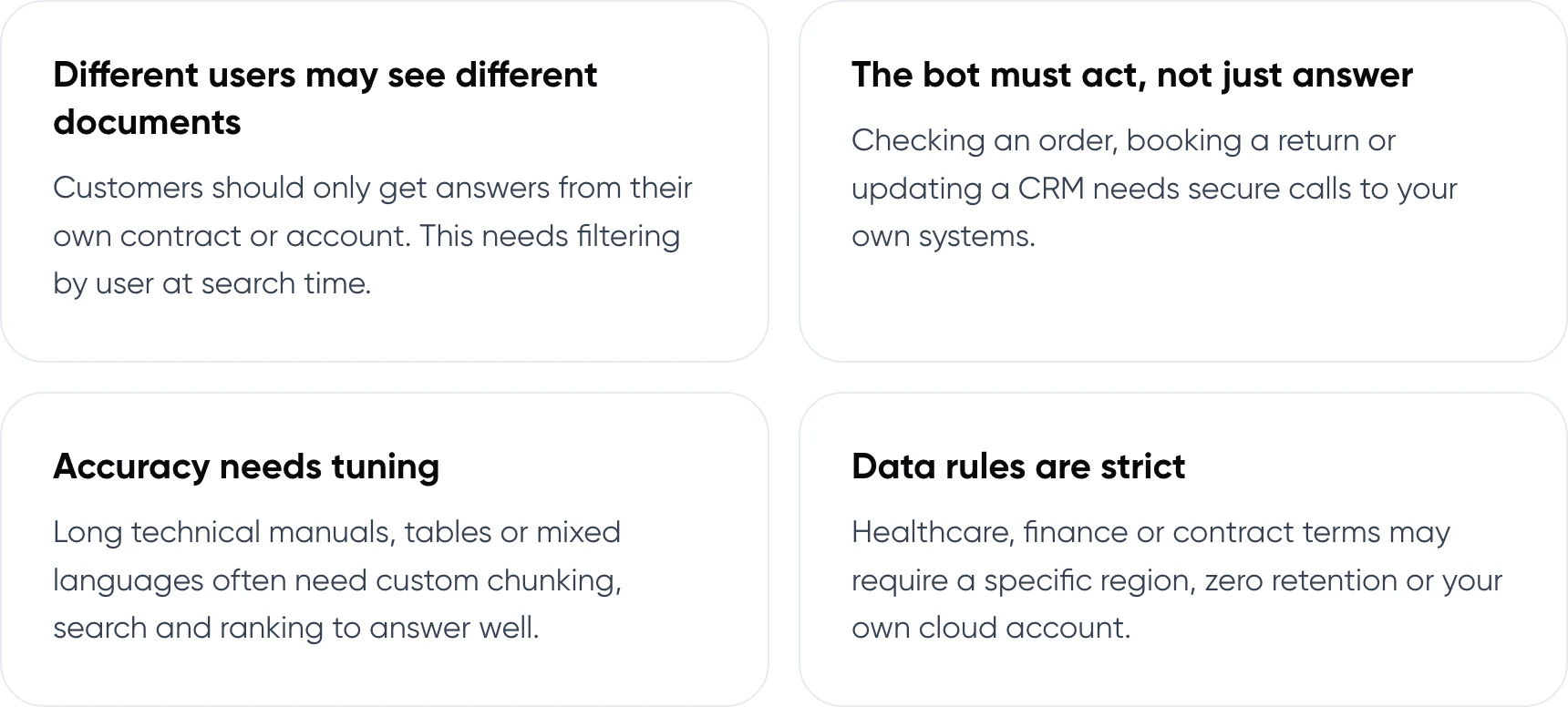
- Different users may see different documents — Customers should only get answers from their own contract or account. This needs filtering by user at search time.
- The bot must act, not just answer — Checking an order, booking a return or updating a CRM needs secure calls to your own systems.
- Accuracy needs tuning — Long technical manuals, tables or mixed languages often need custom chunking, search and ranking to answer well.
- Data rules are strict — Healthcare, finance or contract terms may require a specific region, zero retention or your own cloud account.
Warning: RAG reduces wrong answers but does not remove them. A Stanford RegLab study of commercial legal research tools built this way found they still gave incorrect or unsupported answers on 17% to 33% of test questions. Whichever route you pick, test against real questions and show sources so users can check.
7. Example: Morgan Stanley’s Assistant on 100,000 Documents
Morgan Stanley Wealth Management built AI @ Morgan Stanley Assistant, an internal chatbot on GPT-4 that answers advisors’ questions from the firm’s own research and procedures.
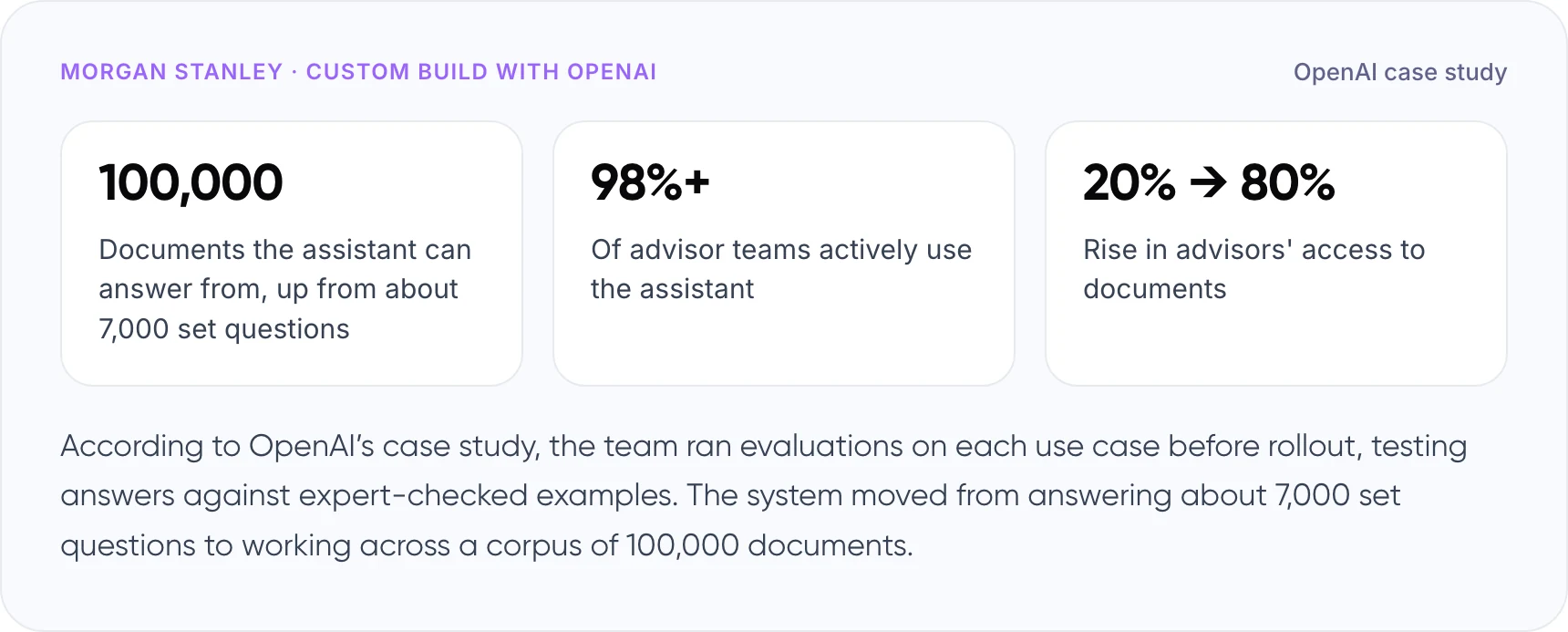
Morgan Stanley · custom build with OpenAI (OpenAI case study)
- 100,000 — Documents the assistant can answer from, up from about 7,000 set questions
- 98%+ — Of advisor teams actively use the assistant
- 20% → 80% — Rise in advisors' access to documents
According to OpenAI’s case study, the team ran evaluations on each use case before rollout, testing answers against expert-checked examples. The system moved from answering about 7,000 set questions to working across a corpus of 100,000 documents.
Most teams don’t need a project on this scale. The useful lesson is the order of work: documents first, evaluation before launch, and adoption tracked as the measure of success.
8. How Should You Prepare Your Documents?
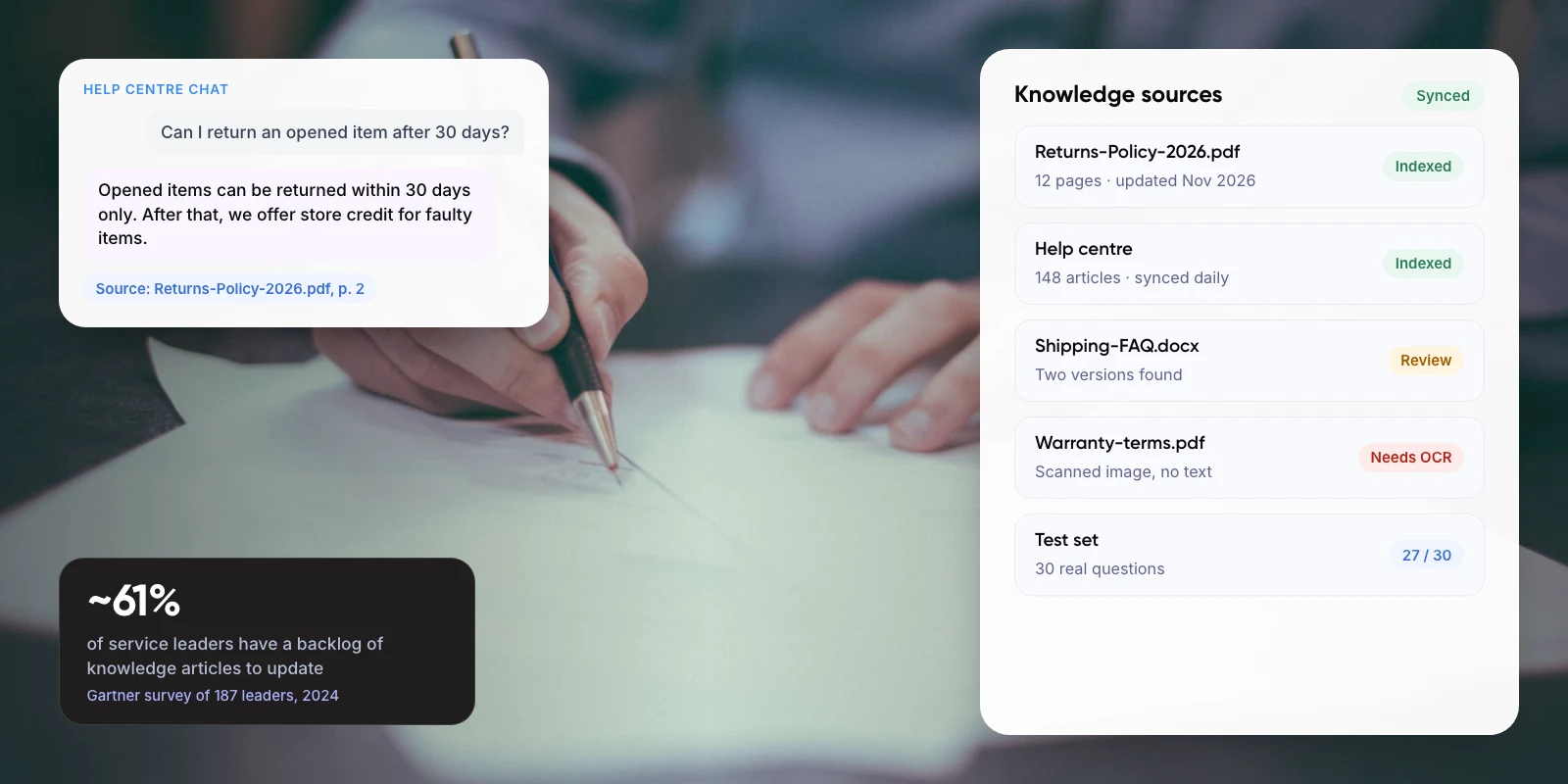
The bot can only be as accurate as the files it searches. A Gartner survey of 187 service leaders (July to August 2024) found 61% had a backlog of knowledge articles to edit, and over a third had no formal process for revising outdated ones.
Remove old versions so the bot can’t quote last year’s policy. Give each document a clear title and date. Split long PDFs by topic, and turn scanned images into real text. Tables in PDFs often lose their structure when extracted, so check how key tables come through in the bot’s answers.
Then give one person the job of keeping the sources current. For how to pass a conversation to a person when the documents don’t have the answer, see how to hand off from chatbot to human without losing context.
9. Frequently Asked Questions
Can ChatGPT be trained on my own documents?
Not in the sense of changing the model. Tools built on ChatGPT and other models use retrieval: they search your uploaded files and answer from the passages they find. You can update a file and the bot uses the new version on the next question, without retraining.
How much does it cost to build an AI chatbot on your own documents?
No-code tools such as Chatbase cost $40 to $500 a month on monthly billing, with message credits per plan. A custom build pays per use to the model provider, often a small amount, but engineering and maintenance are the main cost.
Is a no-code document chatbot secure enough for business use?
It can be for public help content. For private documents, check the vendor's data terms, where data is stored, whether it is used for training and which subprocessors receive it. If you need per-user access control, a custom build is usually the safer route.
How accurate are document chatbots?
Accuracy depends mostly on document quality and testing. Retrieval reduces wrong answers but does not remove them. A Stanford study of commercial legal research tools built this way found errors on 17% to 33% of test questions.
What file types can a document chatbot use?
Most tools accept PDFs, Word files, text files and website pages, and many connect to cloud drives or help centres. Scanned PDFs need text recognition first, and complex tables may lose structure, so check how they appear in answers.
10. Conclusion
An AI chatbot trained on your own documents is mostly a search problem, and the quality of your documents decides most of the result. Start this week by collecting 30 real customer questions and cleaning the files that answer them. Then try a no-code tool against that list. If it falls short on accuracy, access control or integrations, that is the point to consider a custom build.
If you need a support chatbot that answers from your documents and connects to your help desk, our AI customer support automation service can build it for you.
Our service: AI Customer Support Automation
Support chatbots that answer from your documents, cite sources and hand off to your team. See the service →
Custom build: AI Agent Development
Custom AI agents on your own documents and systems, with access control and evaluation built in. Explore the service →
See how we have built AI for clients in our Zenva and Paymate case studies.
Author