Solo Owner? Best AI Customer Support Tools Under $50/mo (No Support Team Needed)
You can run AI customer support on your own for under $50 a month. The right tool depends on one number: how many chats you want the AI to answer.
We compared five tools on their November 2026 prices and worked out what each costs at 50 and 100 AI chats a month.
1. The Short Answer
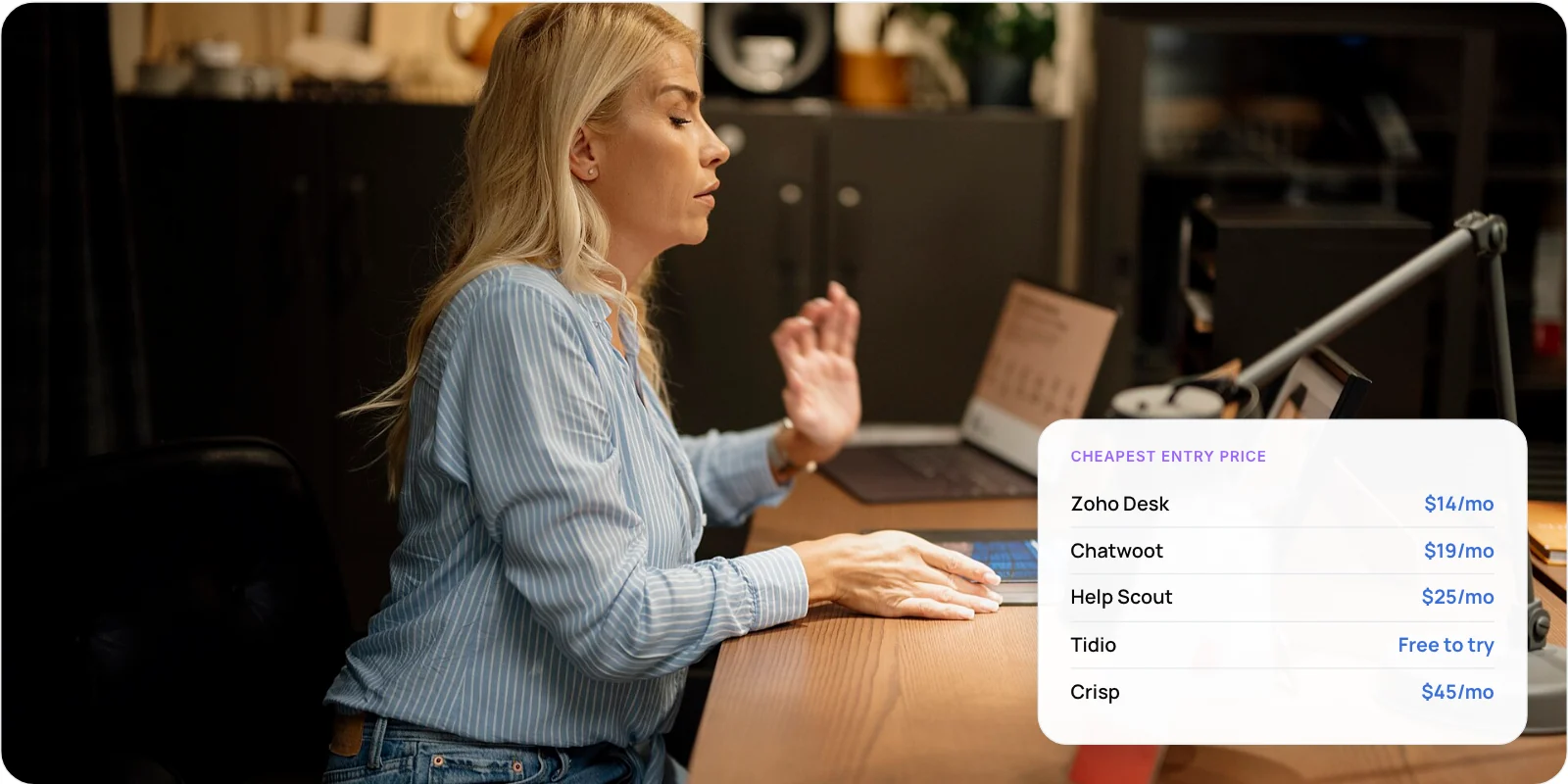
For most solo owners, Chatwoot or Zoho Desk is the cheapest way to get AI customer support. Crisp has the simplest flat price. Help Scout suits very low volume, and Tidio is best for a free trial.
The AI can carry real load. Intercom reported in June 2026 that its AI agent resolved 76% of conversations on average across its customers. That is a vendor figure, but it shows what good help content makes possible.
Key takeaways
- Four of the five tools give one person AI support for $14 to $45 a month.
- How the AI is billed matters more than the seat price.
- Chatwoot and Zoho Desk stay under $50 even at 100 AI chats a month.
- Always keep a clear way for customers to reach you.
2. What Does a Solo Owner Actually Need?
Three things. Everything else can wait until you hire.
- One inbox. Email, website chat and social messages in one place, so nothing gets missed.
- A short help center. Ten to twenty clear articles. The AI answers from these.
- An AI agent. Replies to common questions at any hour and passes the rest to you.
Note: All five tools below include these three. You do not need a separate chatbot app.
3. The 5 Best AI Customer Support Tools Under $50
Prices are for one person, checked in November 2026. Confirm on each vendor’s pricing page before you buy.
Lowest cost: Zoho Desk
$14/mo (Standard, annual)
A ticket-based help desk with an Answer Bot that replies from your help articles. The $7 Express plan is cheaper but has no Answer Bot.
- Good for: Email-first businesses on a tight budget
- Watch out: No built-in website chat on this plan; some AI features need your own OpenAI key
Best overall: Chatwoot
$19/mo (Startups, annual)
Open-source inbox for chat, email, WhatsApp and social. Includes 300 Captain AI credits a month, and one credit covers one AI reply. Extra credits are $20 per 1,000.
- Good for: Owners selling across several channels
- Watch out: 300 credits covers about 100 chats of three AI replies each
Low volume: Help Scout
$25/mo + $0.75 per AI resolution
Clean email-style help desk. You pay only when the AI fully solves a question, and the first three months of AI are free.
- Good for: Email support with very few AI chats
- Watch out: Goes over $50 after about 33 resolutions
Free to try: Tidio
Free plan; paid AI from $68/mo
Live chat built for small shops. The free plan covers 50 conversations a month and includes 50 AI chats once. After that, the Lyro AI agent is a paid add-on ($39 a month for 50 AI chats) on top of the $29 Starter plan.
- Good for: Testing AI chat on a small store at no cost
- Watch out: Paid AI goes over $50; human and AI chats are billed separately
Flat price: Crisp
$45/mo (Mini, per workspace)
One flat price with unlimited human conversations and up to four seats. Includes about $5 of AI credits, roughly 90 AI conversations.
- Good for: Owners who want a predictable bill
- Watch out: AI credits top up beyond the included amount
4. What Will You Really Pay Each Month?
Seat prices are easy to compare. AI usage is where bills differ. Here is one seat at two volumes, based on our calculations from list prices.
- Zoho Desk Standard — How AI is billed: Included in seat · 50 AI chats: $14 · 100 AI chats: $14
- Chatwoot Startups — How AI is billed: 300 credits included · 50 AI chats: $19 · 100 AI chats: $19
- Crisp Mini — How AI is billed: ~$5 credits (~90 chats) · 50 AI chats: $45 · 100 AI chats: ~$46
- Tidio Starter + Lyro — How AI is billed: Separate AI add-on · 50 AI chats: $68 · 100 AI chats: $104
- Help Scout Standard — How AI is billed: $0.75 per resolution · 50 AI chats: $62.50 · 100 AI chats: $100
Blue is under $50. Zoho Desk, Chatwoot and Help Scout seat prices assume annual billing; Tidio and Crisp are monthly. Help Scout assumes every AI chat is a resolution. Chatwoot assumes about three AI replies per chat.
Tip: Help Scout gives new accounts three months of AI answers free. Use that window to learn your real volume before you commit.
5. Which Tool Fits Your Business?
- You want the lowest cost and use email → Zoho Desk
- You sell on WhatsApp, Instagram and your website → Chatwoot
- You want one flat bill with no counting → Crisp
- You want to try AI chat free before paying → Tidio (free plan)
- Email is everything and volume is very low → Help Scout
Our pick for most solo owners is Chatwoot. One seat covers chat, email, WhatsApp and social, and the included AI credits cover about 100 short chats a month. Self-hosting is free if you are comfortable running a server.
Outgrowing off-the-shelf tools? We build AI agents that work with your own data.
6. How to Set It Up in One Day
- Count last month’s messages. This tells you which pricing model fits.
- Write your top 15 answers. Shipping, returns, pricing, opening hours, account help. One clear answer each.
- Connect your main channel. Usually website chat plus email, or WhatsApp if customers message you there.
- Turn on the AI and set limits. Point it at your articles only and add a monthly spending cap.
- Write the handoff line. For example: “I’ll pass this to Priya, who replies within 4 hours.”
- Test with 20 real questions. Fix the article, not the AI, when an answer is wrong.
Step 2 matters most. The AI answers only from what you write. Our guide to agentic RAG for customer service explains how this works.
7. What Should You Never Hand to the AI?
Customers still want a person when it matters. In a 2024 Gartner survey of 5,728 customers, 64% said they would prefer companies didn’t use AI for service. Their main worry was not being able to reach a human.
- Refunds and disputes. Money decisions need your judgement.
- Angry or upset customers. A fast human reply keeps the relationship.
- Legal, medical or safety questions. Wrong answers here carry real risk.
- Your biggest customers. Route them straight to you.
Warning: Set a monthly spending cap on any tool that bills per AI chat. A sale or an outage can triple your volume overnight.
8. Frequently Asked Questions
What is the cheapest AI customer support tool?
On list price, Zoho Desk Standard at $14 a month billed annually, which includes an Answer Bot. Chatwoot is $19 a month with 300 AI credits, or free if you self-host. The cheapest choice for you depends on how many chats the AI handles.
Can I run customer support alone with AI?
Yes, for routine questions. An AI agent can answer shipping, returns and pricing questions at any hour from your help articles. You still handle refunds, complaints and anything unusual, so check handed-off chats at least once a day.
Do I need coding skills to set this up?
No. All five tools have a copy-and-paste chat widget and a point-and-click AI setup. The only exception is self-hosting Chatwoot, which needs a server. The cloud version works without any code.
Is a free AI chatbot good enough?
For testing, yes. Free plans are limited: Tidio’s free plan includes only 50 AI chats in total, and Help Scout’s free AI period ends after three months. Plan for a paid tier once customers rely on it.
How much time will the AI save me?
It depends on how many of your questions repeat. Intercom reported its AI agent resolved 76% of conversations on average in 2026. Your rate will be lower at first and improves as you add help articles.
9. Conclusion
AI customer support under $50 a month is realistic for a solo owner if you pick the tool that matches your volume. Count last month’s customer messages today. Under 100, start a free trial of Chatwoot or Crisp this week.
New to the topic? Read what customer support automation is and how it works. When you need an agent built around your own systems, see our AI customer support automation services.
Author