Proactive Support: Messaging Customers About the Outage Before They Notice
When something breaks, the first message should come from you, not from an angry customer. Here is what to send, when to send it, and how AI helps.
1. The Short Answer
Proactive customer support for outages means telling affected customers about a problem before they contact you. Send a short first message within minutes. Say what is affected, what you are doing, and when the next update will come.
It works, but only if the message is clear. In a 2022 Gartner survey of more than 4,800 customers, proactive service improved customer effort scores. Yet two-thirds still contacted the company afterwards, often because the message left questions open.
Key takeaways
- Send the first message within minutes, even if you don’t know the cause yet.
- Every update should say what is affected, what you are doing, what customers should do, and when the next update comes.
- Gartner found two-thirds of customers contact support after proactive outreach, often because the message left questions open.
- AI can draft updates, find affected customers and answer follow-ups. A person should approve every message.
2. What Is Proactive Outage Communication?
It is the customer-facing part of incident response. Engineers fix the problem. One named person keeps customers informed, from the first alert to the final summary.
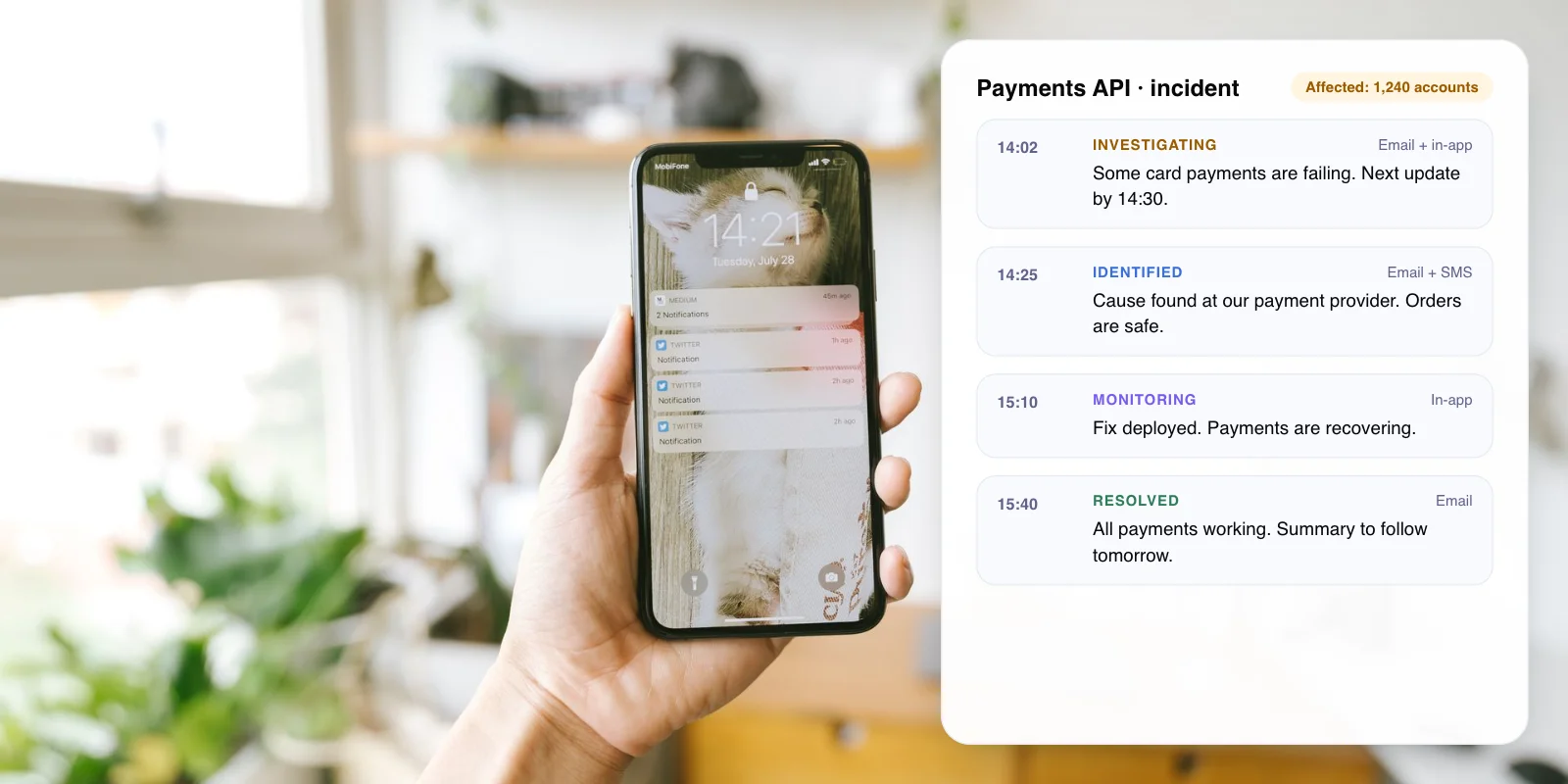
Many teams use the four incident stages found in status page tools such as Atlassian Statuspage: Investigating, Identified, Monitoring and Resolved. Each stage gets its own short message.
- Investigating You know something is wrong. Say what customers may notice.
- Identified You know the cause. Say what you are doing about it.
- Monitoring A fix is live. Say what to check, and when you will confirm.
- Resolved It is fixed. Say since when, and promise a summary.
3. Why Message Customers First?
Outages are getting rarer, but each one costs more. Uptime Institute’s Annual Outage Analysis 2026 found outage frequency per site fell for the fifth year in a row, while costs kept rising.
- 57% of operators said their latest major outage cost over $100,000
- 1 in 5 said their latest major outage cost over $1 million
- 2 in 3 customers still contacted support after proactive outreach
Sources: Uptime Institute, Annual Outage Analysis 2026 (2025 survey of data center operators); Gartner survey of 4,800+ customers, 2022.
Silence makes it worse. Customers who find the problem themselves open tickets, call and post on social media while your team is still fixing it. A message sent first answers them before they go looking.
4. What Should an Outage Message Say?
Every update needs four things. Atlassian’s incident communication guide also advises telling customers when to expect the next update.
- What is affected Name the feature, region or customer group in plain words. “Card payments in India”, not “PG-API latency”.
- What you are doing One line on progress. You don’t need the root cause yet.
- What customers should do A workaround, or a clear “no action needed”. Mention data safety if people will worry about it.
- When the next update comes A specific time, in the customer’s time zone. Then keep to it.
Example first message
“Some card payments are failing for customers in India. Your existing orders are safe. Our team is working on a fix. We will update you by 14:30 IST.”
Tip: Keep your promise on timing, even with nothing new to say. A short “still working on it, next update at 15:00” stops people from guessing.
5. Reactive vs Status Page vs Proactive Messages
A status page is the base. Proactive messages take that same update to the customers who are affected.
- Who finds out first — Reactive only: The customer · Status page: Customers who check the page · Proactive messages: Affected customers, directly
- Where they hear — Reactive only: Social media, support queue · Status page: Your status page · Proactive messages: Email, SMS, in-app, WhatsApp
- Support load — Reactive only: Highest: everyone writes in · Status page: Lower: some self-serve · Proactive messages: Lowest, if the message is clear
- Effort to set up — Reactive only: None · Status page: Low · Proactive messages: Medium: needs a list of affected customers
- Main risk — Reactive only: Lost trust and a flooded inbox · Status page: Customers never visit it · Proactive messages: Wrong details sent to many people
Our assessment of typical setups.
6. How Does AI Help With Proactive Customer Support?
AI should not decide that you have an outage. Your monitoring and on-call engineer do that. In our view, AI is most useful for the slow, manual work around the message.
- Spot the spike early AI groups incoming tickets and chats by topic. A sudden cluster of “payment failed” messages can flag an issue your monitoring missed.
- Draft the update It turns the engineer’s technical note into a plain-language message, in your template and in each customer’s language.
- Find who is affected It matches the failing service or region to customer records, so only affected customers get the message.
- Answer follow-up questions Your support chatbot uses the same approved update to answer “is it fixed yet?” instead of guessing.
Warning: Never let AI publish an outage message on its own. A person approves every customer-facing update. Wrong details about an incident cause more damage than a short delay.
New to the topic? Read what customer support automation is and how it works.
7. What Can We Learn From Real Outages?
Cloudflare · Nov 18, 2025
A detailed post-mortem, published the same day
Failures began at 11:20 UTC. The team first suspected a large DDoS attack, but the cause was a database permissions change. All systems were normal by 17:06 UTC, and CEO Matthew Prince published a detailed post-mortem the same day.
Lesson: early guesses can be wrong. Say “investigating” until you know.
CrowdStrike · Jul 19, 2024
One faulty update, 8.5 million Windows devices
A faulty content update to CrowdStrike’s Falcon sensor crashed Windows machines that were online between 04:09 and 05:27 UTC. Microsoft estimated 8.5 million devices were hit. CrowdStrike published a preliminary review five days later, on July 24.
Lesson: if a supplier fails, your customers still expect to hear from you.
Want outage alerts that reach the right customers in minutes? We can map the workflow with you.
8. How to Set Up Proactive Outage Messages in 7 Steps
- Define what counts as an incident. Agree on severity levels and which ones trigger a customer message.
- Name an owner. One person sends customer updates during each incident, separate from the engineers fixing it.
- Write templates now. One per stage, with blanks for the service, impact and next update time.
- Connect monitoring to customer data. Map each service and region to the customers who use it, so you can target messages.
- Choose channels. Use a status page as the main record, plus email, in-app or SMS for customers who are affected.
- Brief your support chatbot. Feed it the approved update so it answers outage questions with the same facts.
- Practise. Run a mock incident each quarter and time how long the first message takes.
Tip: Put your ticket volume during your last incident into our free AI ROI Calculator to estimate what fewer outage tickets would save.
9. Frequently Asked Questions
What is proactive customer support?
Proactive customer support means contacting customers about an issue before they contact you. During an outage, that means telling affected customers what is wrong, what you are doing and when you will update them. Gartner’s 2022 research found proactive service lowered customer effort.
How quickly should you notify customers about an outage?
As soon as you confirm customers are affected, usually within minutes. The first message does not need a root cause. Say what people may notice and when the next update will come. A short message on time is better than a detailed one an hour later.
Should you use a status page or send messages?
Both. A status page is the single public record of the incident, and Atlassian recommends having one. Direct messages by email, in-app or SMS reach affected customers who would never think to check the page. Use the same wording in both.
Can AI send outage notifications automatically?
AI can draft the message, find affected customers and answer follow-up questions in chat. In our view, a person should approve every outage message before it goes out. Incorrect incident details sent to thousands of customers are hard to take back.
Why do customers still contact support after an alert?
Usually because the alert left questions open. Gartner found two-thirds of customers contacted support after proactive outreach, often for more information or confirmation. Say what customers should do and when the next update comes to reduce follow-ups.
10. Conclusion
Proactive customer support during an outage comes down to speed and clarity. Write your templates now, decide who sends them, and connect your monitoring to a list of affected customers. Then run a practice incident this month and time how long the first message takes.
To build the workflow with us, see our AI customer support automation services.
Author