Best Pay-As-You-Go Customer Support Tools (No Monthly Contract)
Pay-as-you-go customer support software charges per conversation, minute or resolution instead of per seat on an annual contract. Amazon Connect, Twilio Flex and Intercom’s Fin are the closest to pure usage pricing. Help Scout, Freshdesk and Chatwoot pair a free or low-cost inbox with metered AI.
1. What Does Pay-As-You-Go Mean for Customer Support Software?
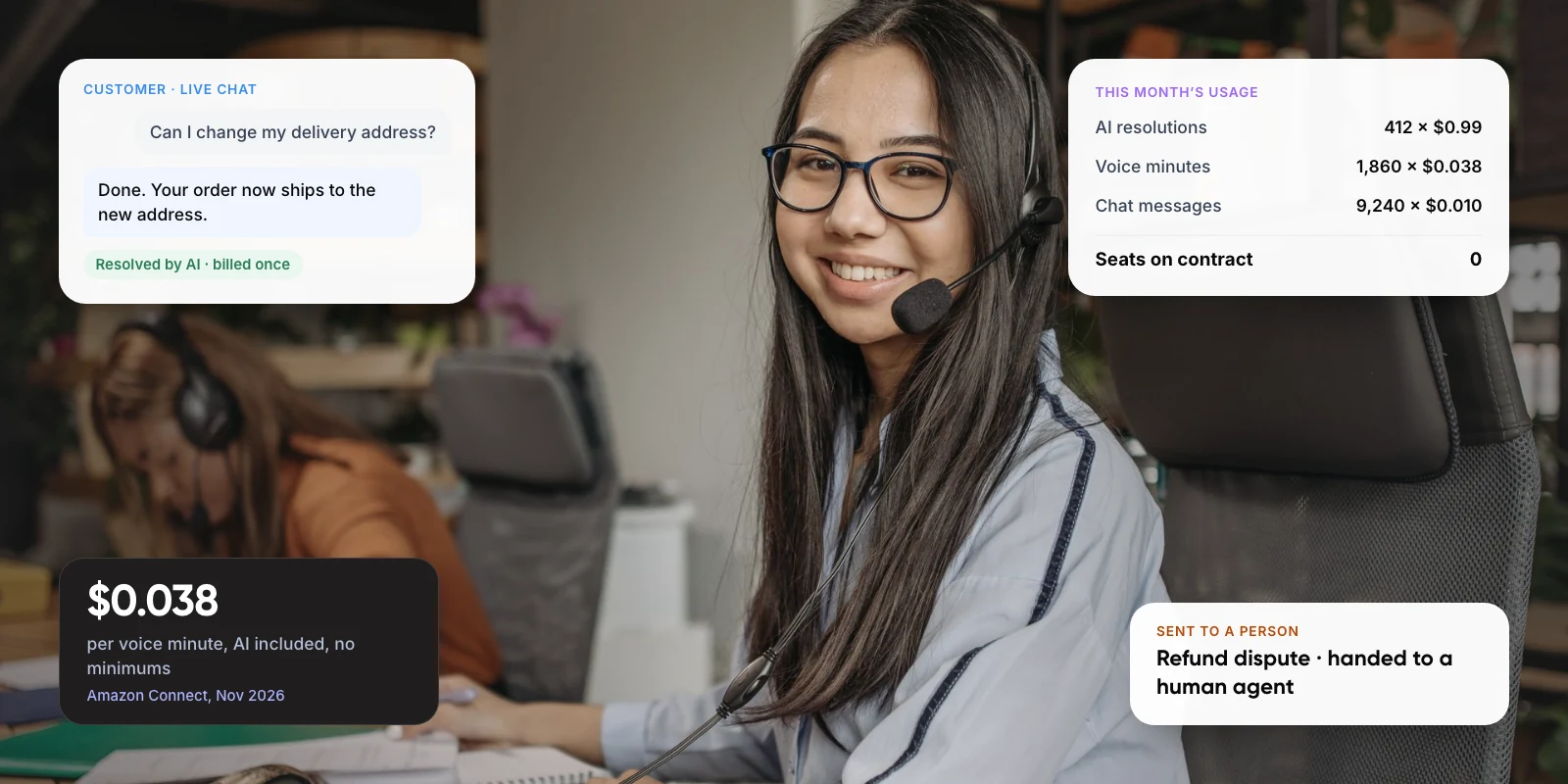
Most customer support software is sold per agent seat, with a discount for paying a year upfront. Pay-as-you-go flips that. You pay for what customers actually use: minutes on a call, messages in a chat, or conversations an AI agent resolves. If volume drops in a quiet month, so does the bill.
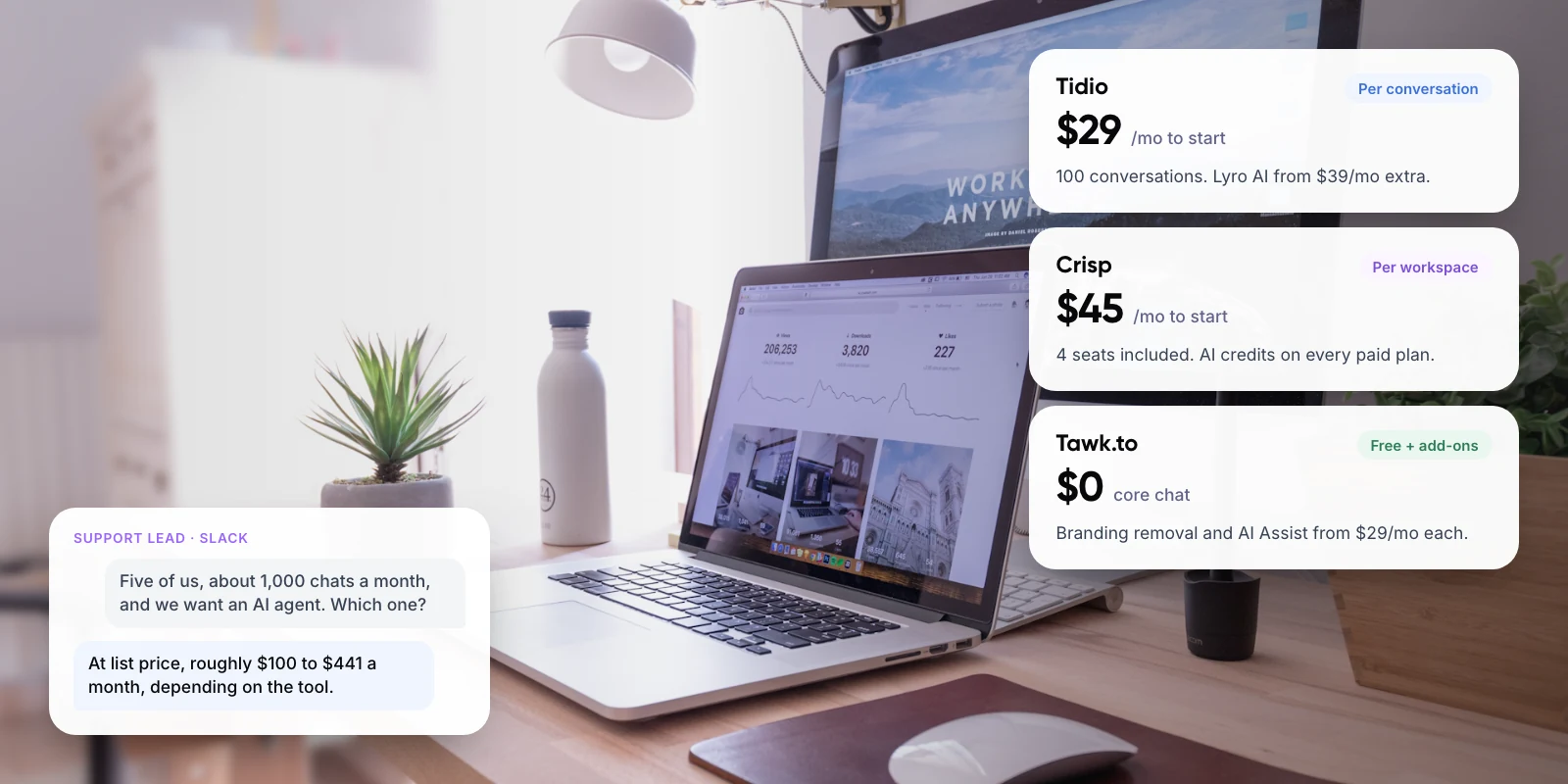
In practice, vendors use three models. Pure usage pricing has no seats and no minimum, as with Amazon Connect. Outcome pricing charges per AI resolution, as with Intercom’s Fin. Hybrid pricing keeps a seat fee for human agents but meters the AI on top. Many tools marketed as “no contract” are actually the third type: you can cancel monthly, but you still pay for every seat.
Key takeaways
- Only a few tools are truly usage-only: Amazon Connect, Twilio Flex on hourly billing, and Fin running on your existing help desk.
- AI is now commonly billed per outcome: about $0.75 (Help Scout), $0.99 (Fin) and $2.00 pay-as-you-go (Zendesk) per resolution, as of late 2026.
- “No contract” often still means paying per seat each month. Check whether the human inbox or only the AI is metered.
- Usage pricing suits seasonal or uncertain volume. At steady high volume, a committed plan or your own build is usually cheaper.
2. Which Pay-As-You-Go Customer Support Tools Are Worth Considering?
We picked tools that publish their usage prices and let you start without a long-term commitment. All prices are US list prices taken from each vendor’s pricing page in November 2026. Taxes, telephony and add-ons are extra.
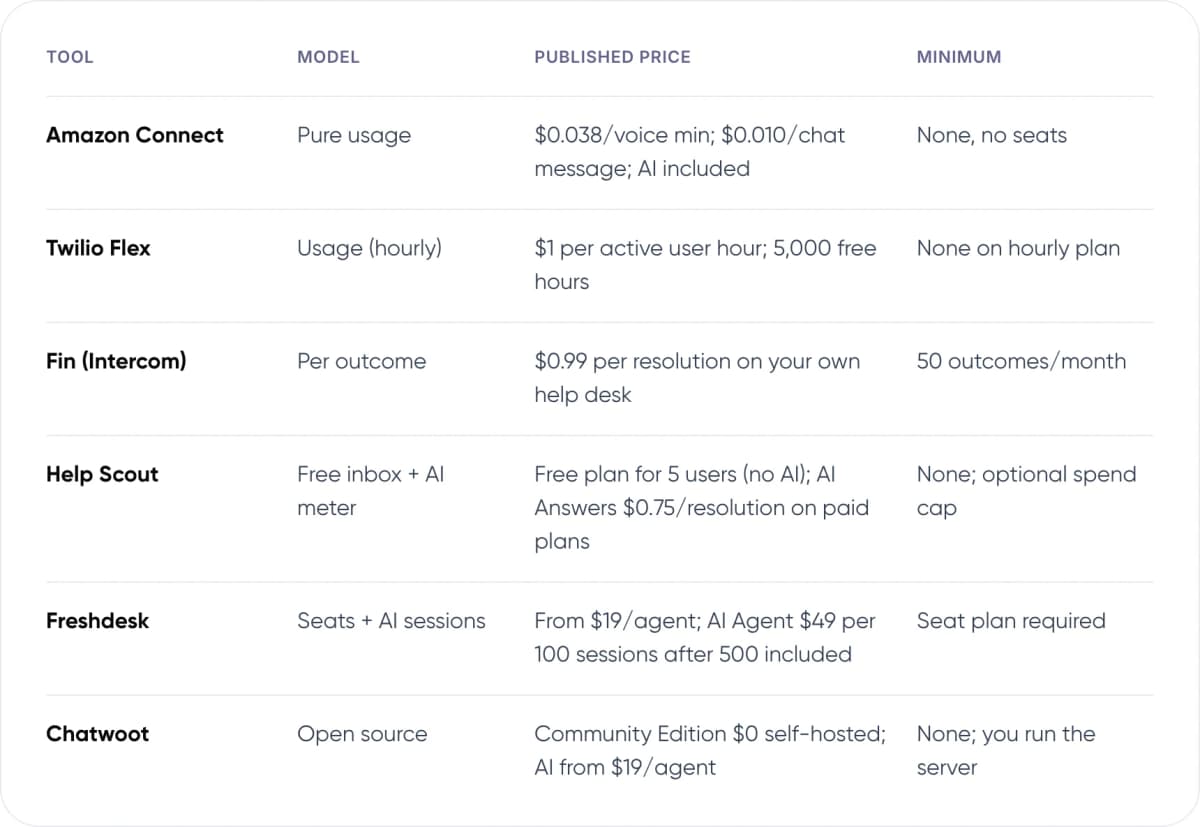
- Amazon Connect — Model: Pure usage. Published price: $0.038/voice min; $0.010/chat message; AI included. Minimum: None, no seats.
- Twilio Flex — Model: Usage (hourly). Published price: $1 per active user hour; 5,000 free hours. Minimum: None on hourly plan.
- Fin (Intercom) — Model: Per outcome. Published price: $0.99 per resolution on your own help desk. Minimum: 50 outcomes/month.
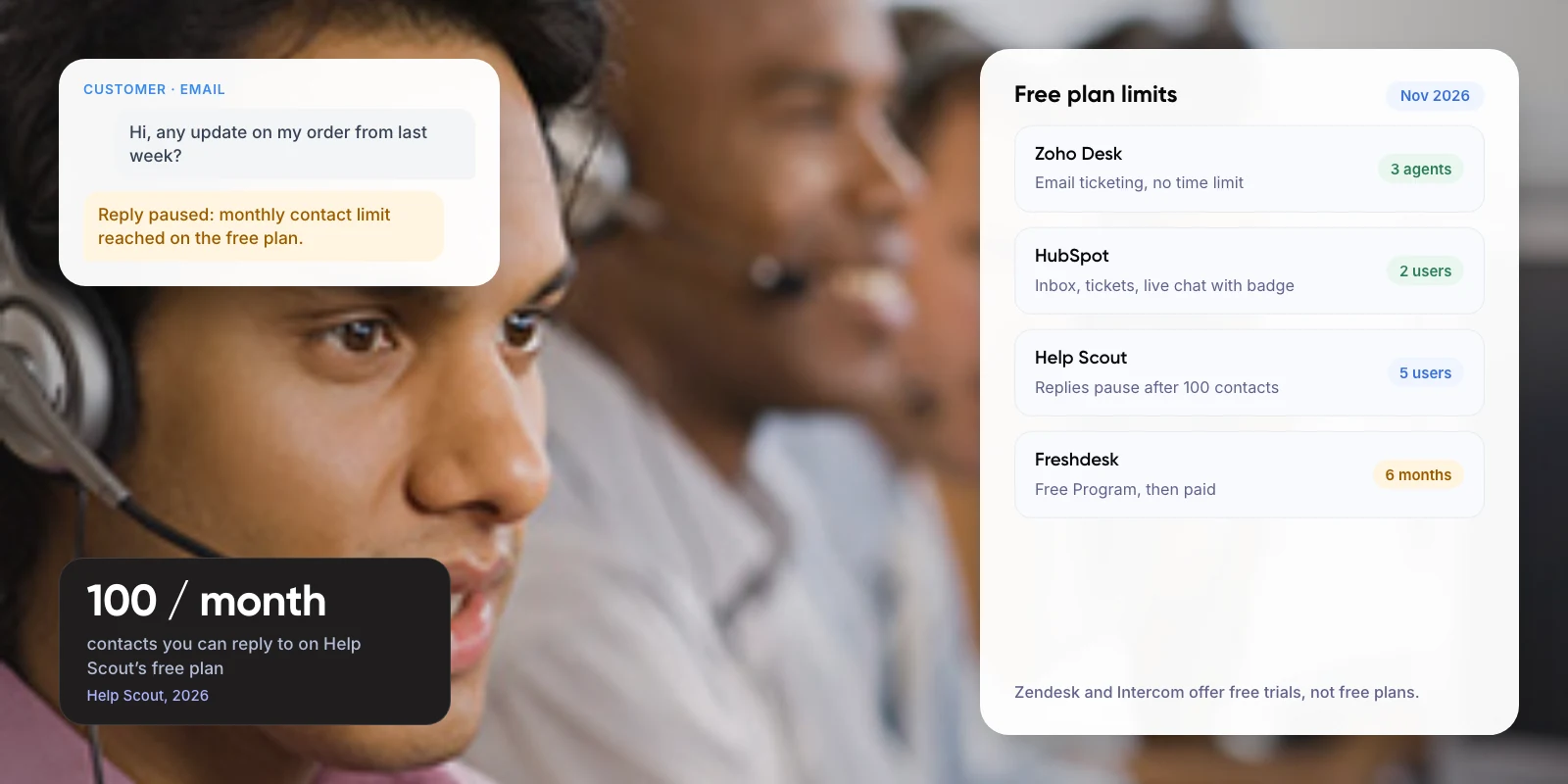
- Help Scout — Model: Free inbox + AI meter. Published price: Free plan for 5 users (no AI); AI Answers $0.75/resolution on paid plans. Minimum: None; optional spend cap.
- Freshdesk — Model: Seats + AI sessions. Published price: From $19/agent; AI Agent $49 per 100 sessions after 500 included. Minimum: Seat plan required.
- Chatwoot — Model: Open source. Published price: Community Edition $0 self-hosted; AI from $19/agent. Minimum: None; you run the server.
Note: Vendors change AI pricing often. Freshworks, for example, raised Freddy AI Agent from $100 per 1,000 sessions (10 cents each) to $49 per 100 (49 cents each) in November 2025. Check the live pricing page before you budget.
3. How Does Each Tool Charge, and Who Is It For?
Amazon Connect: best for usage-only contact centres
AWS lists no minimum monthly fees, long-term commitments or seat charges. Voice is $0.038 per minute plus telephony, chat is $0.010 per message, and AI features are included in those channel rates. The trade-off is setup: you build flows yourself or with a partner, and bills can be hard to predict.
Twilio Flex: best for part-time and seasonal agents
Flex’s active-user-hour plan is billed pay-as-you-go at $1 per hour an agent is logged in. Agents who never log in cost nothing, and new accounts get 5,000 free hours. Calls and messages are metered separately, and Flex needs developers to customise.
Fin by Intercom: best for adding AI to your current help desk
Fin charges $0.99 per outcome, billed at most once per conversation. On Zendesk, Salesforce, HubSpot or Freshdesk there is no seat charge, but a 50-outcome monthly minimum applies. A customer who stops replying after Fin’s answer can count as a resolution.
Help Scout: best for small teams starting free
The free plan covers up to 5 users and 100 contacts a month, without the AI chatbot. On paid plans, AI Answers costs $0.75 per resolution, with a monthly spending cap you control and three free months for new accounts. Paid seats start at $25 per user per month billed annually.
Freshdesk: best for teams already on Freshworks
Freshdesk is seat-based from $19 per agent, so it is not pure pay-as-you-go. Its Freddy AI Agent is metered by session at $49 per 100, after 500 included sessions. A session is one customer conversation window, billed whether or not the AI solves the problem, and unused packs expire.
Chatwoot: best when you want to own the stack
The Community Edition is open source and free to self-host, with no agent limit. You pay for a server and the time to maintain it. Its Captain AI agent is not in the free edition; it starts at $19 per agent per month.
4. How Much Will Pay-As-You-Go Support Actually Cost?
Take a store with 2,000 chat conversations a month, where AI resolves half. The AI line alone varies more than twofold between vendors. These are our estimates at list price, before seats, free allowances or taxes.

- Fin on your help desk — Calculation: 1,000 resolutions × $0.99. AI cost / month: ~$990.
- Help Scout AI Answers — Calculation: 1,000 resolutions × $0.75. AI cost / month: ~$750 + any seats.
- Freshdesk Freddy AI Agent — Calculation: 2,000 sessions × $0.49 (every chat is a session). AI cost / month: ~$980 + seats.
- Zendesk, pay-as-you-go — Calculation: 1,000 resolutions × $2.00. AI cost / month: ~$2,000 + seats.
The cheapest rate is not always the cheapest bill. Freshdesk bills every session, including ones the AI hands to a person. Fin and Help Scout bill only resolutions, but count silence as success. In our view, the fair comparison is cost per ticket a customer would agree was solved.
At high volume, a custom agent on your own model account can cost less per conversation, because you pay the model provider’s token rates directly. It needs engineering upfront. Our guide to agentic RAG for customer service covers how that works.
Not sure which pricing model fits your volume? We can model it with your ticket data.
5. When Is Pay-As-You-Go the Wrong Choice?
Usage pricing moves risk from you to your volume. That works when volume is uncertain. It works against you when volume is high and steady, because you lose the discount a commitment would buy.
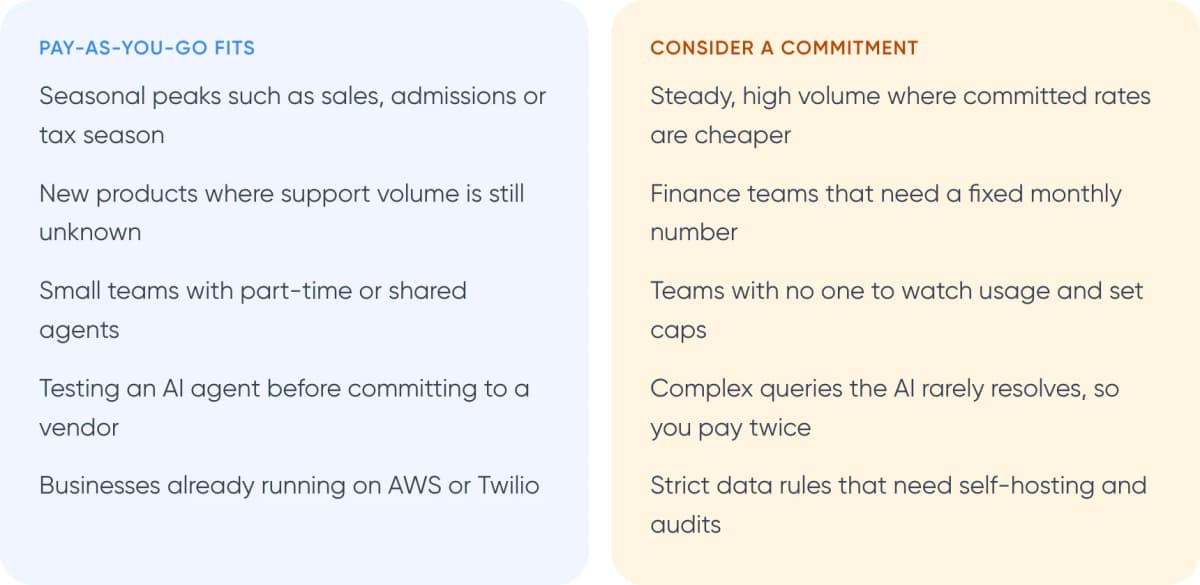
Pay-as-you-go fits
- Seasonal peaks such as sales, admissions or tax season
- New products where support volume is still unknown
- Small teams with part-time or shared agents
- Testing an AI agent before committing to a vendor
- Businesses already running on AWS or Twilio
Consider a commitment
- Steady, high volume where committed rates are cheaper
- Finance teams that need a fixed monthly number
- Teams with no one to watch usage and set caps
- Complex queries the AI rarely resolves, so you pay twice
- Strict data rules that need self-hosting and audits
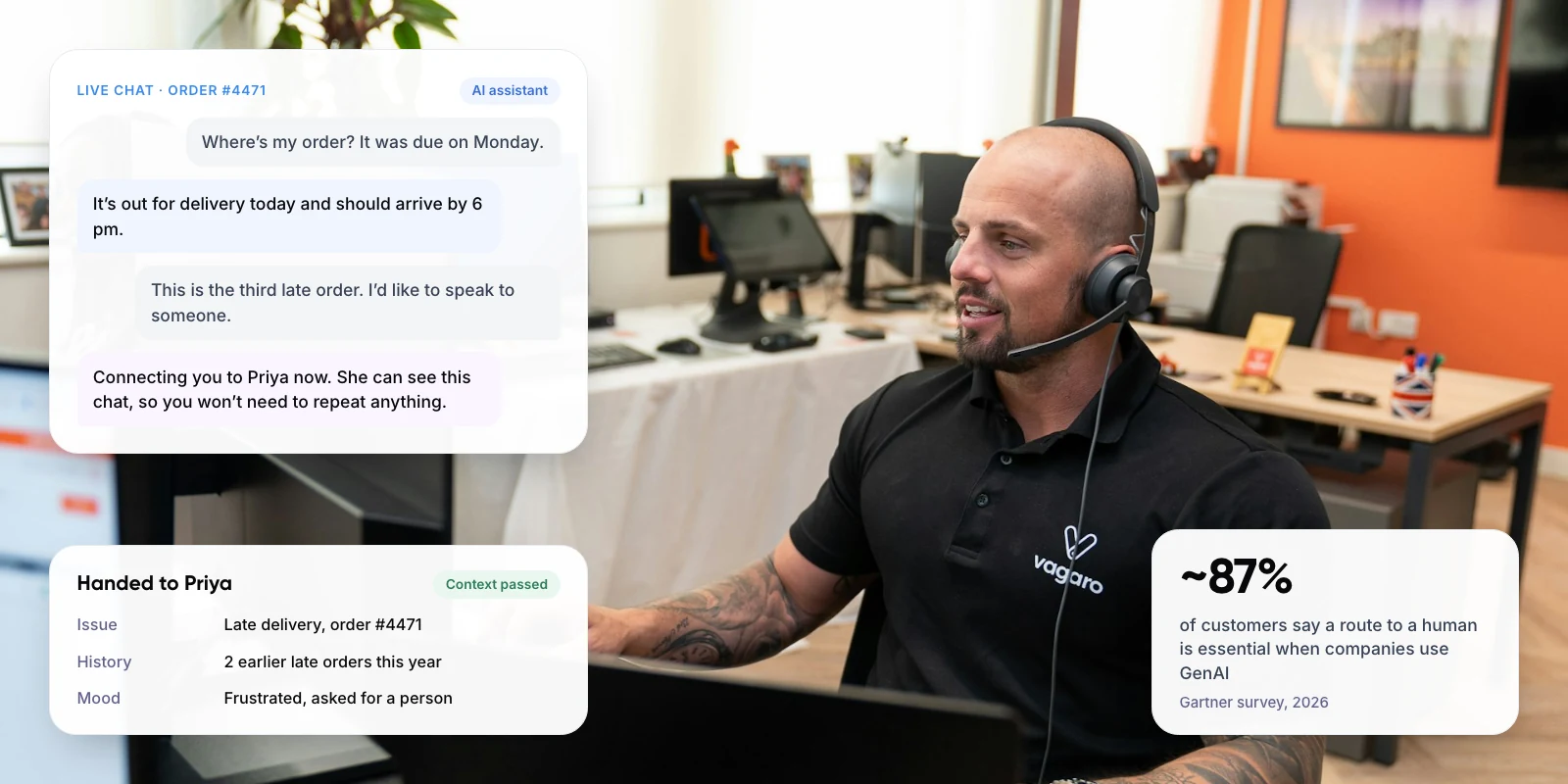
Whatever you choose, keep a clear route to a person. Gartner’s 2026 survey found ~87% of customers say access to a human agent is essential when a company uses generative AI for service. A cheap AI resolution that blocks escalation costs more in churn than it saves.
Warning: A product launch or outage can multiply conversations overnight. Set a monthly spending cap or usage alert on day one, and decide in advance what happens when it is reached.
6. How Do You Choose the Right Customer Support Software? 5 Steps
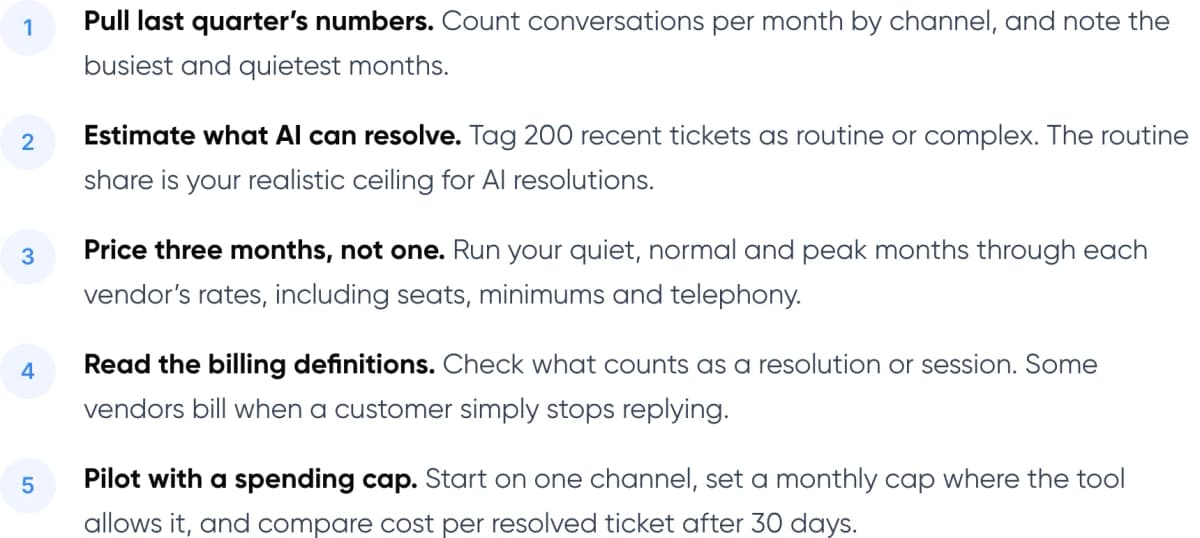
- Pull last quarter’s numbers. Count conversations per month by channel, and note the busiest and quietest months.
- Estimate what AI can resolve. Tag 200 recent tickets as routine or complex. The routine share is your realistic ceiling for AI resolutions.
- Price three months, not one. Run your quiet, normal and peak months through each vendor’s rates, including seats, minimums and telephony.
- Read the billing definitions. Check what counts as a resolution or session. Some vendors bill when a customer simply stops replying.
- Pilot with a spending cap. Start on one channel, set a monthly cap where the tool allows it, and compare cost per resolved ticket after 30 days.
Plan the handover too. When the AI passes a chat to a person, the agent should see the full conversation; our guide to chatbot handoff and context transfer explains how.
7. Frequently Asked Questions
Is there customer support software with no monthly fee?
Yes. Amazon Connect bills only for usage, with no seats or minimums. Twilio Flex’s hourly plan charges $1 per active user hour. Help Scout has a free plan for up to 5 users without AI, and Chatwoot’s Community Edition is free to self-host, though you pay for the server and upkeep.
What is the cheapest AI customer support option per resolution?
Among major vendors in late 2026, Help Scout’s AI Answers is about $0.75 per resolution and Fin is $0.99 per outcome. Zendesk charges $2.00 per automated resolution on pay-as-you-go. Compare cost per resolved ticket, not list price, because resolution definitions differ.
Can I use an AI agent without changing my help desk?
Yes. Intercom sells Fin for Zendesk, Salesforce, HubSpot, Freshdesk and other help desks at $0.99 per outcome, with a 50-outcome monthly minimum and no seat charge. You keep your current ticketing and add the AI layer.
Is pay-as-you-go cheaper than per-seat pricing?
It depends on volume. Usage pricing is usually cheaper when volume is low or seasonal. At steady high volume, per-seat plans or committed AI packs often win; Zendesk, for example, charges $1.50 per resolution committed versus $2.00 pay-as-you-go.
What hidden costs should I check?
Telephony and phone-number fees on top of per-minute rates, minimum monthly commitments, session packs that expire, and add-ons such as agent copilots. Also check whether a customer who stops replying is billed as a resolution.
8. Conclusion
Pay-as-you-go customer support software makes sense when your volume is seasonal, new or hard to predict. Amazon Connect and Twilio Flex are the closest to usage-only, and Fin adds metered AI to the help desk you already have. Before you sign up, run your quiet and peak months through each vendor’s rates and compare cost per resolved ticket.
For an example of our multichannel support work, see Paymate.
If you would rather own your AI agent than pay a vendor for every resolution, our AI customer support automation service can help. We plan, build and run AI support connected to your help desk, order system and knowledge base.
Author