AI Helpdesk Setup Service: Migrate and Automate Your Support Desk
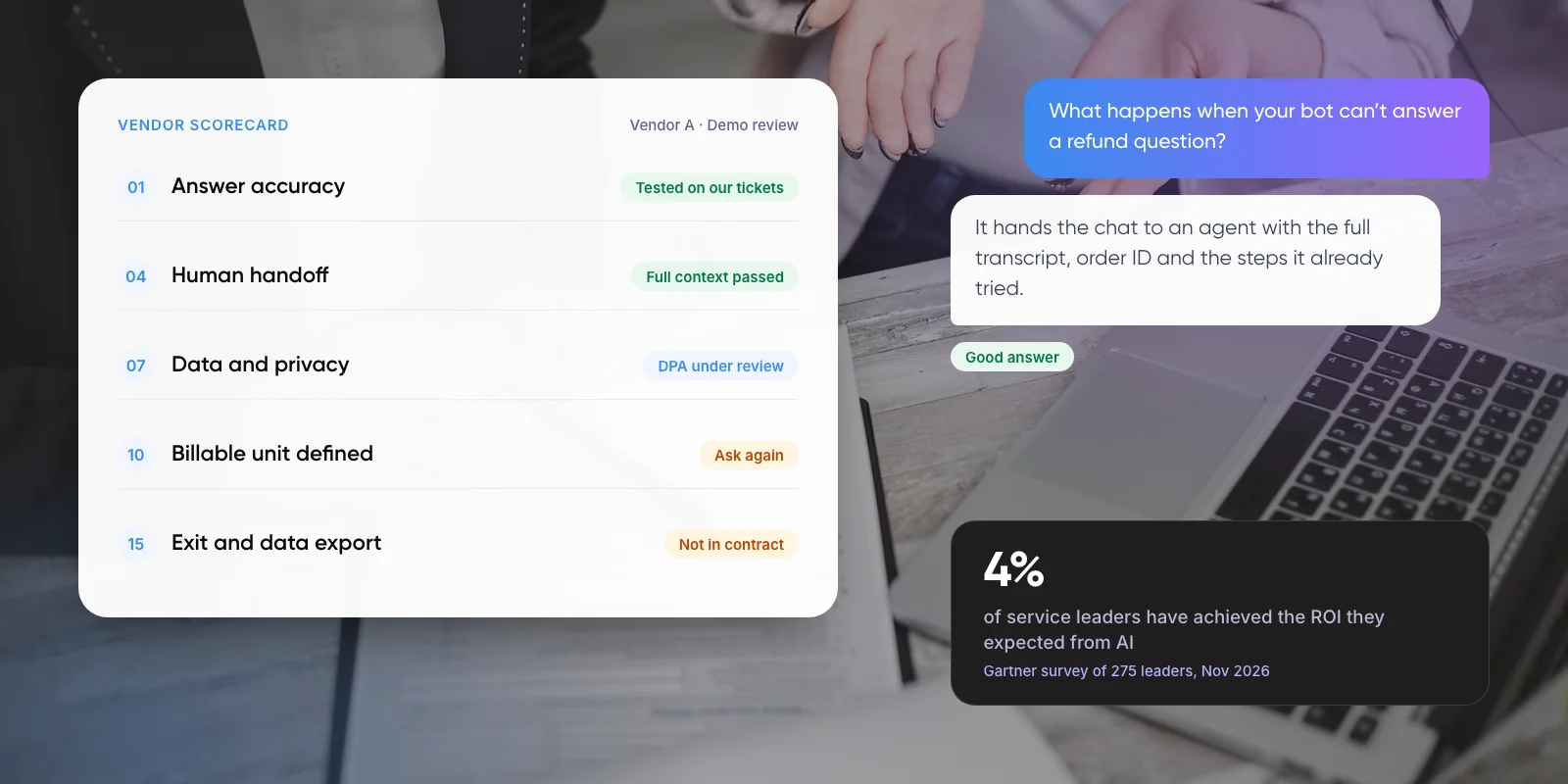
An AI helpdesk setup service moves your support desk to a new platform, rebuilds your rules there and adds AI that answers from your own help content. The AI is rarely the hard part. Gartner’s November 2026 survey of 275 service leaders found only ~4% had achieved the return they expected from AI.
This guide explains what moves between help desks and what has to be rebuilt, the steps of a clean migration, what AI costs once it is live, and when paying for a setup service makes sense.

1. What Does an AI Helpdesk Setup Service Include?
It covers three jobs that are often sold separately. Migration moves your records: tickets with their replies, contacts, companies and help articles. Configuration rebuilds how the desk behaves, from routing rules to saved replies and integrations. AI setup connects an AI agent to your help content and decides which questions it may answer.
Each job fails in its own way. A poor migration loses history. A poor configuration sends tickets to the wrong team. A poor AI setup gives confident wrong answers, and customers notice those quickly.
Note: A trigger is a rule that runs when a ticket changes, such as “send billing questions to the finance group”. A macro is a saved reply or set of actions an agent applies with one click. An SLA is a response-time target the desk tracks.
Key takeaways
- An AI helpdesk setup service covers three jobs: moving your data, rebuilding your rules and adding AI on top.
- Tickets, contacts and help articles can be moved. Triggers, macros, SLAs and reports are usually rebuilt by hand.
- Zendesk’s import keeps original ticket dates but not metrics such as first reply time, so export old reports first.
- Turn on AI last, for a few common question types, with a clear route to a person.
2. When Is It Worth Moving Your Help Desk?
Teams usually move for one of four reasons: seat prices that keep rising, a missing channel such as WhatsApp, AI pricing that no longer fits their volume, or a desk with hundreds of rules nobody understands any more.
Moving is not always the answer. If your current tool offers the AI you need and the platform itself works, a cleanup costs less than a migration. In our view, migrate when the platform limits you, not when the setup is messy. A messy setup moves with you unless someone fixes it on the way.
That cleanup is also where AI results come from. In the same 2026 Gartner research, the service teams it calls AI-forward invest “nearly 1.8 times more” in data, knowledge and process foundations than in the AI use cases themselves, according to Gartner analyst Christopher Sladdin.
3. What Moves Over and What Has to Be Rebuilt?
The simplest way to plan is to split everything into data and configuration. Data can be copied. Configuration describes how one product behaves, so it rarely translates cleanly into another.
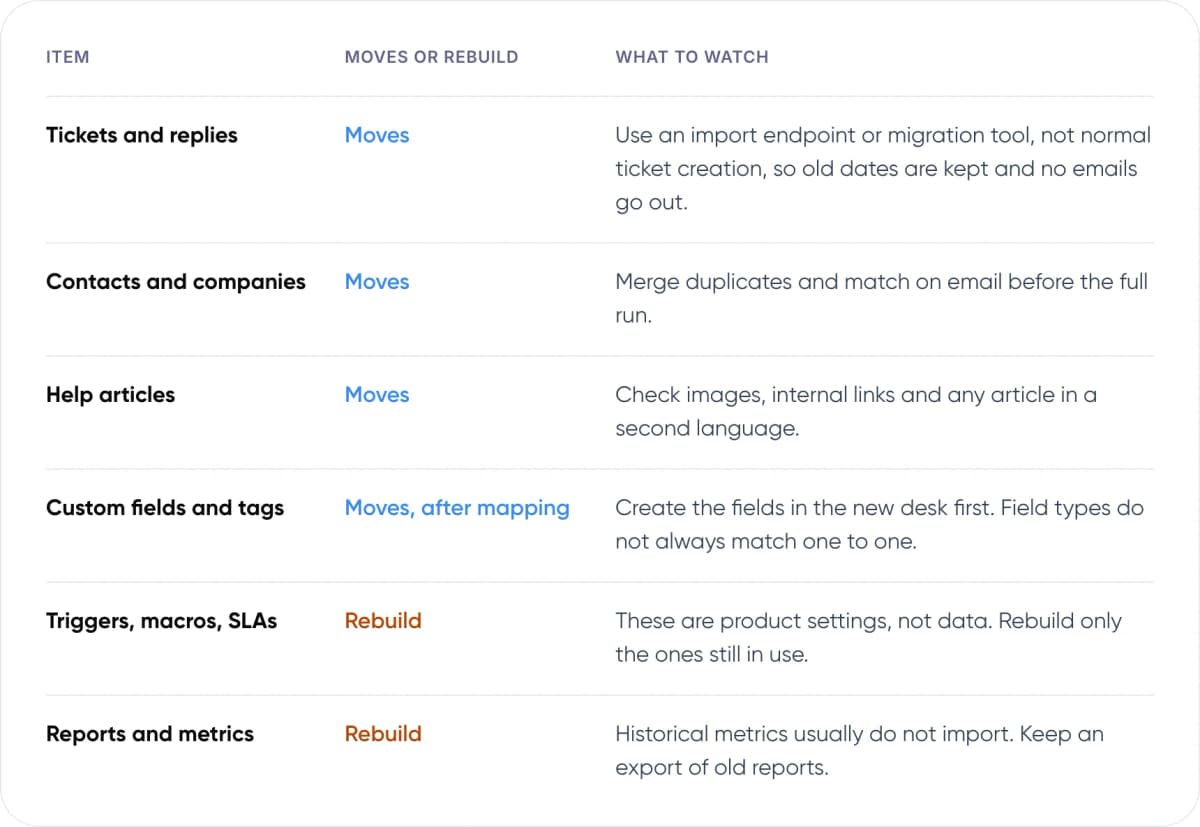
- Tickets and replies — Moves or rebuild: Moves. What to watch: Use an import endpoint or migration tool, not normal ticket creation, so old dates are kept and no emails go out.
- Contacts and companies — Moves or rebuild: Moves. What to watch: Merge duplicates and match on email before the full run.
- Help articles — Moves or rebuild: Moves. What to watch: Check images, internal links and any article in a second language.
- Custom fields and tags — Moves or rebuild: Moves, after mapping. What to watch: Create the fields in the new desk first. Field types do not always match one to one.
- Triggers, macros, SLAs — Moves or rebuild: Rebuild. What to watch: These are product settings, not data. Rebuild only the ones still in use.
- Reports and metrics — Moves or rebuild: Rebuild. What to watch: Historical metrics usually do not import. Keep an export of old reports.
Zendesk’s documentation shows the detail that matters. Its Ticket Import API keeps the original created, updated and solved dates. According to Zendesk’s migration guidance, no triggers run on imported tickets, so customers are not emailed about old conversations. Metrics such as first reply time are not imported, so export your old reports before you switch.
Large archives need their own plan. For imports of 750,000 tickets or more, Zendesk’s docs suggest sending closed tickets straight to the archive so the live queue stays fast. Moving the other way, Freshdesk has documented a free Zendesk import app for tickets, contacts and help articles, though reporting metrics on imported tickets are not supported.
4. How Does a Help Desk Migration Work? 7 Steps
This is the order we recommend for most migrations. The AI goes in last, once the desk underneath it works.
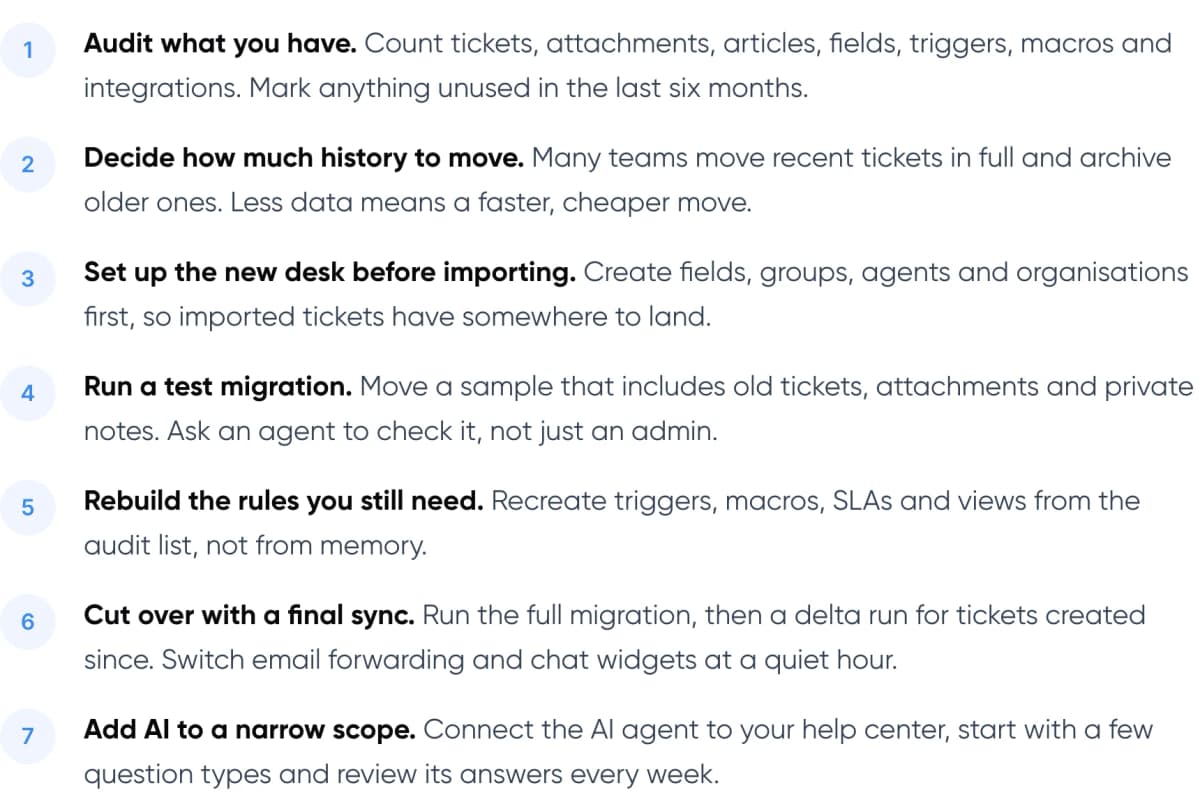
- Audit what you have. Count tickets, attachments, articles, fields, triggers, macros and integrations. Mark anything unused in the last six months.
- Decide how much history to move. Many teams move recent tickets in full and archive older ones. Less data means a faster, cheaper move.
- Set up the new desk before importing. Create fields, groups, agents and organisations first, so imported tickets have somewhere to land.
- Run a test migration. Move a sample that includes old tickets, attachments and private notes. Ask an agent to check it, not just an admin.
- Rebuild the rules you still need. Recreate triggers, macros, SLAs and views from the audit list, not from memory.
- Cut over with a final sync. Run the full migration, then a delta run for tickets created since. Switch email forwarding and chat widgets at a quiet hour.
- Add AI to a narrow scope. Connect the AI agent to your help center, start with a few question types and review its answers every week.
Warning: Keep customer notifications switched off in the new desk until cutover day. If notifications are on during a test run, real customers can receive emails about tickets that were closed long ago.
5. How Do You Add AI Without Hurting Support Quality?
An AI agent answers from your help articles and, depending on the tool, from past replies and any systems you connect, such as order or billing data. If that content is thin or out of date, the answers will be too. We suggest starting with your five to ten most common question types and widening the scope only when those answers hold up.
Klarna is the best-known public example. Its OpenAI-powered assistant handled 2.3 million conversations in its first month, two-thirds of Klarna’s service chats. In its February 2024 release, Klarna said repeat inquiries fell by ~25%. It also said customers were resolving their issues in under 2 minutes, compared with 11 minutes before. These are Klarna’s own figures.
The follow-up matters as much. In 2025 Klarna began recruiting human agents again to keep people available for customers who want them, while the assistant kept handling routine chats. For most teams the end state is the same mix: AI for routine questions and a clear route to a person. Our guide to chatbot handoff and context transfer covers how to pass a conversation over without making the customer repeat themselves.
6. What Does an AI Helpdesk Cost After Setup?
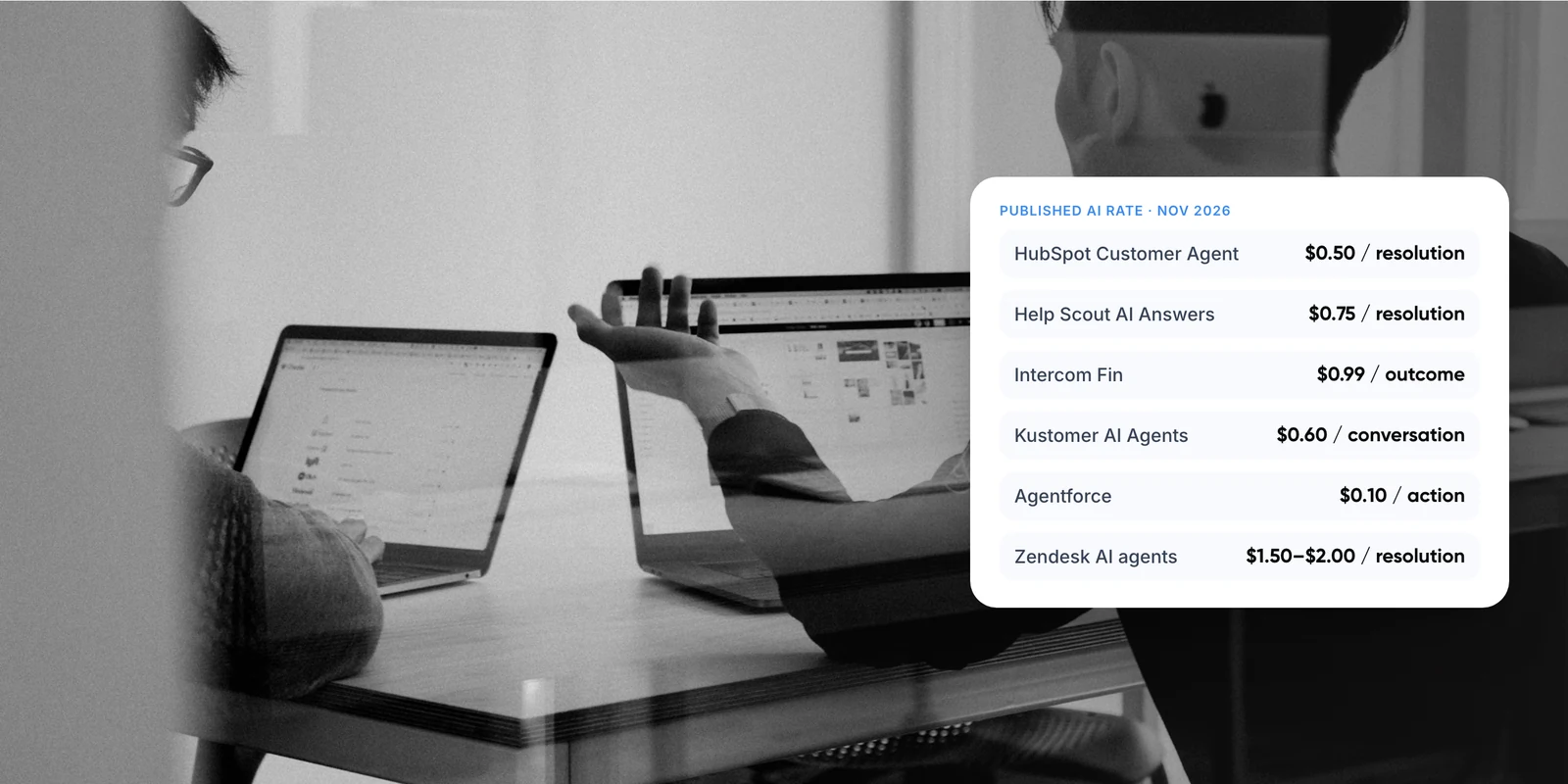
Plan for two kinds of cost: a one-off cost to move and a running cost for seats and AI. Most AI agents are now billed per resolution, meaning a conversation the AI closes without passing it to a person.
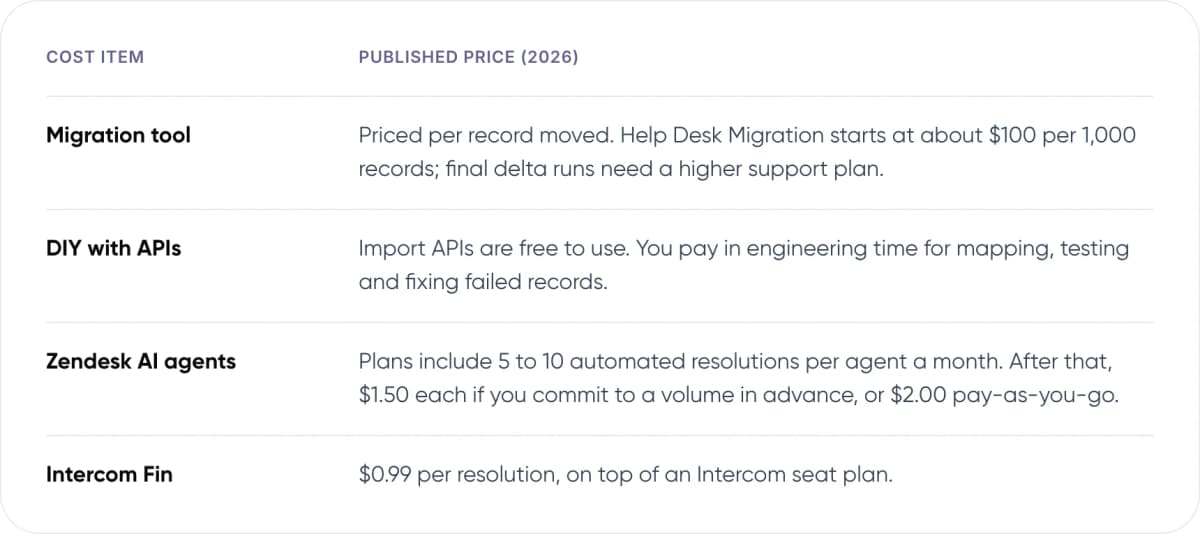
- Migration tool — Published price (2026): Priced per record moved. Help Desk Migration starts at about $100 per 1,000 records; final delta runs need a higher support plan.
- DIY with APIs — Published price (2026): Import APIs are free to use. You pay in engineering time for mapping, testing and fixing failed records.
- Zendesk AI agents — Published price (2026): Plans include 5 to 10 automated resolutions per agent a month. After that, $1.50 each if you commit to a volume in advance, or $2.00 pay-as-you-go.
- Intercom Fin — Published price (2026): $0.99 per resolution, on top of an Intercom seat plan.
Per-resolution pricing ties the bill to results, but the meter keeps running as volume grows. Before you switch AI on, estimate how many conversations it should close each month and set a spending limit where the platform allows one.
Planning a move? We can review your current desk and map what moves and what gets rebuilt.
7. DIY, Migration Tool or Setup Service?
There are three realistic routes. They differ mainly in who rebuilds the configuration and who sets up the AI.
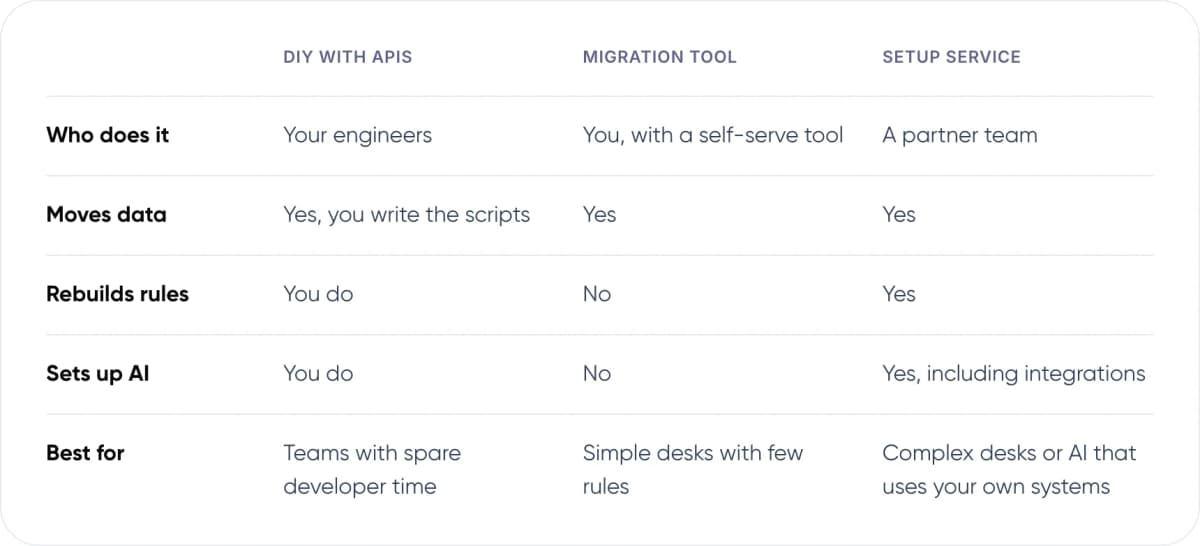
- Who does it — DIY with APIs: Your engineers. Migration tool: You, with a self-serve tool. Setup service: A partner team.
- Moves data — DIY with APIs: Yes, you write the scripts. Migration tool: Yes. Setup service: Yes.
- Rebuilds rules — DIY with APIs: You do. Migration tool: No. Setup service: Yes.
- Sets up AI — DIY with APIs: You do. Migration tool: No. Setup service: Yes, including integrations.
- Best for — DIY with APIs: Teams with spare developer time. Migration tool: Simple desks with few rules. Setup service: Complex desks or AI that uses your own systems.
Our view: if you have a few thousand tickets, few rules and no AI plans yet, a migration tool is enough. Pay for a setup service when you have custom fields, integrations with order or billing systems, or AI that needs to act on data. Those are the parts that tools do not rebuild for you.
8. Frequently Asked Questions
What is an AI helpdesk setup service?
It is a project that moves your support desk to a new platform, rebuilds its rules and adds an AI agent. The service usually covers ticket and article migration, triggers, macros and SLAs, integrations with systems such as billing, and training the AI on your help content.
Can I keep my ticket history when I switch help desks?
Yes, in most cases. Zendesk’s Ticket Import API keeps the original created, updated and solved dates, and Freshdesk offers a free app for importing from Zendesk. Reporting metrics such as first reply time usually do not carry over, so export your old reports before cutover.
Will customers get emails about old tickets during migration?
They should not, if the import is done correctly. Zendesk says no triggers run on tickets created through its import API. The risk comes from using normal ticket creation or leaving notifications on in a test. Keep notifications off until cutover day.
How long does a help desk migration take?
It depends on ticket volume, attachments, API rate limits and how many rules you rebuild. A small desk with a few thousand tickets can move quickly. A large desk with custom fields and integrations needs a test run, a full run and a final delta run, with checks between each.
How much does AI cost in a help desk?
Most vendors now charge per resolution. Zendesk includes 5 to 10 automated resolutions per agent a month, then charges $1.50 committed or $2.00 pay-as-you-go. Intercom charges $0.99 per Fin resolution. Estimate your monthly resolutions before you choose a plan.
9. Conclusion
A good AI helpdesk setup service moves your history intact, rebuilds only the rules you still need and adds AI where your help content can support it. Start with an audit this week: count your tickets, fields, triggers and macros, and mark which ones nobody has used in six months. That list sets the scope, the cost and the timeline.
For an example of our multichannel support work, see Paymate.
If you would rather not run the move yourself, our customer support automation service can handle it end to end: the migration, the rebuild of your rules and an AI agent connected to the tools you already use.
Author