How to Automate Email Support Without Sounding Like a Bot
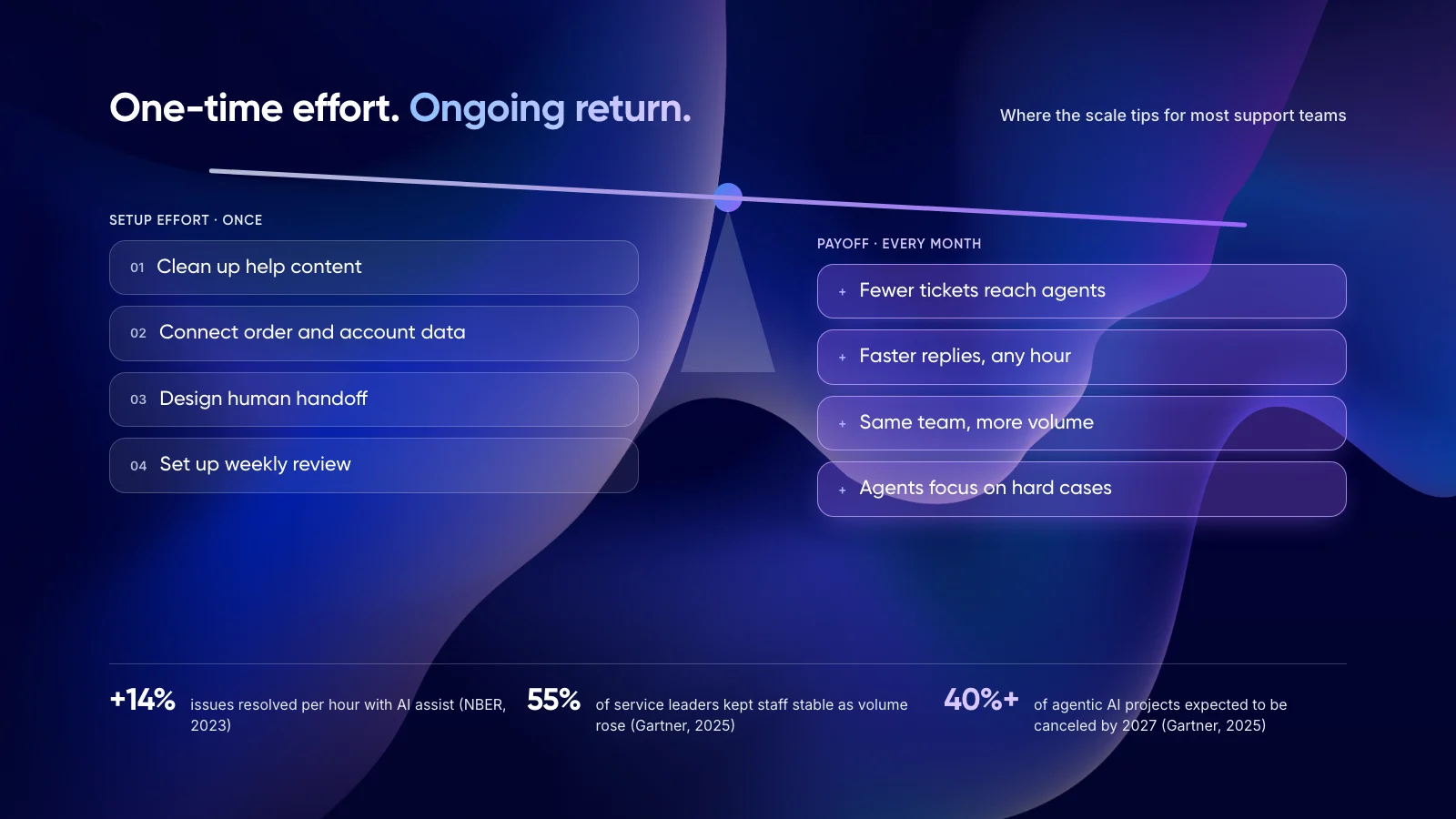
You can send AI email responses at scale and still sound like your own team. It works when the model gets the customer’s context, your team’s voice and clear limits on what it is allowed to say.
This guide covers the workflow, which emails to auto-send, and a seven-step plan to keep every reply personal.
1. The Short Answer
You can automate email support without sounding like a bot if every AI email response is built from the customer’s real data, written in your team’s voice and checked by a person when the stakes are high. Most robotic replies come from missing context, not from the AI model itself.
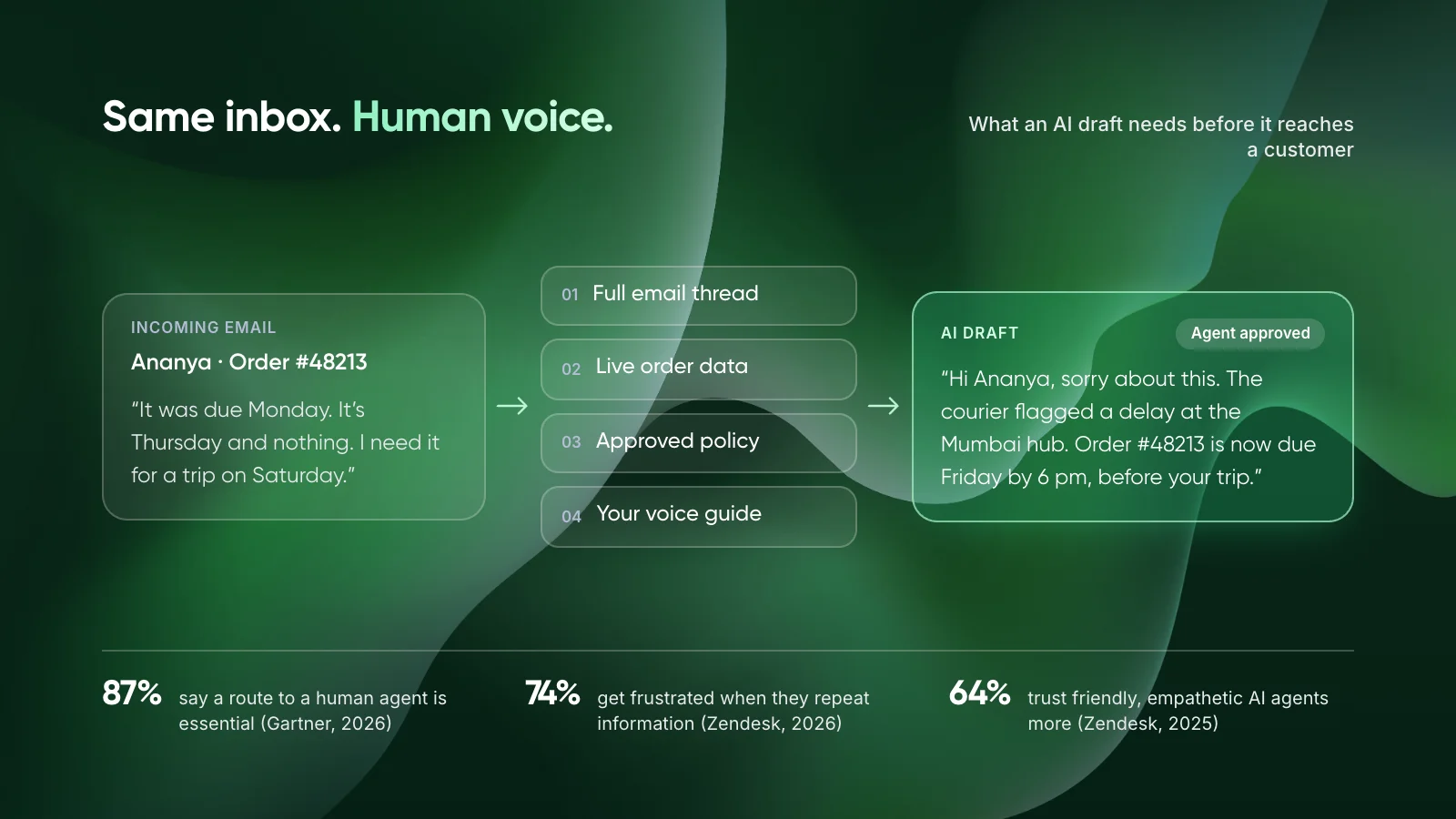
Customers are open to AI, with conditions. In Gartner’s August 2026 survey of 3,566 customers, 50% said generative AI makes service interactions easier. But 87% said companies using it must offer a way to reach a human agent.
Key takeaways
- Bot-like emails come from fixed templates, missing order or account data and replies that ignore the earlier thread.
- Ground every draft in live data and approved policy. Never let the model guess a policy.
- Auto-send only factual, low-risk replies. Send refunds, complaints and exceptions to an agent for review.
- Say when AI helped write a reply, and make “reply to reach a person” actually work.
2. Why Do Automated Customer Service Responses Sound Like a Bot?
Customers can usually spot an automated email within two lines. The signs repeat: a stiff greeting, an answer to a question they did not ask, and a sign-off with no clear next step.

Every unread email is a customer waiting for an answer about their own order, not a generic one. Photo by CHUTTERSNAP on Unsplash.
The reply ignores what the customer already said
This is the most common cause. Zendesk’s CX Trends 2026 report found that 74% of consumers get frustrated when they have to repeat information, and 81% want representatives to pick up where they left off. An email asking for an order number that is already in the thread fails both tests.
The model is used like a template
Older autoresponders dropped a first name into fixed text. Large language models can write a new reply each time, but many teams still prompt them with one rigid script. The result reads the same for every customer, just with better grammar.
There is no way out to a person
In Gartner’s 2024 survey of 5,728 customers, 64% said they would prefer companies did not use AI in customer service. Their top concern was that AI would make it harder to reach a person. An automated email with no human route confirms that fear.
Note: In support, personalization means using what you know about this customer and this issue: order status, plan, past tickets and their tone. Inserting a first name is not personalization.
3. How Does an AI Email Response Workflow Work?
A good setup treats the model as one step in a pipeline, not the whole system. Each step below removes one reason a reply might sound generic or be wrong.
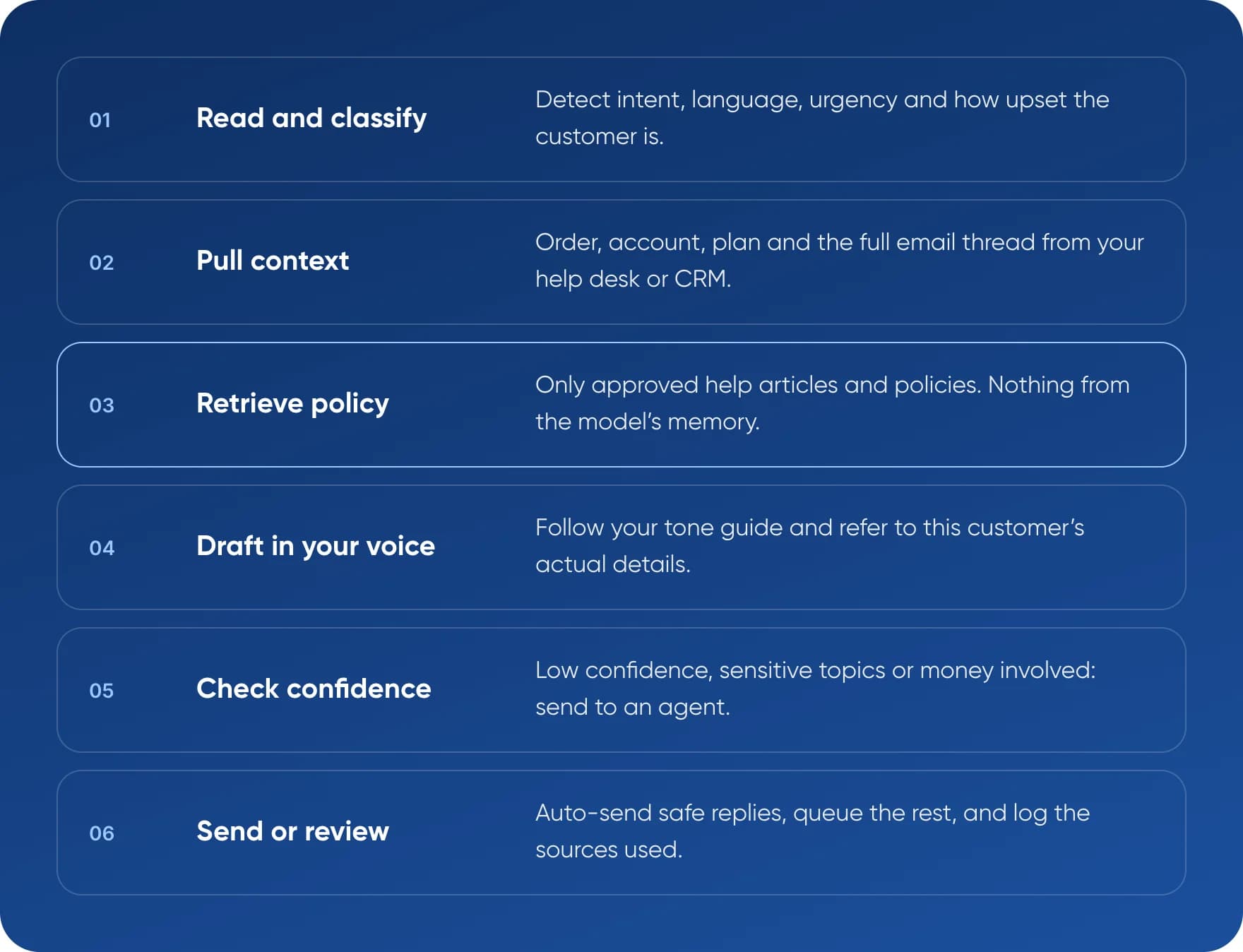
- Read and classify. Detect intent, language, urgency and how upset the customer is.
- Pull context. Order, account, plan and the full email thread from your help desk or CRM.
- Retrieve policy. Only approved help articles and policies. Nothing from the model’s memory.
- Draft in your voice. Follow your tone guide and refer to this customer’s actual details.
- Check confidence. Low confidence, sensitive topics or money involved: send to an agent.
- Send or review. Auto-send safe replies, queue the rest, and log the sources used.
Step 3 is the one teams skip most often. Retrieval-augmented generation (RAG) means the model looks up approved documents before it writes, instead of answering from its training data. Our guide to deploying agentic RAG for customer service covers the setup in detail.
4. Which Emails Should You Auto-Send, and Which Need Review?
Not every email deserves the same level of automation. The split below is our view, based on what a wrong answer costs for each type of email.
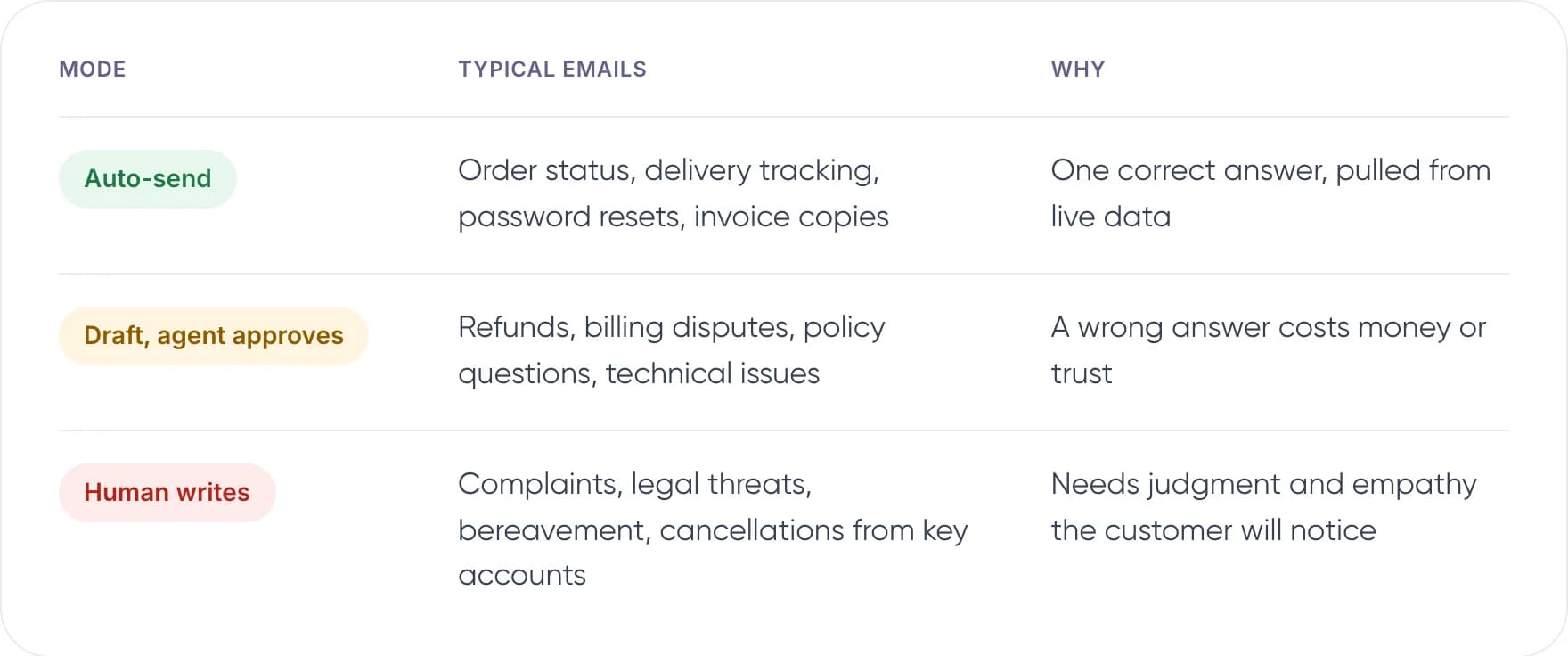
- Auto-send: order status, delivery tracking, password resets, invoice copies. There is one correct answer, pulled from live data.
- Draft, agent approves: refunds, billing disputes, policy questions, technical issues. A wrong answer costs money or trust.
- Human writes: complaints, legal threats, bereavement, cancellations from key accounts. These need judgment and empathy the customer will notice.
We suggest starting with auto-send for one or two email types and agent review for everything else. Move a type up a level only after its drafts have been accurate for several weeks in a row.
5. How to Automate Customer Service Emails Without Losing Personalization
This is the order we follow when we set up automated customer support for email. Each step makes the next one safer.
- Sort 500 recent emails by intent. Mark which need a lookup, which need judgment and which repeat almost word for word. This shows where automation is safe.
- Write a voice guide from your best replies. Pick 20 emails your top agents wrote. Note greeting style, sentence length, words you avoid and how you apologise. Send this guide with every request.
- Ground every draft in live data. Give read access to orders, accounts and the full thread. A reply that says “your order left Pune on Monday” reads as human because it is specific.
- Restrict answers to approved policy. Tell the model to answer only from retrieved documents and to say when it does not know. This one rule prevents most invented policies.
- Set review thresholds. Route drafts to an agent when confidence is low, the customer is upset or money is involved. Agents edit and send, and their edits improve the next drafts.
- Be open about AI and keep a human path. Add a short line such as “Drafted with AI, checked by our team” where it applies. Make sure replying to the email reaches a person.
- Review a sample every week. Read 50 sent replies. Track reopen rate, CSAT on automated replies and how often agents rewrite drafts.

One email, one customer. The reply should read as if it was written for that one person. Photo by Philip Oroni on Unsplash.
Same email, two replies
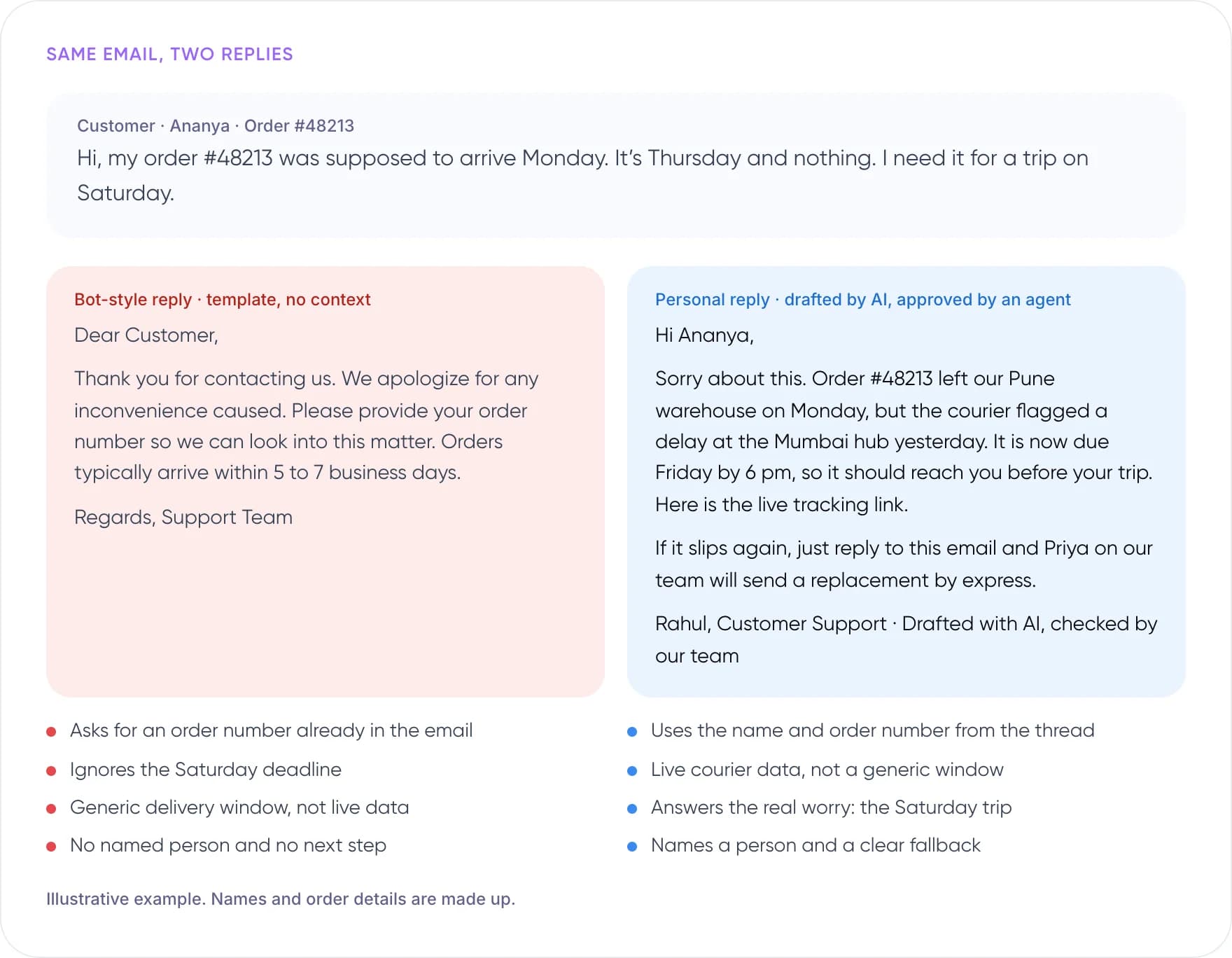
- The bot-style reply asks for an order number already in the email, ignores the Saturday deadline, quotes a generic delivery window instead of live data, and has no named person or next step.
- The personal reply uses the name and order number from the thread, gives live courier data, answers the real worry (the Saturday trip) and names a person with a clear fallback.
Illustrative example. Names and order details are made up.
Not sure which emails to automate first? Book a free AI consultation.
6. What Happens When an AI Email Reply Gets It Wrong?
Two public cases show what happens when a model speaks for a company without limits.
Cursor: an invented policy, sent by email
In April 2025, a Cursor user emailed support after being logged out when switching devices. The reply came from “Sam”, an AI support agent, and said this was expected under a one-device policy. Ars Technica reported that no such policy existed, and users cancelled subscriptions before a co-founder apologised. The emails did not say they came from AI, so customers read them as official.
Air Canada: liable for its chatbot’s answer
In Moffatt v. Air Canada (2024), a British Columbia tribunal held the airline liable after its website chatbot gave wrong bereavement fare advice. It rejected the argument that the chatbot was responsible for its own answers. The award was small, at C$812.02. In our view, the same logic applies to email: you own what your AI tells customers.
Tip: Log every automated email with the documents and data used to write it. If a reply is disputed, you can show exactly where each fact came from.
7. How We Handle AI Email Support at Neuradynamics
We follow the workflow above in our own client work. Two recent builds show how it holds up on real inbox volume.

Each reply starts from the customer’s own data and ends with a person’s approval. Photo by Mariia Berezovsky on Unsplash.
An AI email assistant for ecommerce support
For one ecommerce client, we built an AI email assistant for Shopify merchants. It writes each AI email response from live order data and the store’s own policies, so the reply refers to the customer’s actual order instead of a generic delivery window.
Agents review every draft before it is sent. This keeps each merchant’s tone intact and catches anything the model gets wrong. The team now saves about 50 hours a month for every 2,000 emails, and that time goes back into complaints and complex cases.
Faster first replies for a payments platform
For a payments company, we built an omnichannel customer support system that answers routine email in under a minute, down from hours. Complex cases go to the support team with the conversation history attached, so agents can pick up where the system left off.
It follows the same split described earlier in this guide: automate the routine questions and route the sensitive ones to people.
What both builds have in common
- Live data in every draft. Order, account and thread history are pulled in before the model writes a word.
- Approved policy only. Answers come from the business’s own help content, never from the model’s memory.
- A person on anything uncertain. Sensitive, unclear or money-related emails always reach the team.
- Ecommerce email support: ~50 hours saved per month for every 2,000 emails, with AI drafts built from live order data and agent review on every reply.
- Payments customer support: under 1 minute first response on email, down from hours, with complex cases routed to the team.
See more examples in our AI project portfolio, or find out how our AI customer support automation services can work for your inbox.
8. Common Mistakes
- Prompting the model with one fixed template. Every reply ends up sounding the same, with better grammar.
- Letting the model answer from memory. That is how invented policies reach customers.
- Auto-sending emotional emails. Upset customers notice a generic tone at once.
- Hiding that AI is involved. If customers find out later, trust drops further.
- Measuring speed only. A fast reply that gets reopened did not save any time.
New to the topic? Start with what customer support automation is and how it works.
9. Frequently Asked Questions
Can AI write customer support emails that sound human?
Yes, when it has context. A model that sees the full thread, the customer’s order or account details and your team’s voice guide can write specific, natural replies. Without that context, even strong models fall back on generic phrases. Agent review on sensitive emails catches what the model misses.
How do you automate customer service emails without losing personalization?
Connect the AI to your help desk thread, CRM and order data, then restrict it to approved policies. Give it a voice guide built from your best agents’ replies. Auto-send only factual, low-risk emails and route the rest to agents for a quick review before sending.
Should I tell customers an email was written with AI?
We recommend it. Cursor’s 2025 incident showed how unlabelled AI emails get treated as official policy. In the EU, Article 50 of the AI Act sets transparency duties for AI systems that interact with people. For most replies, one short line near the signature is enough.
What are the pros and cons of automated customer service responses?
The benefits are faster replies at any hour and less repetitive work for agents. A 2023 NBER study found AI assistance raised issues resolved per hour by 14%. The risks are wrong answers, a generic tone and customers feeling blocked from a person, which is why review rules matter.
Which help desks support AI email responses?
Most major help desks, including Zendesk, Freshdesk, Intercom and Gorgias, offer AI drafting or reply features, and many expose APIs for custom agents. Built-in tools suit standard questions. A custom setup makes sense when replies depend on your own systems, data or approval rules.
10. Conclusion
An AI email response sounds like a bot when it lacks context, voice or a route to a person. Fix those three and automation can make your replies more specific than before. This week, sort 500 recent emails by intent and pick the one type with a clear answer based on your own data.
If you want help designing the workflow, see our AI customer support automation services or our work on custom AI agents.
Author