Agentic AI Workflows: A Step-by-Step Guide to Building End-to-End Agent Pipelines
Imagine an AI that doesn't just answer your question — it researches the web, drafts a competitive analysis, emails it to your team, and logs the task in your CRM. All without a single click from you.
That's not science fiction. That's an agentic AI workflow, and businesses are deploying them right now.
For years, AI meant a chatbot that responded to prompts or a model that classified images. Powerful, yes — but fundamentally passive. You asked, it answered. Nothing more. Agentic AI flips this entirely. Instead of waiting for instructions at every step, an agentic system is given a goal and figures out the steps itself. It plans, uses tools, remembers context, checks its own work, and keeps going until the job is done.
We're at an inflection point in 2025–2026. The cost of running capable LLMs has dropped dramatically. Tooling has matured. And companies across every industry are moving from AI experimentation to AI execution. The ones who understand how to build robust agent pipelines will have a serious competitive edge.
This guide is your practical roadmap — whether you're a developer building your first agent, a product leader evaluating what's possible, or a CTO designing the next layer of your AI stack.
“New to the AI automation landscape? Before diving in, check out our comparison of Intelligent Automation vs RPA vs AI Agents to understand where agentic AI fits in the broader picture.”
What Are Agentic AI Workflows?
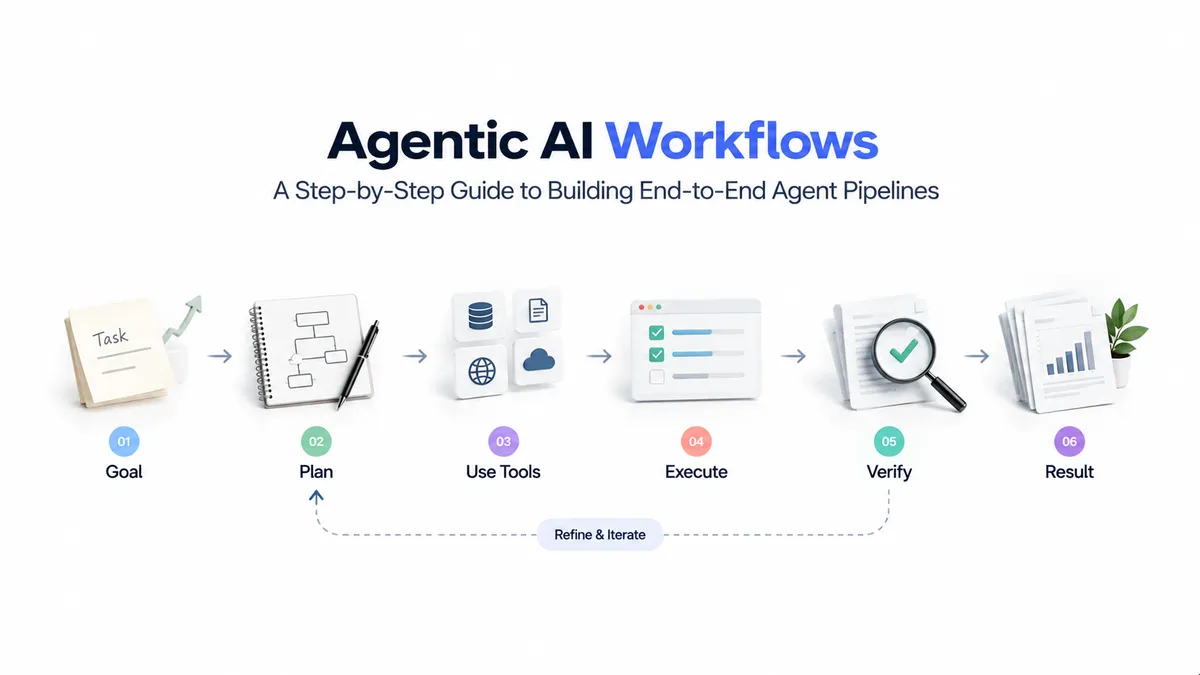
An agentic AI workflow is a system in which an AI model doesn't just generate a single response — it takes a sequence of actions to achieve a defined goal, adapting its behavior based on feedback, tool outputs, and changing context along the way.
The key word is autonomy. Traditional AI is reactive: give it input, get output. Agentic AI is proactive: give it a goal, and it figures out the path.
Think of it this way. A traditional chatbot is like a vending machine — you press a button, you get a snack. An agentic AI is more like hiring a smart, resourceful intern. You say "get me a competitive analysis of our top three rivals by Friday," and they figure out how to do it — where to look, what to compare, how to structure the output — without you micromanaging every step.
What makes an AI system "agentic" comes down to four defining properties:
Goal-directedness — The agent works toward an objective rather than just answering a single prompt. It can decompose a high-level goal into sub-tasks and sequence them intelligently.
Tool use — Agents don't just generate text. They can call APIs, search the web, read files, write code, query databases, and interact with external systems to actually do things in the world.
Memory — Agents retain context across steps. They remember what they've already done, what they found, and what still needs to happen — both within a session (short-term) and across sessions (long-term, via external storage).
Self-evaluation — Good agentic systems check their own outputs. Before proceeding to the next step, they evaluate whether the current step succeeded and adjust if it didn't.
These four properties together create something qualitatively different from a chatbot: a system that can handle complex, multi-step, real-world tasks with minimal human intervention.

The Core Components of an Agent Pipeline
Every agentic AI system — from a simple research bot to a sophisticated multi-agent enterprise workflow — is built from the same fundamental building blocks. Understanding these components is essential before you write a single line of code.
The LLM Core
This is the reasoning engine at the heart of your agent. It's responsible for understanding goals, deciding what to do next, interpreting tool results, and generating outputs. Popular choices include Claude (Anthropic), GPT-4o (OpenAI), and Gemini (Google), each with different strengths in reasoning, context length, and tool-calling capability.
The LLM doesn't just generate text — in an agentic context, it generates decisions. "Should I search the web or query the database? Have I answered the question fully? Do I need to loop back and revise?"
“Choosing the right LLM for your agent matters more than most people realize. Read our in-depth guide on LLM Fine-Tuning vs RAG for Enterprise AI to understand how to configure and optimize the model layer for your specific use case.”
Tools and Actions
Tools are what give an agent its ability to act in the world, not just talk about it. A tool is any callable function the agent can invoke: a web search API, a code execution environment, a database query, a file reader, a CRM API endpoint, or even another agent.
The quality of your tool definitions matters enormously. Agents use tool descriptions to decide when and how to use them — vague or ambiguous tool descriptions are one of the most common sources of agent failure.
Memory
Memory is what separates a coherent, capable agent from one that feels amnesiac and circular. There are two layers:
Short-term memory lives in the context window — the conversation history, recent tool outputs, and intermediate reasoning that the LLM can see right now. This is fast and always available, but it's limited and ephemeral.
Long-term memory lives outside the model — typically in a vector database (like Pinecone, Weaviate, or Chroma) or a relational store. This allows agents to recall information from past sessions, access large knowledge bases, and build persistent state across interactions.
Most production agents need both. Short-term for in-task coherence, long-term for cross-task knowledge and personalization.
The Orchestrator
The orchestrator is the conductor of your agent pipeline. It controls the flow of execution: which agent runs when, how tools are called, how outputs are passed between steps, and when the task is considered complete.
Some orchestrators are simple — a linear sequence of steps. Others are complex graph-based systems where agents can branch, loop, and call sub-agents dynamically. Frameworks like LangGraph and Microsoft AutoGen specialize in building sophisticated orchestration patterns.
The Evaluator / Guardrail Layer
This is the most underappreciated component and the one that separates toys from production systems. An evaluator checks agent outputs before they're acted upon: Is this answer factually consistent? Did the agent hallucinate a tool call? Does this output meet the quality bar?
Guardrails add safety constraints: the agent should never expose PII, never make financial transactions above a certain threshold without human approval, never take irreversible actions without confirmation.
Human-in-the-loop (HITL) triggers are a key part of this layer — defining exactly when human judgment should override autonomous action.

Types of Agentic Architectures
Not all agentic systems are built the same way. The right architecture depends on your task complexity, the degree of autonomy you need, and how much control you want to maintain.
Single-Agent Architecture
One LLM, one set of tools, one context. The agent receives a goal, reasons through it, calls tools as needed, and returns a result. This works well for focused, bounded tasks — summarizing a document, answering a question with web research, generating a report from structured data.
Simple doesn't mean weak. A well-designed single agent with the right tools can handle a surprising amount of complexity. The trap is trying to make a single agent do too much, which causes it to lose focus and make mistakes.
Sequential Pipeline Architecture
Multiple agents (or LLM calls) arranged in a chain, where the output of one becomes the input of the next. Agent A researches a topic → Agent B synthesizes the findings → Agent C writes the final report → Agent D checks it for accuracy.
This architecture is predictable, easy to debug, and great for workflows where the steps are well-defined and order matters. Think of it like an assembly line: each station does one job well.
Multi-Agent Systems
The most powerful — and complex — architecture. Multiple specialist agents collaborate dynamically, each with its own role, tools, and context. A Planner agent breaks down the goal. A Researcher agent gathers information. A Writer agent drafts the output. A Critic agent reviews and requests revisions.
This mirrors how high-performing human teams work: a consulting team, for instance, has a project lead, analysts, writers, and reviewers — each doing what they're best at, coordinated toward a shared outcome.
Multi-agent systems are ideal for complex, open-ended tasks but require careful orchestration design. Without good coordination logic, agents can contradict each other, get stuck in loops, or duplicate effort.
Step-by-Step: Building Your First Agent Pipeline
Let's make this concrete. We'll walk through building a competitive research agent — one that takes a company name as input and autonomously researches competitors, synthesizes key findings, and produces a structured report. This is a real use case many businesses need, and it maps cleanly onto all the concepts above.
Step 1: Define the Goal and Success Criteria
Before touching any code or framework, be brutally specific about what you want the agent to do and what "done" looks like.
Bad goal definition: "Research competitors."
Good goal definition: "Given a company name, identify the top 3 competitors, extract their pricing model, key product features, and target customer segment, and produce a structured markdown report in under 5 minutes."
The more specific your goal, the better your agent will perform — because specificity flows into every downstream decision: which tools you need, how you design the prompt, and what your evaluator checks.
Also define failure modes up front. What should the agent do if a competitor's website is paywalled? What if it can't find pricing information? These edge cases are much easier to handle in design than in debugging.
Step 2: Choose Your LLM
Your choice of LLM has real consequences for agent behavior. Consider:
Context window size — Agents accumulate a lot of context (tool call histories, intermediate results). A small context window means you'll need to compress or truncate aggressively. Claude 3.5 and GPT-4o both offer 128K+ tokens, which gives you room to work.
Tool-calling reliability — Not all models are equally good at knowing when to call a tool vs. when to reason from existing context. Test your specific use case with at least two models before committing.
Cost vs. capability — For tasks that require frequent tool calls and multi-step reasoning, a mid-tier model running many steps can cost more than a frontier model running fewer, smarter steps. Profile your pipeline before optimizing.
For most production agent pipelines in 2026, Claude Sonnet or GPT-4o strike the best balance of capability and cost.
Step 3: Define Your Tools
For the competitive research agent, you'll need at minimum:
- A web search tool (Bing Search API, Tavily, or Exa) to find competitor pages and recent news
- A web scraper/reader to extract structured content from pages
- A report formatter to convert findings into clean markdown
Write crisp, explicit descriptions for each tool. The agent reads these descriptions to decide whether to use a tool — treat them like function docstrings that an intelligent reader will act on:
web_search(query: str) -> list[SearchResult]
Searches the web for current information. Use when you need factual data
about a company, product, pricing, or recent news that is not already
in your context. Returns a list of results with title, URL, and snippet.
Vague descriptions produce unpredictable tool use. Explicit descriptions make agent behavior consistent and debuggable.
Step 4: Design the Memory Layer
For a single-session research task, short-term memory (context window) is likely sufficient. But if you want the agent to remember research it did last week — or accumulate a growing knowledge base of competitors over time — you need a long-term memory layer.
A vector database like Pinecone or Chroma lets you store embeddings of past research and retrieve the most relevant chunks at the start of a new session. This prevents redundant research and enables the agent to build a richer knowledge base over time.
For your first agent, keep it simple: start with short-term context only, and add long-term memory when you hit real use cases that require it.
Step 5: Build the Orchestration Logic
The orchestration logic defines how the agent reasons and acts. The two most common patterns are:
ReAct (Reason + Act) — The agent alternates between reasoning about what to do next and acting (calling a tool). Each step looks like: "I need to find Competitor X's pricing. I'll use web_search for that." → calls tool → "The search returned their pricing page. I'll use the web reader to extract details." → and so on. This is intuitive and works well for most tasks.
Plan-and-Execute — The agent first produces a full plan (a list of steps), then executes each step in sequence. This is better for complex tasks where upfront planning reduces errors, but it's less adaptive when things don't go as expected.
For the competitive research agent, a ReAct loop is the right call — it handles uncertainty gracefully when competitor websites vary widely in structure and information availability.
Step 6: Add an Evaluation and Guardrail Layer
Once you have a working agent, add checks before it finalizes outputs or takes consequential actions.
Output validators check structural completeness: does the report contain sections for all three competitors? Are there at least N data points per section?
Hallucination checks cross-reference key claims against the source URLs the agent retrieved. If the agent claims a competitor's price is $99/month but none of the retrieved pages mention this, flag it for review.
Human-in-the-loop triggers define when a human should approve before the agent proceeds. For a research agent, this might be: "If confidence in pricing data is low, show the user the retrieved sources and ask them to confirm before generating the report."
Step 7: Test, Monitor, and Iterate
Agent pipelines fail in ways that traditional software doesn't. The failure modes are probabilistic, context-dependent, and sometimes subtle. An agent might work perfectly 9 times and fail spectacularly on the 10th because a competitor's website had an unusual layout.
Build an evaluation suite: a set of inputs with known expected outputs, run regularly to catch regressions. Tools like LangSmith, Braintrust, and Arize provide tracing and evaluation infrastructure specifically for LLM pipelines.
Monitor in production: log every tool call, every intermediate reasoning step, and every output. When something goes wrong — and it will — you need the full trace to understand why.
Iterate fast: start with a narrow, well-defined task, get it working reliably, then expand scope. The teams that succeed with agentic AI are the ones who treat it as an empirical engineering discipline, not a one-shot deployment.
“If you're building this as a product: Our guide on How to Launch an AI-Powered MVP in 30 Days walks through the full product development process — from architecture decisions to shipping — with a week-by-week breakdown and cost estimates.”

Common Pitfalls (and How to Avoid Them)
Even experienced teams make these mistakes when building their first agent pipelines. Knowing them in advance saves weeks of debugging.
Over-engineering with agents when a simple chain would do. Not every multi-step task needs a fully autonomous agent. If your workflow is predictable and the steps are always the same, a deterministic pipeline (a simple chain of LLM calls) is faster, cheaper, and more reliable. Use agents where adaptability and decision-making under uncertainty are genuinely required.
Vague tool definitions causing hallucinated calls. If your tool descriptions are ambiguous, the agent will guess — and guess wrong. Invest time in writing precise, unambiguous tool descriptions with clear usage guidance. Include examples of when not to use a tool if that's non-obvious.
No memory strategy leading to circular behavior. An agent without proper memory management will re-research things it already found, lose track of its own progress, and produce incoherent multi-step outputs. Plan your memory architecture before you build.
Missing error handling creating infinite loops. What happens when a tool call fails? When a web page returns a 404? When a tool returns an empty result? Without explicit error handling in your orchestration logic, agents can get stuck in retry loops or make increasingly erratic decisions trying to recover.
Skipping the human-in-the-loop for high-stakes decisions. Fully autonomous is not always the right goal. For actions that are costly, irreversible, or customer-facing, build in human review checkpoints. An agent that autonomously sends emails to all your customers is a liability without an approval step.
Real-World Use Cases by Industry
Agentic AI pipelines are being deployed across virtually every vertical. Here are some of the most impactful use cases happening right now:
Sales and Revenue Operations — Prospect research agents that pull company data, recent news, and social signals, then draft personalized outreach emails for each prospect. SDRs using these pipelines report 3–5x more personalized outreach at a fraction of the time cost.
Legal — Contract review agents that read lengthy agreements, extract key clauses (termination, liability, IP ownership), flag non-standard terms against a defined playbook, and produce a risk summary for attorney review.
Healthcare — Patient intake agents that collect symptoms, medical history, and insurance information through a conversational interface, then route patients to the appropriate specialist and pre-populate intake forms — reducing admin burden and improving triage accuracy.
Financial Services — Market research agents that monitor news feeds, SEC filings, and earnings calls, extract relevant signals for a defined investment thesis, and generate daily briefing reports for analysts.
SaaS Customer Support — Tier-1 support agents that diagnose customer issues by querying product logs, knowledge bases, and past support tickets, and autonomously resolve the majority of tickets — escalating to humans only when truly novel issues arise.
“We've built agentic pipelines across all of these domains. Explore our AI services to see how Neura Dynamics designs and deploys intelligent automation for enterprise and startup teams.”
When to Build vs. Buy
This is the question every engineering leader needs to answer before committing to a build.
Build custom agent pipelines when: your use case involves proprietary data and domain logic that generic tools don't handle; you need tight integration with internal systems; the task represents a genuine competitive differentiator (and you don't want a vendor having visibility into it); or your team has the ML engineering capacity to build and maintain it.
Use managed or off-the-shelf solutions when: you need to move fast and the use case is relatively standard; you don't have ML engineers on staff; the task is important but not strategically differentiated; or you want to validate the use case before committing to a full build.
In practice, most enterprises end up in a hybrid: managed infrastructure (hosted LLMs, vector databases as a service) combined with custom orchestration and domain-specific tool and prompt design. The custom layer is where your unique value lives; the infrastructure layer is a commodity.
“Not sure which path is right for your business? Our Generative AI consulting team specializes in helping companies map the right architecture for their specific goals — from first pilot to full production deployment. Talk to us.”
Conclusion
Agentic AI is not a future concept. It's being deployed in production right now, across industries, by teams of all sizes. The technology has reached a maturity point where the question is no longer whether agentic workflows are feasible — it's where to start and how to do it right.
The fundamentals are clear: a capable LLM core, well-designed tools, a thoughtful memory strategy, robust orchestration logic, and guardrails that keep the system reliable and safe. Build on these foundations and you have the architecture for a system that can genuinely augment — and in some cases replace — complex human workflows.
Start narrow. Define a specific, valuable task. Build a simple single-agent pipeline. Test it rigorously. Then expand. The teams winning with agentic AI aren't the ones who tried to automate everything at once — they're the ones who got one workflow working well, learned deeply from it, and scaled from there.
Ready to build your first agent pipeline?
Neura Dynamics specializes in designing and deploying end-to-end agentic AI systems for startups and enterprise teams — from architecture and LLM selection through to production deployment and monitoring. We've built agent pipelines across sales, healthcare, legal, fintech, and SaaS.
Author

Abhilasha is the Co-Founder of Neuradynamics, where she helps businesses turn Generative AI into practical, growth-focused solutions. Passionate about AI innovation, automation, and digital transformation, she writes about emerging technologies, scalable AI systems, and real-world applications across industries including EdTech, E-commerce, and automotive.